Backup guide
Learn about the backup features, usage calculation, billing, performance impact, and data protection policies for ApsaraDB RDS for MySQL.
Backup features
|
Category |
Feature Name |
Description |
Primary use case/scenario |
|
Basic backup features |
Automatic backup |
A core automated protection mechanism. You can configure the backup cycle, time window, and retention period. |
For routine operations and maintenance (O&M), the system automatically performs full backups based on the configured policy. When combined with log backups, this provides the data foundation for point-in-time recovery (PITR). |
|
Manual backup |
Allows you to create instant backups on demand. |
Creates a clearly traceable recovery point before major changes, such as application upgrades or data migration. |
|
|
Advanced backup features |
Database/Table-level backup |
Allows you to recover specific databases or tables without restoring the entire instance. |
Handles fine-grained recovery scenarios, such as accidental table deletion or data updates, to minimize business impact. |
|
High-frequency backup (physical/snapshot) |
Allows you to quickly restore data to a specific point in time, which significantly reduces the potential data loss window. |
Ideal for business scenarios that require a stringent recovery point objective (RPO). |
|
|
Disaster recovery and cost optimization |
Cross-region backup |
Automatically backs up data to another geographical region. |
Achieves region-level disaster recovery and ensures maximum business availability. |
|
Sparse backup |
Allows you to flexibly configure backup policies to retain the minimum number of backup sets. |
Reduces backup storage costs while ensuring data availability. |
|
|
Set a backup retention policy for released instances |
After an instance is released (deleted), its backup data can be retained for an additional period of time. |
Prevents permanent data loss due to accidental operations and provides a final recovery opportunity. |
By combining these features, you can build a flexible data protection system that covers routine O&M, disaster recovery, and performance and cost management.
You can also use the logical backup feature of Data Disaster Recovery (DDR), which supports cross-account backup, single-database or single-table backup, geo-redundancy, and storing backups in OSS, to automatically back up ApsaraDB RDS for MySQL or self-managed MySQL databases.
Backup methods
ApsaraDB RDS for MySQL supports logical backup, physical backup, and snapshot backup. The following table compares these methods:
|
Dimension |
Logical backup |
Physical backup |
Snapshot backup |
|
Backup granularity |
Database object level, such as tables, indexes, and stored procedures. |
Database file level, such as InnoDB data files. |
Cloud disk block level, which covers the entire instance storage volume. |
|
Typical tool |
|
XtraBackup |
Based on the ESSD snapshot service |
|
Recovery precision |
You can restore a single table or database, but point-in-time recovery is not supported unless combined with binary logs. |
Supports full backups and log backups for recovery to any point in time with second-level granularity. |
Supports point-in-time recovery, which relies on log backups. |
|
Scenarios |
Cross-version migration, single-table recovery, and exporting to a self-managed database |
Fast full recovery, disaster recovery, and cross-region backup |
Extremely fast recovery for the shortest Recovery Time Objective (RTO) and scenarios with high business continuity requirements |
|
Related operations |
Restore an ApsaraDB RDS for MySQL logical backup file to a self-managed database |
Restore an ApsaraDB RDS for MySQL physical backup file to a self-managed database |
Restore an ApsaraDB RDS for MySQL snapshot backup file to a self-managed database |
Backup usage
Backup components
RDS backups consist of data backups and log backups.
-
Data backup: The system backs up your data and generates backup sets. This feature is enabled by default and cannot be disabled. Data backups are retained for a minimum of 7 days, with a minimum backup frequency of twice a week. If you have minimal data backup needs, you can reduce the amount of data backups by modifying the backup frequency and the backup set retention period.
-
Log backup: Also known as incremental backup. This feature is enabled by default but can be disabled. Log backups are retained for a minimum of 7 days. Using a combination of data backups and log backups, you can restore data to any point in time (PITR) starting from the first full backup within the backup retention period. If you have minimal log backup needs, you can reduce the amount of log backups by shortening the backup set retention period or disabling log backups.
View backup usage
Backup usage = Data backup size + Log backup size
-
On the instance's Basic Information page, view the Backup Usage parameter in the Instance Resources section.
-
After a minor version update for an ApsaraDB RDS for MySQL or Serverless ApsaraDB RDS for MySQL Basic Edition instance, the Basic Information page may show Backup Usage as 0. This value automatically updates after the next scheduled backup completes.
For example, in the following figure, the backup usage is 33.2 GB (data backup) plus 20.19 MB (log backup). Archive Backup refers to data backups that are retained for more than 2 years (730 days). Data refers to non-archived data backups.
Backup usage
|
Log |
Description |
Purpose |
|
Data backup |
Generates backup sets and stores them in the backup storage provided by Alibaba Cloud. Does not occupy the instance's storage space. |
Mainly used for data restoration and is the basis for point-in-time recovery (PITR). |
|
Log backup |
When enabled, binary logs are uploaded in real time to the backup storage provided by Alibaba Cloud. Does not occupy the instance's storage space. |
Enables point-in-time recovery. |
|
Binary log |
The raw logs of the instance, stored in the instance's storage space. |
Can be used to set up a master-slave architecture, for example. |
-
Clearing binary logs reduces the storage space that they occupy but does not affect the size of log backups.
-
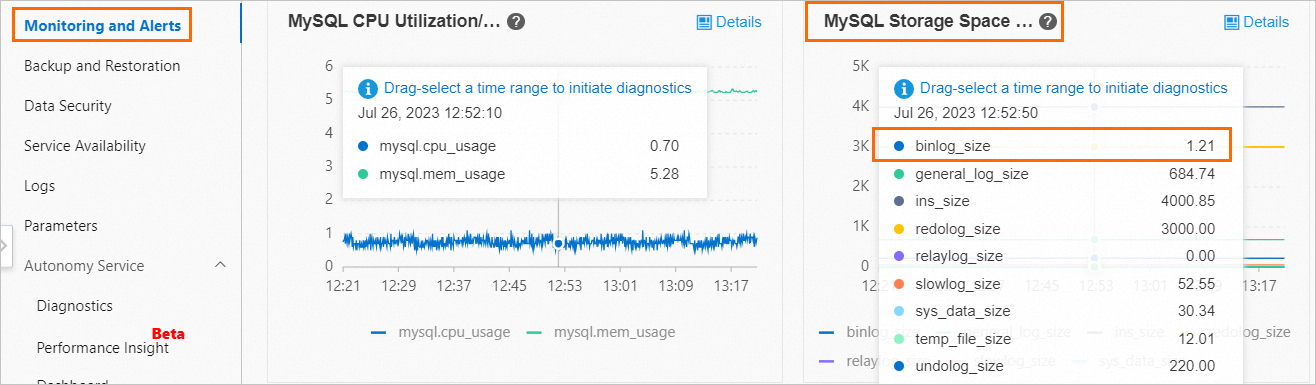
On the Monitoring and Alerts page of the instance, you can view the storage space that is occupied by binary logs. For more information, see View monitoring information.
Backup costs
Backup billable items
|
Billable item |
Billable item code |
Billed product |
References |
|
RDS basic backup |
BackupCharged |
ApsaraDB RDS |
|
|
Cross-region backup storage for instances with Premium Local SSDs |
DdrOssStorageSize |
||
|
Cross-region backup storage for cloud disk instances |
BackupStorageSize |
Database Backup (DBS) |
|
|
Cross-region backup network traffic |
NetworkOutDuplicationSize |
||
|
Outbound traffic for backup download |
NetworkOutSize |
||
|
Backup conversion for cloud disk instances |
BackupAnalyticSize |
||
|
Backup set retention for deleted instances with Premium Local SSDs |
StandardStorageSize |
||
|
Backup set retention for deleted cloud disk instances |
BackupStorageSize |
||
|
Database/Table recovery storage for instances with Premium Local SSDs |
CapacitySandboxStorageSize |
Free backup quota
The free backup quota depends on whether the storage compression feature is enabled.
|
Storage type |
Storage compression status |
Free quota |
Description |
|
Premium Enterprise SSD (ESSD) |
Disabled |
The free quota is equal to 200% of the storage capacity that you purchase for your RDS instance. |
On the instance's Basic Information page, in the Usage Statistics section, view the Backup Usage parameter (the actual logical data size). |
|
Enabled |
The free quota is equal to 400% of the storage capacity that you purchase for your RDS instance. |
||
|
Premium Local SSD |
Disabled |
The free quota is equal to 50% of the storage capacity that you purchase for your RDS instance. |
|
|
Enabled |
The free quota is equal to 100% of the storage capacity that you purchase for your RDS instance. |
The free backup quota applies only to regular backups with a backup storage period of 730 days or less. It does not apply to archived backups that are retained for more than 730 days.
Cost details
If your backup usage does not exceed the free quota, backups are free of charge. The excess usage is billed on a pay-as-you-go basis. The hourly backup cost is calculated using the following formula: Hourly backup cost = (Backup usage - Free backup quota) × Unit price for backup.
For the unit prices of regular and archived backup storage, go to the RDS Pricing Details page.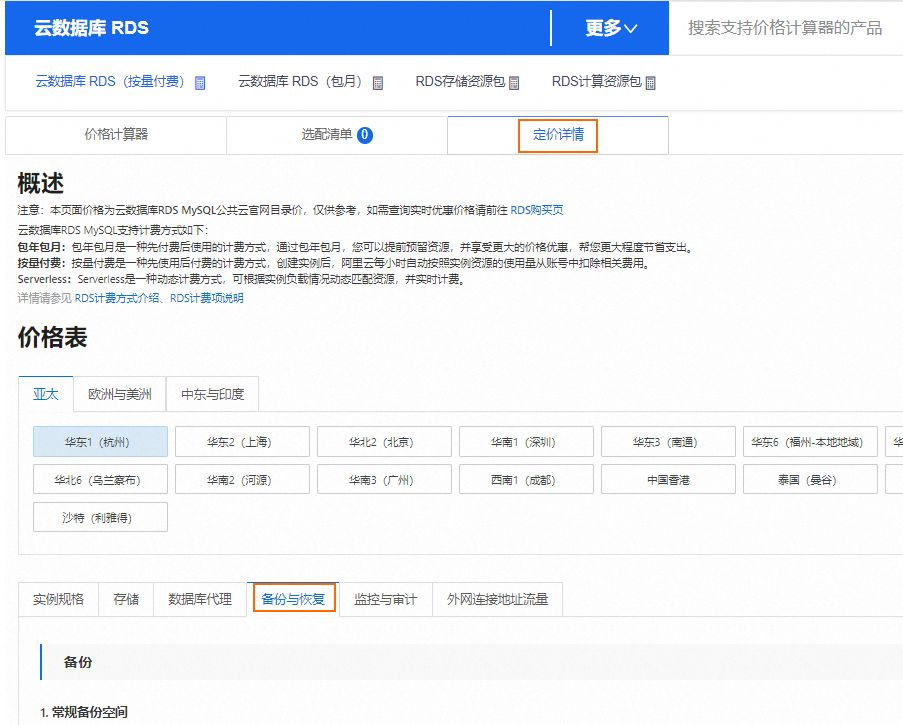
Notes
-
Backup costs are related to backup usage, not storage space usage. This is because backups do not occupy the storage space of the RDS instance.
-
When you analyze backup costs, check the backup usage, not the storage space usage.
-
Control operations that involve disk replacement, such as rebuilding a secondary database, have the following effects on a cloud disk instance:
-
The single-region backup storage amount for the cloud disk instance increases, which leads to higher single-region backup storage costs. The billable item code is BackupCharged.
-
The cross-region backup network traffic for the cloud disk instance increases, which leads to higher cross-region backup network traffic costs. The billable item code is NetworkOutDuplicationSize.
-
The cross-region backup storage amount for the cloud disk instance increases, which leads to higher cross-region backup storage costs. The billable item code is BackupStorageSize.
NoteFor example, if a Data Definition Language (DDL) operation causes a long delay on the secondary database, the system may automatically trigger a rebuild of the secondary database, which increases costs.
-
How to reduce backup costs
-
Reduce backup usage
You can delete or reduce backups. For more information, see Delete or reduce backups.
-
Increase the free quota
You can scale out the storage space. For more information, see Change configuration.
The free quota is related to the storage capacity. For example, if you scale out the storage space from 150 GB to 300 GB, the free quota increases from 75 GB to 150 GB.
-
Purchase RDS savings plans or RDS storage plans
If you want to retain backups for a long time and have no plans to scale out, you can purchase RDS savings plans or RDS storage plans to offset backup costs. RDS storage plans have priority over RDS savings plans.
View backup bills
-
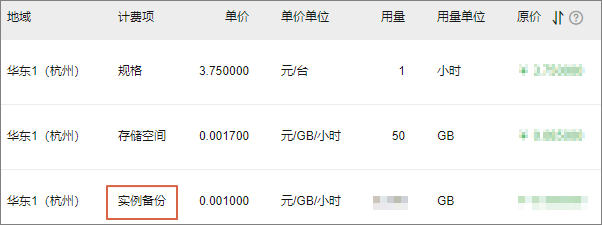
On the Billing Details page, select Billable Item and Details. Enter the instance name, instance ID, or bill ID, and then click Search.

-
Find the details for the Instance Backup billable item.
Backup storage location
Data backups and log backups are stored in the backup storage provided by Alibaba Cloud. They do not occupy the instance's storage space.
Backups are stored in the same region as the RDS instance, but not necessarily in the same zone. To store backups in a different region, use cross-region backup.
-
Backup storage is not externally accessible. To download backups, see Download a backup set.
-
Backup storage comes with a free quota. Usage that exceeds the quota is charged. For more information, see Backup costs.
Performance impact of backups
|
Instance type |
Impact of backups |
|
High-availability series, Cluster Edition, or RDS Enterprise Edition |
Backups are performed on the secondary instance. They do not consume the CPU of the primary instance or affect its performance. Note
In rare cases, if the secondary instance is unavailable, backups will be performed on the primary instance. |
|
Due to the single-node architecture, backups will affect the instance's performance. |
Data protection for backups
-
Tamper-proofing:
-
Full physical backups and log backups for ApsaraDB RDS for MySQL are stored in OSS. Full snapshot backups are stored in the ESSD snapshot service. The backup system uses both storage methods internally, and both have the write-once-read-many (WORM) tamper-proof attribute.
-
-
Protection against malicious or accidental deletion:
-
Manual deletion by user: You can delete manual backups, but you cannot delete automatic backups. For more information, see Delete or reduce backups.
-
Automatic deletion upon expiration: Automatic backup data can be deleted. However, automatic backups cannot be disabled, the minimum retention period is 7 days, and the minimum backup frequency is twice a week. For more information, see Automatic backup. Therefore, your full and log data from automatic backups cannot be completely deleted.
-
FAQ
-
Q: My RDS instance's automatic backups have exceeded the free quota and are now being billed. How can I disable the backup feature?
A: The default backup feature for RDS is enabled by default and cannot be disabled. However, you can delete existing backups or reduce the creation of new backups by modifying the automatic backup policy. For more information, see Delete or reduce backups.
-
Q: My backups have not exceeded the free quota. Why am I being charged?
A: This charge may be for previous backups that exceeded the free quota.
-
Q: Can a storage plan be used to deduct the costs incurred when backups exceed the free quota?
A: A storage plan offsets the cost of backup storage that exceeds the free quota for subscription or pay-as-you-go RDS instances (excluding instances with Premium ESSDs or standard SSDs).
-
Q: Why is the backup size larger than the data volume?
A: Cloud disk instances use snapshot backups, and the size of a snapshot backup can be much larger than the data size. When the snapshot backup size is calculated, the size of all non-empty blocks is included. If writes are scattered, more non-empty blocks are generated, which makes the snapshot backup larger.
-
Q: I shortened the backup retention period from x days to y days. Why hasn't the backup size changed?
A: If no backups older than y days existed, no backup data was deleted. Therefore, the backup size does not change.
-
Q: My ApsaraDB RDS for MySQL instance has been released. Why am I still being charged for backups?
A: Even after an ApsaraDB RDS for MySQL instance is released, if you set a backup retention policy for the instance after deletion, these backup files are retained on the Backup Management page in the RDS console. Backup storage is free for 7 days after the instance is released. After 7 days, billing begins.
Therefore, you may incur backup costs if the backup retention period exceeds the 7-day free period. In this case, you are billed based on the actual storage amount and the region. For more information about billing, see Cost details. If you do not need the backups, you can change the retention policy for the target instance to Do Not Retain on the Deleted Instance Backups tab to avoid backup storage costs.