Nonblocking DDL
The nonblocking DDL feature in ApsaraDB RDS for MySQL prevents session blocking and connection pile-ups when a Data Definition Language (DDL) operation cannot acquire a metadata lock (MDL). This improves instance stability and availability during DDL execution.
How it works
Background: In MySQL, a DDL operation must acquire an exclusive metadata lock (MDL-X) on the target table to ensure metadata consistency. If there are uncommitted transactions or long-running queries on the table, the DDL thread enters a pending state because it cannot acquire the lock immediately. Because a pending MDL-X lock has the highest priority, it blocks all subsequent access to the target table. This can cause session blocking, connection pile-ups, and response delays. In severe cases, it can render the entire business system unavailable.
Introduction: The nonblocking DDL feature in ApsaraDB RDS for MySQL changes how DDL threads acquire and wait for metadata locks (MDL). It replaces a single, long wait with a series of intermittent, short waits. During the intervals between waits, the DDL thread releases its request for the MDL-X lock, which allows new sessions to access the target table. This prevents the DDL thread from blocking other sessions from accessing the target table for an extended period.
Usage notes
To use the nonblocking DDL feature, your instance must meet one of the following version requirements. If your instance does not meet the requirements, you can upgrade the minor engine version or upgrade the major database version:
MySQL 8.4
MySQL 8.0 with a minor engine version of 20250531 or later
The nonblocking DDL feature has the following limitations:
Only the
ALTER TABLE,CREATE INDEX, andDROP INDEXoperations are supported. To perform anOPTIMIZE TABLEoperation, useALTER TABLE ... ENGINE = InnoDBinstead.This feature is inactive on secondary nodes and read-only instances when data is synchronized from the primary node.
Enabling this feature lowers the priority of DDL operations. This makes it more likely that a DDL operation fails because it cannot acquire a metadata lock (MDL).
Parameter management
Parameters
You can use the loose_rds_nonblock_ddl_retry_interval and loose_rds_nonblock_ddl_lock_wait_timeout parameters to control and adjust the nonblocking DDL feature. After this feature is enabled, the DDL thread intermittently attempts to acquire a metadata lock (MDL). If an attempt fails, the thread releases its MDL request and waits before retrying.
Parameter | Description |
|
|
|
|
Modify parameters
Go to the Instances page. In the top navigation bar, select the region in which the RDS instance resides. Then, find the RDS instance and click the ID of the instance.
In the left-side navigation pane, click Parameters.
On the Editable Parameters tab, search for the parameter that you want to modify and change its value.
Click OK and then click Submit Parameters. In the dialog box, specify when the changes take effect.
Feature effectiveness
Test method
This test uses sysbench to compare the performance impact of a DDL operation with and without the nonblocking DDL feature. Perform the following steps:
Use sysbench to create a table and insert data.
sysbench oltp_read_write --db-ps-mode=auto --percentile=95 --mysql-host=$HOST --mysql-port=$PORT --mysql-user=$USER --mysql-db=$DB --tables=1 --table-size=50 --threads=16 prepareStart a sysbench stress test to simulate online business traffic.
sysbench oltp_read_write --db-ps-mode=auto --percentile=95 --mysql-host=$HOST --mysql-port=$PORT --mysql-user=$USER --mysql-db=$DB --tables=1 --table-size=50 --threads=16 --report-interval=1 --time=100 runIn a separate session, start a long-running transaction on the target table to block subsequent DDL operations.
SELECT SLEEP(60) FROM sbtest1 LIMIT 1;In another session, with the nonblocking DDL feature disabled, run the following DDL operation and observe the change in Transactions Per Second (TPS).
ALTER TABLE sbtest1 ENGINE = InnoDB;
-- Expected result: The DDL thread is blocked because it cannot acquire the metadata lock (MDL).
Enable the nonblocking DDL feature by setting the
loose_rds_nonblock_ddl_retry_intervalparameter to 6 and theloose_rds_nonblock_ddl_lock_wait_timeoutparameter to 1. Run the same DDL operation and observe the change in TPS.ALTER TABLE sbtest1 ENGINE = InnoDB; -- Expected result: The DDL thread intermittently acquires the metadata lock (MDL) and is not fully blocked.
Test results
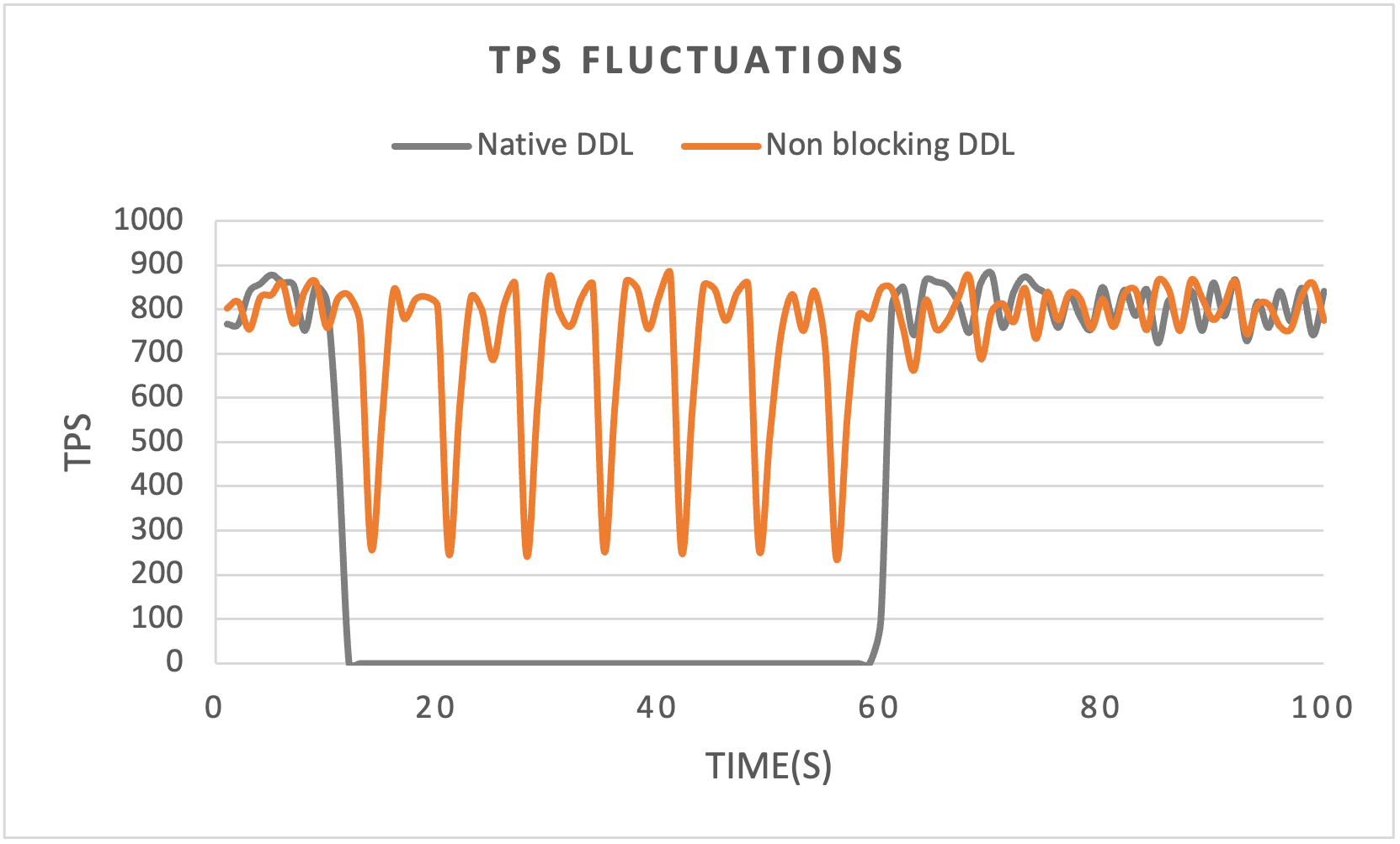
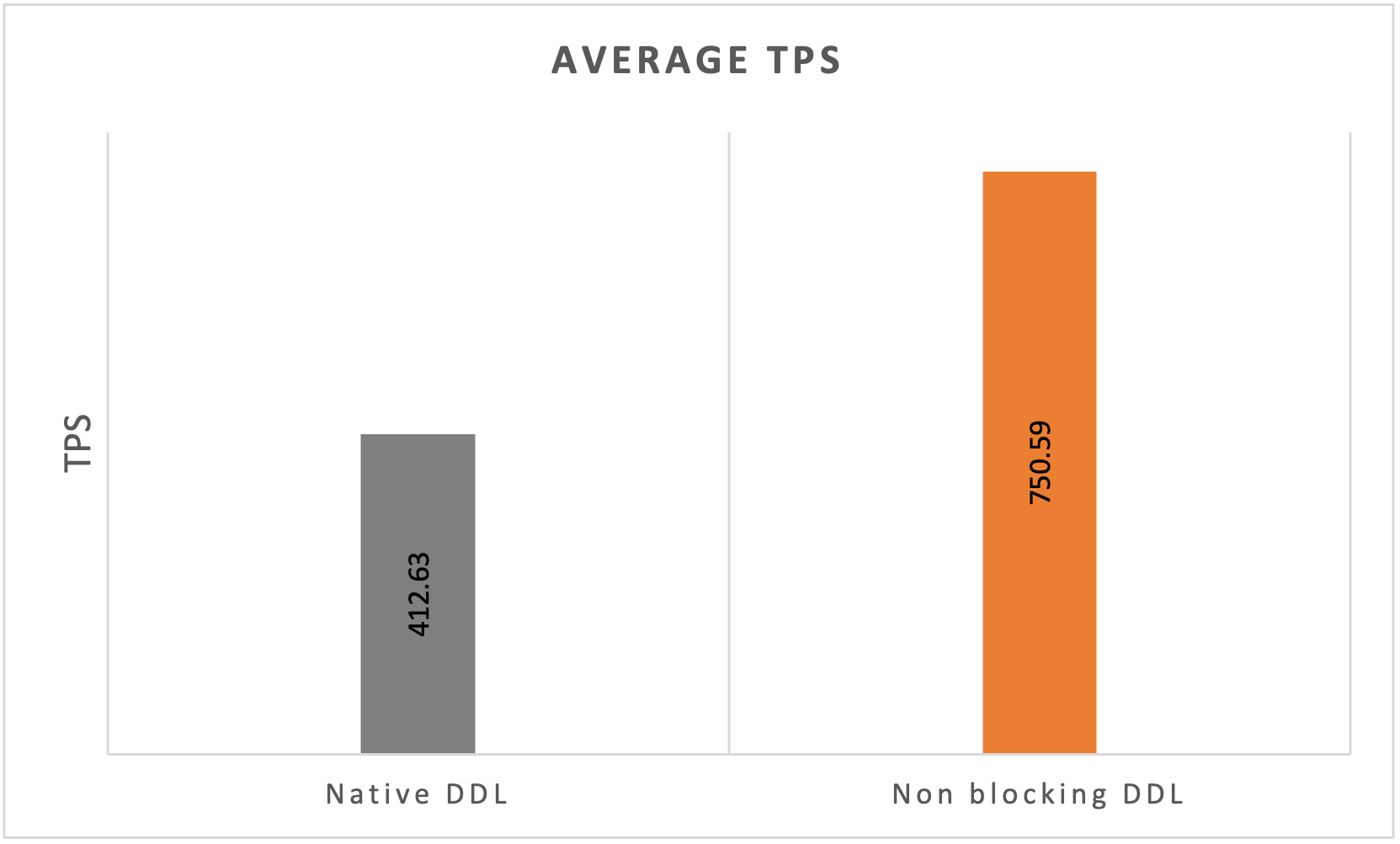
When the nonblocking DDL feature is disabled, the DDL thread cannot acquire the metadata lock (MDL), and the session is completely blocked.
With the nonblocking DDL feature enabled, the DDL thread intermittently acquires the metadata lock (MDL). This prevents the session from being completely blocked and maintains system stability.