CreateDBInstance
Creates an ApsaraDB RDS instance.
Operation description
Supported engines
ApsaraDB RDS for MySQL
ApsaraDB RDS for PostgreSQL
ApsaraDB RDS for SQL Server
ApsaraDB RDS for MariaDB
Related documentation
Try it now
 Test
Test
RAM authorization
|
Action |
Access level |
Resource type |
Condition key |
Dependent action |
|
rds:CreateDBInstance |
create |
*All Resource
|
|
None |
Request parameters
|
Parameter |
Type |
Required |
Description |
Example |
| RegionId |
string |
Yes |
The region ID. You can call the DescribeRegions operation to query the region ID. |
cn-hangzhou |
| Engine |
string |
Yes |
The database engine. Valid values:
|
MySQL |
| EngineVersion |
string |
Yes |
The database engine version. Valid values:
Note
|
8.0 |
| DBInstanceClass |
string |
Yes |
The instance type. You can specify a standard or Yitian instance type. For more details, see Primary ApsaraDB RDS instance types. To create a Serverless instance, specify one of the following values:
|
mysql.n2.medium.2c |
| DBInstanceStorage |
integer |
Yes |
Instance storage capacity of the instance. Unit: GB. Instance storage capacity increases in increments of 5 GB. For more information about the valid values, see Primary ApsaraDB RDS instance types. |
100 |
| SystemDBCharset |
string |
No |
[Deprecated] This parameter is deprecated and does not need to be configured. |
gbk |
| DBInstanceNetType |
string |
Yes |
The network connectivity type of the instance. Set the value to Intranet, which indicates internal network connection. |
Intranet |
| DBInstanceDescription |
string |
No |
The name of the instance. The name must be 2 to 255 characters in length. It must start with a letter or Chinese character and can contain digits, letters, Chinese characters, and hyphens (-). Note
The name cannot start with http:// or https://. |
testInstance |
| SecurityIPList |
string |
Yes |
The IP address whitelist of the instance. Separate multiple entries with commas (,). Duplicate entries are not allowed. You can add up to 1,000 IP addresses or CIDR blocks to the whitelist of a single instance. The following formats are supported:
|
10.10.XX.XX/24 |
| ClientToken |
string |
No |
The client token that is used to ensure the idempotence of the request and prevent duplicate submissions. You can use the client to generate the value, but you must ensure that it is unique among different requests. The token can contain only ASCII characters and cannot exceed 64 characters in length. |
ETnLKlblzczshOTUbOCz**** |
| PayType |
string |
Yes |
The billing method of the instance. Valid values:
Note
The system automatically generates an order and completes the payment. You do not need to manually confirm the payment. |
Postpaid |
| ZoneId |
string |
No |
The zone ID of the primary node.
|
cn-hangzhou-b |
| ZoneIdSlave1 |
string |
No |
The zone ID of the secondary node.
|
cn-hangzhou-c |
| ZoneIdSlave2 |
string |
No |
The zone ID of the second secondary node. ApsaraDB RDS for MySQL Cluster Edition instances support the creation of one or two secondary nodes when you create the instance. If you need to create a second secondary node, you can use this parameter to specify its zone. |
cn-hangzhou-d |
| InstanceNetworkType |
string |
No |
The network type of the instance. Valid values:
Note
|
VPC |
| ConnectionMode |
string |
No |
The access mode of the instance. Valid values:
The default value is allocated by the system. Note
SQL Server 2012, 2016, and 2017 instances support only the standard access mode. |
Standard |
| VPCId |
string |
No |
The ID of the VPC. Note
This parameter takes effect only when the network type InstanceNetworkType is set to VPC. |
vpc-**** |
| VSwitchId |
string |
No |
The ID of the vSwitch.
|
vsw-**** |
| PrivateIpAddress |
string |
No |
Settings for the internal IP address of the instance. The IP address must be within the IP address range of the specified vSwitch. By default, the system automatically allocates an IP address based on VPCId and VSwitchId. |
172.16.XX.XX |
| UsedTime |
string |
No |
The subscription duration. Valid values:
Note
This parameter is required if the billing method is Prepaid. |
2 |
| Period |
string |
No |
The subscription period of the instance. Valid values:
Note
This parameter is required if the billing method is Prepaid. |
Year |
| ResourceGroupId |
string |
No |
The ID of the resource group. |
rg-acfmy**** |
| DBInstanceStorageType |
string |
No |
The instance storage type. Valid values:
The default value of this parameter is automatically determined based on the instance type specified by DBInstanceClass:
Note
Serverless instances support only PL1 ESSDs and premium cloud disks. |
general_essd |
| BusinessInfo |
string |
No |
The extended business parameters. |
121436975448952 |
| EncryptionKey |
string |
No |
The ID of the key used for cloud disk encryption in the same region. If you specify this parameter, cloud disk encryption is enabled and cannot be disabled. You must also specify RoleARN. You can view the key ID or create a new key in the Key Management Service (KMS) console. For more information, see Create a CMK. Note
|
0d24*****-da7b-4786-b981-9a164dxxxxxx |
| RoleARN |
string |
No |
The global resource descriptor (ARN) for the authorization of the ApsaraDB RDS service account by the primary account to access KMS. You can call the CheckCloudResourceAuthorized operation to query the ARN. Important If you enable cloud disk encryption, you must specify RoleARN. |
acs:ram::1406****:role/aliyunrdsinstanceencryptiondefaultrole |
| AutoRenew |
string |
No |
Specifies whether to enable auto-renewal for the instance. This parameter is valid only when you create a subscription instance. Valid values:
Note
|
true |
| Category |
string |
No |
The instance edition. Valid values:
|
HighAvailability |
| DedicatedHostGroupId |
string |
No |
The ID of the dedicated cluster host group. This parameter is required when you create an ApsaraDB RDS instance in a dedicated cluster.
|
dhg-4n**** |
| TargetDedicatedHostIdForMaster |
string |
No |
The ID of the host on which the primary instance is created in the dedicated cluster. This parameter is required when you create an ApsaraDB RDS instance in a dedicated cluster. If you do not specify this parameter, the system automatically assigns a host.
|
i-bp**** |
| TargetDedicatedHostIdForSlave |
string |
No |
The ID of the host on which the secondary instance is created in the dedicated cluster. This parameter is required when you create a high availability series or RDS Enterprise Edition instance in a dedicated cluster. If you do not specify this parameter, the system automatically allocates a host.
|
i-bp**** |
| TargetDedicatedHostIdForLog |
string |
No |
The ID of the host on which the logger instance is created in the dedicated cluster. This parameter is required when you create an RDS Enterprise Edition instance in a dedicated cluster. If you do not specify this parameter, the system automatically allocates a host.
|
i-bp**** |
| DBParamGroupId |
string |
No |
The ID of the parameter template. You can call the DescribeParameterGroups operation to query parameter templates. Note
This parameter is supported only by MySQL and PostgreSQL. If you do not specify this parameter, the default parameter template is used. You can also create a custom parameter template and specify it here. |
rpg-sys-**** |
| DBTimeZone |
string |
No |
The time zone of the instance. This parameter takes effect only when Engine is set to MySQL or PostgreSQL.
Note
|
+08:00 |
| DBIsIgnoreCase |
string |
No |
Specifies whether table names are case-sensitive. Valid values:
|
true |
| TargetMinorVersion |
string |
No |
The minor engine version of the ApsaraDB RDS instance. This parameter is required only when you create a MySQL or PostgreSQL instance. Format:
|
rds_20200229 |
| StorageAutoScale |
string |
No |
Specifies whether to enable automatic storage expansion. This feature is supported only by MySQL and PostgreSQL. Valid values:
Note
You can also call the ModifyDasInstanceConfig operation to adjust this setting after the instance is created. For more information, see Enable automatic storage expansion. Valid values:
|
Disable |
| StorageThreshold |
integer |
No |
The threshold percentage that triggers automatic storage expansion. Valid values:
Note
This parameter is required if StorageAutoScale is set to Enable. Valid values:
|
50 |
| StorageUpperBound |
integer |
No |
The upper limit of the total storage capacity for automatic storage expansion. The automatic expansion will not cause the total storage capacity of the instance to exceed this value. Unit: GB. Note
|
2000 |
| DryRun |
boolean |
No |
Specifies whether to perform a precheck for the instance creation operation. Valid values:
|
false |
| UserBackupId |
string |
No |
The ID of the user backup. You can call the ListUserBackupFiles operation to query the backup ID. If you specify this parameter, the instance is created based on the user backup. To specify this parameter, the following limits apply:
|
67798**** |
| Amount |
integer |
No |
The number of ApsaraDB RDS for MySQL instances to create. This parameter is applicable only when you create multiple ApsaraDB RDS for MySQL instances at a time. Valid values: 1 to 20. Default value: 1. Note
|
2 |
| CreateStrategy |
string |
No |
The strategy for creating multiple instances at a time. This parameter takes effect only when Amount is greater than 1. Valid values:
|
Atomicity |
| Tag |
array<object> |
No |
The list of tags. |
|
|
object |
No |
The details of the tags. |
||
| Key |
string |
No |
The tag key. Specify this parameter to add a tag to the instance.
|
testkey1 |
| Value |
string |
No |
The tag value corresponding to the tag key. Specify this parameter to add a tag to the instance.
|
testvalue1 |
| DeletionProtection |
boolean |
No |
Specifies whether to enable the release protection feature for the ApsaraDB RDS instance. This feature is supported only for pay-as-you-go instances. Valid values:
|
true |
| BabelfishConfig |
string |
No |
The configuration information for Babelfish for ApsaraDB RDS for PostgreSQL. Configuration format: {"babelfishEnabled":"true","migrationMode":"xxxxxxx","masterUsername":"xxxxxxx","masterUserPassword":"xxxxxxxx"} Parameter description:
Note
This parameter is applicable only to ApsaraDB RDS for PostgreSQL instances. For more information about Babelfish for ApsaraDB RDS for PostgreSQL, see Babelfish overview. |
{"babelfishEnabled":"true","migrationMode":"single-db","masterUsername":"babelfish_user","masterUserPassword":"Babelfish123!"} |
| ServerlessConfig |
object |
No |
The settings for the ApsaraDB RDS Serverless instance. This parameter is required when you create a Serverless instance. Note
MariaDB does not support Serverless instances. |
|
| AutoPause |
boolean |
No |
Specifies whether to enable the smart pause and start feature for the Serverless instance. Valid values:
Note
This parameter is required only for MySQL and PostgreSQL Serverless instances. If no connections are established within 10 minutes, the instance enters the paused state. When a connection is established, the instance automatically wakes up. |
true |
| MaxCapacity |
number |
No |
The maximum number of RDS Capacity Units (RCUs) for automatic scaling of the instance. Valid values:
Note
The value of this parameter must be greater than or equal to the value of MinCapacity, and only integers are supported. |
8 |
| MinCapacity |
number |
No |
The minimum number of RCUs for automatic scaling of the instance. Valid values:
Note
The value of this parameter must be less than or equal to the value of MaxCapacity. |
0.5 |
| SwitchForce |
boolean |
No |
Specifies whether to enable forced elastic scaling for the Serverless instance. Valid values:
Note
|
false |
| ConnectionString |
string |
No |
The internal endpoint of the database. Endpoint format: |
rm-uf6wjk5****.mysql.rds.aliyuncs.com |
| Port |
string |
No |
The port used to initialize the ApsaraDB RDS instance. Valid values:
|
3306 |
| BurstingEnabled |
boolean |
No |
[Deprecated] This parameter is deprecated and does not need to be configured. |
0 |
| AutoPay |
boolean |
No |
Specifies whether to enable the I/O performance burst feature for premium cloud disks. Valid values:
Note
For more information about the I/O performance burst feature for premium cloud disks, see What are premium cloud disks?. |
false |
| IoAccelerationEnabled |
string |
No |
Specifies whether to enable automatic payment. Valid values:
Note
The default value is true. If your payment method has an insufficient balance, you can set AutoPay to false. In this case, an unpaid order is generated, and you can log on to the ApsaraDB RDS console to pay the order manually. |
true |
| ColdDataEnabled |
boolean |
No |
Specifies whether to enable the Buffer Pool Extension (BPE) feature for premium cloud disks. Valid values:
|
0 |
| WhitelistTemplateList |
string |
No |
Specifies whether to enable the data archiving feature for premium cloud disks. Valid values:
|
false |
| AutoCreateProxy |
boolean |
No |
The whitelist templates.
To configure multiple IP addresses, separate the IP addresses or CIDR blocks with commas (,). Do not add spaces before or after the commas. Example: |
192.168.0.1,172.16.213.9 |
| AutoUseCoupon |
boolean |
No |
Specifies whether to automatically create a proxy. Valid values:
|
false |
| PromotionCode |
string |
No |
Specifies whether to use vouchers. Valid values:
Note
If you use vouchers and later need to downgrade the instance configuration, the amount deducted by the vouchers will not be refunded. |
true |
| OptimizedWrites |
string |
No |
The coupon code. Valid values:
|
aliwood-1688-mobile-promotion |
| ExternalReplication |
boolean |
No |
Specifies whether to enable the 16KB atomic write feature. Valid values:
|
optimized |
| CustomExtraInfo |
string |
No |
Specifies whether to enable native replication for ApsaraDB RDS for MySQL. Valid values:
|
ON |
Response elements
|
Element |
Type |
Description |
Example |
|
object |
The response parameters. |
||
| ConnectionString |
string |
The internal endpoint of the instance. |
rm-uf6wjk5****.mysql.rds.aliyuncs.com |
| DBInstanceId |
string |
The ID of the instance. If you set the Amount parameter to a value greater than 1, the number of instance IDs returned corresponds to the value, separated by commas. For example, if the Amount parameter is set to 3, three instance IDs are returned. Example:
|
rm-uf6wjk5**** |
| DryRun |
boolean |
Indicates whether a precheck is required before the instance is created.
|
true |
| DryRunResult |
boolean |
Indicates whether the precheck for creating the instance passed. Valid values:
Note
|
true |
| Message |
string |
The prompt message for the batch creation task. Note
This parameter is returned only when the Amount parameter is greater than 1. |
Batch Create DBInstance Task Is In Process. |
| OrderId |
string |
The ID of the order. |
1007893702**** |
| Port |
string |
The port number of the internal endpoint of the instance. |
3306 |
| RequestId |
string |
The ID of the request. |
1E43AAE0-BEE8-43DA-860D-EAF2AA0724DC |
| TagResult |
boolean |
Indicates whether tags are successfully bound to the instance. Valid values:
Note
If no tags are bound to the instance, this parameter is not returned. |
true |
| TaskId |
string |
The ID of the batch creation task.
|
s2365879-a9d0-55af-fgae-f2**** |
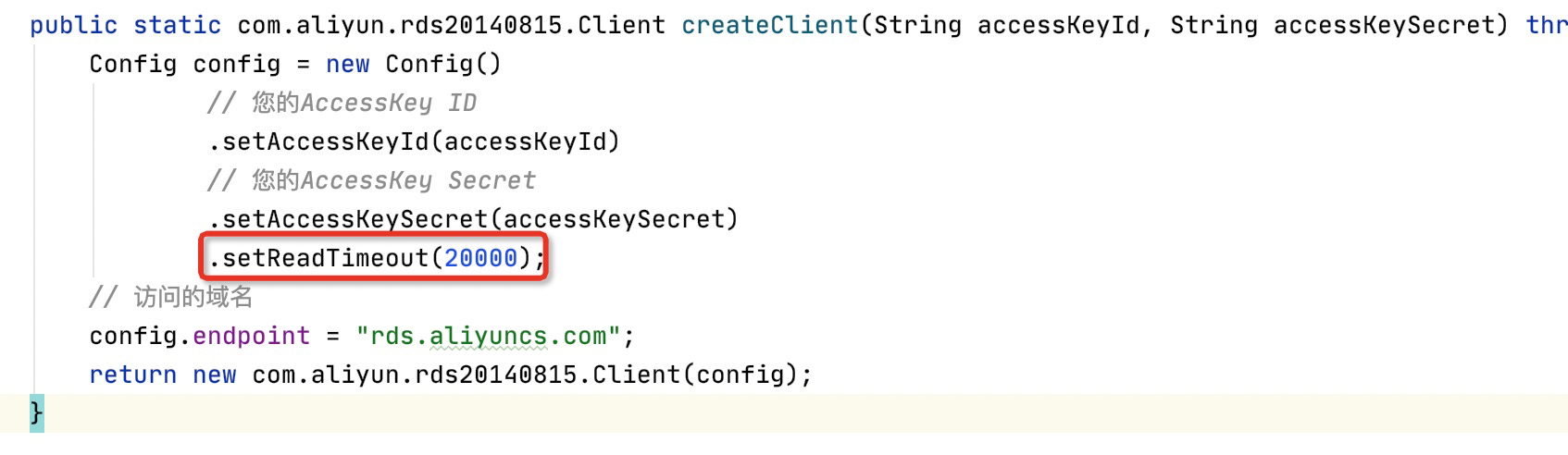
When you use the latest SDK to call this operation, the default client timeout in the SDK may differ from the server timeout. As a result, a request timeout error may be returned even if the operation was successfully called. To avoid this issue, set the ReadTimeout parameter to 20000 before you call the operation.
Examples
Success response
JSON format
{
  "ConnectionString": "rm-uf6wjk5****.mysql.rds.aliyuncs.com",
  "DBInstanceId": "rm-uf6wjk5****",
  "DryRun": true,
  "DryRunResult": true,
  "Message": "Batch Create DBInstance Task Is In Process.",
  "OrderId": "1007893702****",
  "Port": "3306",
  "RequestId": "1E43AAE0-BEE8-43DA-860D-EAF2AA0724DC",
  "TagResult": true,
  "TaskId": "s2365879-a9d0-55af-fgae-f2****"
}
Error codes
|
HTTP status code |
Error code |
Error message |
Description |
|---|---|---|---|
| 400 | Invalid.ParamGroupDBVersion | %s.%s | |
| 400 | InvalidInstanceLevel.DiskType | Specified instance level not support request disk type | The current instance type does not support the specified storage type. |
| 400 | RR309 | We have detected a security risk with your payment method. Please proceed with verification via the link in your email or console message and re-submit your order after verification. | A security risk was detected in the default payment method. Please verify your payment method before placing your order. A verification link will be sent to you via email and internal message. |
| 400 | InvalidZoneId.NotSupported | The Specified vpc Zone not supported. | VPC-hosted RDS instances cannot be created in the zone. Specify a different zone. |
| 400 | InvalidZone.NotSupportedForStorageType | The specified zone is closed or invalid for Specified DBInstanceStorageType. | The specified region is unavailable or invalid for the specified DBInstanceStorageType. |
| 400 | InvalidNetworkTypeClassicWhenCloudStorage | The Specified InstanceNetworkType value Classic is not valid when choose cloud storage type. | When selecting a cloud storage type, specifying a InstanceNetworkType value of Classic is not valid. |
| 400 | InvalidZone.NotSupported | The Specified Zone not supported. | The zone is invalid. |
| 400 | InvalidEssdStorageSize | invalid cloud essd storage size. | The storage size of cloud disks is invalid. Check the storage size. |
| 400 | InvalidParameter | Some Reuquest Parameters Is Invalid. Check or Try It Again Later. | |
| 400 | Pay.AmountLimitExceeded | Pay amount limit exceeded. | |
| 400 | IncompleteAccountInfo | Your information is incomplete. Complete your information before the operation. | The operation failed. Items that are marked with an asterisk (*) in the account information must be specified. Make sure that you specify these items on the Basic Information page in Account Center. |
| 400 | IncompleteTaxInfo | Your tax information is incomplete. Complete your information before the operation. | The operation failed. Your tax information is incomplete. Complete your tax information. |
| 400 | InvalidPaymentMethod.Incomplete | No payment method is specified for your account. We recommend that you add a payment method. | No valid payment method is specified for your Alibaba Cloud account. Add a valid payment method. |
| 400 | InvalidPaymentMethod.Missing | No payment method is specified for your account. We recommend that you add a payment method. | No valid payment method is specified for your Alibaba Cloud account. Add a valid payment method. |
| 400 | InsuffcientBalanceOrBankAccount | Add a payment method or add funds to the prepayment balance. Get started by creating an instance. | No valid payment method is specified within your Alibaba Cloud account. Add a valid payment method or add funds to your Alibaba Cloud account. |
| 400 | InvalidPaymentMethod.NoAccess | No payment method is specified for your account. We recommend that you add a payment method. | |
| 400 | InvalidPaymentMethod.InsufficientBalance | No payment method is specified for your account. We recommend that you add a payment method or add funds to the prepayment balance. | |
| 400 | Pay.LowFunds | The balance of the advance payment is insufficient or there is no balance of the advance payment. | |
| 400 | Pay.ChargeChannelNotFound | Failure to obtain the first external payment channel if the advance balance is insufficient. | |
| 400 | VswitchIpExhausted | Vswitch IP exhausted. | The operation failed. No vSwitch IP addresses are available. |
| 400 | InvalidPrivateIpAddress.AlreadyUsed | The specified IP is already used. | The IP address has been used. |
| 400 | InvalidEcsImage.NotFound | Sepcified ecs image does not exist | |
| 400 | InvalidMinorVersion.NotFound | Sepcified minor version does not exists. | |
| 400 | InvalidConcurrentOperate | Concurrent operation is detected. | Concurrent operations exist. Wait until the previous operation is complete and try again. |
| 400 | ZoneId.NotMatchWithCategory | The number of ZoneId specified does not match with category. | The number of zones is not supported for the database engine or the RDS edition of the RDS instance. Modify the zone settings. |
| 400 | InvalidSecurityIPList.Format | The specified parameter securityIPList is not valid. | The format of the IP address whitelist does not meet the requirements. Check the IP address whitelist. |
| 400 | InvalidDBParamGroupId.Format | The specified parameter dbParamGroupId is not valid. | |
| 400 | InvalidTargetMinorVersion.Format | The specified parameter targetMinorVersion is not valid. | |
| 400 | InvalidDedicatedHostGroupId.Format | The specified parameter dedicatedHostGroupId is not valid. | |
| 400 | InvalidDBInstanceClass.Malformed | The specified parameter DBInstanceClass is not valid. | |
| 400 | InvalidEngineVersion.Malformed | The specified parameter EngineVersion is not valid. | The database engine version is invalid. Check the database engine version and try again. |
| 400 | CreditPayInsufficientBalance | Insufficient credit pay limit. Please contact your channel partner to increase the limit. | The quota runs out. Contact your customer service representatives to increase the quota. |
| 400 | InvalidTagKey.Malformed | The Tag.N.Key parameter is empty. | The Tag.N.Key parameter is left unspecified. |
| 400 | InvalidTagValue.Malformed | The Tag.N.Value parameter is empty. | The Tag.N.Value parameter is left unspecified. |
| 400 | Duplicate.TagKey | The Tag.N.Key contains duplicate keys. | The values of two Tag.N.Key parameters are duplicate. |
| 400 | NumberExceed.Tags | The maximum number of Tags is exceeded. The maximum is 20. | The number of tags exceeds 20. |
| 400 | MissingParameter.ResourceIds | The parameter ResourceIds.N must not be null. | The ResourceIds.N parameter cannot be empty. |
| 400 | InvalidParameter.TagKey | The Tag.N.Key parameter is invalid. | The value of the Tag.N.Key parameter is invalid. |
| 400 | InvalidParameter.TagValue | The Tag.N.Value parameter is invalid. | The Tag.N.Value parameter is invalid. |
| 400 | NoPermission.SystemTag | You have no permission to use system tags. | You have no permission to use the system tag. |
| 400 | InvalidParam.Amount | Amount is allowed from 1 to 20. | Amount is allowed from 1 to 20. |
| 400 | InvalidParam.CreateStrategy | Only Atomicity and Partial are allowed. | Only the Atomicity and Partial parameters are supported. |
| 400 | InvalidParam.Engine | Only MySQL is allowed when Amount > 1. | |
| 400 | InvalidMultiZoneInfoList | The Specified Zone Info List is Invaild. | |
| 400 | InvalidKmsConfigStatus | The Kms Service Config is Invalid. | |
| 400 | InvalidConnectionString.Duplicate | Specified connection string already exists in the Aliyun RDS. | |
| 400 | InvalidPort.Malformed | Specified port is not valid. | The port number is invalid. |
| 400 | InvalidUsedTime | UsedTime can not Less than or equal to zero. | The value of the UsedTime parameter must be greater than 0. |
| 400 | Kms.Unauthorized | KMS has not been authorized. | KMS is not authorized. |
| 400 | InvalidDBInstanceClass.Offline | The specified instance type is no longer provided. Please specify another instance type. | The instance type that you select is no longer available. Select another instance type. |
| 400 | SystemParamGroupCode.Format | Specific DBParamGroupId is not valid. | The specified DBParamGroupId parameter is invalid. |
| 400 | InvalidDBInstanceName.Duplicate | Specified DB instance name already exists in the Aliyun RDS. | The operation failed. The instance name already exists. Specify a different name and try again. |
| 400 | ServiceLinkedRole.NotExist | Service linked role for RDS PostgreSQL not exist. | Create the AliyunServiceRoleForRdsPgsqlOnEcs role for ApsaraDB RDS for PostgreSQL. |
| 400 | CommodityServiceCalling.Exception | Failed to call commodity service. | Failed to call commodity service return. |
| 400 | Commodity.InvalidComponent | The module you purchased is not legal, please buy it again. | The module you purchased is not legal, please buy it again. |
| 400 | Pay.InsufficientBalance | Insufficient available balance. | Insufficient available balance. |
| 400 | Price.CommoditySys | Commodity system call exception. | Commodity system call exception. |
| 400 | RegionEndTimeDissolvedAustralia | Cloud services in the Australia (Sydney) region will be discontinued. Set the validity date to September 30, 2024 or earlier than September 30, 2024. | Hello customer, this area has been abolished. |
| 400 | RegionEndTimeDissolvedIndia | Cloud services in the India (Mumbai) region will be discontinued. Set the validity date to July 15, 2024 or earlier than July 15, 2024. | Hello customer, this area has been abolished. |
| 400 | InvalidPrivateIpAddress.Format | The specified private IP address format is incorrect. | The specified IP address is not in the correct format. |
| 400 | InvalidPrivateIpAddress.Mismatch | Specified private IP address is not in the CIDR block of virtual switch. | The VPC endpoint is invalid. |
| 400 | TooManyWhitelistTemplateIds | create dbinstance can support attach to up to 10 whitelist templates. | Excessive number of incoming whitelist templates! You can associate up to 10 whitelist templates. |
| 400 | UnsupportExtendDisk.NotSupport | Specified DB instance is unsupport extend disk. | Disk expansion is not supported on the specified instance. |
| 400 | InvalidWhitelistTemplateId | the template id list is invalid. | The ID of the specified whitelist template is incorrect. Check the setting. |
| 400 | InvalidRequestId | The request is copy, check your token. | The request is copy, check your token. |
| 400 | InvalidParameter.MinCapacity | The specified parameter 'MinCapacity' is not valid. | The specified parameter 'MinCapacity' is not valid. |
| 400 | UnsupportedClassCode | The specified DB instance class stops selling. | The specified DB instance class stops selling. |
| 400 | InvalidParameter.NotSupportDBInstanceStorageType | Parameter DBInstanceStorageType is invalid. | Invalid DBInstanceStorageType parameter |
| 400 | InvalidParam.InstanceNetworkType | Creation of classic network instances is not supported. | Classic network offline, does not support the creation of classic network instances! |
| 400 | InvalidOrder.NotFound | Specified order does not exist in RDS. | The specified order does not exist in RDS. |
| 400 | InvalidVSwitchId.Format | The specified vswitch Id format is incorrect. | The format of the specified vSwitch ID is invalid. |
| 400 | Order.ComboInstanceNotAllowOperate | A package instance is not allowed to operate independently. | A package instance is not allowed to operate independently. |
| 400 | Price.PricingPlanResultNotFound | Pricing plan price result not found. | Pricing plan price result not found. |
| 400 | Order.NoRealNameAuthentication | You have not passed the real-name authentication and do not meet the purchase conditions. Please log in to the user center for real-name authentication. | You have not passed the real-name authentication and do not meet the purchase conditions. Please log in to the cost and cost for real-name authentication. |
| 400 | InsufficientAvailableQuota | Your account quota limit is less than 0, please recharge before trying to purchase. | Your account available limit is less than 0, please recharge before trying to purchase. |
| 400 | RegionDissolvedEOM | Dear customer, Alibaba Cloud plans to optimize and adjust the current region. Cloud services in this region will cease operations. You are currently unable to operate new purchase orders. Thank you for your understanding and support. | Hello, Alibaba Cloud plans to optimize and adjust the current region. Cloud services in this region will stop operating. In order to ensure your business continuity and smooth transition of data migration, you are currently unable to operate new purchase orders. Thank you for your understanding and support. |
| 400 | Order.PeriodInvalid | There is a problem with the period you selected, please choose again. | There is a problem with the period you selected, please choose again. |
| 400 | pay.noCreditCard | Account not bound to credit card. | The account is not bound to a credit card. |
| 400 | Order.InstHasUnpaidOrder | There is an unpaid order for the service you have purchased. Please pay or void it before placing the order. | There is an unpaid order for the service you have purchased. Please pay or void it before placing the order. |
| 400 | BasicInfoUncompleted | Your information is incomplete. Complete your information before the operation. | Your basic information is not complete, please complete your basic information before operation. |
| 400 | Risk.RiskControlRejection | Your account is abnormal, please contact customer service for details. | Your account is abnormal, please contact customer service for details. |
| 400 | Api.NotSupport | Specified api is not supported. | The current interface does not support. |
| 400 | ContainForbiddenLabelError | There is a label that prohibits placing orders. Please contact your distributor for assistance. | You cannot place the order because a tag indicates that order placement is prohibited. Contact your distributor. |
| 400 | InvalidDBInstanceId.NotFound | The DBInstanceId provided does not exist in records. | The DBInstanceId provided does not exist. |
| 400 | InvalidParam | Sepcified wal level Parameter is invalid. There are still logical slots in instance, so it can not be set as replica. | The specified wal_level parameter is invalid. There is still a copy slot in the instance, so it cannot be set to replica. |
| 400 | System.SaleValidateFailed | Sales expression validation system error. | A system error occurs when the sales expression is verified. |
| 400 | Abs.InvalidAccount.NotFound | account is not found. | The account does not exist. |
| 400 | SqlExecuteFailedOrTimeout | sql command execution failed or timed out:%s. | SQL command execution failed or timed out |
| 400 | ColdData.EngineVersionNotSupport | The current instance engine version not support coldDataEnabled. | The current instance engine version not support coldDataEnabled. |
| 400 | ColdData.MinorVersionNotSupport | The current instance minor version not support coldDataEnabled. | The current instance minor version not support coldDataEnabled. |
| 400 | IncorrectTargetClasscode | The current instance type does not support this operation. | This operation is not supported by the instance type. |
| 400 | RequiredParam.NotFound | Required input param is not found. | The required parameters are not provided. |
| 400 | Parameters.Invalid | Parameter error, please check the parameters. | Parameter error, please check the parameters. |
| 400 | BackupPolicyNotSupport | Cold Data won't open with CrossBackup or Flash Backup, please check Backup Policy. | Cold Data won't open with CrossBackup or Flash Backup, please check Backup Policy. |
| 400 | InvalideStatus.Format | The instance status does not support this operation. | This operation is not supported in the current instance status. |
| 400 | InvalidReleasedKeepPolicy.Format | Specified Released Keep Policy is not valid. | Specified Released Keep Policy is not valid. |
| 400 | InvalidDBInstanceEngineType.Format | the DB instance engine type does not support this operation. | This operation is not supported for the database engine of the instance. |
| 400 | Pay.NoCreditCard | No credit cards. | No credit cards. |
| 400 | VpcNetworkTypeNotSupport | The vpc network type instance does not support this operation. | The vpc network type instance does not support this operation. |
| 400 | MirrorInsExists | Specified DB instance mirror ins already existed. | Specified DB instance mirror ins already existed. |
| 400 | InvalidBackupSet | The specified database does not exist in the backup set. | The specified database does not exist in the backup set. |
| 400 | OrdTCommodityQueryError | Failed to query for product. | Failed to query product. |
| 400 | ProductInstanceReleased | The instance has been released. Please check before placing the order. | The instance has been released, please verify and place an order. |
| 400 | IncorrectTargetCategory | Current target category does not support this operation. | Current target category does not support this operation. |
| 400 | PurchaseDurationInsufficient | The purchase duration does not meet the requirements, please choose again. | The purchase duration does not meet the requirements, please select again. |
| 400 | NotFound.ParamGroupId | Current ParamGroupId not found. | The parameter template does not exist. |
| 400 | InvalidParamForXfs | Xfs instance must be single tenant standard instance. | Xfs instance must be single tenant standard instance. |
| 400 | UnsupportedColdData | Current coldDataEnabled parameter can not support. | The specified region does not support cold storage. |
| 400 | AtLeastThreeVSwitchAvailableIp | The primary vswitch requires at least three available IP addresses. | The master switch requires at least 3 available IPs. |
| 400 | AtLeastTwoVSwitchAvailableIp | The primary vswitch requires at least two available IP addresses. | The master switch requires at least 2 available IPs. |
| 400 | DuckDBOperationConflictBetweenPrimaryAndReadOnlyInstance | Current instance is already attached to another duckdb instance, operation is conflict. | The current instance is already associated with another DUCKDB instance, which conflicts with the current DUCKDB operation. |
| 400 | AtLeastTwoVSwitchParamExists | The specified params(Vswitchs) at least two. | At least two Vswitchs parameters must be specified. Each Vswitchs parameter specifies a vSwitch in a zone. |
| 400 | InvalidVPCId.NotFound | Specified virtual vpc is not found. | The VPC ID cannot be found. Check the VPC ID. |
| 400 | InvalidDefaultVSwitch.NotFound | InvalidDefaultVSwitch.NotFound | The operation failed. The vSwitch cannot be found in the VPC. |
| 400 | InvalidVSwitchId.Mismatch | Specified instance and virtual switch are not in the same zone. | The RDS instance and the vSwitch are not in the same zone. |
| 400 | InvalidVpcIdOrVswitchId.NotSupported | The specified vpcId or vSwitchId is not supported. | The VPC that is specified by the vpcId parameter or the vSwitch that is specified by the vSwitchId parameter is not supported. Check the values of these parameters. |
| 400 | Trade.NotSupportAsyncPay | The current default payment method is an external channel, which does not support synchronous auto-pay. | The current default payment method is an external channel and does not support synchronized automatic payments. It is recommended to switch the default payment method to account balance or credit control limit and then reinitiate. |
| 400 | Commodity.TradeTypeNotSupported | This product does not support the requested transaction type. Please choose a different operation. | This product does not support the requested transaction type. Please choose a different operation. |
| 400 | Commodity.NotSupported | Purchasing this product is currently not supported. Please verify the product information or choose another product. | Purchasing this product is currently not supported. Please verify the product information or choose another product. |
| 400 | Promotion.CouponError | Coupon or promotional activity validation failed. Please verify that the selected promotion is valid and try again. | Coupon or promotional activity validation failed. Please verify that the selected promotion is valid and try again. |
| 400 | Region.Invalid | The region parameter is invalid. Please select a supported region and try again. | The region parameter is invalid. Please select a supported region and try again. |
| 400 | Order.UpgradeNotAllowed | The upgrade cannot be completed because the upgraded specification costs less than the refundable amount. Please select a higher specification or contact support regarding the remaining balance. | The upgrade cannot be completed because the upgraded specification costs less than the refundable amount. Please select a higher specification or contact support regarding the remaining balance. |
| 400 | Pay.AccountMismatch | The order information does not match the current payment account. Please pay using the account that placed the order. | The order information does not match the current payment account. Please pay using the account that placed the order. |
| 400 | Pay.MergePayNotSupported | The selected orders do not support combined payment. Please pay for them individually. | The selected orders do not support combined payment. Please pay for them individually. |
| 400 | Order.InvalidParameter | One or more request parameters are invalid. Please check the billing period, quantity, amount, instance specification, and other parameters, then try again. | One or more request parameters are invalid. Please check the billing period, quantity, amount, instance specification, and other parameters, then try again. |
| 401 | CannotDecreaseEssdPerfLevel | cannot decrease cloud essd performance level. | |
| 500 | ExternalFailure | The request processing has failed due to external service failure. | The request processing has failed due to external service failure. |
| 500 | RequestMetaDataFailed | The service request failed. Please try again later or contact service personnel. | The service request failed. Please try again later or contact service personnel. |
| 500 | InvokeProxyFailure | The request processing has failed due to service failure of rds api. | The request failed to be processed due to an RDS API failure. |
| 403 | ByokRoleArnNotFound | The roleArn can not be null. | The roleArn can not be null. |
| 403 | RISK.RISK_CONTROL_REJECTION | Risk control rejection. | |
| 403 | AliCroup2CloudUserCannotBuyNotInnerCommodity | There is no group cloud commodity label, and users within the group are not allowed to purchase. | The product does not have the enterprise cloud migration tag. Internal users are not allowed to purchase it. |
| 403 | GroupReplicationNotSupport.InvalidEngineVersion | Group Replication requires the instance engine version to be 8.0. | The database engine version of the instance is not MySQL 8.0. MySQL Group Replication is not supported. |
| 403 | GroupReplicationNotSupport.InvalidNodeClassCode | Group Replication requires the ClassCode of each node to be consistent. | The nodes in the instance have different instance types. MySQL Group Replication is not supported. |
| 403 | GroupReplicationNotSupport.InvalidNodeNum | Group Replication is not supported, the number of nodes must be an odd number greater than or equal to 3. | The number of nodes in the instance is not an odd number greater than or equal to 3. MySQL Group Replication is not supported. |
| 403 | GroupReplicationNotSupport.InvalidXengine | Group Replication is not supported because the instance has xengine tables. | The instance contains tables that use the X-Engine storage engine. MySQL Group Replication is not supported. |
| 403 | GroupReplicationNotSupport.MemoryTooSmall | Group Replication is not supported because the memory is too small. | The instance memory is insufficient to support MySQL Group Replication. |
| 403 | IncorrectMinorVersion | Current engine minor version does not support operations. | This operation is not supported for the current minor engine version. |
| 403 | CloudDiskEncryptionNotSupport | The encryption key is not allowed for general-purpose instance. | Universal instances do not support cloud disk encryption. |
| 403 | CloudSSDNotSupport | Cloud ssd does not support this operation, please upgrade to essd. | Standard SSDs do not support this operation. Upgrade to ESSDs. |
| 403 | InvalidVswitchId | Specified conn vswitch id is not valid. | The specified VSwitchId is invalid or empty. |
| 403 | BasicCategoryNotSupport | The Basic category is not supported. | Basic series not supported |
| 403 | OrderStatus.UnPaid | The specified db instance has unpaid order. | The instance has an unpaid order. Please pay first and try again. |
| 403 | InvalidReduceDiskSize | The storage capacity after the scale-down must be larger than the used amount. | The scale-in target capacity cannot be less than the current storage space usage |
| 403 | InvalidUserOperatorPermission | The user permission does not support this operation. | The user is not authorized to perform this operation. |
| 403 | OperationDenied.ZoneResource | There is no available zone for inventory. | There is no available zone for inventory. |
| 403 | NotInFlowController | Sorry,no permission. | Sorry,no permission. |
| 403 | InvalidKmsKey | Kms key is disabled. | The KMS key is disabled. |
| 403 | InvalidInstanceLevel.Malformed | Current DB instance level does not support this operation. | The specified database instance type does not support this operation. |
| 403 | IncorrectCharacterType | Current DB instance character type does not support this operation. | This operation is not supported for the character type of the instance. |
| 403 | GuardDBInstanceExists | Current DB instance had guard instance. | The current database instance already has a disaster recovery instance. |
| 403 | Pay.OverdueBill | Your account has an overdue bill. Please settle the outstanding balance before trying again. | Your account has an overdue bill. Please settle the outstanding balance before trying again. |
| 404 | InsufficientResourceCapacity | The target availability zone does not have sufficient resources. | The target Availability Zone does not have enough resources. |
| 404 | InvalidClusterKms | The current instance does not authorized to access the Key Management Service. | The instance does not have permissions to access Key Management Service (KMS). |
| 404 | Request.NotFound | The requested resource is not available. | The requested resources are unavailable. |
| 404 | HostInfo.NotFound | The specified host info is not found. | The specified host information does not exist. |
| 404 | Order.SubscriptionNotFound | No subscription record was found. Please verify that the instance has an active subscription. | No subscription record was found. Please verify that the instance has an active subscription. |
| 404 | Order.InstanceNotFound | The specified instance was not found or has been released. Please verify the instance ID and try again. | The specified instance was not found or has been released. Please verify the instance ID and try again. |
| 409 | System.ConcurrentConflict | A duplicate or concurrent operation was detected. Please do not resubmit and try again later. | A duplicate or concurrent operation was detected. Please do not resubmit and try again later. |
| 409 | Order.OperationNotAllowed | The current instance or account status does not allow this operation. Please verify the status and try again, or contact support. | The current instance or account status does not allow this operation. Please verify the status and try again, or contact support. |
| 409 | Order.SubscriptionProcessingFailed | The subscription result is temporarily uncertain. Please check the order status shortly. If payment was deducted but the status is not updated, contact support. Do not place a duplicate order. | The subscription result is temporarily uncertain. Please check the order status shortly. If payment was deducted but the status is not updated, contact support. Do not place a duplicate order. |
| 409 | Order.UnfinishedRefundOrder | An unfinished refund order exists. Please wait for the refund to complete before proceeding. | An unfinished refund order exists. Please wait for the refund to complete before proceeding. |
| 409 | Pay.FinancialRelationChanged | Your account's financial hosting relationship may have changed. Please refresh the page and try the payment again. | Your account's financial hosting relationship may have changed. Please refresh the page and try the payment again. |
| 409 | Order.AlreadyActivated | This product is already activated or purchased. Do not place a duplicate order. To change the configuration, use the upgrade or renewal operation. | This product is already activated or purchased. Do not place a duplicate order. To change the configuration, use the upgrade or renewal operation. |
See Error Codes for a complete list.
Release notes
See Release Notes for a complete list.