Experience the ultimate elasticity of ApsaraDB RDS for PostgreSQL Serverless for free
ApsaraDB RDS for PostgreSQL Serverless instances automatically scale and configure resources based on your workload. These instances are cost-effective, easy to use, and feature flexible elasticity and low resource usage. You can experience the elasticity of the serverless feature online without purchasing any resources and monitor the performance and resource usage of the serverless instance in real time.
Background
Serverless is an ApsaraDB RDS feature that provides automatic scaling and per-second billing. ApsaraDB RDS for PostgreSQL Serverless instances do not have defined specifications. Instead, their compute resources automatically scale within a specified range based on your business workload, and storage resources scale out automatically with your data volume. This approach prevents idle resources and lowers database O&M costs. These instances also support automatic start and stop. When an instance is stopped, you are charged only for storage, not for compute resources. For more information, see Introduction to ApsaraDB RDS for PostgreSQL Serverless instances.
Alibaba Cloud provides the Database Solutions Performance & Price Experience Center. It simulates a client sending write requests to ApsaraDB RDS for PostgreSQL so you can experience the serverless feature. A Sysbench script performs stress testing by accessing the instance endpoint. This shows how ApsaraDB RDS for PostgreSQL automatically scales and configures itself based on the load.
Impact
This experience does not involve deployment in a production environment and will not affect your business.
Costs
This experience is free. The resources used for the trial are provided by Alibaba Cloud, so no charges will be incurred.
What you will learn
Trial environment
Alibaba Cloud provides the following pre-configured environment for your free trial:
-
An ApsaraDB RDS for PostgreSQL Serverless instance with the following configuration:
-
Kernel Version: rds_postgres_1400_20240530
-
Single-Node Scaling Range: 0.5 to 14 RCUs
-
Storage Type: PL1 ESSD
-
-
A stress testing machine with the Sysbench tool installed to run stress testing tasks on the ApsaraDB RDS for PostgreSQL Serverless instance. The stress testing details are as follows:
-
Test Modes:
oltp_read_write,oltp_read_only,oltp_write_only,oltp_delete,oltp_update_index,oltp_update_non_index, andoltp_insert.Test mode
Description
oltp_read_writeTests the read and write performance of the instance.
oltp_read_onlyTests the read-only performance of the instance.
oltp_write_onlyTests the write performance of the instance.
oltp_deleteTests the delete performance of the instance.
oltp_update_indexTests the performance of updating indexed fields.
oltp_update_non_indexTests the performance of updating non-indexed fields.
oltp_insertTests the insert performance of the instance.
NoteThis topic uses the
oltp_write_onlymode as an example. -
Stress Testing Table Size: 16 tables with 1 million data entries per table.
-
Stress Testing Pace: The test starts with 4 concurrent threads. The number of threads increases by 4 every 30 seconds until it reaches 32. Then, the number of threads decreases by 4 every 30 seconds until it returns to 4, where it remains until the test ends.
-
Stress Testing Duration: 10 minutes
-
Metrics to observe
-
Transactions Per Second (TPS): The number of transactions the database executes per second, based on the number of successful COMMITs. This metric is used to observe instance performance.
-
Number of RCUs: The RDS Compute Unit (RCU) is the unit of measurement for ApsaraDB RDS for PostgreSQL Serverless instances. One RCU is equivalent to approximately 1 vCore and 2 GB of memory. 0.5 RCU is equivalent to approximately 0.5 vCore and 1 GB of memory.
Procedure
-
Log on to the Alibaba Cloud ApsaraDB Solutions Experience Center.
-
In the Performance & Price Experience section, locate the Serverless Elasticity & Price-Performance Observation entry and click the Free Trial button.
-
Set Product for Stress Testing to RDS PostgreSQL and Stress Testing Tool to Sysbench.
-
Click the Create Free Trial Task button at the bottom of the page.
-
Select a Stress Testing Mode and click OK to create the Sysbench stress testing task.
NoteThis topic uses the
oltp_write_onlymode as an example. -
After a moment, click the refresh icon
 to refresh the task list and view the status of the stress testing task.Note
The stress testing task runs for 10 minutes. Complete the following steps before the Estimated End Time.
-
Click View Details to go to the real-time stress testing page.
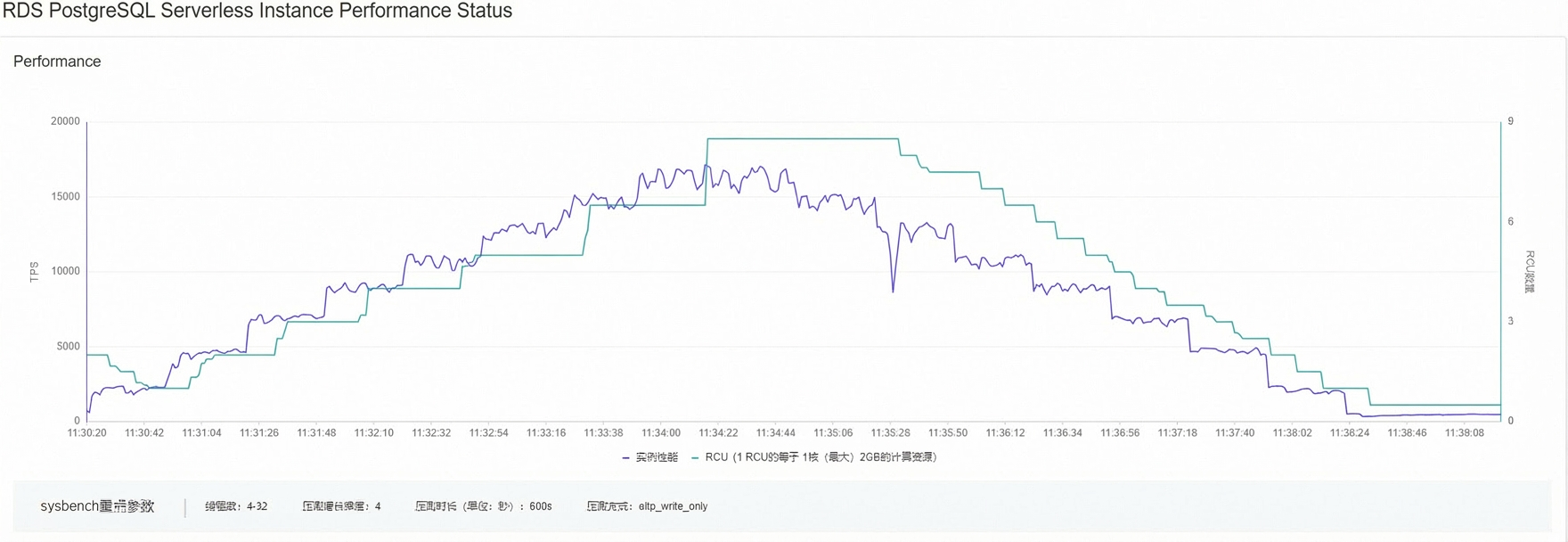
As the stress test runs, you can observe changes in the overall instance performance (measured in TPS) and the number of instance RCUs:
-
As the number of concurrent threads increases, the instance's CPU utilization rises, which triggers an RCU scale-up. The instance's RCUs scale up in seconds, gradually increasing to 8.5 RCUs.
-
The instance's TPS increases as the number of RCUs grows, which demonstrates how serverless elasticity enhances the processing power of ApsaraDB RDS for PostgreSQL.
-
When the number of concurrent threads starts to decrease, the instance load drops. The number of RCUs remains stable for a period and then automatically scales down in steps of 0.5.
NoteThe number of concurrent threads increases from 4 and decreases from 32.
-
-
(Optional) To view the results of a created task, navigate to the Serverless Elasticity & Price-Performance Observation page and click Trial Records. In the panel that appears, click My Tasks to view the details of the trial results.