RDS Long-Term Memory

更新时间:
复制 MD 格式

This topic introduces Alibaba Cloud RDS Long-Term Memory, an enterprise-grade solution that provides AI applications with cross-session, personalized memory capabilities. It explains how to quickly integrate the service using the Alibaba Cloud RDS mem0ai SDK and includes a complete API reference for core operations such as creating, searching, and deleting memories.

Background

In the era of large language model (LLM)-driven AI applications, memory capability (AI Memory) is becoming a core factor in user experience and application value. Traditional AI applications are often stateless—each interaction is independent—and the model cannot remember user preferences, conversation history, or personalized needs. This approach leads to three key problems:

  • Lost context: Users must repeat their background and needs in every conversation.

  • Lack of personalization: AI cannot tailor responses based on long-term user behavior patterns.

  • High cost: To preserve context, applications must pass large volumes of historical dialogue, causing token consumption to surge.

Alibaba Cloud RDS Long-Term Memory is an enterprise-grade AI memory enhancement solution built on the open source project Mem0. It uses intelligent memory management to help AI applications retain context across sessions, adaptively learn over time, and intelligently store and retrieve relevant information—enabling you to build next-generation personalized AI applications with long-term memory.

Key Features

Benefits

Description

Unified hybrid storage architecture

Deeply integrates with Alibaba Cloud RDS for PostgreSQL and leverages its rich extension ecosystem to enable unified “three-in-one” storage of vector, graph, and relational data. All memory data is managed within a single database instance, greatly simplifying the backend architecture of AI applications.

Enterprise-grade vector search engine

Built-in high-performance pgvector extension delivers enterprise-grade vector storage and retrieval. Supports multiple indexing algorithms such as HNSW and IVFFlat, and distance metrics including cosine similarity and Euclidean distance. Enables seamless combination of vector search with SQL-based filtering for flexible, efficient hybrid queries.

Native graph database capability

Integrates the Apache AGE (A Graph Extension) extension to give RDS for PostgreSQL full graph database functionality. Supports the Neo4j-compatible Cypher query language, automatically extracts entities and relationships from conversations to build knowledge graphs, and enables deeper memory association and inference—all with ACID transaction guarantees.

Open source compatible, seamless integration

Built on the widely adopted open source AI memory layer project Mem0, this solution is fully compatible with its APIs and SDKs. Use simple interfaces to quickly add memory capabilities to existing applications or smoothly migrate your on-premises Mem0 applications to the cloud.

Scenarios

Leveraging its powerful long-term memory and relationship reasoning capabilities, RDS Long-Term Memory is ideal for the following scenarios:

  • Personalized AI assistants: Remember user details (such as name and job), preferences (such as “likes spicy food”), and past instructions to deliver more thoughtful, intuitive interactions.

  • Multi-turn customer support: Maintain full context and historical solutions across long, cross-session support conversations—eliminating repetitive explanations and improving resolution efficiency.

  • Knowledge-intensive AI applications: In fields such as education, research, and legal consulting, help AI build and accumulate domain-specific knowledge graphs to enable intelligent, knowledge-based Q&A and inference.

  • Complex relationship analysis: In team collaboration and project management, record relationships between people and tasks (such as “Li Si is Zhang San’s mentor”) to support better decision-making.

Billing

The Long-Term Memory service itself currently has no compute resource fees. You only pay for:

  1. Underlying resource fees: RDS for PostgreSQL instance fees.

  2. Model invocation fees: Pay-as-you-go charges for calling the built-in LLM and embedding model APIs.

Its official billing start date will be announced separately.

Quick Start

Step 1: Create a Long-Term Memory instance

  1. Log on to the RDS console and click Long-Term Memory in the navigation pane on the left.

  2. On the instance list page, click Create Project.

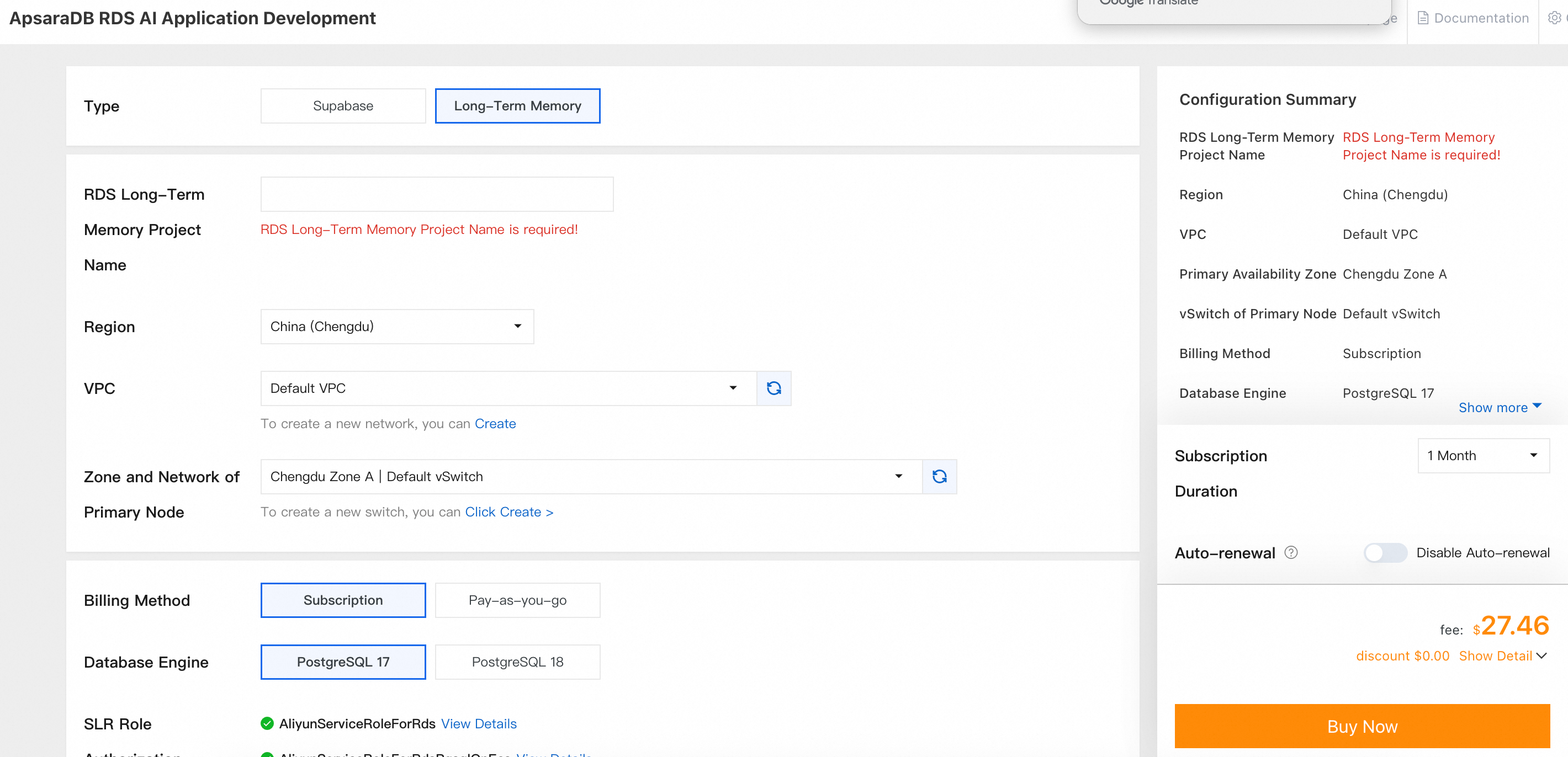
  3. Follow the on-screen prompts to select the Long-Term Memory type and complete the configuration.image

  4. After purchase, return to the console and wait until the instance status changes to Running.

Step 2: Get the endpoint and API key

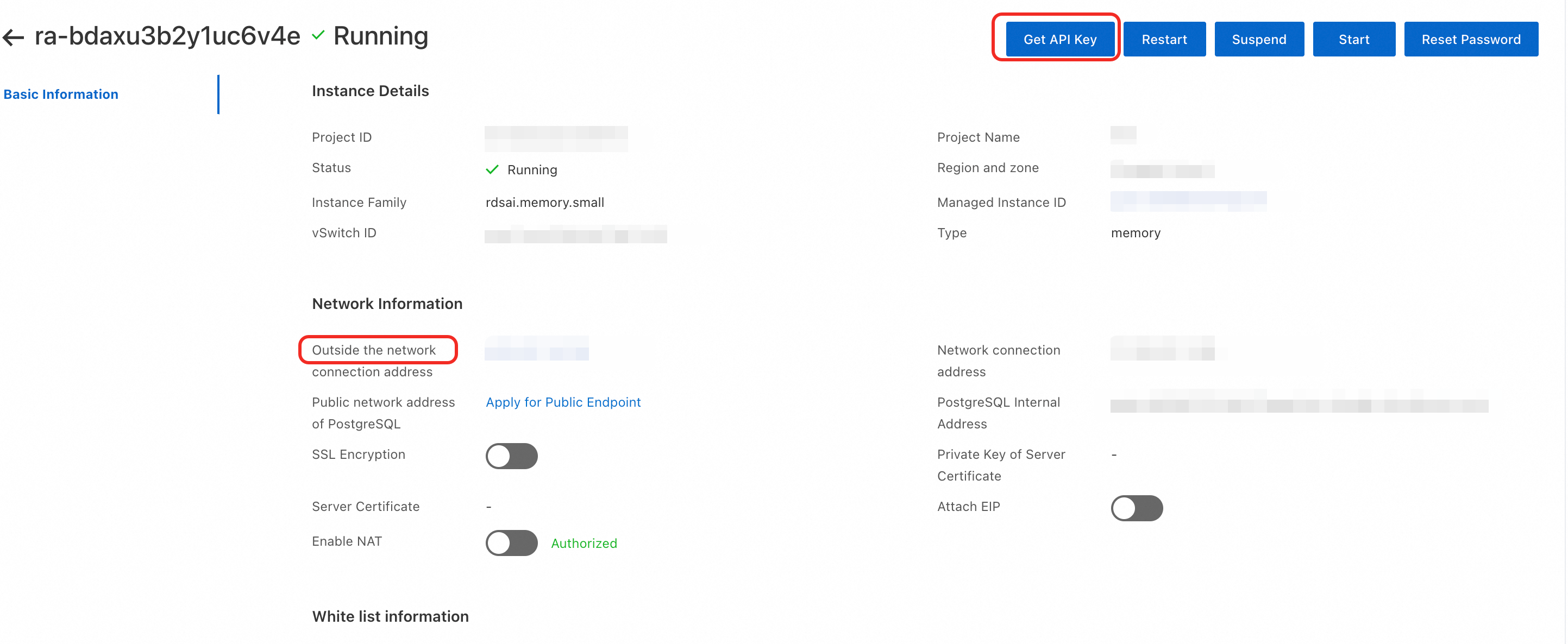
Get the endpoint: On the Long-term memory list page, click the Project ID of your target instance to go to its product page. On the Basic Information tab, view the Outside the network connection address.

Note

Endpoint: Use the Mem0 SDK or the official API endpoint to manage long-term memory.

Mem0 SDK Host: http://<public endpoint>/memory/.

Example: http://<public endpoint>/memory/v1/memories/.

Get API Key: On the Long-term memory list page, click the Project ID of your target instance to go to its product page. In the upper-right corner of the Basic Information tab, click Get API Key to obtain your ServiceKey.

image

Step 3: Network configuration

To ensure your service can be called properly, complete the following network settings.

Allow the instance to access the Internet

  1. Go to the Basic Information page of your instance.

  2. Click Network Information > Attach EIP.

Configure the whitelist

  1. In the Basic Information section of the instance product page, find White list information .

  2. Click Create Whitelist and add your client or test server IP address to the whitelist.

Step 4: Integrate the RDS Long-Term Memory SDK

Install the official SDK

pip3 install mem0ai

Set environment variables

export MEM0_HOST="http://<YOUR-HOST>:80/memory"  # Service endpoint
export MEM0_API_KEY="<your-api-key>"             # API key

Complete SDK usage example

Vector-only storage (no graph)
Python example
#!/usr/bin/env python3
"""
Basic Mem0 SDK test script
Performs create, read, update, and delete operations using MemoryClient

Usage:
    python test_mem0_sdk_basic.py
"""
import os
import json
import time
from mem0 import MemoryClient

# ============================================

def main():
    # Load configuration from environment variables
    api_key = os.environ.get("MEM0_API_KEY")
    host = os.environ.get("MEM0_HOST")

    print("=" * 60)
    print("Mem0 SDK Basic Functionality Test")
    print("=" * 60)
    print(f"Service endpoint: {host}")

    # Initialize client
    client = MemoryClient(host=host, api_key=api_key)

    # Test user
    user_id = f"sdk_test_user_{int(time.time())}"
    print(f"Test user: {user_id}")
    print("=" * 60)

    memory_id = None

    try:
        # =================== 1. Add memory ===================
        print("\n[1] Add memory")
        print("-" * 40)

        messages = [
            {"role": "user", "content": "My name is Zhang San. I work in Beijing and enjoy playing basketball."},
            {"role": "assistant", "content": "Hello Zhang San! Beijing is a great city, and basketball is a fantastic sport."},
        ]

        result = client.add(messages, user_id=user_id)
        print(f"Add result: {json.dumps(result, ensure_ascii=False, indent=2)}")

        # Wait for processing to complete
        time.sleep(2)

        # =================== 2. Get all memories ===================
        print("\n[2] Get all memories")
        print("-" * 40)

        all_memories = client.get_all(user_id=user_id)
        print(f"Memory list: {json.dumps(all_memories, ensure_ascii=False, indent=2)}")

        memories = all_memories.get("results", [])
        print(f"Total memories: {len(memories)}")

        if memories:
            memory_id = memories[0]["id"]
            print(f"First memory ID: {memory_id}")

        # =================== 3. Search memories ===================
        print("\n[3] Search memories")
        print("-" * 40)

        search_result = client.search("Where does Zhang San work?", user_id=user_id)
        print(f"Search result: {json.dumps(search_result, ensure_ascii=False, indent=2)}")

        # =================== 4. Get a single memory ===================
        print("\n[4] Get a single memory")
        print("-" * 40)

        if memory_id:
            single_memory = client.get(memory_id)
            print(f"Memory details: {json.dumps(single_memory, ensure_ascii=False, indent=2)}")
        else:
            print("No memory ID available")

        # =================== 5. Update memory ===================
        print("\n[5] Update memory")
        print("-" * 40)

        if memory_id:
            new_content = "Zhang San now works in Shanghai and still enjoys playing basketball."
            update_result = client.update(memory_id, new_content)
            print(f"Update result: {json.dumps(update_result, ensure_ascii=False, indent=2)}")
        else:
            print("No memory ID available")

        # =================== 6. Get memory history ===================
        print("\n[6] Get memory history")
        print("-" * 40)

        if memory_id:
            history = client.history(memory_id)
            print(f"History: {json.dumps(history, ensure_ascii=False, indent=2)}")
        else:
            print("No memory ID available")

        # =================== 7. Delete a single memory ===================
        print("\n[7] Delete a single memory")
        print("-" * 40)

        if memory_id:
            delete_result = client.delete(memory_id)
            print(f"Delete result: {json.dumps(delete_result, ensure_ascii=False, indent=2)}")
        else:
            print("No memory ID available")

    except Exception as e:
        print(f"\nError: {e}")
        import traceback
        traceback.print_exc()
        return 1

    return 0

if __name__ == "__main__":
    exit(main())

Hybrid vector + graph storage (with graph)

Python example

#!/usr/bin/env python3
"""
Mem0 SDK graph search test script
Performs create, read, update, and delete operations with graph-enabled search

Key features:
- Enable graph search with enable_graph=True
- Shows relations (graph relationships) in results
- Compares standard search vs. graph search

Usage:
    python current_file.py
"""

import os
import json
import time
from mem0 import MemoryClient

# ============================================
# Configuration
# ============================================
HOST = "http://<your-host>:80/memory"  # Service endpoint
API_KEY = "<your-api-key>"              # API key

# ============================================


def print_json(data, title=None):
    """Print JSON data in formatted form"""
    if title:
        print(f"\n{title}:")
    print(json.dumps(data, ensure_ascii=False, indent=2))


def print_relations(relations):
    """Print graph relationships in formatted form"""
    if not relations:
        print("  (No graph relationships)")
        return
    
    print(f"  Total relationships: {len(relations)}")
    for i, rel in enumerate(relations, 1):
        source = rel.get("source", "?")
        relationship = rel.get("relationship", "?")
        destination = rel.get("destination") or rel.get("target", "?")
        print(f"    [{i}] {source} --[{relationship}]--> {destination}")


def main():
    # Load configuration from environment variables
    api_key = os.environ.get("MEM0_API_KEY", API_KEY)
    host = os.environ.get("MEM0_HOST", HOST)
    
    print("=" * 70)
    print("Mem0 SDK Graph Search Test")
    print("=" * 70)
    print(f"Service endpoint: {host}")
    
    # Initialize client
    client = MemoryClient(host=host, api_key=api_key)
    
    # Test user
    user_id = "user_001"
    print(f"Test user: {user_id}")
    print("=" * 70)
    
    try:
        # =================== 1. Add multiple memories (build graph relationships) ===================
        print("\n[1] Add multiple memories (build graph relationships)")
        print("-" * 50)
        
        # First conversation: Personal info
        messages1 = [
            {"role": "user", "content": "My name is Zhang San. I work at Alibaba on AI platform development."},
            {"role": "assistant", "content": "Hello Zhang San! Alibaba's AI platform is highly influential."},
        ]
        result1 = client.add(messages1, user_id=user_id)
        print(f"Add result 1: {json.dumps(result1, ensure_ascii=False)[:200]}...")
        
        time.sleep(2)
        
        # Second conversation: Hobbies
        messages2 = [
            {"role": "user", "content": "I enjoy playing basketball and often play with Li Si on weekends."},
            {"role": "assistant", "content": "Basketball is a great sport—more fun with friends!"},
        ]
        result2 = client.add(messages2, user_id=user_id)
        print(f"Add result 2: {json.dumps(result2, ensure_ascii=False)[:200]}...")
        
        time.sleep(2)
        
        # Third conversation: Additional relationships
        messages3 = [
            {"role": "user", "content": "My boss is Manager Wang, head of the Data Intelligence department."},
            {"role": "assistant", "content": "Understood. Manager Wang leads the Data Intelligence department."},
        ]
        result3 = client.add(messages3, user_id=user_id)
        print(f"Add result 3: {json.dumps(result3, ensure_ascii=False)[:200]}...")
        
        # Wait for graph construction to complete
        print("\nWaiting for graph relationships to build...")
        time.sleep(5)
        
        # =================== 2. Get all memories (with graph) ===================
        print("\n[2] Get all memories (enable_graph=True)")
        print("-" * 50)
        
        all_memories = client.get_all(user_id=user_id, enable_graph=True)
        
        results = all_memories.get("results", [])
        relations = all_memories.get("relations", [])
        
        print(f"\nVector search results: {len(results)} memories")
        for i, mem in enumerate(results[:5], 1):
            print(f"  [{i}] {mem.get('memory', '')[:50]}...")
        
        print(f"\nGraph relationships:")
        print_relations(relations)
        
        # =================== 3. Graph search vs. standard search ===================
        print("\n[3] Graph search vs. standard search comparison")
        print("-" * 50)
        
        query = "Where does Zhang San work?"
        print(f"Search query: {query}")
        
        # 3.1 Standard search (graph disabled)
        print("\n【Standard search】enable_graph=False:")
        search_normal = client.search(query, user_id=user_id, enable_graph=False)
        normal_results = search_normal.get("results", [])
        normal_relations = search_normal.get("relations")
        
        print(f"  Vector results: {len(normal_results)}")
        for i, mem in enumerate(normal_results[:3], 1):
            score = mem.get("score", "N/A")
            memory = mem.get("memory", "")[:40]
            print(f"    [{i}] score={score:.4f} | {memory}...")
        print(f"  Graph relationships: {normal_relations}")
        
        # 3.2 Graph search (graph enabled)
        print("\n【Graph search】enable_graph=True:")
        search_graph = client.search(query, user_id=user_id, enable_graph=True)
        graph_results = search_graph.get("results", [])
        graph_relations = search_graph.get("relations", [])
        
        print(f"  Vector results: {len(graph_results)}")
        for i, mem in enumerate(graph_results[:3], 1):
            score = mem.get("score", "N/A")
            memory = mem.get("memory", "")[:40]
            print(f"    [{i}] score={score:.4f} | {memory}...")
        
        print(f"  Graph relationships:")
        print_relations(graph_relations)
        
        # =================== 4. Multi-keyword graph search ===================
        print("\n[4] Multi-keyword graph search")
        print("-" * 50)
        
        queries = [
            "Relationship between Zhang San and Li Si",
            "Who is Manager Wang?",
            "Basketball-related activities",
        ]
        
        for query in queries:
            print(f"\nQuery: {query}")
            result = client.search(query, user_id=user_id, enable_graph=True)
            
            results = result.get("results", [])
            relations = result.get("relations", [])
            
            print(f"  Vector results: {len(results)}")
            if results:
                print(f"    Top1: {results[0].get('memory', '')[:50]}...")
            
            print(f"  Graph relationships:")
            print_relations(relations)
        
    except Exception as e:
        print(f"\nError: {e}")
        import traceback
        traceback.print_exc()
    return 0


if __name__ == "__main__":
    exit(main())

Appendix: API Reference

API Index

Operation

Method

Endpoint

Get all

POST

/v2/memories/

Search

POST

/v2/memories/search/

Add

POST

/v1/memories/

Get single

GET

/v1/memories/{id}/

Update

PUT

/v1/memories/{id}/

Delete single

DELETE

/v1/memories/{id}/

Delete all

DELETE

/v1/memories/

Request headers

All API requests must include the following authentication header: Authorization: Token <your-api-key>.

Request examples

The following shows sample API calls.

Add memory

Store new memories. The service automatically analyzes the messages content to generate conversation summaries and semantic memories.

curl -X POST "http://<host>/memory/v1/memories/" \
  -H "Authorization: Token <api-key>" \
  -H "Content-Type: application/json" \
  -d '{
    "messages": [
      {"role": "user", "content": "My name is Zhang San. I work at Alibaba."}
    ],
    "user_id": "user_001",
    "agent_id": "my_agent",
    "enable_graph": false
  }'

Search memories

Search for the most relevant memories based on a query string.

curl -X POST "http://<host>/memory/v2/memories/search/" \
  -H "Authorization: Token <api-key>" \
  -H "Content-Type: application/json" \
  -d '{"query": "search content", "user_id": "user_001"}'

Get all memories

Retrieve all raw memories within a specified scope.

curl -X POST "http://<host>/memory/v2/memories/" \
  -H "Authorization: Token <api-key>" \
  -H "Content-Type: application/json" \
  -d '{"user_id": "user_001"}'

Delete a single memory

Delete a specific memory by its ID.

curl -X DELETE "http://<host>/memory/v1/memories/<memory-id>/" \
  -H "Authorization: Token <api-key>"

Get a single memory

curl -X GET "http://<host>/memory/v1/memories/<Memory_Id>/" \
 -H "Authorization: Token <api-key>"

Graph search (enable_graph=true)

curl -X POST "http://<host>/memory/v2/memories/search/" \
  -H "Content-Type: application/json" \
  -H "Authorization: Token <api-key>" \
  -d '{
    "query": "Zhang San's job",
    "user_id": "user_001",
    "enable_graph": true,
    "limit": 10
  }'

Standard search (enable_graph=false or omitted)

curl -X POST "http://<host>/memory/v2/memories/search/" \
  -H "Content-Type: application/json" \
  -H "Authorization: Token <api-key>" \
  -d '{
    "query": "Where does Zhang San work?",
    "user_id": "user_001",
    "enable_graph": false,
    "limit": 10
  }'

Get all memories (with graph)

curl -X POST "http://<host>/memory/v2/memories/" \
  -H "Content-Type: application/json" \
  -H "Authorization: Token <api-key>" \
  -d '{
    "user_id": "user_001",
    "enable_graph": true
  }'