ST_Buffer
Returns a Geometry object that contains all points within a specified distance from a center point. For a Geography object, the calculation is performed in a geometric spatial reference system.
Syntax
geometry  ST_Buffer(geometry  g1 , float radiusOfBuffer);
geometry  ST_Buffer(geometry g1 , float radiusOfBuffer , integer numSegQuarterCircle);
geometry  ST_Buffer(geometry g1 , float radiusOfBuffer , text bufferStyleParameters);
geography ST_Buffer(geography g1 , float radiusOfBufferInMeters);
geography ST_Buffer(geography g1 , float radiusOfBuffer , integer numSegQuarterCircle);
geography ST_Buffer(geography g1 , float radiusOfBuffer , text bufferStyleParameters);
Parameters
Parameter | Description |
g1 | The target Geometry or Geography object. |
radiusOfBuffer | The buffer radius. This parameter applies only to Geometry objects. |
numSegQuarterCircle | The number of segments used to approximate a quarter circle. The default value is 7. |
bufferStyleParameters | Key-value pair parameters separated by spaces. |
radiusOfBufferInMeters | The buffer radius, in meters. This parameter applies only to Geography objects. |
Description
For a Polygon object, a negative radius value shrinks the polygon instead of expanding it.
The unit of the radius is determined by the unit specified in the spatial reference system.
For Geography objects, this function is a simple wrapper for the Geometry implementation. It first selects an optimal Spatial Reference Identifier (SRID) for the bounding box of the Geography object. The function prefers projections such as Universal Transverse Mercator (UTM), Lambert Azimuthal Equal-Area (LAEA), or polar stereographic. As a fallback, it uses the Mercator projection. Then, it creates the buffer in the planar spatial reference system and transforms it back to the World Geodetic System (WGS) 84 geographic coordinate system.
The function ignores the third dimension (Z coordinate) and returns a 2D buffer, even if the input is a 3D Geometry object.
This function is often used incorrectly for radius searches. Creating a buffer for a radius search is slow and inefficient. Use the ST_DWithin function instead.
The bufferStyleParameters are as follows:
Parameter Name | Description | Type | Default value | Notes |
quad_segs | The number of segments used to approximate a quarter circle. | integer | 8 | A larger value creates a smoother curve. |
endcap | The end cap style. | string | round | Valid values:
|
join | Connection method | string | round | Valid values:
|
mitre_limit | Rate limit | float | 5.0 | This parameter affects only the mitre join style. |
side | The buffer position. | string | -- | Valid values are both, left, and right. The left and right values create a single-sided buffer relative to the direction of the line. This parameter applies only to LineString objects. It does not affect Point or Polygon objects. |
Examples
Number of segments for different arcs:
SELECT ST_Buffer('POINT(0 0)'::geometry,1),ST_Buffer('POINT(3 0)'::geometry,1,'quad_segs=2');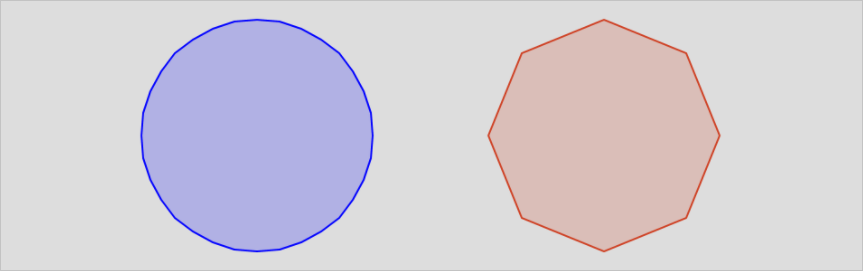
Compare the three end cap styles:
SELECT ST_Buffer('LINESTRING(0 0,0 3)'::geometry,1,'endcap=round'),
            ST_Buffer('LINESTRING(6 0,6 3)'::geometry,1,'endcap=flat'),
         ST_Buffer('LINESTRING(12 0,12 3)'::geometry,1,'endcap=square');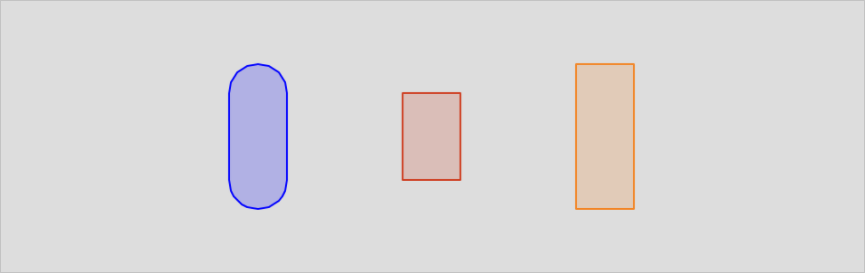
You can compare the three join styles:
SELECT ST_Buffer('LINESTRING(0 0,3 0,3 3)'::geometry,1.2,'join=round'),
         ST_Buffer('LINESTRING(6 0,9 0,9 3)'::geometry,1.2,'join=mitre'),
         ST_Buffer('LINESTRING(12 0,15 0,15 3)'::geometry,1.2,'join=bevel');
Compare different mitre_limit values:
SELECT ST_Buffer('LINESTRING(0 0,3 0,3 3)'::geometry,1.2,'join=mitre mitre_limit=1.0'),
         ST_Buffer('LINESTRING(6 0,9 0,9 3)'::geometry,1.2,'join=mitre mitre_limit=0.5'),
         ST_Buffer('LINESTRING(12 0,15 0,15 3)'::geometry,1.2,'join=mitre mitre_limit=0.1');
Compare different buffer sides:
SELECT ST_Buffer('LINESTRING(0 0,3 0,3 3,0 3)'::geometry,1,'side=both'),
       ST_Buffer('LINESTRING(6 0,9 0,9 3,6 3)'::geometry,1,'side=right'),
       ST_Buffer('LINESTRING(12 0,15 0,15 3,12 3)'::geometry,1,'side=left');