ST_ConcaveHull
Returns the concave hull of a set of geometry objects. Think of it as shrink-wrapping the input geometries — the result hugs the data more tightly than a convex hull, which is more like stretching a rubber band around the set.
Syntax
geometry ST_ConcaveHull(geometry geomA, float targetPercent, boolean allowHoles)Parameters
Parameter | Type | Description | Default |
| geometry | The input geometry object. | — |
| float | The target ratio of the concave hull area to the convex hull area. Lower values produce a tighter hull but increase processing time and the risk of topology exceptions. | — |
| boolean | Specifies whether to allow holes in the output polygon. |
|
Usage notes
Input type handling
For point, LineString, or GeometryCollection inputs, wrap them in
ST_Collectbefore passing to this function.For polygon inputs, use
ST_Unioninstead.Invalid geometry objects cause the function to fail.
ST_ConcaveHull is not an aggregate function. To compute the concave hull over a column of geometries, combine it with ST_Collect or ST_Union:
ST_ConcaveHull(ST_Collect(geom_column), 0.80)Output dimension is never higher than the dimension of the input geometry.
Tuning `targetPercent`
Start with 0.99. This is fast — sometimes as fast as computing a convex hull — and typically produces a hull whose area is less than 99% of the convex hull area. If the result is not tight enough, try lower values. Processing time increases as the value decreases.
Post-processing for simpler geometry
To simplify the output, pass the result to ST_SimplifyPreserveTopology or ST_SnapToGrid. ST_SnapToGrid is faster because it skips validity checks, but it may produce invalid geometry objects. ST_SimplifyPreserveTopology is slower but verifies the validity of the returned results.
Convex hull vs. concave hull
ST_ConcaveHull computes a convex hull faster than a concave hull. However, the concave hull encloses all input geometry objects more tightly and is useful for image recognition.
Examples
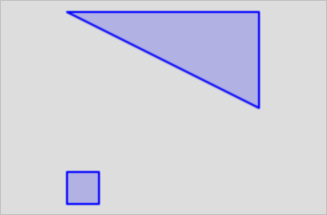
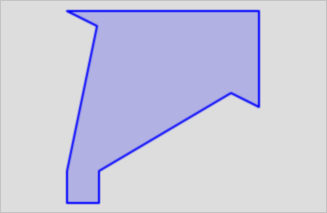
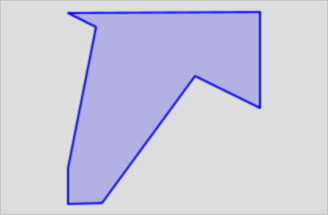
Compare `targetPercent` values on a MULTIPOLYGON
SELECT
  g,
  ST_ConcaveHull(g, 0.99),
  ST_ConcaveHull(g, 0.98)
FROM (
  SELECT 'MULTIPOLYGON(((0 0,1 0,1 1,0 1,0 0)),((0 6,6 3,6 6,0 6)))'::geometry AS g
) AS test;
The three results — the original object, the hull at 0.99, and the hull at 0.98 — are shown below:
Compute concave hulls for grouped point observations
Use ST_ConcaveHull with GROUP BY and ST_Collect to estimate the coverage area for each category in a dataset:
SELECT
  category,
  ST_ConcaveHull(ST_Collect(geom), 0.80) AS coverage_area
FROM observations
GROUP BY category;
Related topics
ST_ConvexHull — a faster alternative when a tighter fit is not required
ST_Collect — aggregate point, LineString, or polygon inputs before passing to ST_ConcaveHull
ST_SimplifyPreserveTopology — simplify the output while preserving topology
ST_SnapToGrid — faster simplification without topology validation