Rotates a geometry object by a specified number of radians in the counterclockwise direction.
Syntax
geometry ST_Rotate(geometry geomA, float rotRadians);
geometry ST_Rotate(geometry geomA, float rotRadians, float x0, float y0);
geometry ST_Rotate(geometry geomA, float rotRadians, geometry pointOrigin);
Parameters
| Parameter | Description |
|---|---|
geomA | The geometry object to rotate. |
rotRadians | The rotation angle, in radians. |
x0 | The x coordinate of the rotation origin. |
y0 | The y coordinate of the rotation origin. |
pointOrigin | The point object to use as the rotation origin. |
Usage notes
If no rotation origin is specified, the point (0, 0) is used as the default rotation origin.
Supported geometry types include circular strings, curves, polyhedral surfaces, triangles, triangulated irregular network (TIN) surfaces, and 3D objects.
Examples
Rotate a line 180 degrees about the origin
SELECT ST_AsEWKT(ST_Rotate('LINESTRING (1 2,2 2)'::geometry, pi()));Output:
        st_asewkt
-------------------------
 LINESTRING(-1 -2,-2 -2)
(1 row)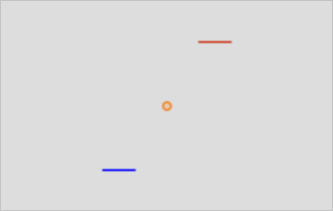
Rotate a line 30 degrees counterclockwise about the point (-1, -1)
SELECT ST_AsEWKT(ST_Rotate('LINESTRING (1 2,2 2)'::geometry, pi()/6,-1,-1));Output:
                           st_asewkt
---------------------------------------------------------------
 LINESTRING(-0.767949192431122 2.59807621135332,0.09807621135316 3.09807621135332)
(1 row)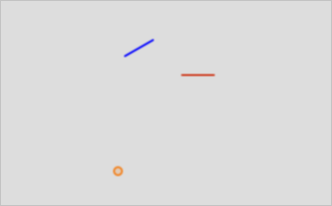
Rotate a line 30 degrees counterclockwise about its centroid
SELECT ST_AsEWKT(ST_Rotate('LINESTRING (1 2,2 2)'::geometry, pi()/6,ST_Centroid('LINESTRING (1 2,2 2)'::geometry)));Output:
                        st_asewkt
---------------------------------------------------------
 LINESTRING(1.06698729810778 1.75,1.93301270189222 2.25)
(1 row)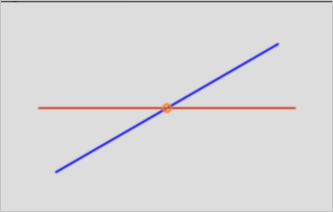
该文章对您有帮助吗?