Vector search (PASE)
This topic describes how to perform vector search efficiently in RDS for PostgreSQL by using the PASE extension, which is based on the IVFFlat or HNSW algorithm.
The PASE extension is no longer maintained. We recommend that you use the pgvector extension.
For questions, discussions, and feedback about extensions, you can join the RDS for PostgreSQL extension exchange group on DingTalk (ID: 103525002795) to get more information.
Prerequisites
Your instance runs RDS for PostgreSQL 11 to 16.
Background information
In recent years, representation learning, a key technology in the field of deep learning, has advanced significantly. It is now widely used in industrial applications such as ad delivery, facial recognition payment, and image and speech recognition. In these scenarios, data is embedded into high-dimensional vectors, and vector search is used to find similar items.
PASE (PostgreSQL ANN search extension) is a high-performance vector search index extension developed for PostgreSQL. It uses mature, stable, and efficient approximate nearest neighbor (ANN) search algorithms, including the IVFFlat and HNSW algorithms, to enable extremely fast vector queries. PASE does not support the extraction or generation of feature vectors. You are responsible for generating feature vectors for your entities. PASE then performs similarity searches on the large volume of vectors you have generated.
Target audience
This topic requires a basic knowledge of machine learning, search, and recommendation systems.
Usage notes
-
An index can become bloated. You can check the size of an index by running the
select pg_relation_size('index_name');command. Rebuild the index if its size becomes significantly larger than the data size and query performance noticeably degrades. -
The index can become less accurate after frequent data updates. To ensure absolute accuracy, rebuild the index periodically.
-
To use an IVFFlat index with internal centroids (
clustering_type=1), you must insert some data into the table before creating the index. -
Use a privileged account to execute the SQL examples in this topic.
PASE algorithms
-
IVFFlat algorithm
IVFFlat is a simplified version of IVFADC, suitable for scenarios that require high recall and can tolerate moderate query latency (in the 100 ms range). Compared to other algorithms, the IVFFlat algorithm offers the following advantages:
-
If the query vector is part of the candidate dataset, IVFFlat can achieve 100% recall.
-
The algorithm is simple, which results in faster index creation and a smaller storage footprint.
-
You can specify the centroids and control recall by adjusting simple parameters.
-
The algorithm's parameters are highly interpretable, giving you full control over accuracy.
The following figure illustrates how the IVFFlat algorithm works.
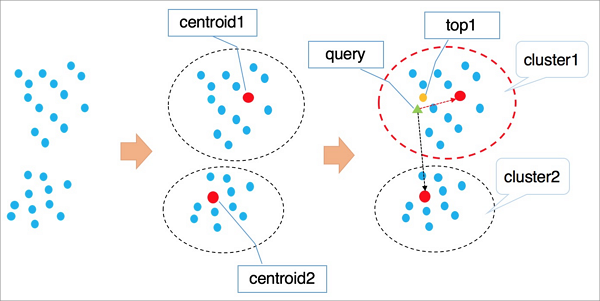
The process is as follows:
-
Vectors in a high-dimensional space are grouped into clusters by using a clustering algorithm such as k-means. Each cluster has a centroid.
-
During a search, the algorithm first iterates through the centroids of all clusters to find the
nclusters whose centroids are closest to the target vector. -
The algorithm then iterates through all elements within these
nclusters and performs a global sort to find the finalknearest vectors.
Note-
During the search for centroids, distant clusters are automatically excluded to speed up the query. However, this means there is no guarantee that the optimal top-
kvectors are all within the selectednclusters, which can reduce accuracy. You can control the accuracy of the IVFFlat algorithm by adjusting the number of clusters to scan,n. A largernvalue increases accuracy but also increases the computational load. -
The first stage of IVFFlat and IVFADC is identical. The main difference lies in the second stage of computation. IVFADC uses product quantization to avoid exhaustive computation, which leads to some accuracy loss. In contrast, IVFFlat uses brute-force calculation to avoid this loss while keeping the computation manageable.
-
-
HNSW algorithm
The Hierarchical Navigable Small World (HNSW) algorithm is suitable for very large-scale vector datasets (tens of millions or more) and scenarios with strict query latency requirements (in the 10 ms range).
HNSW is a graph-based algorithm that rapidly iterates through a proximity graph to find potential near neighbors. The performance improvement of the HNSW algorithm is more significant with large datasets compared to other algorithms. However, storing neighbor points consumes additional storage space, and adjusting parameters alone offers diminishing returns for improving recall.
The following figure illustrates how the HNSW algorithm works.
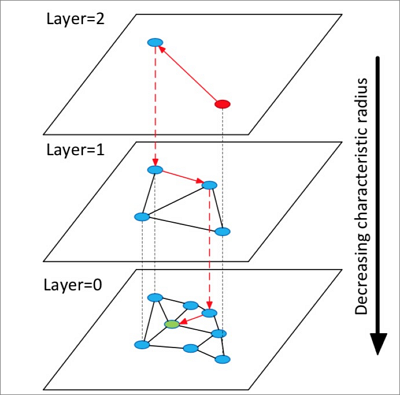
The process is as follows:
-
The algorithm constructs a multi-layered graph, where each layer is a sparser version of the one below it and acts as a skip list, similar to an expressway system, for the lower layer.
-
The search starts from a randomly selected point in the top layer.
-
The algorithm finds the neighbors of the starting point and stores them in a fixed-size dynamic list, ordered by their distance to the target. In subsequent steps, it takes points from the dynamic list, finds their neighbors, and inserts these newly discovered neighbors back into the list. The list is re-sorted after each insertion, keeping only the top
kpoints. This process continues iteratively until the list stabilizes. The first point in the stabilized list is then used as the entry point for the next layer down. -
This process is repeated for each layer until the search reaches the bottom layer.
NoteThe HNSW algorithm builds upon the single-layer graph of the NSW algorithm by constructing a multi-layered graph. Searching for nearest neighbors in this graph can achieve a higher acceleration ratio than clustering-based algorithms.
-
Each algorithm has specific use cases. For example, the IVFFlat algorithm is suitable for high-precision image comparison, while the HNSW algorithm is ideal for retrieval in search and recommendation scenarios.
Use PASE
Procedure
-
Create the PASE extension. Run the following command:
CREATE EXTENSION pase; -
Calculate vector similarity. You can use one of two constructor methods to calculate vector similarity:
-
Use the PASE data type constructor
Examples
SELECT ARRAY[2, 1, 1]::float4[] <?> pase(ARRAY[3, 1, 1]::float4[]) AS distance; SELECT ARRAY[2, 1, 1]::float4[] <?> pase(ARRAY[3, 1, 1]::float4[], 0) AS distance; SELECT ARRAY[2, 1, 1]::float4[] <?> pase(ARRAY[3, 1, 1]::float4[], 0, 1) AS distance;Note-
The
<?>operator calculates the similarity between a left vector (float4[]) and a right vector (pase). -
The
pasetype is a data type defined within the extension. It has three constructor methods, as shown in the examples. Takepase(ARRAY[3, 1, 1]::float4[], 0, 1)as an example: The first parameter isfloat4[]and represents the right vector. The second parameter is unused in this context and can be set to 0. The third parameter specifies the similarity calculation method:0for Euclidean distance and1for dot product (inner product). -
The dimensions of the left and right vectors must be equal. Otherwise, the calculation fails.
-
-
Use the string constructor
Examples
SELECT ARRAY[2, 1, 1]::float4[] <?> '3,1,1'::pase AS distance; SELECT ARRAY[2, 1, 1]::float4[] <?> '3,1,1:0'::pase AS distance; SELECT ARRAY[2, 1, 1]::float4[] <?> '3,1,1:0:1'::pase AS distance;NoteBoth the string constructor and the PASE data type constructor calculate the similarity between two vectors. The difference is that the string constructor uses colons (
:) as delimiters. Take'3,1,1:0:1'as an example: The first part represents the right vector. The second part is unused in this context and can be set to 0. The third part specifies the similarity calculation method:0for Euclidean distance and1for dot product (inner product).
-
-
Create an index. You can create an index using one of two algorithms:
NoteWhen using a PASE vector index with Euclidean distance as the similarity metric, you do not need to process the original vectors. However, to use inner product or cosine similarity as the metric, you must perform normalization on the vectors. If the original vector is
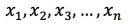 , it must satisfy
  . After normalization, the inner product and cosine similarity values are equivalent in ranking.
-
Create an index by using the IVFFlat algorithm
CREATE INDEX ivfflat_idx ON table_name
USING
  pase_ivfflat(column_name)
WITH
  (clustering_type = 1, distance_type = 0, dimension = 256, base64_encoded = 0, clustering_params = "10,100");
The following table describes the parameters.
Parameter
Description
clustering_type
The clustering method for the IVFFlat algorithm. This parameter is required. Valid values:
-
0: External clustering. Loads an external centroid file specified by the clustering_params parameter. -
1: Internal clustering. Performs a clustering operation internally during index creation by using the k-means algorithm. This is controlled by the clustering_params parameter.
For new users, we recommend that you use internal clustering.
distance_type
The similarity calculation method. Default:
0. Valid values:-
0: Euclidean distance. -
1: Dot product (inner product). To use this method, you must perform normalization on the vectors. In this case, the ranking of dot product (inner product) values is the reverse of the ranking of Euclidean distance values.
Currently, only Euclidean distance is directly supported for indexing. To use dot product (inner product), you must normalize the vectors and use the method provided in the Appendix.
dimension
The vector dimension. This parameter is required. The maximum supported dimension is 512.
base64_encoded
Specifies whether the data is Base64-encoded. Default:
0. Valid values:-
0: The vector type isfloat4[]. -
1: The vector type is a Base64-encoded string of a float array.
clustering_params
For external clustering, this parameter specifies the path to the centroid file. For internal clustering, it specifies the clustering parameters in the format
"clustering_sample_ratio,k". This parameter is required.-
clustering_sample_ratio: The clustering sample ratio, with 1000 as the denominator. The valid range is an integer from(0, 1000]. For example, a value of1means that 1/1000th of the data in the table is sampled for k-means clustering. A larger value improves query accuracy but increases index creation time. We recommend that the total number of sampled data points does not exceed 100,000. -
k: The number of centroids. A larger value improves query accuracy but increases index creation time. We recommend a value in the range of[100, 1000].
-
-
Create an index by using the HNSW algorithm
CREATE INDEX hnsw_idx ON table_name
USING
  pase_hnsw(column_name)
WITH
  (dim = 256, base_nb_num = 16, ef_build = 40, ef_search = 200, base64_encoded = 0);
The following table describes the parameters.
Parameter
Description
dim
Vector dimension. Required. The value range is
[8,512].base_nb_num
The number of neighbors for each node in the graph. This parameter is required. A higher value improves query accuracy but increases the index creation time and the index size. The recommended value range is
[16-128].ef_build
The heap length for the index creation process. This parameter is required. A larger value provides better results but slows down the creation process. The recommended value range is
[40,400].ef_search
The heap length for the query. This is a required parameter. A larger value improves result quality but degrades query performance. The value must be in the range of
[10,400].base64_encoded
Specifies whether the data is Base64-encoded. Default:
0. Valid values:-
0: The vector type isfloat4[]. -
1: The vector type is a Base64-encoded string of a float array.
-
-
-
Run a query. You can query the data using either index type:
-
Query by using an IVFFlat index
SELECT id, vector <#> '1,1,1'::pase as distance FROM table_name ORDER BY vector <#> '1,1,1:10:0'::pase ASC LIMIT 10;Note-
The
<#>operator is used to query an IVFFlat index. -
The vector index is activated by the
ORDER BYclause. It supports ascending sort order (ASC). -
The pase data type consists of three parts separated by colons (:). For example, in
1,1,1:10:0, the first part is the query vector. The second part is a query parameter for IVFFlat with a value range of(0,1000]. A larger value results in higher query accuracy but lower query performance. It is recommended that you determine the optimal value by debugging based on your actual data. The third part specifies the similarity calculation method for the query, where 0 indicates Euclidean distance and 1 indicates dot product (inner product). If you use the dot product (inner product) method, you must perform vector normalization. In this case, the order of the dot product (inner product) values is the reverse of the order of the Euclidean distance values.
-
-
Query by using an HNSW index
SELECT id, vector <?> '1,1,1'::pase as distance FROM table_name ORDER BY vector <?> '1,1,1:100:0'::pase ASC LIMIT 10;Note-
The
<?>operator is used to query an HNSW index. -
The vector index is activated by the
ORDER BYclause. It supports ascending sort order (ASC). -
The
pasedata type has a three-part format, with parts separated by colons (:). In the example1,1,1:100:0, the first part is the query vector. The second part is the HNSW query effect parameter, which has a value range of(0,∞). A larger value results in higher query accuracy but lower query performance. We recommend that you determine this value by debugging with your actual data and start with an initial value of 40. The third part specifies the similarity calculation method for the query, where 0 indicates Euclidean distance and 1 indicates dot product (inner product). When you use the dot product (inner product) method, vector normalization is required. In this case, the order of the dot product (inner product) values is the reverse of the order of the Euclidean distance values.
-
-
Example
This example demonstrates how to query data by using an IVFFlat index.
-
Create the PASE extension. Run the following command:
CREATE EXTENSION pase; -
Create a test table and insert test data.
Create a test table.
CREATE TABLE vectors_table ( id SERIAL PRIMARY KEY, vector float4[] NOT NULL );Insert test data.
INSERT INTO vectors_table (vector) VALUES ('{1.0, 0.0, 0.0}'), ('{0.0, 1.0, 0.0}'), ('{0.0, 0.0, 1.0}'), ('{0.0, 0.5, 0.0}'), ('{0.0, 0.5, 0.0}'), ('{0.0, 0.6, 0.0}'), ('{0.0, 0.7, 0.0}'), ('{0.0, 0.8, 0.0}'), ('{0.0, 0.0, 0.0}'); -
Create an index by using the IVFFlat algorithm.
CREATE INDEX ivfflat_idx ON vectors_table USING pase_ivfflat(vector) WITH (clustering_type = 1, distance_type = 0, dimension = 3, base64_encoded = 0, clustering_params = "10,100"); -
Query the data by using the IVFFlat index.
SELECT id, vector <#> '1,1,1'::pase as distance
FROM vectors_table
ORDER BY
vector <#> '1,1,1:10:0'::pase
ASC LIMIT 10;
Appendix
-
Example of dot product (inner product) calculation
This example uses an HNSW algorithm index. The following code shows how to create a function:
CREATE OR REPLACE FUNCTION inner_product_search(query_vector text, ef integer, k integer, table_name text) RETURNS TABLE (id integer, uid text, distance float4) AS $$ BEGIN RETURN QUERY EXECUTE format(' select a.id, a.vector <?> pase(ARRAY[%s], %s, 1) AS distance from (SELECT id, vector FROM %s ORDER BY vector <?> pase(ARRAY[%s], %s, 0) ASC LIMIT %s) a ORDER BY distance DESC;', query_vector, ef, table_name, query_vector, ef, k); END $$ LANGUAGE plpgsql;NoteFor normalized vectors, the inner product equals the cosine similarity. Therefore, you can use the same method to calculate cosine similarity.
-
Custom centroid file for an IVFFlat index
This is an advanced feature. To use this feature, upload a centroid file to a specified path on the server and use it as an index parameter to build the index. For more information about the parameters, see IVFFlat index parameters. The file format is as follows:
vector_dimension|number_of_centroids|set_of_centroid_vectorsExample
3|2|1,1,1,2,2,2
Related documents
-
Product Quantization for Nearest Neighbor Search
Hervé Jégou, Matthijs Douze, and Cordelia Schmid.
-
Yu. A. Malkov and D. A. Yashunin.