Improve CPU performance for a Tair instance
Tair (Redis OSS-compatible) does not support directly changing the number of CPU cores. However, you can improve overall instance performance by changing the instance architecture or adding more nodes or shards. If CPU utilization remains high after you have optimized for factors like resource-intensive commands, hotkeys, and large keys, and have ruled out abnormal service access, use the methods in this topic to improve your instance's overall CPU performance.
Confirm product type, deployment mode, and instance type
The method for improving CPU performance depends on the instance's product type, deployment mode, and instance type. Before you begin, confirm this information for your instance.
Log on to the console and go to the Instances page. In the top navigation bar, select the region in which the instance that you want to manage resides. Then, find the instance and click the instance ID.
On the Instance Information page, view the Edition, Instance Type, and Deployment Mode in the Basic Information and Configuration Information sections.
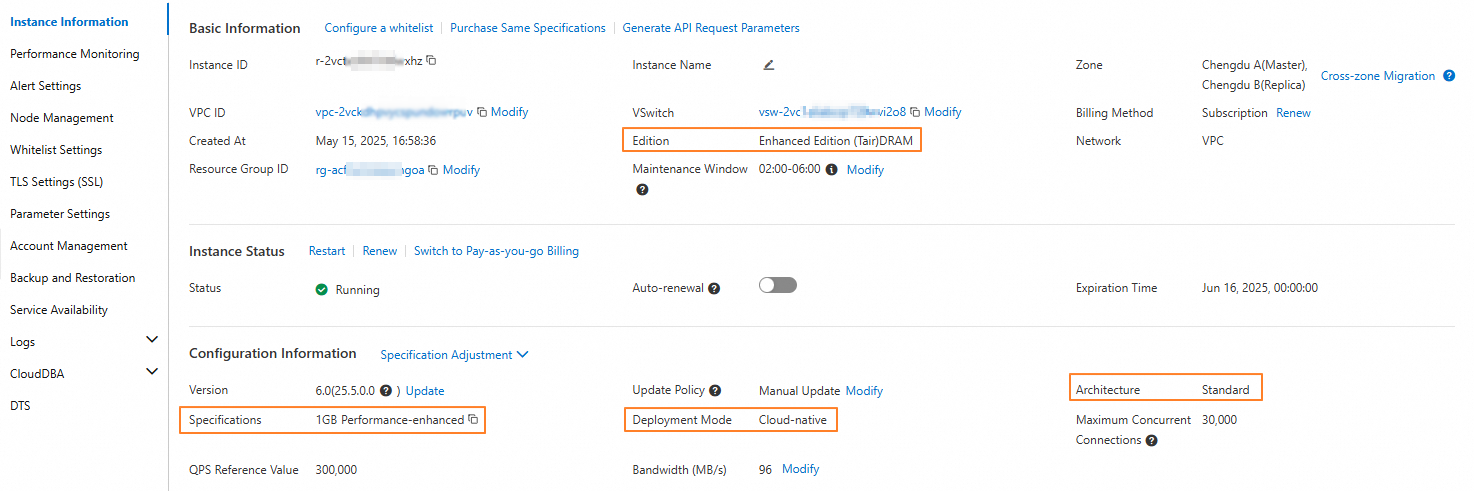 Note
NoteThe UI labels and their locations for Edition, Instance Type, and Deployment Mode may vary slightly depending on the instance. Refer to the console for the most accurate information.
For a cloud-native instance, click Node Management in the left-side navigation pane to check if the Read/Write Splitting switch is enabled.
Standard architecture instances
Redis, memory, and persistent memory
Confirm instance edition and architecture
On the Instance Information page, confirm that the instance meets the following conditions:
The Architecture is Standard.
The Edition is Tair (Enterprise Edition) DRAM-based Instance or Tair Enterprise Edition (Persistent Memory Type).
Methods to improve CPU performance
For a standard architecture instance, the number of CPU cores per shard is fixed. However, you can improve overall instance performance by changing its architecture:
If your workload has a balance of read and write operations, or is write-intensive, consider changing to the cluster architecture. By increasing the number of shards, you can improve the overall CPU performance of the instance. For more information, see Change the architecture of an instance.
If your workload is read-intensive, consider enabling read/write splitting. By enabling read/write splitting and increasing the number of read-only nodes, you can improve the overall CPU performance of the instance.
NoteData synchronization between the primary and read-only nodes has a slight delay. Therefore, the read/write splitting architecture is suitable only for services that can tolerate dirty reads. If your service requires strong consistency, change to the cluster architecture.
Disk type
Confirm instance edition and architecture
On the Instance Information page, confirm that the Edition of the instance is Tair Enterprise Edition Disk (SSD) Type or Tair Enterprise Edition Disk (ESSD) Type.
Methods to improve CPU performance
You can improve CPU performance by changing the instance type of shards. For more information, see Change the specifications of an instance.
Cluster architecture instances
Confirm instance edition and architecture
On the Instance Information page, confirm that the Architecture is Cluster.
Methods to improve CPU performance
For a cluster architecture instance, the number of CPU cores per shard is fixed. However, you can improve overall instance performance by increasing the number of shards.
If you have upgraded the bandwidth plan for your cluster instance, monitor the instance's traffic after you increase the number of shards and determine whether you need to upgrade the bandwidth plan for the new shards.
Read/write splitting architecture instances
Confirm instance edition and architecture
On the Instance Information page, confirm that the Architecture is Read/Write Splitting, or on the Node Management page, confirm that the Read/Write Splitting switch is enabled.
Methods to improve CPU performance
For a read/write splitting architecture instance, the number of CPU cores is fixed. However, you can improve overall instance performance by increasing the number of read-only nodes.
Related documents
For information about how to troubleshoot high CPU utilization, see Troubleshoot high CPU utilization on an instance.
For details on the performance of Community Edition for Redis and Tair (Enterprise Edition), see the performance white paper.
For more information about the instance types, CPU cores, memory, bandwidth, and maximum connections for Community Edition for Redis and Tair (Enterprise Edition), see Instance type navigation and FAQ.