Build an enterprise-specific chatbot with Tair vector search and LLMs
This topic describes a solution for building an enterprise-specific chatbot by using the vector search capability of Tair (Enterprise Edition) and large language models (LLMs).
Background
Large language models (LLMs) possess extensive foundational knowledge, reading comprehension, and logical reasoning skills. However, to fully leverage their potential in practical applications, you must provide additional information for the following reasons:
-
Lack of access to private data: Although LLMs are trained on vast datasets, they do not have access to specific private data or new domain knowledge.
-
Limited context window for multi-turn conversations: The request size (number of tokens) that an LLM can process is limited, typically ranging from 4 KB to 32 KB, and response latency increases as the request grows. For example, with ChatGLM, if you continuously append conversation history to the request, you must discard older parts of the conversation once the token limit is reached. This prevents the model from maintaining long-session, multi-turn conversations.
Therefore, you can use Tair (Enterprise Edition) as external storage for large language models. You can store private data and long-term conversation history in Tair vector search and combine the efficient vector search capabilities of Tair with the AI capabilities of large language models to make your enterprise-specific chatbots more intelligent.
Tair features and advantages
Tair vector search, a built-in engine in Tair (Enterprise Edition), provides a vector database service featuring real-time high performance, multi-modal hybrid search, and ease of use.
-
Real-time high performance: All operations are performed in memory. Tair supports indexing algorithms such as FLAT and HNSW, and distance metrics such as Euclidean distance, inner product, and cosine distance. The latency for both index creation and vector queries is less than 1 ms. For more information, see the TairVector Performance White Paper.
-
Multi-modal hybrid search: Tair is fully compatible with the Redis ecosystem and usage patterns. It also supports vector search, full-text search, and various other extended data structures. For more information, see Tair Extended Data Structures Overview.
-
Easy to use: You can start with a 1 GB specification (low-cost). Tair supports online scale-out and scale-in and can be scaled up to a 16 TB cluster.
Use cases
Q&A over private data
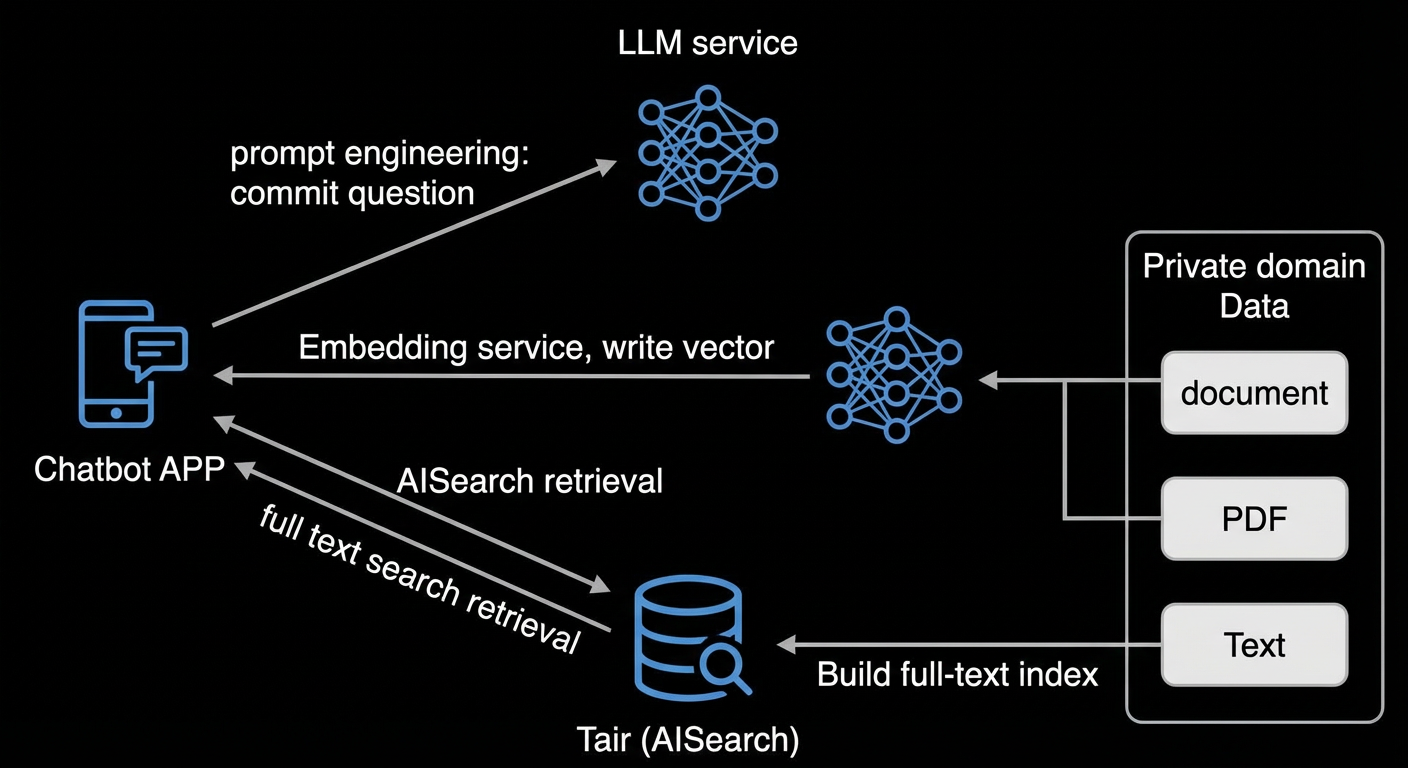
You can ingest private data into Tair vectors and build a full-text search index in advance. Before a request is sent to the LLM, Tair performs retrieval from two recall paths: vector search and full-text search. The retrieved context is then formatted into a prompt and submitted to the LLM along with the user's query to create a customized, enterprise-specific chatbot.
Long-session conversation
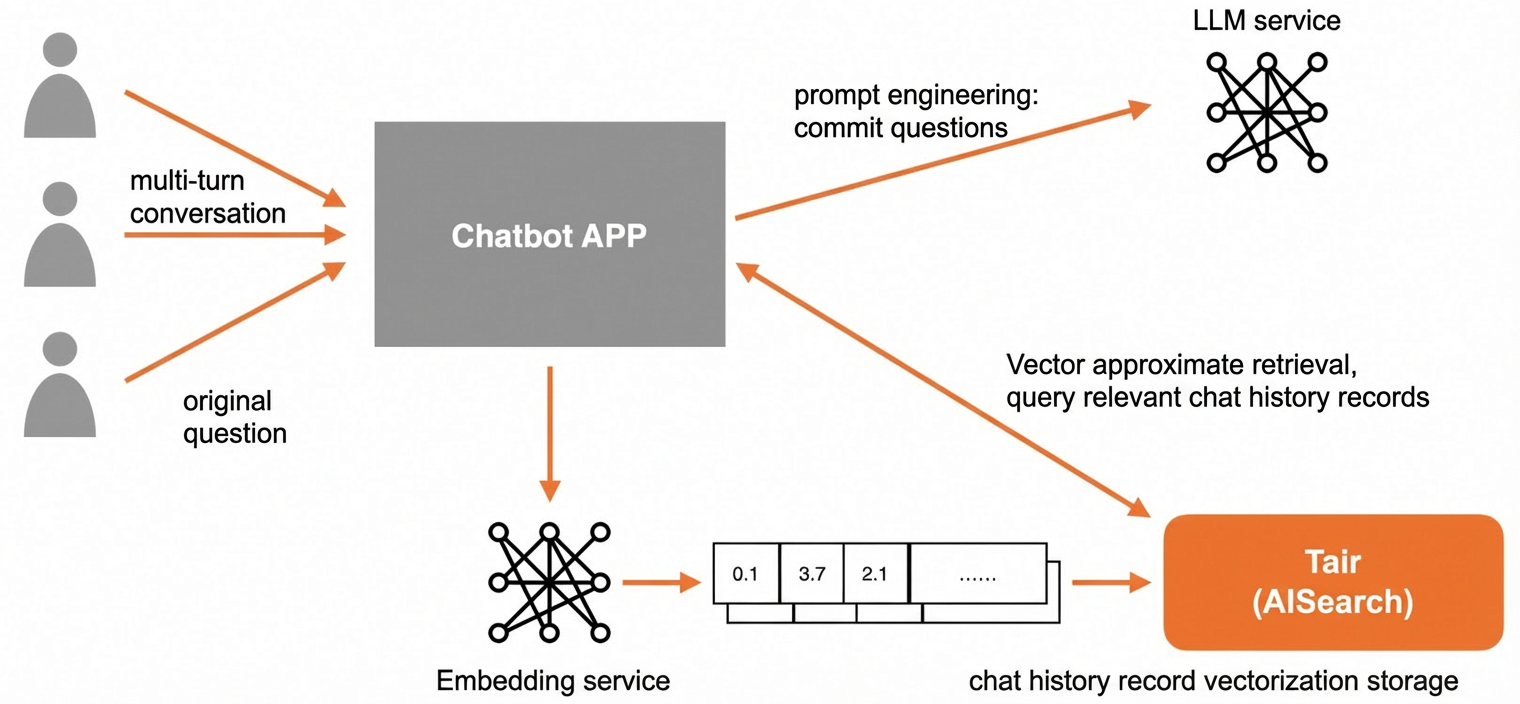
You can store the user's conversation history in a session, which supports expiration mechanisms such as Time to Live (TTL). Before sending a request to the LLM, you can retrieve relevant historical information from Tair by using vector search. This context is then refined in a prompt and submitted to the LLM, enabling a context-aware capability for long-session, multi-turn conversations.
Quick start
The Build an Enterprise-Specific Chatbot with LLM and Tair solution is now available on the Alibaba Cloud CADT platform.
This solution template comes with pre-deployed ECS and Tair instances and pre-installed packages. The demo implements both Q&A over private data and long-session conversation functionalities. You can follow the tutorial to quickly try out your own enterprise-specific chatbot. For more information, see Build an Enterprise-Specific Chatbot with LLM and Tair.
Code
This project is based on the open-source project langchain-ChatGLM. It uses Tair as the vector database and ChatGLM-6B as the model. Please comply with the relevant licenses, laws, and regulations.
As shown in the following figure, the gray arrows indicate that a text (TXT) file is processed, and the resulting vector information and chunked source text are written to Tair. The orange arrows indicate that when a user submits a query, the system first retrieves the top-k most similar vectors from Tair. These vectors are then combined with the user's query in a prompt and submitted to the LLM to provide a more accurate answer.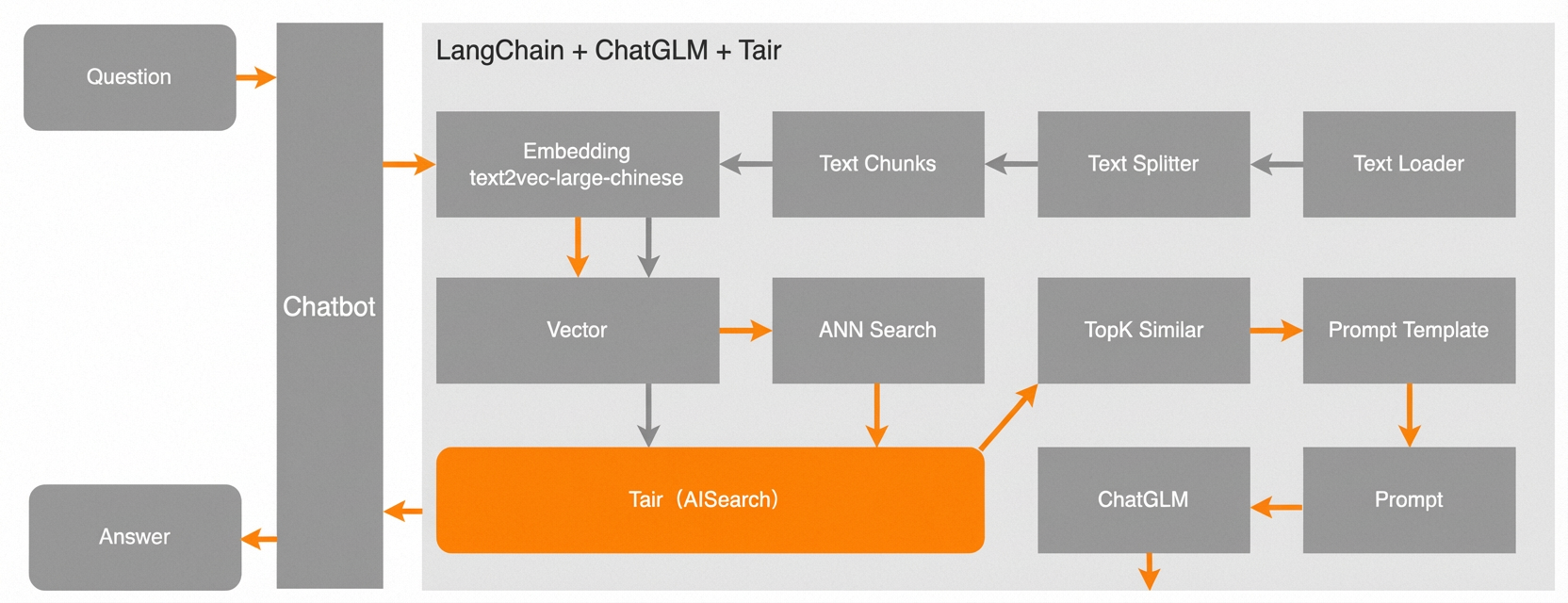
The following code illustrates only the integration of Tair with the large language model. For instructions on running the full demo, see the Quick start section.
# -*- coding: utf-8 -*-
# !/usr/bin/env python
import torch
from langchain.document_loaders import  TextLoader
from langchain.embeddings.huggingface import HuggingFaceEmbeddings
from transformers import AutoTokenizer, AutoModel
from langchain.vectorstores import Tair
from utils import ChineseTextSplitter
from langchain.schema import Document
from typing import List
from tair import Tair as TairClient

TOPK = 2
EMBEDDING_DEVICE = "cuda" if torch.cuda.is_available() else "mps" if torch.backends.mps.is_available() else "cpu"
PROMPT_TEMPLATE =
"""
Known information:
{context}
Based on the known information, answer the user's question concisely. If the answer cannot be found in the provided information, say "The answer cannot be found based on the information provided" or "Not enough relevant information was provided." The question is: {question} Please provide the answer in Chinese.
"""

PROMPT_TEMPLATE_SESSION =
"""
Previously provided user questions:
{context}
Based on the known information, answer the user's question concisely. If the answer cannot be found in the provided information, answer the question on your own. The question is: {question} Please provide the answer in Chinese.
"""

class ChatBot():

    """
    When using open-source models, comply with the relevant licenses, laws, and regulations. The following describes the parameters:
    tair_url: The endpoint of Tair, for example, "redis://account_name:account_password@r-bp10xx****.redis.rds.aliyuncs.com:6379".
    GanymedeNil/text2vec-large-chinese: You must download "https://huggingface.co/GanymedeNil/text2vec-large-chinese" and replace this with the local directory path.
    THUDM/chatglm-6b: You must download "https://huggingface.co/THUDM/chatglm-6b" and replace this with the local directory path.
    """
    def __init__(self, tair_url):
        self.tair_url = tair_url
        self.text_embeddings_model= HuggingFaceEmbeddings(model_name='GanymedeNil/text2vec-large-chinese',
                                           model_kwargs={'device': EMBEDDING_DEVICE})
        self.tokenizer = AutoTokenizer.from_pretrained("THUDM/chatglm-6b", trust_remote_code=True)
        self.llm_model = AutoModel.from_pretrained("THUDM/chatglm-6b", trust_remote_code=True).half().cuda()
        self.tair_session_client = TairClient.from_url(tair_url)

    """
    In this code example, private data is stored in the LangChain index.
    """
    def get_langchain_tair(self, index_name="langchain"):
        return Tair(self.text_embeddings_model, self.tair_url, index_name)

    """
    Use the EXPIRE command to set an expiration time for an index.
    """
    def expire_index(self, index_name):
        return self.tair_session_client.expire(index_name, 1200)

    """
    Checks if an index exists. Returns `True` if the index does not exist, or `False` if it does.
    """
    def not_exists_index(self, session_id):
        index = self.tair_session_client.tvs_get_index(session_id)
        if index is not None:
            return False
        return True

    """
    Interface for interacting with the LLM. In this code example, history is empty. For details on how the LLM handles history, see "https://github.com/imClumsyPanda/langchain-ChatGLM/blob/master/webui.py".
    """
    def chat(self, question:str):
        response, history = self.llm_model.chat(self.tokenizer, question, history=[])
        return response

    """
    Writes private data. This method requires a file path as input.
    For more information about ChineseTextSplitter, see "https://github.com/imClumsyPanda/langchain-ChatGLM/blob/master/textsplitter/chinese_text_splitter.py".
    """
    def insert_text(self,filepath:str):
        loader = TextLoader(filepath, autodetect_encoding=True)
        textsplitter = ChineseTextSplitter(pdf=False, sentence_size=100)
        docs= loader.load_and_split(textsplitter)
        self.insert_text_to_tair(docs,filepath)

    """
    For the specific implementation of Tair.from_documents, see "https://github.com/langchain-ai/langchain/blob/master/libs/community/langchain_community/vectorstores/tair.py".
    This method ultimately calls Tair's TVS.HSET API to write vectors and scalars.
    """
    def insert_text_to_tair(self,docs:List[Document]=None,filename:str=""):
        Tair.from_documents(docs, self.text_embeddings_model, tair_url=self.tair_url)

    """
    Creates a prompt with private data and submits it to the LLM.
    """
    def chat_by_prompt(self,query:str,topk:int=TOPK):
        context = self.get_langchain_tair().similarity_search(query, k=topk)
        context = "\n".join([doc.page_content for doc in context])
        prompt = PROMPT_TEMPLATE.replace("{question}", query).replace("{context}", context)
        response = self.chat(prompt)
        return response

    """
    Retrieves the user's conversation history from a session and uses it to answer the question.
    """
    def get_prompt_by_tair_session(self, query, session_id):
        if self.not_exists_index(session_id):
            prompt = query
            return prompt
        related_docs_with_score = self.get_langchain_tair(session_id).similarity_search(query, k=self.top_k)
        if len(related_docs_with_score)>0:
            context = "\n".join([doc.page_content for doc in related_docs_with_score])
            prompt = PROMPT_TEMPLATE_SESSION.replace("{question}", query).replace("{context}", context)
        else:
            prompt = query
        return prompt

    """
    Writes the conversation history to a session. The optimal way to store sessions is an area for further exploration, and you can customize the implementation to meet your specific needs.
    """
    def insert_tair_session(self, query, resp, session_id):
        text = f"{query}"
        Tair.from_texts([text], self.embeddings, None, session_id, "content", "metadata", tair_url=self.insert_tair_session, index_type="FLAT")
        self.expire_index(session_id)
Demonstration
Q&A over private data
The following example shows how to upload private data and ask questions about it. In the Langchain Tair ChatGLM WebUI, select the Knowledge Base Q&A mode. Then, from the panel on the right, upload a private data file (such as tar_vector.txt) and load it into the knowledge base. In the conversation area on the left, enter a query (such as "What is TairVector?"). The chatbot provides an accurate answer based on the loaded knowledge base and cites the source of the information.
Long-session conversation
The following example demonstrates how the chatbot answers questions based on information that the user previously provided. In Dialogue with Session mode, the user first asks "What is my hobby?" and then "Answer what my hobby is based on the fact that I like to play basketball." When the user later asks "What is my hobby?", the chatbot infers from the conversation history stored in the session that the user's hobby is playing basketball. This demonstrates the chatbot's context-aware capability in multi-turn conversations.