Pipelining
You can use the Redis pipelining mechanism to perform batch operations or improve command execution performance. Pipelining sends multiple commands to the server at once, which reduces network latency and improves performance. Tair (Redis OSS-compatible) supports native Redis pipelining.
Introduction to pipelining
Typically, clients and Redis servers use a ping-pong interaction pattern. In this pattern, a client sends a command and waits for the server's response before sending the next command.
Redis also supports a pipeline mode. This mode works like an assembly line. The client sends a command and does not wait for the response before sending subsequent commands. After sending all commands, the client reads all the responses and matches them to the original commands in order. In most Redis client implementations of pipeline mode, commands are sent in a batch. After all command results are received, they are returned to the application.
The following figure shows the network communication for the ping-pong and pipeline patterns.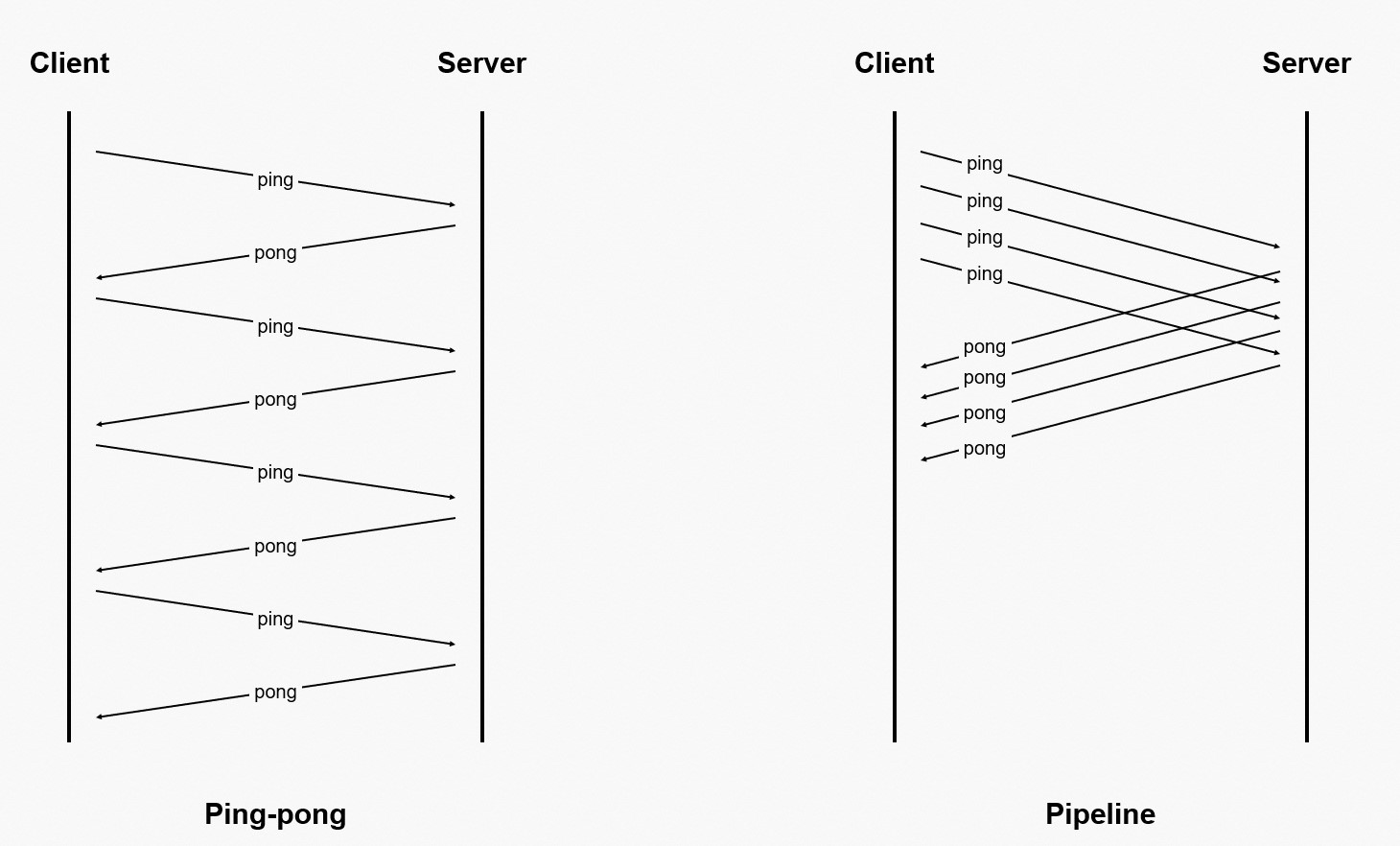
Pipelining improves program efficiency and performance by reducing network round-trip time (RTT). It also reduces the number of read() and write() system calls and process context switches.
Pipelining is very effective in some scenarios. For example, to submit multiple commands to the server quickly and do not require an immediate response for each command, you can use pipelining as a batch processing tool to optimize performance.
When you use pipelining, the client has exclusive use of the connection to the server. During this time, you cannot perform other non-pipeline operations until the pipeline is closed. To perform other operations at the same time, you must create a separate connection for the pipeline operation to keep it separate from regular operations.
For more information, see Pipeline.
Precautions
Pipelining does not guarantee atomicity.
Pipelining only changes the client's sending method to a batch of commands. The server still parses the data stream into individual commands and executes them in order. Each command is independent. This means the server may execute commands from other clients during this process. To guarantee atomicity, you must use transactions or Lua scripts.
Rollback is not supported if an error occurs during pipeline execution.
Pipelining does not have the properties of a transaction. Do not use pipelining if the commands to be executed have dependencies on each other.
NoteSome clients, such as redis-py, use the MULTI and EXEC transaction commands to simulate a pipeline. When you use these clients, be aware of the differences between pipelining and transactions. Otherwise, errors may occur. For more information about the limits on transactions, see Transactions.
Servers and some clients have buffer limits. Do not use too many commands in a single pipeline.
Pipelining is a client-server interaction pattern and is independent of the server architecture. Therefore, instances that use a cluster architecture with proxy mode, a cluster architecture with direct connection mode, or a read/write splitting architecture all support pipelining.
NoteThe cluster architecture has its own limits. For example, it does not support accessing keys across slots in a single command. If you try to access data that does not belong to the current node, a
-MOVEDerror occurs. When you use pipelining in a cluster architecture, make sure that the commands within the pipeline meet the execution conditions of the cluster architecture. For more information about the limits, see Command limitations for cluster and read/write splitting instances.
Code examples
Performance comparison
The following code demonstrates the performance difference between using and not using a pipeline.
package pipeline.kvstore.aliyun.com;
import java.util.Date;
import redis.clients.jedis.Jedis;
import redis.clients.jedis.Pipeline;
public class RedisPipelinePerformanceTest {
        static final String host = "xxxxxx.m.cnhza.kvstore.aliyuncs.com";
        static final int port = 6379;
        static final String password = "password";
        public static void main(String[] args) {
            Jedis jedis = new Jedis(host, port);
                // The password of the Tair instance
                String authString = jedis.auth(password);// password
                if (!authString.equals("OK")) {
                    System.err.println("AUTH Failed: " + authString);
                    jedis.close();
                    return;
                }
                // Run multiple commands consecutively.
                final int COUNT=5000;
                String key = "KVStore-Tanghan";
                // 1 ---Operation without a pipeline---
                jedis.del(key);// Initialize the key.
                Date ts1 = new Date();
                for (int i = 0; i < COUNT; i++) {
                    // Send a request and receive a response.
                    jedis.incr(key);
                }
                Date ts2 = new Date();
                System.out.println("Without pipeline > value is:"+jedis.get(key)+" > Time elapsed: " + (ts2.getTime() - ts1.getTime())+ "ms");
                //2 ----Comparison with a pipeline operation---
                jedis.del(key);// Initialize the key.
                Pipeline p1 = jedis.pipelined();
                Date ts3 = new Date();
                for (int i = 0; i < COUNT; i++) {
                    // Send the request.
                    p1.incr(key);
                }
                // Receive the response.
                p1.sync();
                Date ts4 = new Date();
                System.out.println("With pipeline > value is:"+jedis.get(key)+" > Time elapsed: " + (ts4.getTime() - ts3.getTime())+ "ms");
                jedis.close();
        }
    }
After you enter the correct endpoint and password for the Tair (Redis OSS-compatible) instance and run the Java program, the system returns the following output. This output shows that using a pipeline is much faster.
Without pipeline > value is:5000 > Time elapsed: 5844ms
With pipeline > value is:5000 > Time elapsed: 78ms
How to handle response data
You can handle response data from a Jedis pipeline in two ways. For more information, refer to the following code example.
package pipeline.kvstore.aliyun.com;
import java.util.List;
import redis.clients.jedis.Jedis;
import redis.clients.jedis.Pipeline;
import redis.clients.jedis.Response;
    public class PipelineClientTest {
        static final String host = "xxxxxxxx.m.cnhza.kvstore.aliyuncs.com";
        static final int port = 6379;
        static final String password = "password";
        public static void main(String[] args) {
            Jedis jedis = new Jedis(host, port);
                // Instance password
                String authString = jedis.auth(password);// password
                if (!authString.equals("OK")) {
                    System.err.println("AUTH Failed: " + authString);
                    jedis.close();
                    return;
                }
                String key = "KVStore-Test1";
                jedis.del(key);// Initialize
                // -------- Method 1
                Pipeline p1 = jedis.pipelined();
                System.out.println("-----Method 1-----");
                for (int i = 0; i < 5; i++) {
                    p1.incr(key);
                    System.out.println("Pipeline sends request");
                }
                // Requests sent. Start receiving responses.
                System.out.println("Requests sent. Start receiving responses.");
                List<Object> responses = p1.syncAndReturnAll();
                if (responses == null || responses.isEmpty()) {
                    jedis.close();
                    throw new RuntimeException("Pipeline error: No response received");
                }
                for (Object resp : responses) {
                    System.out.println("Pipeline receives response: " + resp.toString());
                }
                System.out.println();
                //-------- Method 2
                System.out.println("-----Method 2-----");
                jedis.del(key);// Initialize
                Pipeline p2 = jedis.pipelined();
                // You must declare the Response object first.
                Response<Long> r1 = p2.incr(key);
                System.out.println("Pipeline sends request");
                Response<Long> r2 = p2.incr(key);
                System.out.println("Pipeline sends request");
                Response<Long> r3 = p2.incr(key);
                System.out.println("Pipeline sends request");
                Response<Long> r4 = p2.incr(key);
                System.out.println("Pipeline sends request");
                Response<Long> r5 = p2.incr(key);
                System.out.println("Pipeline sends request");
                try{
                    r1.get();  // This operation fails because the client has not started to receive responses.
                }catch(Exception e){
                    System.out.println(" <<< Pipeline error: The client has not started to receive responses. >>> ");
                }
             // Requests sent. Start receiving responses.
                System.out.println("Requests sent. Start receiving responses.");
                p2.sync();
                System.out.println("Pipeline receives response: " + r1.get());
                System.out.println("Pipeline receives response: " + r2.get());
                System.out.println("Pipeline receives response: " + r3.get());
                System.out.println("Pipeline receives response: " + r4.get());
                System.out.println("Pipeline receives response: " + r5.get());
                jedis.close();
            }
    }
After you enter the correct endpoint and password for the Tair (Redis OSS-compatible) instance and run the Java program, the program returns the following output:
-----Method 1-----
Pipeline sends request
Pipeline sends request
Pipeline sends request
Pipeline sends request
Pipeline sends request
Requests sent. Start receiving responses.
Pipeline receives response: 1
Pipeline receives response: 2
Pipeline receives response: 3
Pipeline receives response: 4
Pipeline receives response: 5

-----Method 2-----
Pipeline sends request
Pipeline sends request
Pipeline sends request
Pipeline sends request
Pipeline sends request
 <<< Pipeline error: The client has not started to receive responses. >>>
Requests sent. Start receiving responses.
Pipeline receives response: 1
Pipeline receives response: 2
Pipeline receives response: 3
Pipeline receives response: 4
Pipeline receives response: 5