Download audit logs
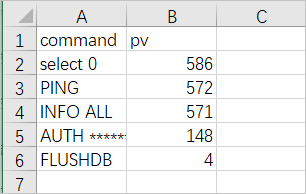
Download audit logs from your Redis instance to archive, filter, and analyze them locally. Logs are exported as CSV files that you can open in Excel or any spreadsheet tool.
Prerequisites
Before you begin, ensure that you have:
The audit log feature enabled for your instance. For instructions, see Enable the audit log feature
Download audit logs
Log on to the console and go to the Instances page. In the top navigation bar, select the region where your instance resides. Find the instance and click its instance ID.
In the left-side navigation pane, choose Logs > Audit Logs.
Click the
 icon in the upper-right corner.
Before downloading, you can filter the logs to narrow the data:
To filter by keyword, type, account, or client IP address, see Filter the audit logs of an instance.
To filter by time, click Select Time Range and set the desired range.
Click Download Chart or Download Chart Data. The browser downloads the logs for the selected time range as CSV files.