Use an ECS instance to connect to an ApsaraDB RDS instance for database initialization
In this tutorial, you use Alibaba Cloud Resource Orchestration Service (ROS) to provision an ECS instance and an ApsaraDB RDS MySQL instance in a single VPC, then use Cloud Assistant to run an initialization script that imports a sample dataset into RDS. By the end, you have a working ECS + RDS environment created from a single YAML template that you can redeploy on demand.
Solution overview
Business scenario
Create an Elastic Compute Service (ECS) instance and an ApsaraDB RDS MySQL instance in the same Alibaba Cloud Virtual Private Cloud (VPC). The ECS instance connects to the RDS instance over the VPC internal network, and Cloud Assistant (RunCommand) automatically runs a shell script on the ECS instance to perform database initialization.
Resources created
No. | Resource | ROS resource type | Description |
1 | VPC |
| Provides an isolated network environment. All resources are deployed within the same VPC. |
2 | vSwitch |
| Divides a subnet within the VPC and specifies the zone. |
3 | Security group |
| Controls inbound and outbound traffic for the ECS instance. |
4 | ECS instance |
| The compute node that runs the database initialization script. |
5 | ApsaraDB RDS MySQL instance |
| The target database that stores initialized data. |
6 | Database account |
| The RDS logon account that the ECS instance uses to connect to the database. |
7 | Cloud Assistant command |
| Remotely runs the shell script on the ECS instance to perform database initialization. |
Expected results after deployment
After the template deploys successfully, you will have:
A complete VPC network environment, including a VPC, a vSwitch and a security group.
An ECS instance attached to the VPC network and security group.
An ApsaraDB RDS MySQL 8.0 instance with an initial database and a super account.
The MySQL official employees sample dataset (approximately 300,000 records) automatically imported into the database.
Architecture diagram
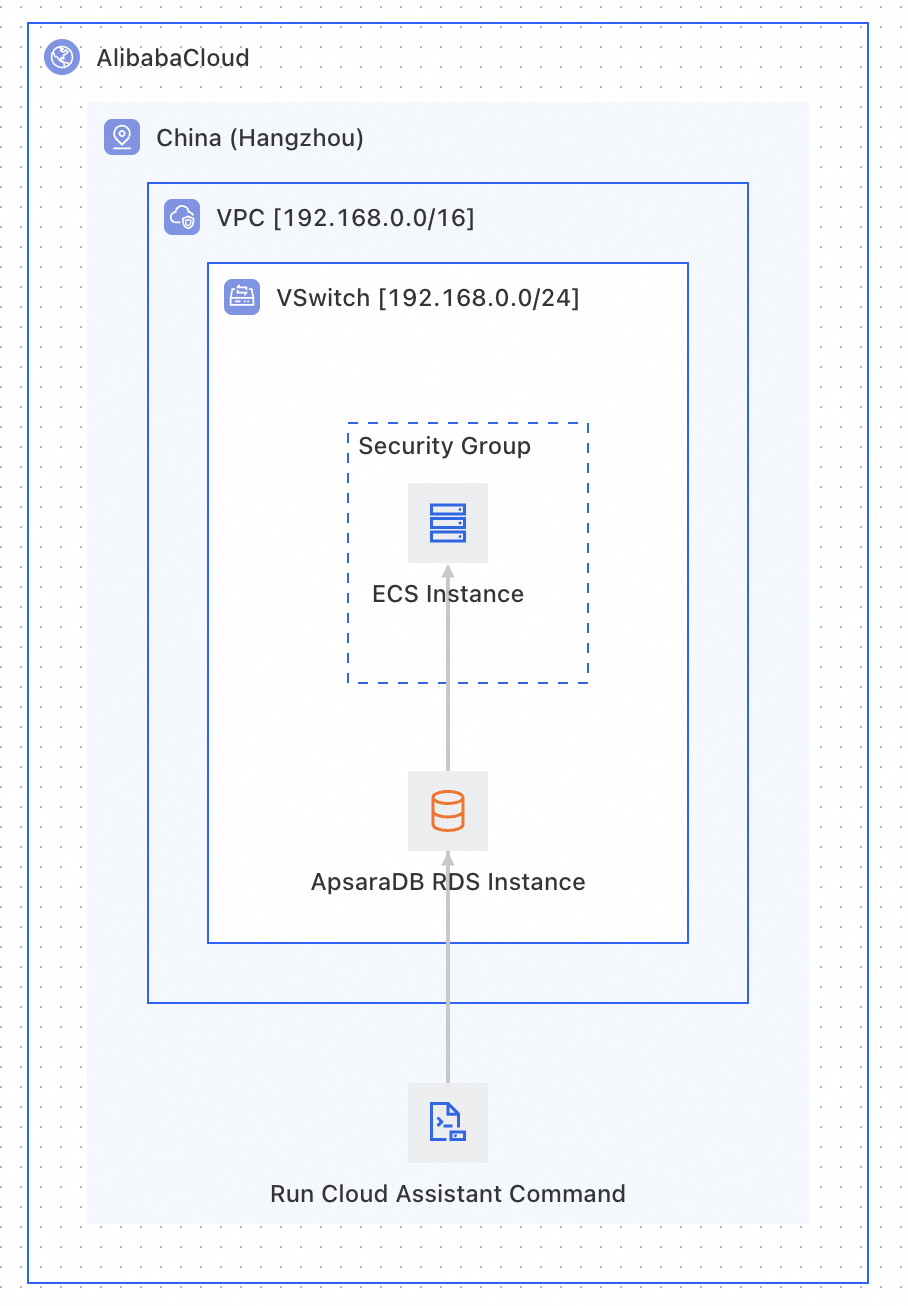
Prerequisites
Before you start, confirm the following:
Account and permissions: An Alibaba Cloud account with permissions to create resources in ECS, ApsaraDB RDS, VPC, and Cloud Assistant.
Knowledge preparation: Basic knowledge of ROS template syntax and structure. For details, see Get started with template content.
Template writing tutorial
This tutorial walks through the template in two phases:
Phase 1 (Basic): uses fixed parameter values so you can focus on resource definitions and dependency relationships.
Phase 2 (Advanced): parameterizes all configurable settings, adds dynamic parameter filtering and groups parameters.
Phase 1: Basic template — Define resources and dependencies
Step 1: Define network resources (VPC + vSwitch + Security group)
Network resources are the foundation for all other resources and must be created first.
Resources:
  # ============================================================
  # Network layer: VPC → vSwitch → SecurityGroup
  # ============================================================

  Vpc:
    Type: ALIYUN::ECS::VPC  # Create VPC
    Properties:
      CidrBlock: 192.168.0.0/16  # VPC CIDR block, supports up to 65,534 internal IPs
      VpcName:
        Ref: ALIYUN::StackName  # Pseudo parameter: use the stack name as the VPC name

  VSwitch:
    Type: ALIYUN::ECS::VSwitch  # Create a vSwitch (subnet) in the VPC
    Properties:
      VSwitchName:
        Ref: ALIYUN::StackName
      VpcId:
        Ref: Vpc  # Ref returns the VpcId of Vpc (implicit dependency; ROS creates Vpc first)
      ZoneId: cn-beijing-h  # This example uses Beijing zone H
      CidrBlock: 192.168.0.0/24  # Subnet CIDR block; must be a subset of the VPC CIDR

  EcsSecurityGroup:
    Type: ALIYUN::ECS::SecurityGroup  # Create a security group
    Properties:
      SecurityGroupName:
        Ref: ALIYUN::StackName
      VpcId:
        Ref: Vpc  # Bind the security group to the same VPC
      SecurityGroupIngress:  # Inbound rule: allow all inbound traffic
        - PortRange: '-1/-1'
          Priority: 1
          IpProtocol: all
          SourceCidrIp: 0.0.0.0/0
          NicType: intranet
Key concepts:
Custom names such as
VpcName,VSwitchName, andSecurityGroupNamecan use pseudo parameters. This helps you quickly find the resources associated with a stack after deployment.Security group rules can be customized to meet your business needs. For example:
To allow external access to a web service, add an inbound rule to open HTTP port 80 or 8080.
To allow SSH logon, add an inbound rule to open port 22.
Step 2: Define database resources (RDS instance + Database account)
Resources:
  # ============================================================
  # Database layer: ApsaraDB RDS MySQL instance + database account
  # ============================================================

  DBInstance:
    Type: ALIYUN::RDS::DBInstance  # Create ApsaraDB RDS MySQL instance
    Properties:
      ZoneId: cn-beijing-h
      VpcId:
        Ref: Vpc  # Deploy RDS in the same VPC as ECS (required for internal network connectivity)
      VSwitchId:
        Ref: VSwitch  # Specify the vSwitch so ECS and RDS are in the same subnet
      Engine: MySQL  # Database engine
      EngineVersion: '8.0'  # MySQL version
      DBInstanceClass: mysql.n2e.medium.1  # Instance type (2 vCPU, 4 GB)
      DBInstanceStorage: 10  # Storage: 10 GB
      MultiAZ: true  # Multi-zone deployment for higher availability
      DBInstanceNetType: Intranet  # Internal network type (VPC network)
      DBMappings:  # Create an initial database
        - CharacterSetName: utf8  # Character set
          DBName: employees  # Database name
      SecurityIPList: 0.0.0.0/0  # RDS whitelist (allows all IPs in the VPC)

  DBAccount:
    Type: ALIYUN::RDS::Account  # Create RDS database account
    Properties:
      DBInstanceId:
        # Fn::GetAtt returns an output attribute of the resource (not the primary identifier)
        Fn::GetAtt:
          - DBInstance  # Logical resource name
          - DBInstanceId  # Attribute name to retrieve
      AccountPassword: Admin@2791
      AccountType: Super  # Super account (has all database permissions)
      AccountName: rdsuser  # Account name
Key concepts:
Difference between
RefandFn::GetAtt:Refreturns the primary identifier of the resource (for example, theVpcIdof a VPC).Fn::GetAttreturns a related attribute of the resource (for example, theInnerConnectionStringof an RDS instance).
Step 3: Define ECS instance resources
Resources:
  # ============================================================
  # Compute layer + initialization: ECS instance + Cloud Assistant for database initialization
  # ============================================================

  EcsInstance:
    Type: ALIYUN::ECS::Instance  # Create ECS instance
    Properties:
      VpcId:
        Ref: Vpc
      SecurityGroupId:
        Ref: EcsSecurityGroup
      VSwitchId:
        Ref: VSwitch  # Same vSwitch as RDS to ensure internal network connectivity
      ImageId: aliyun_3_x64_20G_alibase  # OS image: Alibaba Cloud Linux 3 (maintained release)
      AllocatePublicIP: true
      InstanceType: ecs.c5.large  # Instance type: 2 vCPU, 4 GiB
      SystemDiskSize: 40  # System disk: 40 GiB
      SystemDiskCategory: cloud_essd  # enterprise SSD (ESSD)
      Password: <REPLACE_WITH_STRONG_PASSWORD>  # 8-30 chars, mix of upper/lower/digit/special

  InstanceRunCommand:
    Type: ALIYUN::ECS::RunCommand  # Cloud Assistant: remotely runs commands on ECS
    DependsOn:
      - DBAccount  # Explicit dependency: wait until the database account is created before connecting
    Properties:
      CommandContent:
        # Fn::Sub function: string variable substitution
        # Syntax: Fn::Sub: [template string, {variable: value}]
        # Reference variables in the template string using ${variable}
        Fn::Sub:
          - |
            #!/bin/bash
            # 1. Install the MySQL client and decompression tool
            yum -y install mariadb unzip
            # 2. Download the MySQL official sample dataset from OSS
            wget -P /tmp https://ros-userdata-resources.oss-cn-beijing.aliyuncs.com/MySQL/test_db-master.zip
            # 3. Extract the data files
            unzip /tmp/test_db-master.zip -d /tmp/
            # 4. Connect to the database over the RDS internal endpoint and import SQL
            mysql -h${DBConnectString} -P3306 -u${DBUsername} -p${DBPassword} < /tmp/test_db-master/employees.sql
          - DBConnectString:
              # Retrieve the internal connection string of the RDS instance
              Fn::GetAtt:
                - DBInstance
                - InnerConnectionString
            DBUsername: rdsuser
            DBPassword: Admin@2791
      Type: RunShellScript  # Command type: shell script
      InstanceIds:  # Target ECS instance list
        - Fn::GetAtt:
            - EcsInstance
            - InstanceId
      Timeout: '500'  # Command execution timeout: 500 seconds
Key concepts:
InnerConnectionStringis the VPC internal connection endpoint that is generated automatically after the RDS instance is created.If
AllocatePublicIP: false, the ECS instance has no public IP. To download files from the internet, either configure a NAT Gateway for the VPC or setAllocatePublicIP: true.Implicit vs. explicit dependency:
When you use
ReforFn::GetAttto reference a resource, ROS infers the dependency automatically (implicit).Use
DependsOn(explicit) only when two resources have no direct reference relationship but must be created in a specific order.
The initialization data in this example is the MySQL official employees sample dataset. To ensure stable downloads, upload the data file to your OSS bucket in advance and replace the wget URL.
Complete basic template
ROSTemplateFormatVersion: '2015-09-01'
Description: Create VPC network, deploy ECS and RDS MySQL instances, initialize the database via RunCommand
Parameters:
Resources:
  # === Network layer ===
  Vpc:
    Type: ALIYUN::ECS::VPC
    Properties:
      CidrBlock: 192.168.0.0/16
      VpcName:
        Ref: ALIYUN::StackName

  VSwitch:
    Type: ALIYUN::ECS::VSwitch
    Properties:
      VSwitchName:
        Ref: ALIYUN::StackName
      VpcId:
        Ref: Vpc
      ZoneId: cn-beijing-h
      CidrBlock: 192.168.0.0/24

  EcsSecurityGroup:
    Type: ALIYUN::ECS::SecurityGroup
    Properties:
      SecurityGroupName:
        Ref: ALIYUN::StackName
      VpcId:
        Ref: Vpc
      SecurityGroupIngress:
        - PortRange: '-1/-1'
          Priority: 1
          IpProtocol: all
          SourceCidrIp: 0.0.0.0/0
          NicType: intranet

  # === Database layer ===
  DBInstance:
    Type: ALIYUN::RDS::DBInstance
    Properties:
      ZoneId: cn-beijing-h
      VpcId:
        Ref: Vpc
      VSwitchId:
        Ref: VSwitch
      Engine: MySQL
      EngineVersion: '8.0'
      DBInstanceClass: mysql.n2e.medium.1
      DBInstanceStorage: 200
      MultiAZ: false
      DBInstanceNetType: Intranet
      DBMappings:
        - CharacterSetName: utf8
          DBName: employees
      SecurityIPList: 0.0.0.0/0

  DBAccount:
    Type: ALIYUN::RDS::Account
    DependsOn:
      - DBInstance
    Properties:
      DBInstanceId:
        Fn::GetAtt:
          - DBInstance
          - DBInstanceId
      AccountPassword: Admin@2791
      AccountType: Super
      AccountName: rdsuser

  # === Compute layer + database initialization ===
  EcsInstance:
    Type: ALIYUN::ECS::Instance
    Properties:
      VpcId:
        Ref: Vpc
      SecurityGroupId:
        Ref: EcsSecurityGroup
      VSwitchId:
        Ref: VSwitch
      ImageId: aliyun_3_x64_20G_alibase
      AllocatePublicIP: true
      InstanceType: ecs.c5.large
      SystemDiskSize: 40
      SystemDiskCategory: cloud_essd
      Password: <REPLACE_WITH_STRONG_PASSWORD>  # 8-30 chars, mix of upper/lower/digit/special

  InstanceRunCommand:
    Type: ALIYUN::ECS::RunCommand
    DependsOn:
      - DBAccount
    Properties:
      CommandContent:
        Fn::Sub:
          - |
            #!/bin/bash
            yum -y install mariadb unzip
            wget -P /tmp https://ros-userdata-resources.oss-cn-beijing.aliyuncs.com/MySQL/test_db-master.zip
            unzip /tmp/test_db-master.zip -d /tmp/
            mysql -h${DBConnectString} -P3306 -u${DBUsername} -p${DBPassword} < /tmp/test_db-master/employees.sql
          - DBConnectString:
              Fn::GetAtt:
                - DBInstance
                - InnerConnectionString
            DBUsername: rdsuser
            DBPassword: Admin@2791
      Type: RunShellScript
      InstanceIds:
        - Fn::GetAtt:
            - EcsInstance
            - InstanceId
      Timeout: '500'
Outputs:
  RDSInnerConnectionString:
    Description: RDS internal endpoint
    Label: RDS internal endpoint
    Value:
      Fn::GetAtt:
        - DBInstance
        - InnerConnectionString
  RDSPort:
    Description: RDS port
    Label: RDS port
    Value:
      Fn::GetAtt:
        - DBInstance
        - InnerPort
  ECSPrivateIp:
    Description: ECS internal IP address
    Label: ECS internal IP address
    Value:
      Fn::GetAtt:
        - EcsInstance
        - PrivateIp
  ECSPublicIp:
    Description: ECS public IP address
    Label: ECS public IP address
    Value:
      Fn::GetAtt:
        - EcsInstance
        - PublicIp
Key concept:
After the template creates resources, use the
Outputssection to query resource attributes such as the RDS internal endpoint, the RDS port, the ECS internal IP, and the ECS public IP.
Phase 2: Advanced template — Parameterization and dynamic configuration
In the basic template, properties such as InstanceType and SystemDiskCategory for the ECS instance and DBInstanceClass for the RDS instance use fixed values. When you reuse the template across regions or with different specifications, you have to edit the template each time. Parameters in a template often have dependency relationships. For example, ECS instance types are constrained by the zone (different zones offer different types), and the system disk category is further constrained by both the zone and the instance type. If you enter these parameters manually, you can easily select invalid combinations that cause deployment failures.
The following improvements make the template flexible and reusable:
Parameterization (Parameters) — Extract variable configurations as parameters that are filled in dynamically at deployment time.
Dynamic parameter filtering (AssociationProperty) — Let the ROS console automatically filter available options based on selected parameters.
Parameter grouping (Metadata) — Group parameters by logical category in the console to improve the configuration experience.
Parameter dependency diagram
The following diagram shows the dependency chain using ECS instance type, system disk category, and RDS instance type as examples:
VSwitchZoneId (zone)  <- Base parameter, no prerequisite
|
|-> ECSInstanceType (ECS instance type)
|        |             Depends on: ZoneId
|        |
|        |-> ECSDiskCategory (system disk category)
|                           Depends on: ZoneId + InstanceType
|
|-> DBInstanceClass (RDS instance type)
                     Depends on: ZoneId + Engine (fixed value)
Core approach: First select the zone, then filter ECS and RDS instance types accordingly, and finally filter the disk category based on zone plus ECS instance type. Each step shows only the options that are available under the current conditions, preventing invalid combinations.
How AssociationProperty works
1. VSwitchZoneId — Zone (base parameter)
Set AssociationProperty to ALIYUN::ECS::ZoneId to list all zones available in the current region:
VSwitchZoneId:
    Type: String
    Label:
      zh-cn: 交换机可用区
      en: VSwitch Availability Zone
    Description:
      zh-cn: 选择交换机所在的可用区,ECS 和 RDS 将部署在此可用区
      en: Select the availability zone for VSwitch. ECS and RDS are deployed in this zone.
    AssociationProperty: ALIYUN::ECS::ZoneId
This parameter is the filtering foundation for all subsequent parameters. When a zone is selected, the option lists for other parameters refresh automatically.
2. ECSInstanceType — ECS instance type
Set AssociationProperty to ALIYUN::ECS::Instance::InstanceType and associate ${VSwitchZoneId} to filter available ECS instance types in the selected zone:
ECSInstanceType:
    Type: String
    Label:
      zh-cn: ECS 实例规格
      en: ECS Instance Type
    AssociationProperty: ALIYUN::ECS::Instance::InstanceType
    AssociationPropertyMetadata:
      ZoneId: ${VSwitchZoneId}
Available instance types differ by zone. Without filtering, users might select a type that is out of stock in the selected zone, which causes creation to fail.
3. ECSDiskCategory — System disk category
Set AssociationProperty to ALIYUN::ECS::Disk::SystemDiskCategory and associate ${VSwitchZoneId} and ${ECSInstanceType} to filter disk categories supported by the selected zone and instance type:
ECSDiskCategory:
    Type: String
    Label:
      zh-cn: 系统盘类型
      en: System Disk Category
    Description:
      zh-cn: 选择系统盘类型。可选值:cloud_essd(ESSD云盘)、cloud_ssd(SSD云盘)、cloud_efficiency(高效云盘)
      en: "System disk type. Options: cloud_essd, cloud_ssd, cloud_efficiency"
    AssociationProperty: ALIYUN::ECS::Disk::SystemDiskCategory
    AssociationPropertyMetadata:
      ZoneId: ${VSwitchZoneId}
      InstanceType: ${ECSInstanceType}
Disk category availability depends on both the zone (some zones do not support ESSD) and the instance type (some types only support certain disk categories).
4. DBInstanceClass — RDS instance type
Set AssociationProperty to ALIYUN::RDS::Instance::InstanceType and associate ${VSwitchZoneId} and a fixed Engine: MySQL to filter RDS instance types that support MySQL in the selected zone:
DBInstanceClass:
    Type: String
    Label:
      zh-cn: RDS 实例规格
      en: RDS Instance Class
    Description:
      zh-cn: 选择RDS实例规格。列表已根据数据库引擎和可用区自动过滤。
      en: Select RDS instance class, filtered by engine type and zone.
    AssociationProperty: ALIYUN::RDS::Instance::InstanceType
    AssociationPropertyMetadata:
      Engine: MySQL
      ZoneId: ${VSwitchZoneId}
      EngineVersion: '8.0'
      Category: Basic
      InstanceChargeTYpe: Postpaid
Because this scenario uses MySQL, the engine is fixed. If you want to select other engine, add an Engine parameter with AssociationProperty: ALIYUN::RDS::Engine::EngineId and reference ${Engine} here.
Dynamic parameter filtering template
Parameters:
  VSwitchZoneId:
    Type: String
    Label:
      zh-cn: 交换机可用区
      en: VSwitch Availability Zone
    Description:
      zh-cn: 选择交换机所在的可用区,ECS和RDS将部署在此可用区
      en: Select the availability zone for VSwitch, ECS and RDS will be deployed here
    AssociationProperty: ALIYUN::ECS::ZoneId

  ECSInstanceType:
    Type: String
    Label:
      zh-cn: ECS实例规格
    AssociationProperty: ALIYUN::ECS::Instance::InstanceType
    AssociationPropertyMetadata:
      ZoneId: ${VSwitchZoneId}

  ECSDiskCategory:
    Type: String
    Label:
      zh-cn: 系统盘类型
      en: System Disk Category
    Description:
      zh-cn: 选择系统盘类型。可选值:cloud_essd(ESSD云盘)、cloud_ssd(SSD云盘)、cloud_efficiency(高效云盘)
      en: "System disk type. Options: cloud_essd, cloud_ssd, cloud_efficiency"
    AssociationProperty: ALIYUN::ECS::Disk::SystemDiskCategory
    AssociationPropertyMetadata:
      ZoneId: ${VSwitchZoneId}
      InstanceType: ${ECSInstanceType}

  DBInstanceClass:
    Type: String
    Label:
      zh-cn: RDS实例规格
      en: RDS Instance Class
    Description:
      zh-cn: 选择RDS实例规格。列表已根据数据库引擎和可用区自动过滤。
      en: Select RDS instance class, filtered by engine type and zone.
    AssociationProperty: ALIYUN::RDS::Instance::InstanceType
    AssociationPropertyMetadata:
      Engine: MySQL
      ZoneId: ${VSwitchZoneId}
How AssociationProperty cascade filtering works
When you create a stack in the ROS console, parameter selection triggers a cascade:
Selects the zone (
VSwitchZoneId).The ECS instance type drop-down refreshes to show only types available in that zone.
The RDS instance type drop-down refreshes to show only types that support MySQL in that zone.
After the ECS instance type is selected, the system disk category drop-down refreshes to show only categories supported by that zone plus instance type combination.
This ensures every selection shows only valid options and eliminates deployment failures caused by invalid parameter combinations.
Metadata parameter grouping
Use ALIYUN::ROS::Interface in Metadata to organize parameters into logical groups with labels. The console displays parameters in groups, which improves the configuration experience.
Metadata syntax
Metadata:
  ALIYUN::ROS::Interface:
    ParameterGroups:           # Parameter group list (required)
      - Parameters:            # Parameters in this group (required)
          - ParameterName1
          - ParameterName2
        Label:                 # Group label (required)
          default:
            en: English label text
Metadata rules:
ParameterGroups,Parameters, andLabelare all required.The parameter names listed under
Metadata.ALIYUN::ROS::Interface.ParameterGroups.Parametersmust exactly match the names defined in theParameterssection.Parameters not assigned to any group appear in an ungrouped area in the console.
Metadata template:
Metadata:
  ALIYUN::ROS::Interface:
    ParameterGroups:
      - Parameters:
          - VSwitchZoneId
          - VpcCidrBlock
          - VSwitchCidrBlock
        Label:
          default:
            zh-cn: 基础网络配置
            en: Network Configuration
      - Parameters:
          - ECSInstanceType
          - ECSDiskSize
          - ECSDiskCategory
          - EcsInstancePassword
        Label:
          default:
            zh-cn: ECS实例配置
            en: ECS Instance Configuration
      - Parameters:
          - DBInstanceClass
          - DBInstanceStorage
          - DBName
          - DBUsername
          - DBPassword
        Label:
          default:
            zh-cn: 数据库配置
            en: Database Configuration
Grouping design for this scenario
This template divides 12 parameters into 3 groups:
Group | Included parameters |
Network Configuration | VSwitch Availability Zone |
ECS Instance Configuration | ECS Instance Type |
Database Configuration | RDS Instance Class |
Complete advanced template
ROSTemplateFormatVersion: '2015-09-01'
Description: >-
  Parameterized template: create ECS and RDS MySQL in a VPC, initialize the database via RunCommand.
  Supports dynamic selection of zone, instance type, and disk category.

Parameters:
  # --- Network parameters ---
  VSwitchZoneId:
    Type: String
    Label: VSwitch Availability Zone
    Description: Select the availability zone for VSwitch. ECS and RDS are deployed in this zone.
    AssociationProperty: ALIYUN::ECS::ZoneId

  VpcCidrBlock:
    Type: String
    Label: VPC CIDR Block
    Description: VPC IP address range. Recommended 10.0.0.0/8, 172.16.0.0/12, or 192.168.0.0/16
    Default: 192.168.0.0/16

  VSwitchCidrBlock:
    Type: String
    Label: vSwitch CIDR Block
    Description: Must be a subnet of the VPC CIDR and must not overlap with other vSwitches
    Default: 192.168.0.0/24

  # --- ECS parameters ---
  ECSInstanceType:
    Type: String
    Label: ECS Instance Type
    Description: Select ECS instance type. The list is filtered by the selected zone.
    AssociationProperty: ALIYUN::ECS::Instance::InstanceType
    AssociationPropertyMetadata:
      ZoneId: ${VSwitchZoneId}

  ECSDiskSize:
    Type: Number
    Label: System Disk Size (GiB)
    Description: ECS system disk size, range 40-500 GiB
    Default: 40
    MinValue: 40
    MaxValue: 500

  ECSDiskCategory:
    Type: String
    Label: System Disk Category
    Description: "System disk type. Options: cloud_essd (enterprise SSD), cloud_ssd (standard SSD), cloud_efficiency (ultra disk)"
    AssociationProperty: ALIYUN::ECS::Disk::SystemDiskCategory
    AssociationPropertyMetadata:
      ZoneId: ${VSwitchZoneId}
      InstanceType: ${ECSInstanceType}

  EcsInstancePassword:
    Type: String
    NoEcho: true
    Label: ECS Instance Password
    Description: Length 8-30, must contain at least three of uppercase letters, lowercase letters, digits, and special characters
    MinLength: 8
    MaxLength: 30

  # --- Database parameters ---
  DBInstanceClass:
    Type: String
    Label: RDS Instance Class
    Description: Select RDS instance class. Filtered by engine type and zone.
    AssociationProperty: ALIYUN::RDS::Instance::InstanceType
    AssociationPropertyMetadata:
      Engine: MySQL
      ZoneId: ${VSwitchZoneId}
      EngineVersion: '8.0'
      Category: Basic
      InstanceChargeType: Postpaid

  DBInstanceStorage:
    Type: Number
    Label: RDS Storage (GB)
    Description: RDS storage size, range 20-2000 GB, increment by 5
    Default: 200
    MinValue: 20
    MaxValue: 2000

  DBName:
    Type: String
    Label: Database Name
    Description: Initial database name. Must start with a letter, alphanumeric only.
    Default: employees
    MinLength: 1
    MaxLength: 64

  DBUsername:
    Type: String
    Label: Database Username
    Description: RDS primary account name. 2-16 lowercase letters, must start with a letter.
    Default: rdsuser
    MinLength: 2
    MaxLength: 16

  DBPassword:
    Type: String
    NoEcho: true
    Label: Database Password
    Description: RDS database user password

Resources:
  # === Network layer ===
  Vpc:
    Type: ALIYUN::ECS::VPC
    Properties:
      CidrBlock:
        Ref: VpcCidrBlock
      VpcName:
        Ref: ALIYUN::StackName

  VSwitch:
    Type: ALIYUN::ECS::VSwitch
    Properties:
      VSwitchName:
        Ref: ALIYUN::StackName
      VpcId:
        Ref: Vpc
      ZoneId:
        Ref: VSwitchZoneId
      CidrBlock:
        Ref: VSwitchCidrBlock

  EcsSecurityGroup:
    Type: ALIYUN::ECS::SecurityGroup
    Properties:
      SecurityGroupName:
        Ref: ALIYUN::StackName
      VpcId:
        Ref: Vpc
      SecurityGroupIngress:
        - PortRange: '-1/-1'
          Priority: 1
          IpProtocol: all
          NicType: intranet
          SourceCidrIp: '0.0.0.0/0'

  # === Database layer ===
  DBInstance:
    Type: ALIYUN::RDS::DBInstance
    Properties:
      VpcId:
        Ref: Vpc
      VSwitchId:
        Ref: VSwitch
      Engine: MySQL
      EngineVersion: '8.0'
      DBInstanceClass:
        Ref: DBInstanceClass
      DBInstanceStorage:
        Ref: DBInstanceStorage
      DBInstanceNetType: Intranet
      DBMappings:
        - CharacterSetName: utf8
          DBName:
            Ref: DBName
      SecurityIPList: 0.0.0.0/0

  DBAccount:
    Type: ALIYUN::RDS::Account
    DependsOn:
      - DBInstance
    Properties:
      DBInstanceId:
        Fn::GetAtt:
          - DBInstance
          - DBInstanceId
      AccountPassword:
        Ref: DBPassword
      AccountType: Super
      AccountName:
        Ref: DBUsername

  # === Compute layer + database initialization ===
  EcsInstance:
    Type: ALIYUN::ECS::Instance
    Properties:
      VpcId:
        Ref: Vpc
      SecurityGroupId:
        Ref: EcsSecurityGroup
      VSwitchId:
        Ref: VSwitch
      ImageId: aliyun_3_x64_20G_alibase
      AllocatePublicIP: true  # Public IP is required to download data files from OSS
      InstanceType:
        Ref: ECSInstanceType
      SystemDiskSize:
        Ref: ECSDiskSize
      SystemDiskCategory:
        Ref: ECSDiskCategory
      Password:
        Ref: EcsInstancePassword

  InstanceRunCommand:
    Type: ALIYUN::ECS::RunCommand
    DependsOn:
      - DBAccount  # Wait for the database account to be ready before connecting
    Properties:
      CommandContent:
        Fn::Sub:
          - |
            #!/bin/bash
            yum -y install mariadb unzip
            wget -P /tmp https://ros-userdata-resources.oss-cn-beijing.aliyuncs.com/MySQL/test_db-master.zip
            unzip /tmp/test_db-master.zip -d /tmp/
            mysql -h${DBConnectString} -P3306 -u${DBUsername} -p${DBPassword} < /tmp/test_db-master/employees.sql
          - DBConnectString:
              Fn::GetAtt:
                - DBInstance
                - InnerConnectionString
            DBUsername:
              Ref: DBUsername
            DBPassword:
              Ref: DBPassword
      Type: RunShellScript
      InstanceIds:
        - Fn::GetAtt:
            - EcsInstance
            - InstanceId
      Timeout: '500'

Outputs:
  RDSInnerConnectionString:
    Description: RDS internal endpoint
    Label: RDS internal endpoint
    Value:
      Fn::GetAtt:
        - DBInstance
        - InnerConnectionString
  RDSPort:
    Description: RDS port
    Label: RDS port
    Value:
      Fn::GetAtt:
        - DBInstance
        - InnerPort
  ECSPrivateIp:
    Description: ECS internal IP address
    Label: ECS internal IP address
    Value:
      Fn::GetAtt:
        - EcsInstance
        - PrivateIp
  ECSPublicIp:
    Description: ECS public IP address
    Label: ECS public IP address
    Value:
      Fn::GetAtt:
        - EcsInstance
        - PublicIp

# === Metadata: console parameter group configuration ===
Metadata:
  ALIYUN::ROS::Interface:
    ParameterGroups:
      - Parameters:
          - VSwitchZoneId
          - VpcCidrBlock
          - VSwitchCidrBlock
        Label:
          default:
            en: Network Configuration
      - Parameters:
          - ECSInstanceType
          - ECSDiskSize
          - ECSDiskCategory
          - EcsInstancePassword
        Label:
          default:
            en: ECS Instance Configuration
      - Parameters:
          - DBInstanceClass
          - DBInstanceStorage
          - DBName
          - DBUsername
          - DBPassword
        Label:
          default:
            en: Database Configuration
ROS built-in functions quick reference
Function | Syntax example | Usage in this template | Description |
|
| Reference parameter values or the primary identifier of a resource | Returns the parameter value when referencing a Parameter; returns the primary ID when referencing a Resource |
|
| Retrieve the RDS internal endpoint | Returns an output attribute of the resource after creation (not the primary identifier) |
|
| Concatenate database connection information in shell commands | Use |
Deployment
Deployment parameters
Required parameters (must be specified at deployment)
Parameter | Type | Description | Constraints |
| String | ApsaraDB RDS user password | Follow the RDS password policy |
Optional parameters (have default values, can be left unchanged)
Parameter | Default value | Description |
| 192.168.0.0/16 | VPC CIDR address range |
| 192.168.0.0/24 |
|
| — | Zone ID (dynamically selected in the console) |
| — | ECS instance type (dynamically filtered in the console) |
|
| ECS system disk category |
| 40 | ECS system disk size (GiB), range 40-500 |
| — | ECS instance logon password. Length 8-30, must contain at least three of uppercase letters, lowercase letters, digits, and special characters. |
| — | RDS instance type (dynamically filtered in the console) |
| 200 | RDS storage size (GB), range 20-2000 |
| employees | Initial database name |
| rdsuser | Database account name (2-16 lowercase letters) |
Deployment methods
Method 1: Deploy through the ROS console
Log in to the ROS console.
In the left-side navigation pane, choose Stacks > Create Stack.
Select Select an Existing Template > Enter Template Content and paste the complete template into the editor.
Click Next, and configure parameters by group.
After confirming the configuration, click Create and wait for the stack status to change to
CREATE_COMPLETE.
Method 2: Deploy through ROS IaC Code
IaC Code is an AI infrastructure-as-code assistant for cloud infrastructure. It helps cloud resource users and O&M engineers generate, deploy, and manage infrastructure templates through a terminal workflow.
# Prompt
Deploy an ECS instance and an ApsaraDB RDS MySQL instance. Use Cloud Assistant to initialize the RDS database. The initialization data download URL is: https://ros-userdata-resources.oss-cn-beijing.aliyuncs.com/MySQL/test_db-master.zip
Requirements:
1. ECS uses a newly created VPC and vSwitch.
2. ECS security group opens inbound ports 22 and 3306.
3. Create a new RDS super account and use it to initialize the RDS database.
4. ECS must have a public IP address.
5. VpcCidrBlock, VSwitchZoneId, VSwitchCidrBlock, ECSInstanceType, and ECSDiskCategory must use AssociationProperty and AssociationPropertyMetadata for dynamic console filtering.
FAQ
Q1: Deployment fails with "The specified InstanceType is not available in the zone"
Cause: The selected ECS instance type has no inventory in the specified zone.
Solution:
In the advanced template,
AssociationPropertyautomatically filters available types to prevent this issue.If you use the basic template, go to Elastic Compute Service ECS pricing to confirm instance type availability in the target zone, or switch to a different zone.
Q2: Cloud Assistant command execution times out (RunCommand timeout)
Cause: The data file download is slow, or the SQL import exceeds the configured Timeout value.
Solution:
Increase the
Timeoutvalue in the template (for example, change to'600'or higher).Ensure the ECS instance can access the internet to download files (
AllocatePublicIP: trueor configure a NAT Gateway).Store the data file in an OSS bucket in the same region as the ECS instance, and download it through an internal endpoint.
Q3: ECS cannot connect to RDS, error "Can't connect to MySQL server"
Troubleshooting steps:
Confirm that ECS and RDS are in the same VPC and
vSwitch(ensured by the template).Check that the RDS whitelist (
SecurityIPList) includes the ECS internal IP range or is set to0.0.0.0/0.Confirm that the RDS instance status is Running (
DependsOn: DBAccountensures RDS is ready before the command runs).Check that the security group rules allow outbound traffic on port 3306.
Q4: How do I use an existing VPC instead of creating a new one?
Solution: Remove VPC and vSwitch from Resources and pass them as Parameters instead:
Parameters:
  ExistingVpcId:
    Type: String
    Label:
      en: Existing VPC ID
    AssociationProperty: ALIYUN::ECS::VPC::VPCId
  ExistingVSwitchId:
    Type: String
    Label:
      en: Existing vSwitch ID
    AssociationProperty: ALIYUN::VPC::VSwitch::VSwitchId
    AssociationPropertyMetadata:
      VpcId: ${ExistingVpcId}
Q5: How do I modify this template to use PostgreSQL?
Changes required:
Change the RDS resource to
Engine: PostgreSQLandEngineVersion: '16.0'.Update
DBInstanceClassto a PostgreSQL instance type (for example,pg.n4.medium.2c).Replace the
mysqlcommand inRunCommandwith apsqlcommand.Update the initialization SQL file so it is compatible with PostgreSQL.
For more deployment issues, see the FAQ.