Use nested stacks
This topic describes the structure, best practices, common templates, update behavior, and output values of nested stacks. It also explains how to view nested stacks and their parent stacks.
Structure of a nested stack
A nested stack can contain other nested stacks to form a stack hierarchy. The root stack is the top-level parent stack for all nested stacks in the hierarchy.
Each nested stack has a direct parent stack. For a first-level nested stack, the root stack is also its parent stack.
The relationship between nested stacks and the root stack is as follows:
- Stack A is the root stack for all other nested stacks in this hierarchy.
- For Stack B, Stack A is both the parent stack and the root stack.
- For Stack D, Stack C is the parent stack. For Stack C, Stack B is the parent stack.
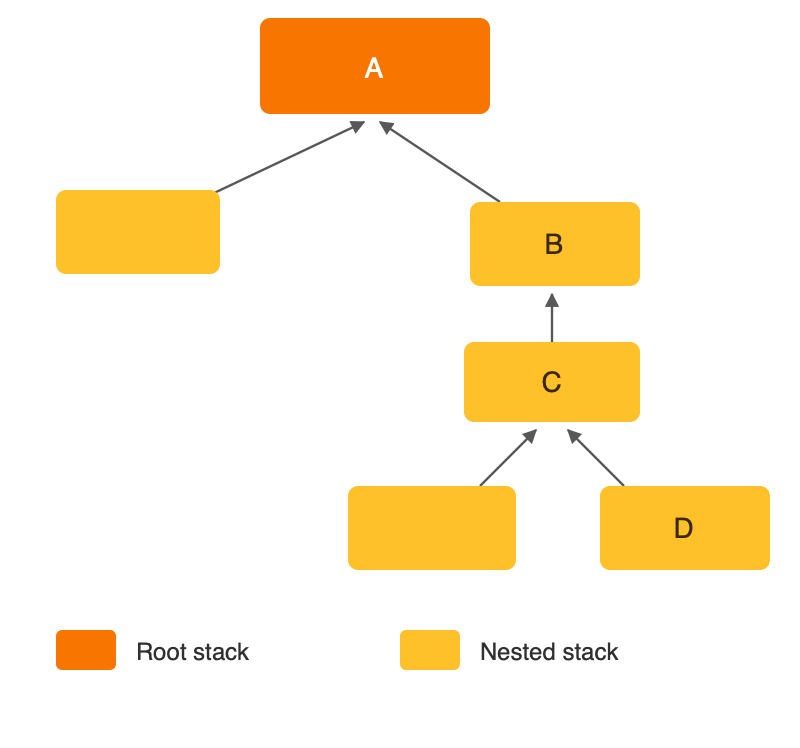
Certain stack operations, such as stack updates, must be started from the root stack. Do not start them directly on a nested stack. In some cases, nested stacks affect how stack operations are executed.
Best practices
Use nested stacks to reuse common templates
As your infrastructure grows, you may find that your templates share common components. You can separate these components into dedicated templates. Then, you can use nested stacks to combine different templates and create a single, unified stack.
A nested stack is a stack created as part of another stack. You can create a nested stack in another stack using the ALIYUN::ROS::Stack resource. For more information about the ALIYUN::ROS::Stack resource, see ALIYUN::ROS::Stack.
For example, you may have a load balancer configuration that you use in most of your stacks. Instead of copying and pasting the configuration into your templates, you can create a dedicated template for the load balancer. Then, you can use the ALIYUN::ROS::Stack resource to reference that template from other templates. When you update the load balancer template, any stack that references it uses the updated load balancer configuration the next time the stack is updated.
Update behavior of nested stack resources
If a template includes multiple nested stacks, Resource Orchestration Service (ROS) initiates an update for each nested stack to check for modifications.
ROS updates only the resources in a nested stack that have been modified in the template.
Use output values from nested stacks
A nested stack is a stack that you create in another stack using the ALIYUN::ROS::Stack resource. Nested stacks allow you to deploy and manage all resources from a single stack. You can use the output from one stack in a nested stack group as an input for another stack in the same group.
View nested stacks that belong to a parent stack
- Log on to the Resource Orchestration Service console.
- In the left navigation pane, click Stacks.
- StacksStack NameOn the page, find the parent stack and click its ID in the column. Note If the parent stack is also a nested stack, select Show Nested Stacks.
- Click the Resources tab.
Find resources of the ALIYUN::ROS::Stack type.
View the parent stack of a nested stack
- Log on to the Resource Orchestration Service console.
- In the left navigation pane, click Stacks.
- On the Stacks page, select Show Nested Stacks to view nested stacks.
- In the Stack Name column, click the stack ID of the nested stack whose parent you want to view.
- Click the Stack Information tab to view the parent stack ID.