Conditional loop
1. Component introduction
Prerequisites: None
This component creates a loop that runs based on a specific condition.
2. Inputs
For information about each input, see the help text in the component panel of the application flow editor.
3. Outputs
For information about each output, see the help text in the component panel of the application flow editor.
4. Component usage example
4.1. Component configuration example
Set the loop condition to ensure that variable a is less than or equal to 5.

Keep the default values for the advanced options.
4.2. Example execution result
None
5. Example of building a flow
Build the flow
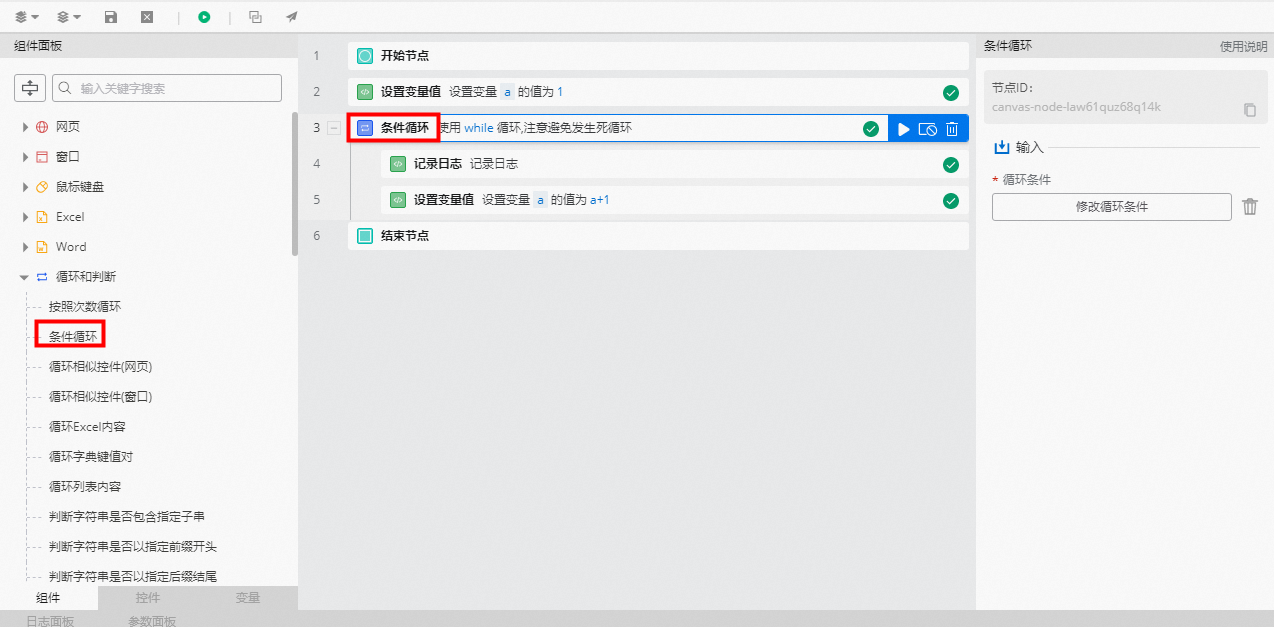
Use the Set Variable Value component to set the initial value of variable a to 1.
Use the Conditional Loop component to set the loop condition to a <= 5.
Use the Log Record component to print the current value of variable a.
Use the Set Variable Value component to increment variable a by 1 in each loop.
Execution result
After the flow runs, the log panel prints the value of variable a for each loop.