Access the Real Translation Buddy Console as a RAM User
Learn how to create, authorize, and log on as a RAM user, and complete the organization, workspace, and seat setup required for translation.
Access flow: The Alibaba Cloud account creates and authorizes a RAM user → The RAM user logs on to Alibaba Cloud → Real Translation Buddy automatically creates a member account on first access → The member joins a workspace and gets a seat → Start translating.
1. Set up a RAM user
Complete the following operations by using the Alibaba Cloud account.
-
Create a RAM user
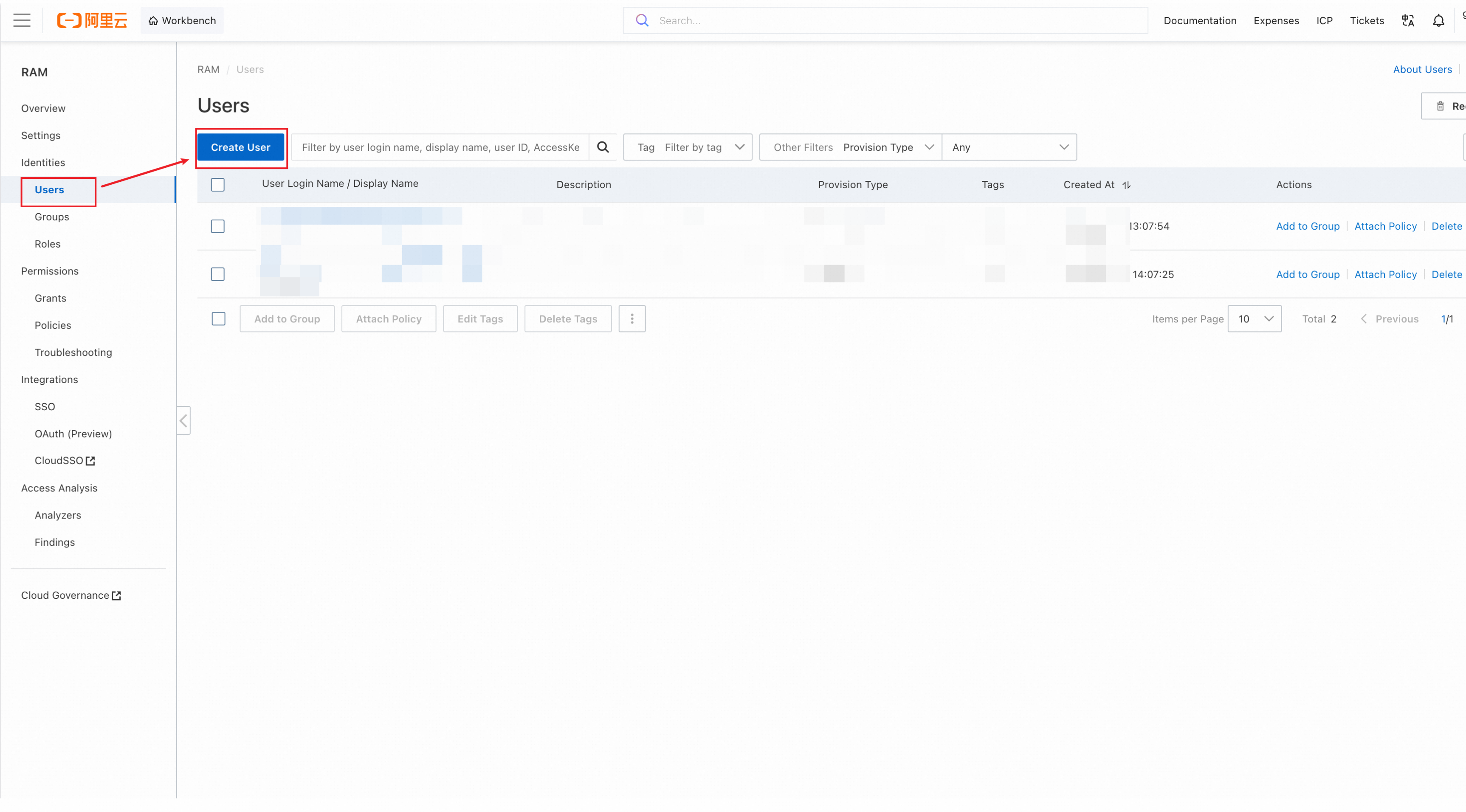
Log on to RAM console > Users by using the Alibaba Cloud account, and click Create User.
For additional creation and authorization methods, see the Alibaba Cloud documentation: Create a RAM user and grant permissions.
For instructions on creating a RAM role, see Create a RAM role for a trusted Alibaba Cloud account.
-
Enter user information and enable console access
On the user creation page, complete the following settings:
-
Enter a User Login Name.
-
Enter a Display Name.
-
In the Access Configuration section, select Console Access.
-
Choose whether to use an automatically generated password or a custom password.
-
If Required at Next Logon is selected, tell the RAM user to reset the password during the first logon.

Submit the form and complete the security verification. If you use an automatically generated password, immediately save the initial password shown on the result page. Securely provide the full user logon name and initial password to the RAM user.
NoteIf MFA is required, ask the RAM user to install an authenticator app that supports virtual MFA, such as the Alibaba Cloud app, before the first logon. The binding process is described in the next section.
-
-
Grant permissions to the RAM user
Return to RAM console > Users, open the user you created, select Permissions > Individual, and click Grant Permission. Keep Resource Scope set to Account, and attach policies based on what the user needs:
Policy
Requirement
Purpose
AliyunRealTranslationAgentFullAccessRequired
Allows the RAM user to access the Real Translation Buddy console.
AliyunBSSFullAccessOnly when the RAM user must purchase seats or subscriptions
Allows the RAM user to manage billing, orders, and purchases.
The following screenshot shows both policies selected. If the RAM user does not need to purchase seats or subscriptions, do not select
AliyunBSSFullAccess.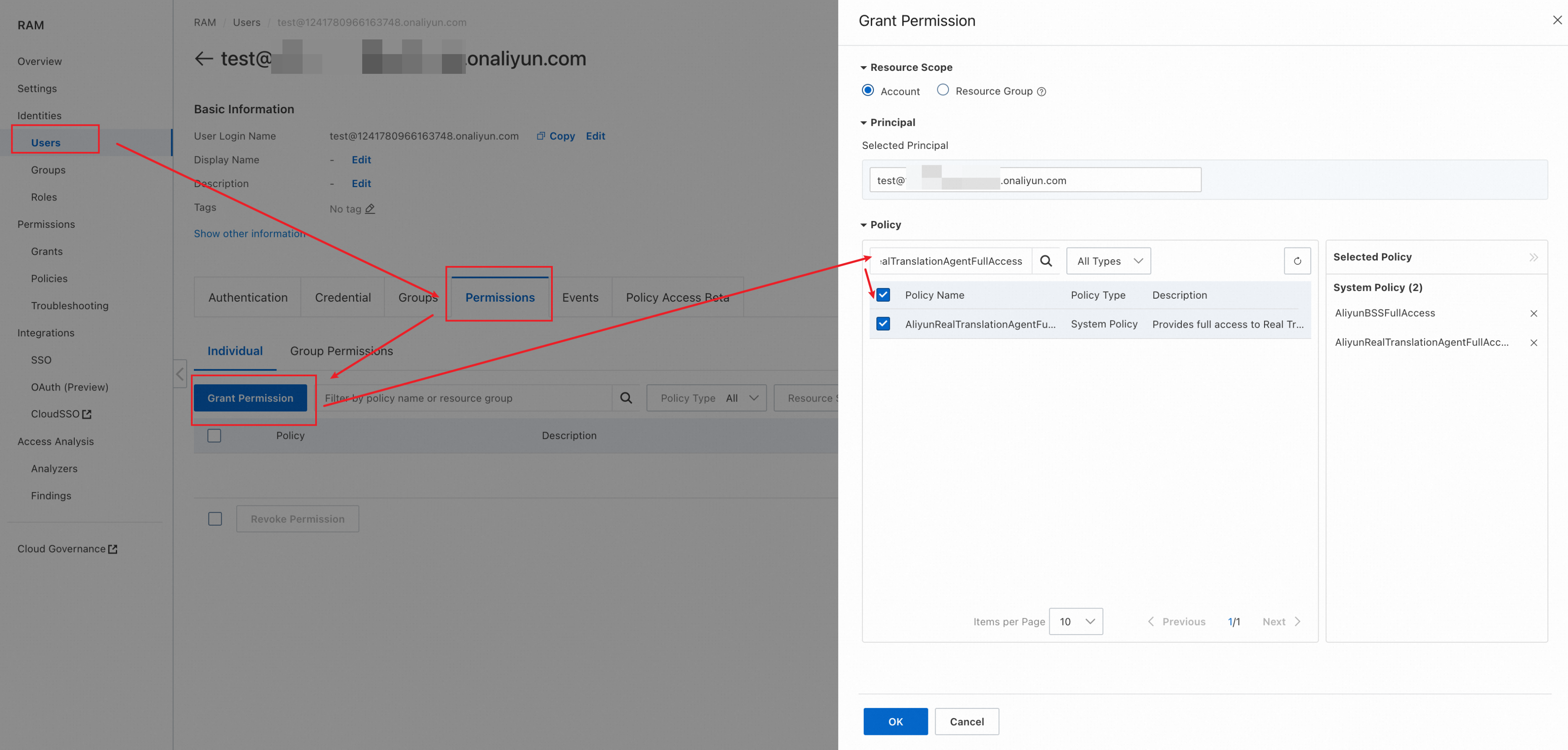
After selecting the required policies, click OK and verify that the policies appear on the Permissions tab.
ImportantAliyunBSSFullAccessprovides full access to Expenses and Costs (BSS), and its scope is not limited to Real Translation Buddy. The RAM user can also view orders for other Alibaba Cloud products and perform billing and cost management operations. Attach this policy only when the RAM user must purchase seats or subscriptions. For a view-only alternative, see View subscription and order data.
RAM permissions determine whether the user can access Real Translation Buddy and perform purchase operations. Actions inside Real Translation Buddy are controlled separately by the member role, workspace, and seat assignment.
2. Log on as a RAM user
-
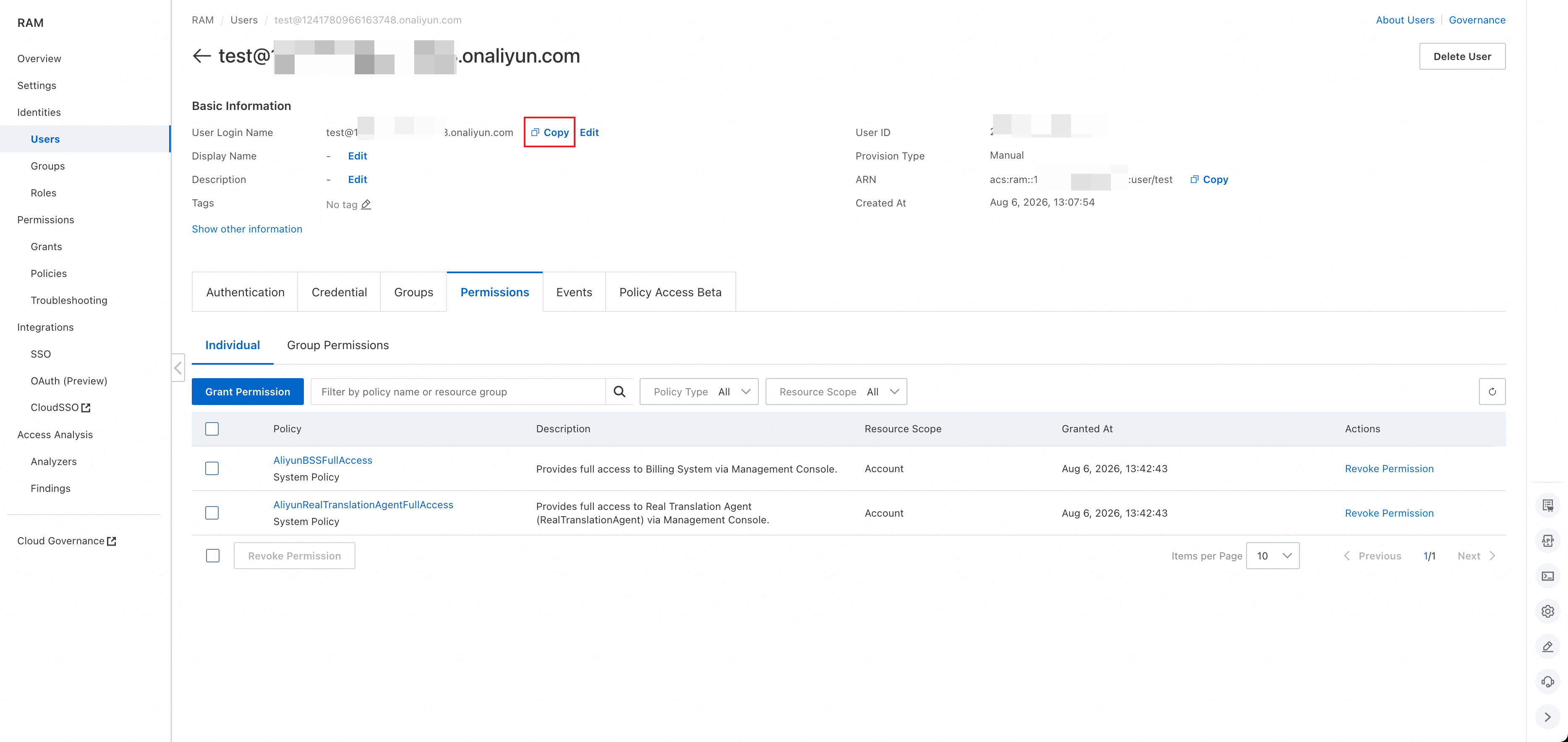
Copy the user logon name
In RAM console > Users, open the RAM user and click Copy next to User Login Name.
-
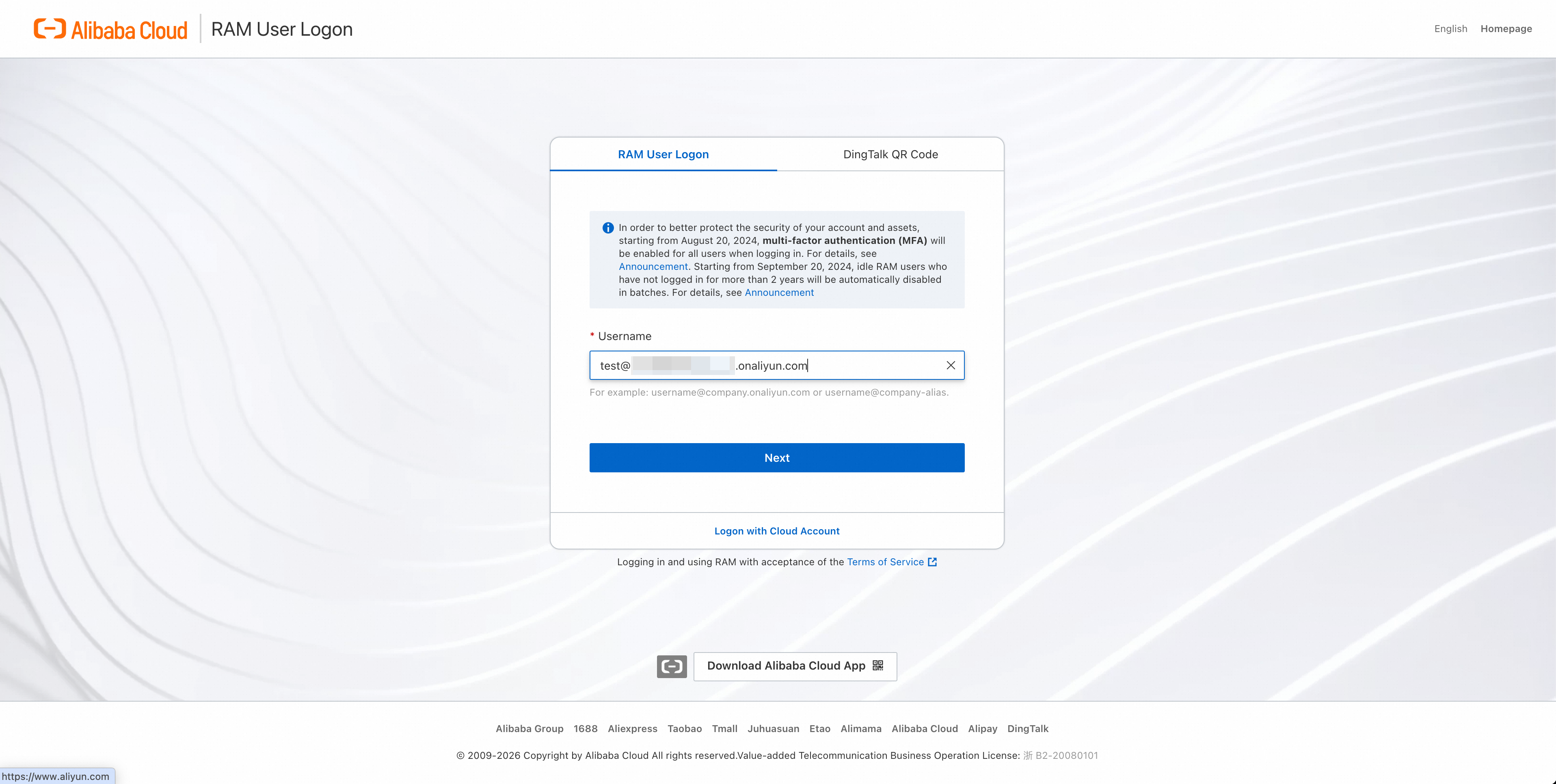
Enter the user logon name
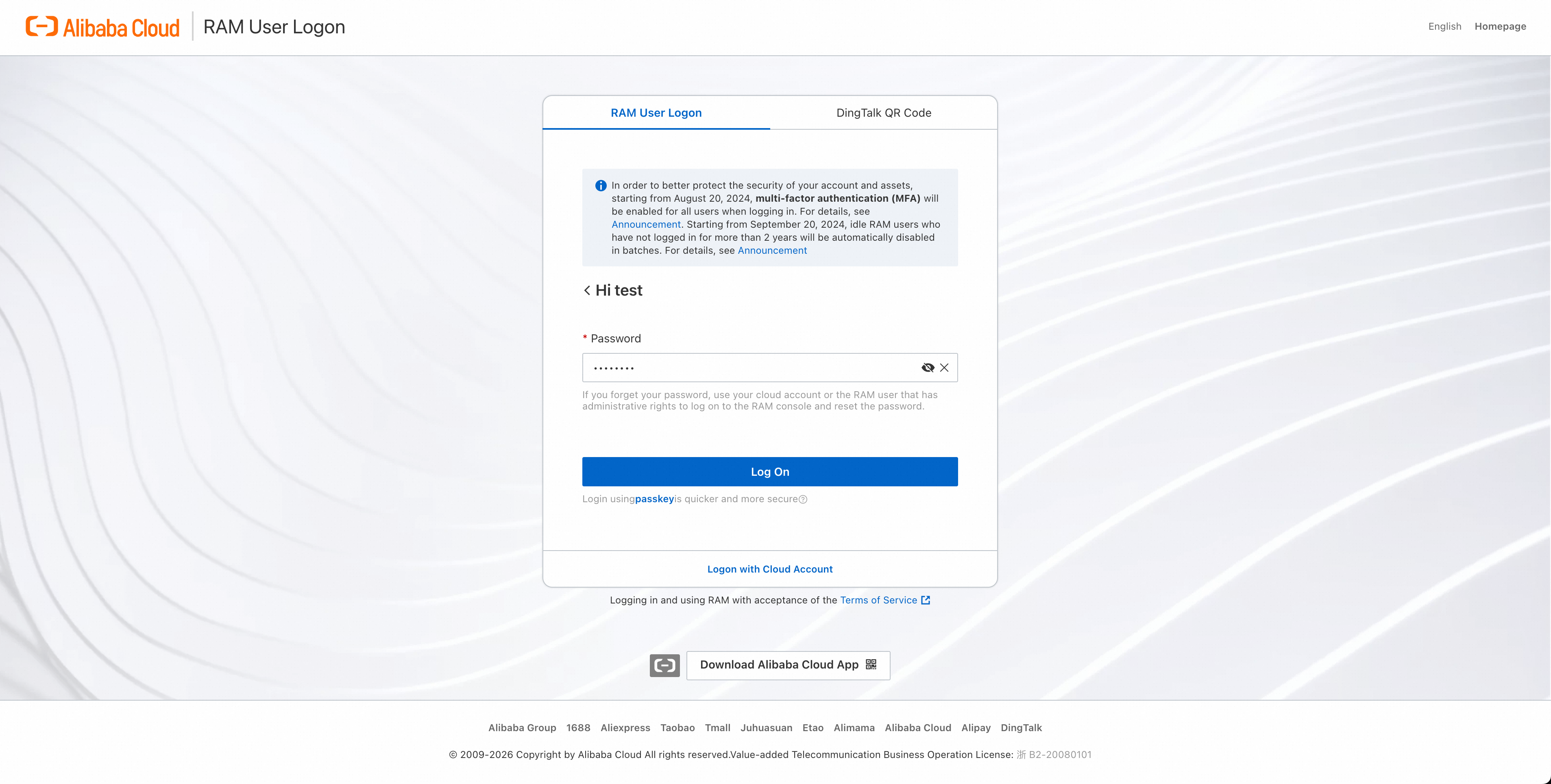
Open the RAM User Logon page, paste the full user logon name, and click Next.
-
Enter the password
Enter the initial or custom password configured when the RAM user was created, and click Log On.

If the page requires the initial password to be reset, set a new password as prompted before continuing.
-
Bind and use a virtual MFA device when prompted
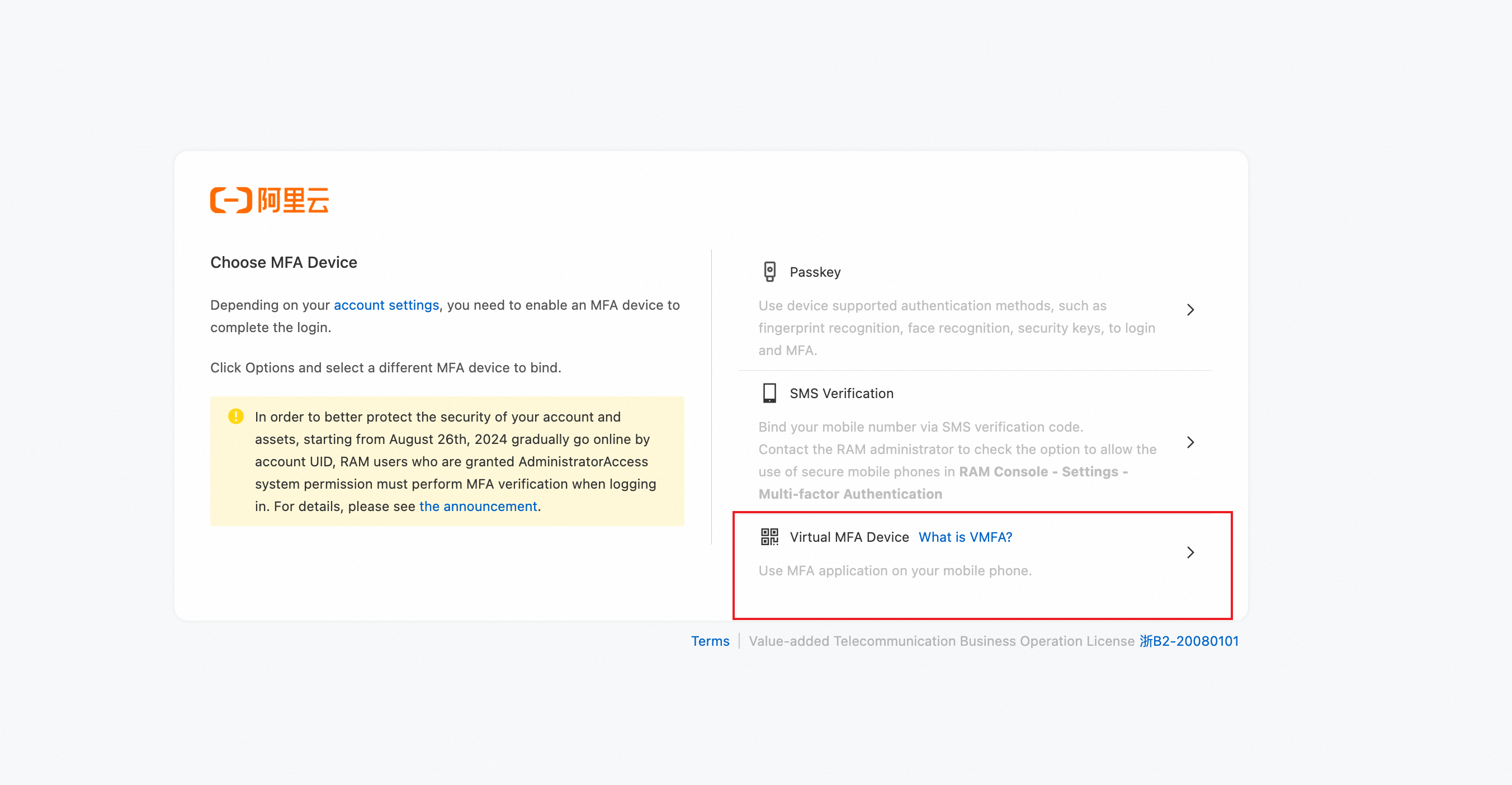
If MFA is required, select Virtual MFA Device. If the Alibaba Cloud app is not installed, click Download Alibaba Cloud App at the bottom of the RAM User Logon page.
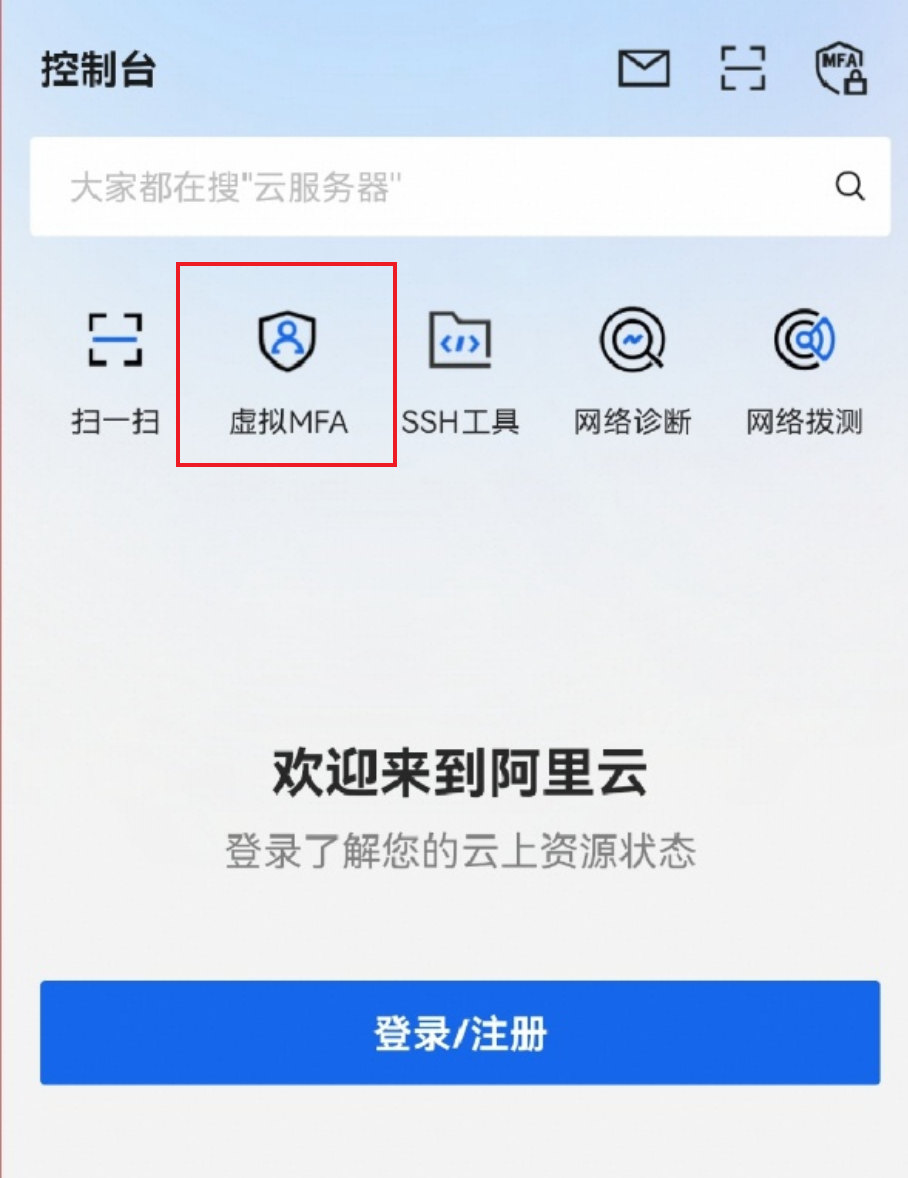
When the QR code appears, open the Alibaba Cloud app, tap Virtual MFA, tap the + icon in the upper-right corner, and select Scan QR code. Scan the QR code on the computer, and then tap OK in the app.
NoteThe Alibaba Cloud app does not currently provide an English interface for this page, so the screenshot is in Chinese. In the screenshot, 「虚拟 MFA」 means Virtual MFA.
Return to the binding page on the computer, enter the one-time password generated by the app, and click OK to complete the binding. For subsequent logons, open the same entry in the app and enter the generated one-time password on the logon page.
3. First access: The system creates a member account
Log on as the RAM user and open the Real Translation Buddy console. The first time you access the console, the system automatically creates a corresponding member account. You do not need to register it manually.
What happens next depends on whether an organization already exists under the parent Alibaba Cloud account:
|
Current status |
Result after first access |
|
No Real Translation Buddy organization exists |
The system creates an organization that belongs to the parent Alibaba Cloud account. Your member account receives the Organization Admin role. |
|
A Real Translation Buddy organization already exists |
The system creates only the member account. The account joins the existing organization as a Member. |
Receiving the Organization Admin role in Real Translation Buddy does not turn the RAM user into an Alibaba Cloud account or give it administrative permissions on the Alibaba Cloud account. The organization still belongs to the parent Alibaba Cloud account.
4. Get a workspace and seat
After you enter Real Translation Buddy, the RAM user follows the same permission rules as other members:
A RAM user can use translation features only after the corresponding Real Translation Buddy member is added to a workspace and assigned a seat. AliyunRealTranslationAgentFullAccess provides console access but does not replace a seat.
-
If the organization has available seats, contact the owner or an Organization Admin to add you to a workspace and assign you a seat. For more information, see Organization Members & Seats.
-
If the organization has no available seats, first purchase seats. For more information, see Manage Subscriptions & Add-on Packages. To purchase as a RAM user, the Alibaba Cloud account must first grant the
AliyunBSSFullAccesspermission to the RAM user. For information about the risks of this permission and a read-only alternative, see View subscription and order data. -
After a purchase is complete, the owner or an Organization Admin must still assign the seat to you. Purchasing a seat does not automatically assign it.
-
To manage members or workspaces, contact the owner or an Organization Admin to update the corresponding Real Translation Buddy role.
5. Start translating
After the member is added to a workspace and assigned a seat, you can start using the translation features.
Open the User Guide to learn how to upload a file, select languages, and submit a translation task.
6. Optional configurations
The following configurations are optional. Use them only when they match your organization's requirements.
Prevent the RAM user from initializing an organization
If the administrator of the Alibaba Cloud account does not want the RAM user to create an organization on first access, create a custom policy with a Deny statement and attach it to the RAM user.
-
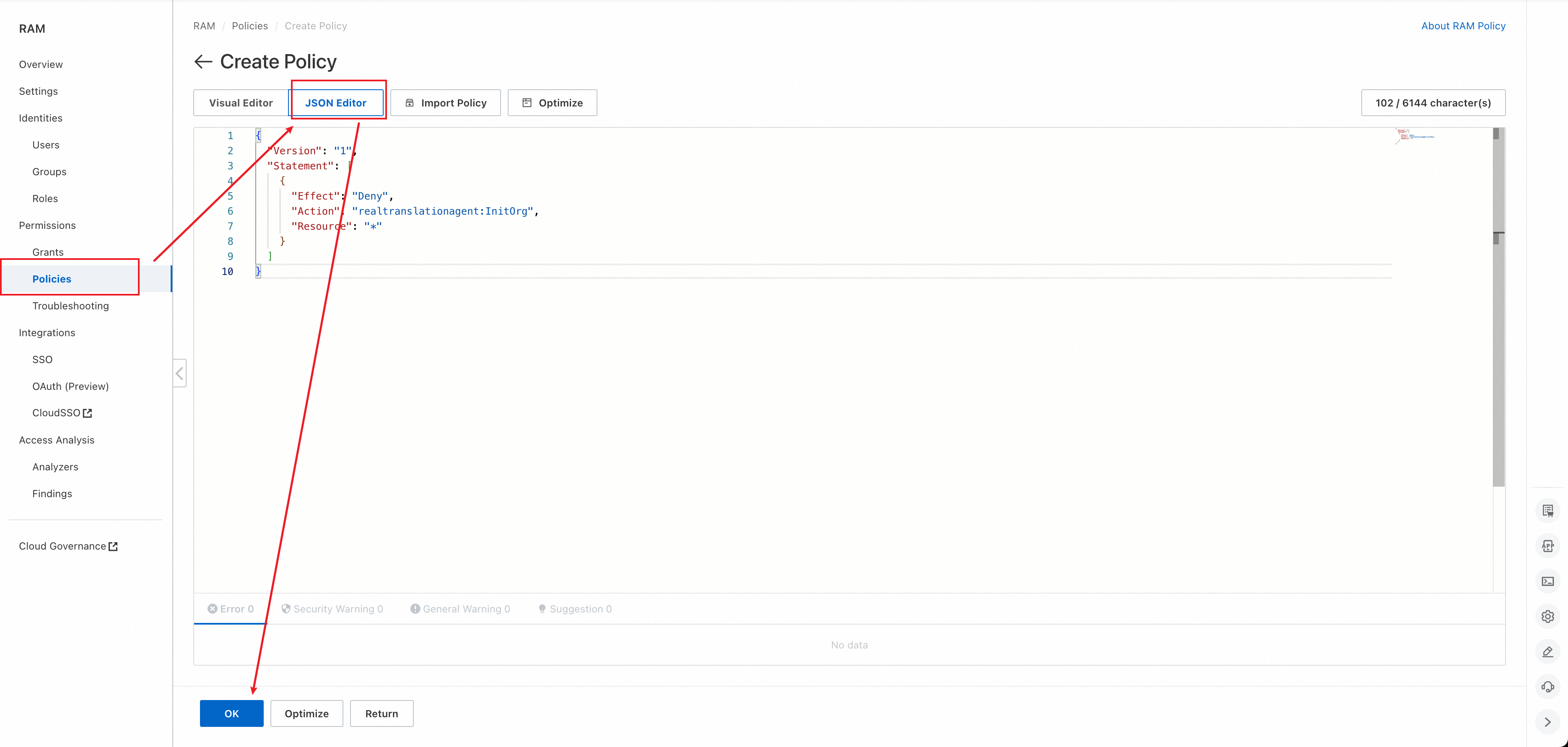
Open the Policies page
Go to RAM console > Permissions > Policies, and click Create Policy.
-
Enter the policy in JSON Editor
On the Create Policy page, click JSON Editor. Copy and paste the following policy without changing it:
{
  "Version": "1",
  "Statement": [
    {
      "Effect": "Deny",
      "Action": "realtranslationagent:InitOrg",
      "Resource": "*"
    }
  ]
}
After you paste the policy, click OK.
-
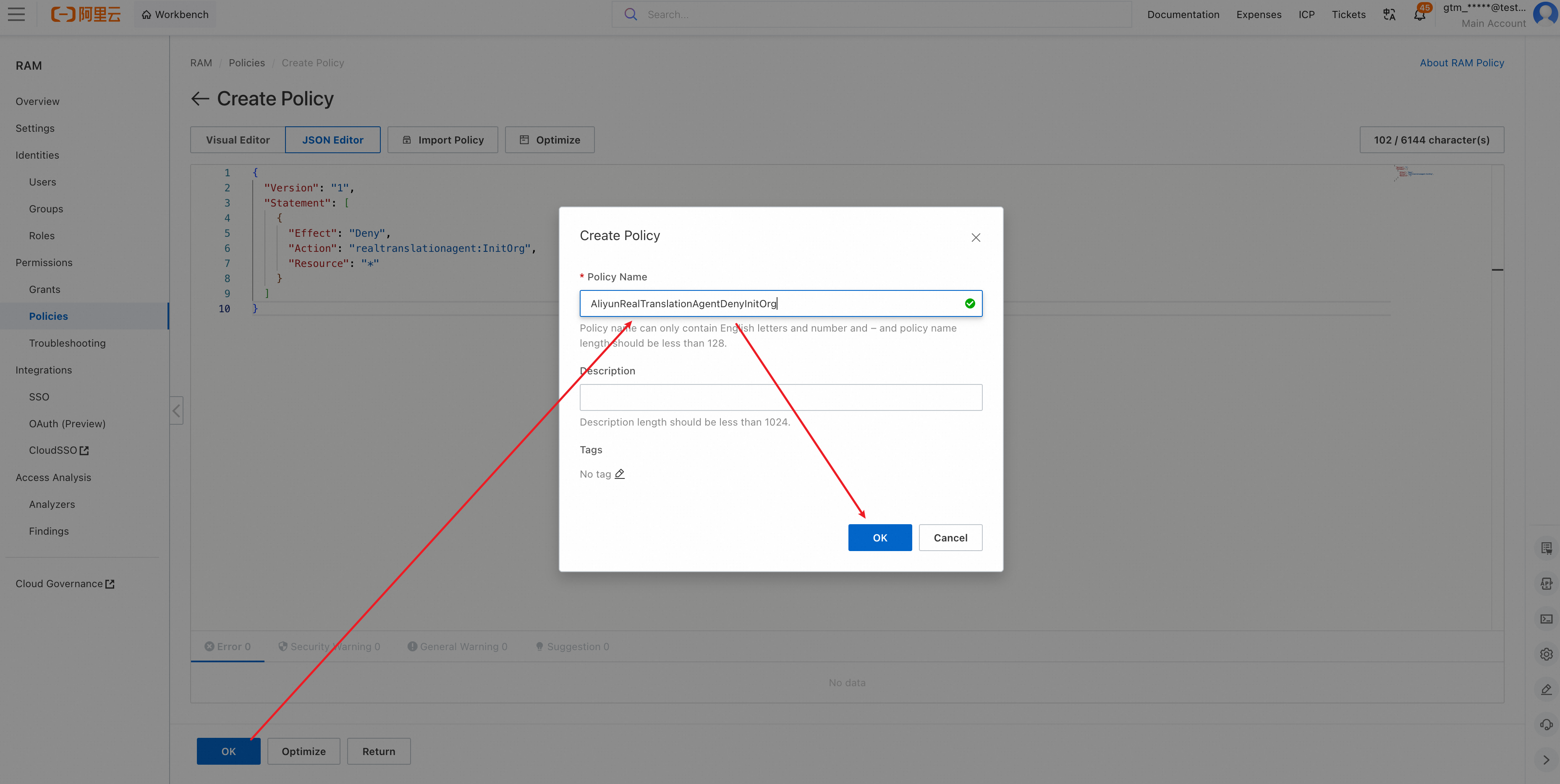
Enter the Policy Name
In the Create Policy dialog box, enter a custom name in Policy Name, such as
AliyunRealTranslationAgentDenyInitOrg, and click OK. This is only an example name for a custom policy. It is not an Alibaba Cloud system policy. -
Grant permissions to the RAM user
Creating the custom policy does not make it effective. Attach both of the following policies to the target RAM user:
-
AliyunRealTranslationAgentFullAccess: Allows the RAM user to access the Real Translation Buddy console. -
Your custom policy, such as
AliyunRealTranslationAgentDenyInitOrg: Denies organization initialization.
-
If no organization exists, this RAM user cannot initialize one. First use the Alibaba Cloud account or another identity that is allowed to initialize the organization, and then let this RAM user access Real Translation Buddy.
The two policies can be attached at the same time. The explicit Deny for InitOrg overrides the Allow, while AliyunRealTranslationAgentFullAccess continues to provide the other console permissions.
View subscription and order data
This section explains the optional BSS permission referenced above. You do not need AliyunBSSFullAccess merely to access the Real Translation Buddy console or use an assigned seat.
Subscription and order data is controlled separately by Expenses and Costs (BSS) permissions. It is not controlled by the RAM user's member role in Real Translation Buddy. This BSS-based access option is available only to RAM users and RAM roles.
Choose an authorization method based on whether the RAM user needs to purchase seats or subscriptions:
|
Requirement |
Authorization method |
|
View data and purchase seats or subscriptions |
Attach |
|
View data but do not purchase seats or subscriptions |
Do not attach |
For view-only access, copy the following policy without changing it:
{
  "Version": "1",
  "Statement": [
    {
      "Action": [
        "bss:CheckTokenPlanAutoRenewal",
        "bss:DescribeOrderList",
        "bss:GetSeatSubscriptionSummary",
        "bss:GetSubscriptionDetail"
      ],
      "Resource": "*",
      "Effect": "Allow"
    }
  ]
}
After you create the custom policy, attach it to the target RAM user.
AliyunBSSFullAccess provides full access to Expenses and Costs and is broader than Real Translation Buddy subscription management. In addition, the BSS query permissions above can show orders for products other than Real Translation Buddy under the parent Alibaba Cloud account. Grant these permissions only to users who need them.
If the RAM user already has purchase permissions from another policy, adding the view-only policy does not remove those permissions. To prevent purchases, also make sure that AliyunBSSFullAccess and other policies that allow purchase operations are not attached.