If a network error occurs on a Smart Access Gateway (SAG) device, you can observe the problem, gather relevant information, and then analyze the information to develop possible solutions. This topic describes how to handle SAG device faults.
Handle SAG-100WM faults
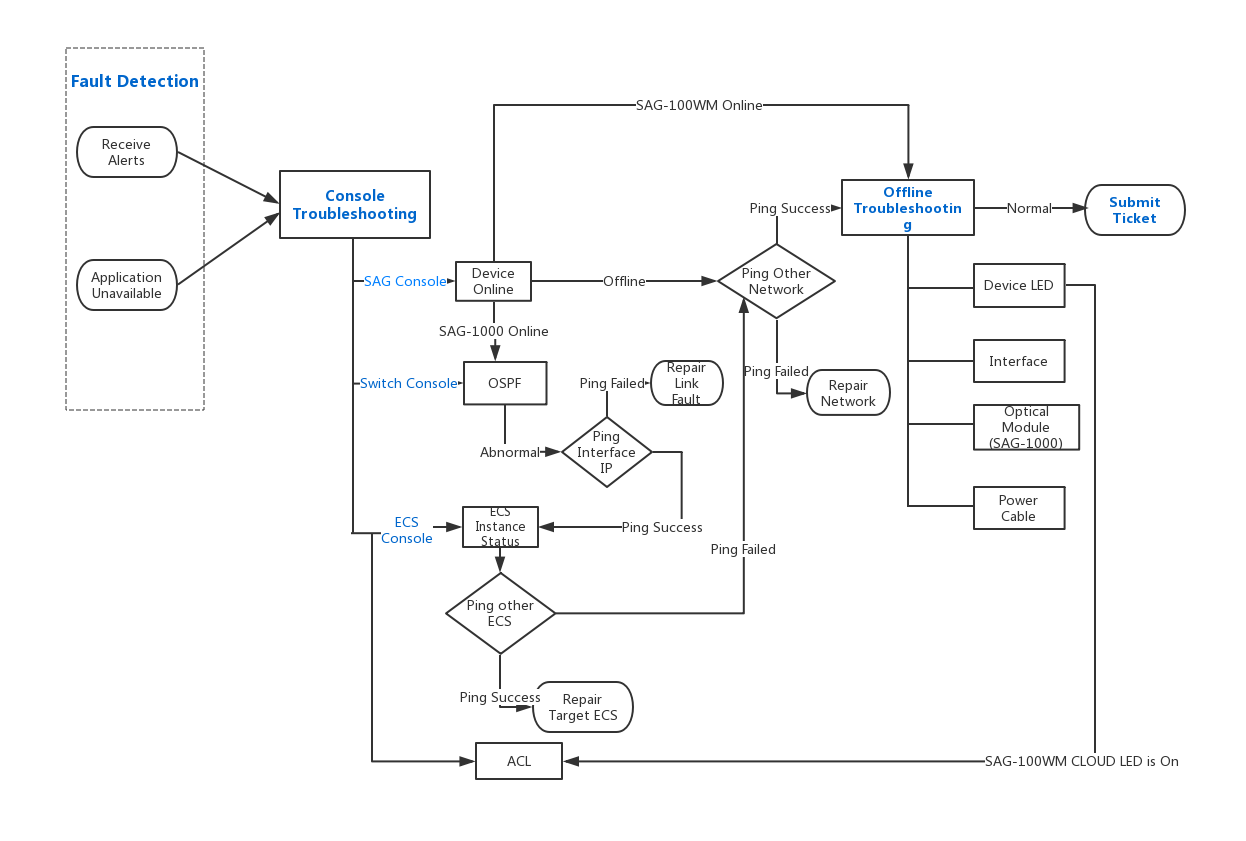
If a fault occurs when you use an SAG-100WM device to access Alibaba Cloud, troubleshoot the issue as follows:
- You receive alert information or the application is unavailable.
- You can log on to the SAG console to view the device status.
- You can access other public websites to check the ISP network status.
- You can check the hardware.
- You can check the security group rule configurations.
For more information, see Cannot ping an Alibaba Cloud service (SAG-100WM).
Handle SAG-1000 faults
If a fault occurs when you use an SAG-1000 device to access Alibaba Cloud, troubleshoot the issue as follows:
- You receive an alert or find an unavailable application.
- You can log on to the SAG console to view the device status.
- You can log on to the vSwitch console to view the OSPF data link status.
- You can log on to the ECS console to view the status of the destination instance.
- You can access other public websites to check the ISP network status.
- You can check the hardware.
For more information, see Cannot ping an ECS instance (SAG-1000) and Cannot connect to a local client in the same CCN instance.
该文章对您有帮助吗?