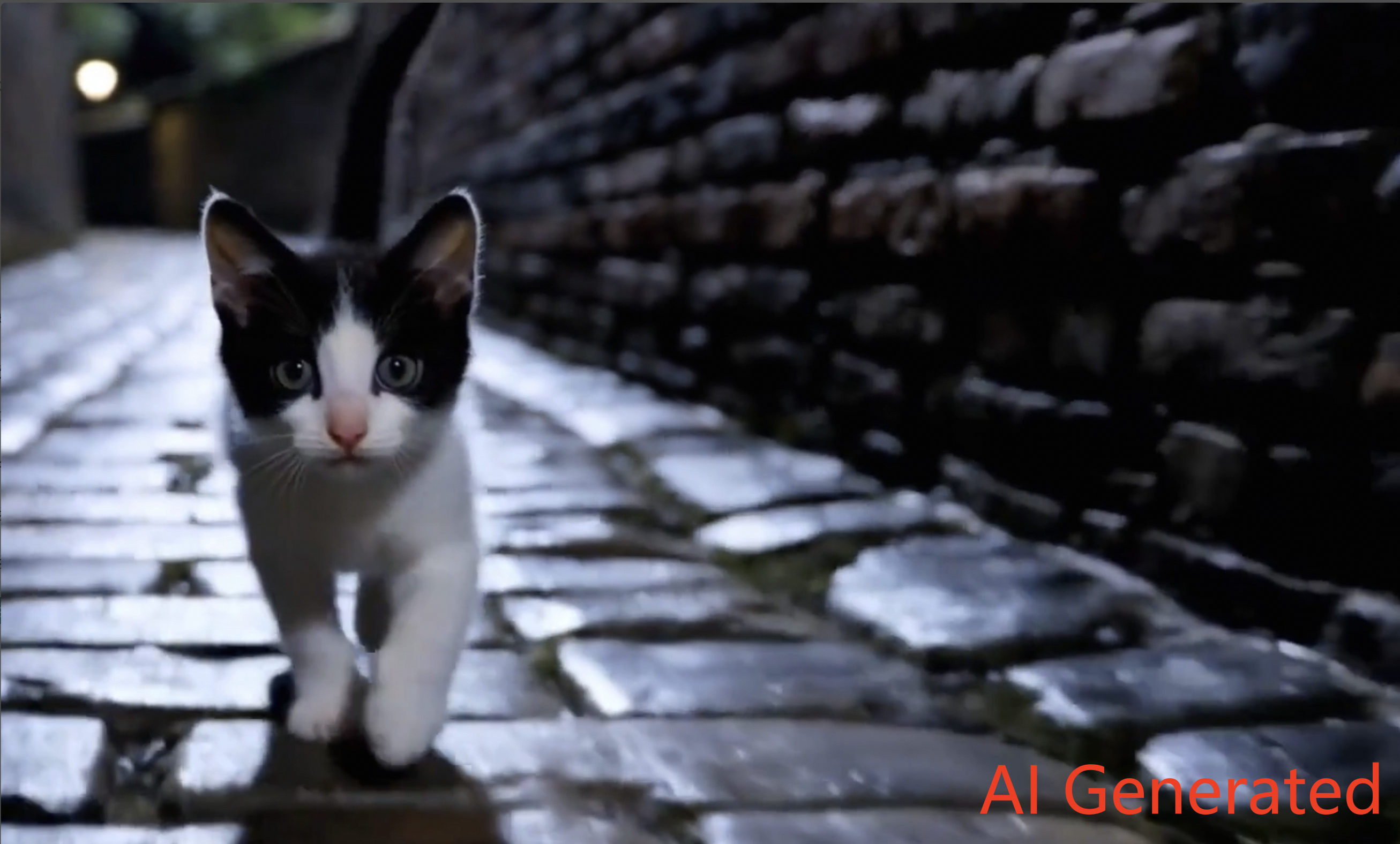
Add identifiers to AIGC videos
This document describes how to add data identifiers to videos.
Background
According to the "Measures for Identifying AI-Generated and Synthesized Content", starting from September 1, 2025, all content generated by artificial intelligence (AI), such as images, audio, and videos, must include both visible and invisible identifiers. These identifiers can be metadata tags or digital watermarks. This ensures that the source of the content is traceable and identifiable.The Secure Access Service Edge (SASE) platform provides the CreateWmEmbedTask API. This API helps enterprises manage content identifiers efficiently and meet compliance requirements.
Video watermark parameters
Name | Type | Required | Description | Example | |
WmType | string | Yes | The watermark type. Valid values:
| PureVideo | |
Filename | string | Yes | The name of the file to embed the watermark in. The backend uses the file extension to verify the file type. | abc.mp4 | |
FileUrl | string | Yes | The URL from which the file can be downloaded. The URL must be publicly accessible. | https://example.com/abc.mp4 | |
WmInfoSize | long | No | The bit width of the watermark information. The default value is 32. This parameter must be the same for both embedding and extracting. For example, if you use a 40-bit software development kit (SDK) for embedding, you must also set this value to 40 for extraction. Valid values:
| 32 | |
WmInfoUint | string | No | The watermark information in decimal format. If you set this parameter, you cannot set WmInfoBytesB64. The value range depends on the WmInfoSize parameter:
| 123*** | |
WmInfoBytesB64 | string | No | The watermark information as a Base64-encoded string. If you set this parameter, you cannot set WmInfoUint. | aGVsbG8gc2F***** | |
ImageEmbedLevel | long | No | Image watermark parameter. A larger value provides higher robustness but reduces visual quality. The default value is 2. Valid values: 0 to 4. | 2 | |
ImageEmbedJpegQuality | long | No | Image watermark parameter. The desired JPEG compression quality factor for the output image. The default value is 95. Valid values: 1 to 100. | 95 | |
VideoControl | object | No | Video control parameters. | ||
TextVisibleControl | object | No | Visible text watermark control parameters. | ||
VisibleText | string | No | The text for the watermark. The format is a UTF-8 string. | Watermark text | |
Mode | string | No | The display mode for the text watermark. Valid values:
| pos | |
Opacity | integer | No | The opacity of the text watermark. Valid values: 1 to 255. A larger value means less transparency. | 255 | |
FontSize | integer | No | The font size. Valid values: 0 to 72. | 30 | |
FontColor | string | No | The color of the text watermark. The format is an RGB color value, such as `0xFFFFFF` or `#FFFFFF`. For example, `0x000000` or `#000000` represents black. | #FF0000 | |
PosX | integer | No | This parameter takes effect when Mode is set to `pos`. It controls the horizontal position of the visible watermark in pixels, with the origin at the top-left corner. | 0 | |
PosY | integer | No | This parameter takes effect when Mode is set to `pos`. It controls the vertical position of the visible watermark in pixels, with the origin at the top-left corner. | 0 | |
Visible | boolean | No | Visibility: true: Displayed. false: Not displayed. | true | |
Margin | object | No | This parameter takes effect when Mode is set to `top-left`, `top-right`, `bottom-left`, or `bottom-right`. It specifies the margin. | ||
Right | float | No | This parameter takes effect when Mode is set to `top-right` or `bottom-right`. It specifies the right margin. | 10 | |
Bottom | float | No | This parameter takes effect when Mode is set to `bottom-left` or `bottom-right`. It specifies the bottom margin. | 10 | |
MetadataControl | object | No | Metadata control parameters. | ||
XmpKvBase64 | string | No | The metadata in Base64 format. Before conversion, the format must be as follows: Note
| QUlHQz17IkxhYmVsIjoiMSIsIkNvbnRlbnRQcm9kdWNlciI6IjAwMTE5MTMzMDEwNk1BMkNGTERHNFIxMDAwMSIsIlByb2R1Y2VJRCI6IkxHZzFGWW0wVGotczRFa19xRTFiSUEiLCJSZXNlcnZlZENvZGUxIjoiTEJrYzlwZUowR294UEVDdFlCY3Q3dmZaWmdadnd5NEZacmhlL0RKb3Z0M3JHRkV5Qko0ejVXWllzbDl5V01iTFJRSzB1QXFTWG9yNW9LZ0ZncDVoU2RPQk5OVlhkemZ3SStsVWdjeXVxM3UyVWJvZjJqR3hRK2w0eitFcnRHR3VtSFpMOHNNK2Izd0llU2phY2Zxa2JpVXJlUFpSdUFDdVJyaHJuczZwM1J0dDM3UWpBbWhzYTFtd3MzM1dMamp3eGpQbjl5aVZoOUtzR0FMdjlaaXZEeGNhRXArZmpqK2tMV0RWK2lKUlZxdXA4Z0hCejlwREpockFGdmUvODlkLzlaQ2lKb1lxeWtIbm9wSmdCWVlYTUE9PSIsIkNvbnRlbnRQcm9wYWdhdG9yIjoiMDAxMTkxMzMwMTA2TUEyQ0ZMREc0UjEwMDAxIiwiUHJvcGFnYXRlSUQiOiJMR2cxRlltMFRqLXM0RWtfcUUxYklBIiwiUmVzZXJ2ZWRDb2RlMiI6IkxCa2M5cGVKMEdveFBFQ3RZQmN0N3ZmWlpnWnZ3eTRGWnJoZS9ESm92dDNyR0ZFeUJKNHo1V1pZc2w5eVdNYkxSUUswdUFxU1hvcjVvS2dGZ3A1aFNkT0JOTlZYZHpmd0krbFVnY3l1cTN1MlVib2Yyakd4UStsNHorRXJ0R0d1bUhaTDhzTStiM3dJZVNqYWNmcWtiaVVyZVBaUnVBQ3VScmhybnM2cDNSdHQzN1FqQW1oc2ExbXdzMzNXTGpqd3hqUG45eWlWaDlLc0dBTHY5Wml2RHhjYUVwK2ZqaitrTFdEVitpSlJWcXVwOGdIQno5cERKaHJBRnZlLzg5ZC85WkNpSm9ZcXlrSG5vcEpnQllZWE1BPT0ifQ== | |
Enable | boolean | No | Specifies whether to enable this feature. true: The item is displayed. false: The item is not displayed. | true | |
Metadata format
The XmpKvBase64 field requires metadata in Base64 format. Before you convert the metadata to Base64, it must meet the following format requirements.
Key | Description | Example value |
Label | Indicates whether the content is generated by AI:
| 1 |
ContentProducer | The code or name of the service provider, used to identify the content producer.
For more information, see Cybersecurity Standards Practice Guide. | 001191******M000100Y43 |
ProduceID | The content production number. This is a unique identifier used by the production platform to trace the generated content. | 123456 |
ReserveCode1 | Reserved field. This field can store information for the generative service provider to implement security protection and ensure content and identifier integrity. A hashing mechanism based on ContentProducer and ProduceID can be used for secure storage and verification of key information. | d41d8cd98f00b204e9800998ecf8427e |
ContentPropagator | The name, number, or code of the propagation platform. For services that provide AI-generated content, this can be the same as ContentProducer. | 001191******M000100Y43 |
PropatorID | The content propagation number. This is a unique number assigned by the propagation platform to the propagated content. | 123456 |
ReserveCode2 | Reserved field. This field can be used by the content propagation service provider to implement security protection and ensure content and identifier integrity. A hashing mechanism based on ContentProducer and ProduceID can be used for secure storage and verification of key information. | d41d8cd98f00b204e9800998ecf8427e |
For example, consider a production platform company named AA with the Unified Social Credit Code 91******M000100Y43.
AIGC={
	"Label": "1",
	"ContentProducer": "0011913301****",
	"ProduceID": "LGg1FYm0Tj-s4Ek****",
	"ReservedCode1": "LBkc9peJ0GoxPECtYBct7vfZZgZvwy4FZrhe/DJovt****",
	"ContentPropagator": "001191330106MA2C****",
	"PropagateID": "LGg1FYm0Tj-s4Ek_****",
	"ReservedCode2": "LBkc9peJ0GoxPECtYBct7vfZZgZvYYXMA****"
}
Example
{
	"WmType": "PureVideo",
	"Filename": "test.mp4",
	"FileUrl": "https://******.oss-cn-hangzhou.aliyuncs.com/test.mp4",
	"WmInfoSize": 64,
	"WmInfoUint": "1234567890",
	"InvisibleEnable": true,
	"VideoControl": {
		"TextVisibleControl": {
			"VisibleText": "AI Generated",
			"Mode": "bottom-right",
			"Opacity": 255,
			"FontSize": 32,
			"FontColor": "#FF0000",
			"PosX": 0,
			"PosY": 0,
			"Visible": true,
			"Margin": {
				"Bottom": 10,
				"Right": 10
			}
		},
		"MetadataControl": {
			"XmpKvBase64": "QUlHQyUzRCU3QiUwQSUyMCUyMCUyMCUyMCUyMkxhYmVsJTIyJTNBJTIwJTIyMSUyMiUyQyUwQSUyMCUyMCUyMCUyMCUyMkNvbnRlbnRQcm9kdWNlciUyMiUzQSUyMCUyMjAwMTE5MTMzMDEqKioqJTIyJTJDJTBBJTIwJTIwJTIwJTIwJTIyUHJvZHVjZUlEJTIyJTNBJTIwJTIyTEdnMUZZbTBUai1zNEVrKioqKiUyMiUyQyUwQSUyMCUyMCUyMCUyMCUyMlJlc2VydmVkQ29kZTElMjIlM0ElMjAlMjJMQmtjOXBlSjBHb3hQRUN0WUJjdDd2ZlpaZ1p2d3k0RlpyaGUvREpvdnQqKioqJTIyJTJDJTBBJTIwJTIwJTIwJTIwJTIyQ29udGVudFByb3BhZ2F0b3IlMjIlM0ElMjAlMjIwMDExOTEzMzAxMDZNQTJDKioqKiUyMiUyQyUwQSUyMCUyMCUyMCUyMCUyMlByb3BhZ2F0ZUlEJTIyJTNBJTIwJTIyTEdnMUZZbTBUai1zNEVrXyoqKiolMjIlMkMlMEElMjAlMjAlMjAlMjAlMjJSZXNlcnZlZENvZGUyJTIyJTNBJTIwJTIyTEJrYzlwZUowR294UEVDdFlCY3Q3dmZaWmdadllZWE1BKioqKiUyMiUwQSU3RA==",
			"Enable": true
		}
	}
}
Result
After the watermark embedding task completes successfully, copy the value of the
TaskIdparameter from the response.Call the GetWmEmbedTask operation. Use the copied
TaskIdvalue to retrieve the URL of the watermarked file (FileUrl).Open the FileUrl in a browser to download the file.
Open the video file. The visible watermark AI Generated appears in the bottom-right corner of the video. This indicates that the video identifier was added successfully.