ASR performance optimization solutions
This document provides solutions for common recognition issues, including channel separation, background noise filtering, dialects, and business-specific terms.
Common performance issues
Performance issues caused by mismatched recording sample rates
Automatic Speech Recognition (ASR) models typically provide a certain level of accuracy. If speech recognition is consistently inaccurate or the recognition rate is very low, ensure that the sample rate of the recording file (8 kHz or 16 kHz) matches the sample rate parameter set during the API call. A mismatch can degrade ASR performance. The figure shows an example that uses the Chinese 8 kHz general-purpose model.
How to check the sample rate of an audio file
To check the sample rate of an audio file, you can use common audio editing software, such as Audacity, or the open source command line interface FFmpeg.
What to do if speech recognition is too sensitive and recognizes invalid sounds (such as noise) as text
You can modify the Voice Activity Detection (VAD) noise threshold by setting the `speech_noise_threshold` parameter.
The value for this parameter ranges from -1 to 1. A smaller value increases sensitivity, which might cause more noise to be incorrectly recognized as speech. A larger value might cause more speech segments to be treated as noise and not be recognized. For example, you can set the value to 0.8. If recognition is still too sensitive, try setting the value to 0.9. If you notice dropped words or missed recognitions, decrease the value to 0.5, 0.2, or even -0.2. 
Why are words often dropped in far-field recognition? How to improve far-field recognition performance
Dropped words can occur in far-field recognition because the VAD thresholds for far-field and near-field scenarios are different. To resolve this, you can modify the VAD noise threshold by setting the `speech_noise_threshold` parameter. The value for this parameter ranges from -1 to 1. A smaller value increases sensitivity, which might cause more noise to be incorrectly recognized as speech. A larger value might cause more speech segments to be treated as noise and not be recognized. For example, you can set the value to -0.2. If words are still frequently dropped, continue to decrease the value to -0.3 or -0.4. If you find that a lot of noise is being misidentified, increase the value to -0.1 or 0.

What to do if some words are consistently recognized incorrectly
Sometimes, specific words, such as names, places, or business-related terms, are consistently recognized incorrectly. To resolve this, you can use the following methods. The example below uses the term "micro-loan".
Add hotwords

When you create a quality inspection task, select the specific hotwords.

Train a custom language model

When you create a quality inspection task, select the custom language model.

Inaccurate recognition caused by mixed-channel (single-channel) recordings
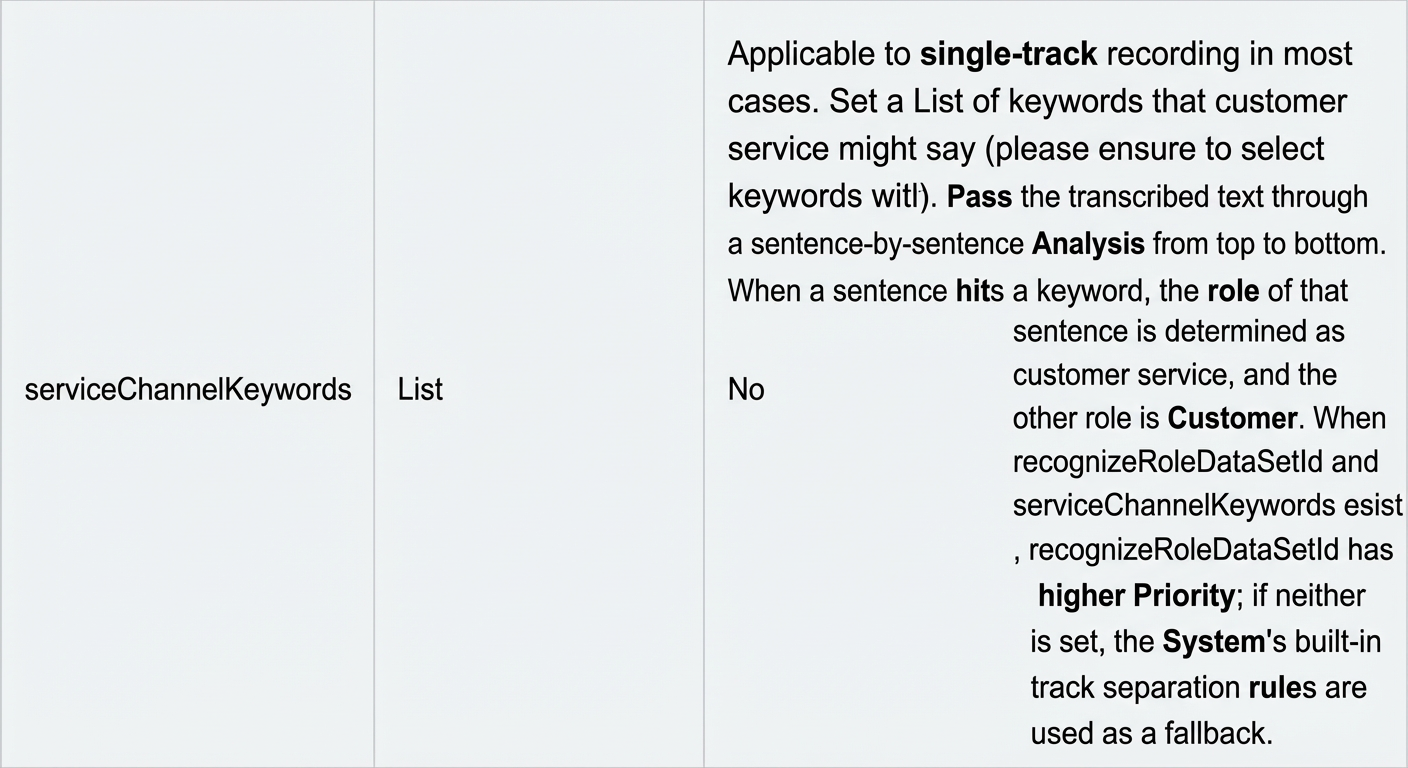
When you use the recording file recognition service, if customer service agents use fixed responses, you can set keywords to identify the agent channel. In dataset management, you can upload a single-channel recording file and then use the agent's fixed responses to identify their role.

When you initiate a quality inspection task through an API, set `autoSplit` to `1` and set `serviceChannelKeywords` to keywords that are unique to the agent. For more information, see UploadAudioData - Upload audio for quality inspection.

If customer service agents do not use fixed responses, store the recordings in separate channels.
Can a recording file recognition request return two identical results?
Yes. This can happen if the submitted audio file is a dual-channel recording and both sound channels contain the same content. This is the expected behavior. To resolve this, you can preprocess the audio file to remove the duplicate channel and recognize only the first sound channel.
Can offline speech quality inspection automatically distinguish between agents and customers?
No. The speech recognition engine can distinguish between different speaker roles, but it cannot determine the identity of each role, such as agent or customer. You must determine the identities based on your business logic. Store recordings that are categorized by role. When you initiate a quality inspection task, you must specify the channel for each role.
When you initiate a quality inspection task using an API, set `autoSplit` to `0`, set `serviceChannel` to the agent's channel, and set `clientChannel` to the customer's channel. For more information, see the API documentation.

When you test the channel separation effect in dataset management, you can specify the channels for dual-channel recordings.

Does offline speech quality inspection support multiple dialects?
Yes, it does. When you create a quality inspection task, you can select a specific language model. If the language models in the list do not meet your requirements, you can contact an Alibaba Cloud engineer to add one.

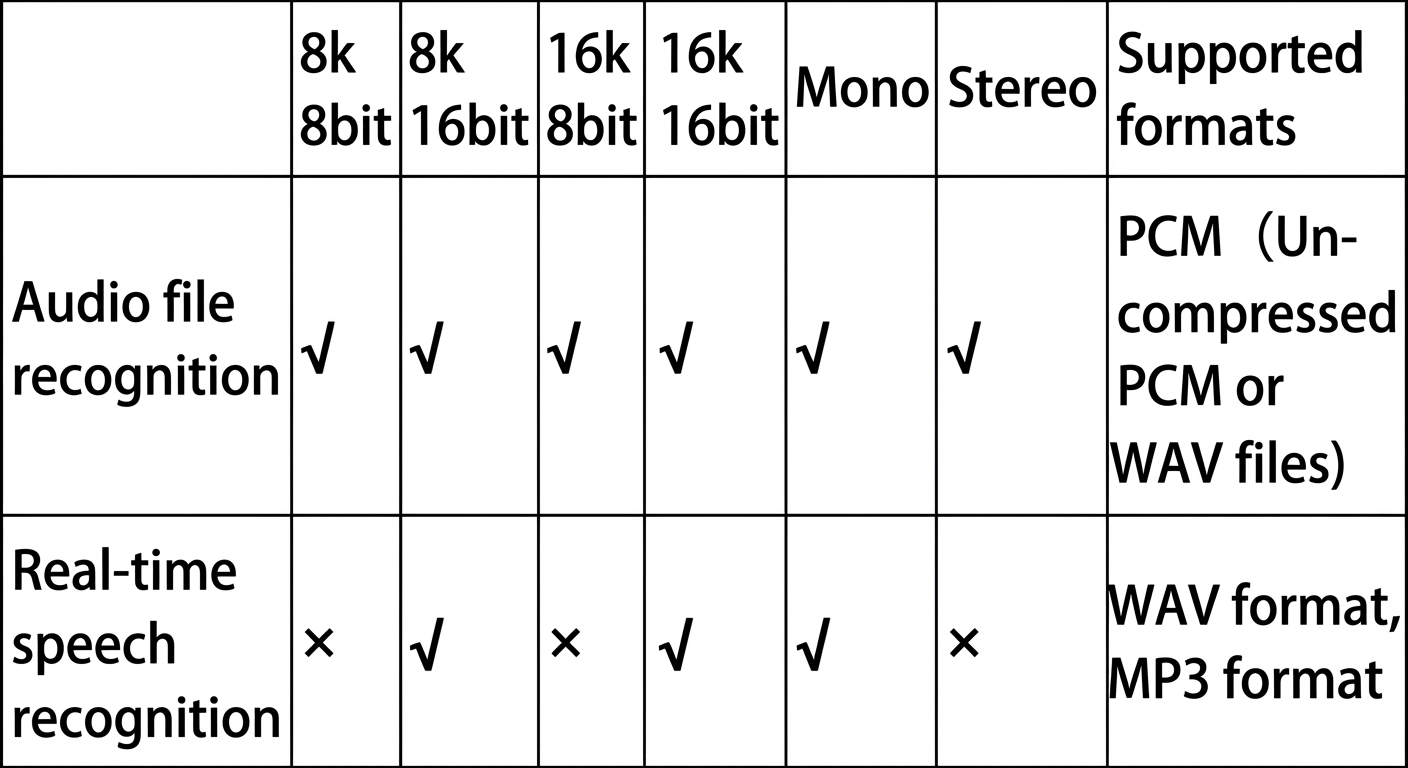
What audio formats do offline and real-time speech quality inspection support?
What sample rates does the speech recognition service support?
The service supports sample rates of 8000 Hz and 16000 Hz. Telephone customer service scenarios typically use an 8000 Hz sample rate. Scenarios that involve mobile apps, PC tools, or HTML5 web pages typically use a 16000 Hz sample rate. Other sample rates, such as 32 kHz or 44 kHz, are also used. However, the caller must adjust the sample rate to 16 kHz during development. Audio files with other sample rates must be transcoded before use.
Other issues
If human voices are misidentified as noise, this issue is difficult to resolve. This is because the noise model is designed to send any sound produced by a human to the ASR engine for recognition.
If non-human noise is misidentified as speech, you can collect more noise data and provide it to Alibaba Cloud to help optimize the noise model.
If the waveform amplitude is small and the energy is too low, data loss can occur during recognition. This may happen because the volume is too low, which causes the noise model to treat the speech as noise. To resolve this, you can adjust the recording device or reduce the distance between the speaker and the device.
If the waveform amplitude is too large and the energy is too high, recognition errors can occur. This may happen because the volume is too high, which leads to clipping and audio distortion. To resolve this, you can adjust the recording device or ask the speaker to move farther away from it.
If the frequency band information is incomplete, recognition may be inaccurate. The ASR model is trained on standard data that has complete frequency bands at an 8 kHz or 16 kHz sample rate. After you ensure the frequency band information is complete, you can use the language model training feature to optimize any remaining inaccuracies.
When you use hotwords, do not set the weight of business-specific hotwords too high. An excessively high weight can cause statements to be truncated, which prevents subsequent speech from being recognized.
For general recognition errors, you can use language model optimization. To do this, copy sentences (not single words) that are frequently recognized incorrectly into the training data multiple times.
If you cannot resolve issues such as slurred speech, low clarity, or unintelligible audio:
If the audio contains dialects or strong accents, recognition errors may occur because the ASR training data does not have sufficient coverage. In this case, contact an Alibaba Cloud engineer for further evaluation.
If you have many recognition requests that involve strong accents (but not dialects), contact an Alibaba Cloud engineer for further evaluation.