Integrate the SDK
When you call an OpenAPI, you can integrate the software development kit (SDK) into your project. The SDK simplifies development, accelerates feature integration, and reduces maintenance costs. Using an Alibaba Cloud SDK involves three main steps: importing the SDK, setting access credentials, and using the SDK. This topic describes this procedure in detail.
Environment requirements
PHP 5.6 or later.
Composer is installed.
The PHP version used to install the SDK with Composer must be the same as or earlier than the runtime PHP version. For example, if you install the SDK in a PHP 7.2 environment to generate the vendor directory, you can use it only in PHP 7.2 or later. If you copy the directory to a PHP 5.6 environment, dependency version incompatibility issues will occur. If you cannot complete the installation due to network issues, you can run the following command to use the Alibaba Cloud Composer full mirror.
composer config -g repo.packagist composer https://mirrors.aliyun.com/composer/Import the SDK
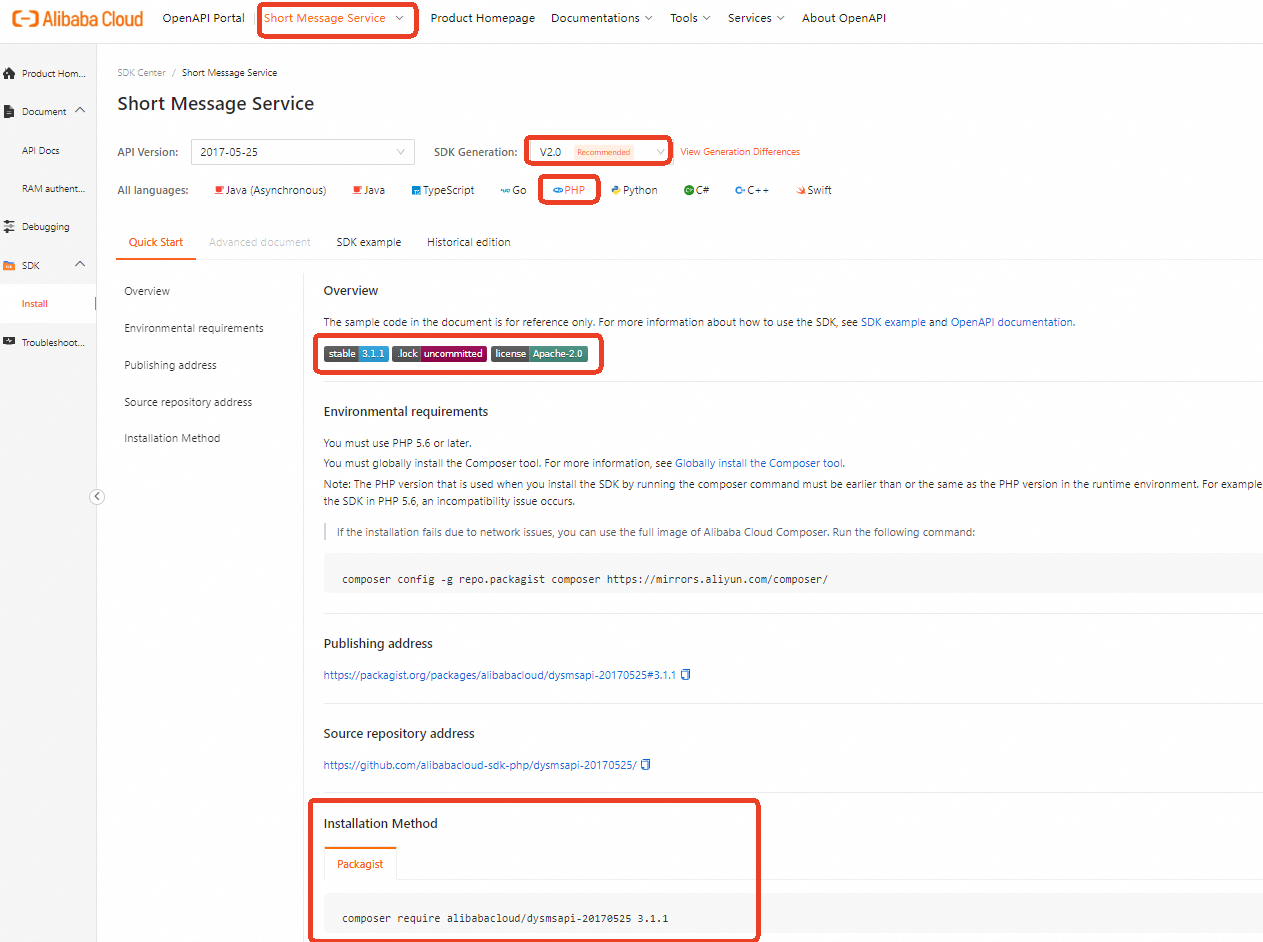
Log on to SDK Center and select the product whose API you want to call, such as Short Message Service (SMS).
On the Installation page, under SDK Generation, select V2.0, and under All Languages, select PHP. Then, on the Quick Start tab, you can find the SDK installation method for Short Message Service (SMS).
Set access credentials
Calling an Alibaba Cloud OpenAPI usually requires access credentials. Common credential types are AccessKey and Security Token Service (STS) token. To prevent credential leaks, a common solution is to store them in environment variables. For more information about security solutions, see Securely use access credentials. This topic uses the ALIBABA_CLOUD_ACCESS_KEY_ID and ALIBABA_CLOUD_ACCESS_KEY_SECRET environment variables as an example:
Configuration method in Linux and macOS
The following examples use ALIBABA_CLOUD_ACCESS_KEY_ID and ALIBABA_CLOUD_ACCESS_KEY_SECRET as variable names. Replace them with your own names if needed, such as OSS_ACCESS_KEY_ID and OSS_ACCESS_KEY_SECRET.
Run the following export commands to set environment variables:
Variables set with export are temporary and valid only for the current session. For persistence, add the export command to your shell startup file (such as ~/.bashrc or ~/.zshrc).
-
Set the AccessKey ID:
# Replace yourAccessKeyID with your AccessKey ID. export ALIBABA_CLOUD_ACCESS_KEY_ID=yourAccessKeyID -
Set the AccessKey secret:
# Replace yourAccessKeySecret with your AccessKey secret. export ALIBABA_CLOUD_ACCESS_KEY_SECRET=yourAccessKeySecret -
Verify the configuration.
Run
echo $ALIBABA_CLOUD_ACCESS_KEY_ID. If the correct value is returned, the configuration is successful.
Configuration method in Windows
Use the graphical user interface (GUI)
Procedure
The following steps describe how to set environment variables using the GUI in Windows 10.
On your desktop, right-click This PC and choose Properties > Advanced system settings > Environment Variables > New under System variables or User variables. Then, complete the configuration.
Variable
Example value
AccessKey ID
Variable name: ALIBABA_CLOUD_ACCESS_KEY_ID
Variable value: yourAccessKeyID
AccessKey secret
Variable name: ALIBABA_CLOUD_ACCESS_KEY_SECRET
Variable value: yourAccessKeySecret
Test the configuration
Click Start (or use the Win+R keyboard shortcut), click Run, enter `cmd`, and then click OK (or press Enter) to open the command prompt. Run the
echo %ALIBABA_CLOUD_ACCESS_KEY_ID%andecho %ALIBABA_CLOUD_ACCESS_KEY_SECRET%commands. If the commands return the correct AccessKey, the configuration is successful.
Use the command prompt (CMD)
Procedure
Open the command prompt as an administrator and run the following commands to add new environment variables to the system.
setx ALIBABA_CLOUD_ACCESS_KEY_ID yourAccessKeyID /M
setx ALIBABA_CLOUD_ACCESS_KEY_SECRET yourAccessKeySecret /M
The
/Mparameter indicates a system environment variable. You can omit this parameter when you set a user environment variable.Test the configuration
Click Start (or use the Win+R keyboard shortcut), click Run, enter `cmd`, and then click OK (or press Enter) to open the command prompt. Run the
echo %ALIBABA_CLOUD_ACCESS_KEY_ID%andecho %ALIBABA_CLOUD_ACCESS_KEY_SECRET%commands. If the commands return the correct AccessKey, the configuration is successful.
Use Windows PowerShell
In PowerShell, you can set new environment variables that are valid for all new sessions:
[System.Environment]::SetEnvironmentVariable('ALIBABA_CLOUD_ACCESS_KEY_ID', 'yourAccessKeyID', [System.EnvironmentVariableTarget]::User)
[System.Environment]::SetEnvironmentVariable('ALIBABA_CLOUD_ACCESS_KEY_SECRET', 'yourAccessKeySecret', [System.EnvironmentVariableTarget]::User)
To set environment variables for all users, you must have administrative permissions:
[System.Environment]::SetEnvironmentVariable('ALIBABA_CLOUD_ACCESS_KEY_ID', 'yourAccessKeyID', [System.EnvironmentVariableTarget]::Machine)
[System.Environment]::SetEnvironmentVariable('ALIBABA_CLOUD_ACCESS_KEY_SECRET', 'yourAccessKeySecret', [System.EnvironmentVariableTarget]::Machine)
You can set temporary environment variables that are valid only for the current session:
$env:ALIBABA_CLOUD_ACCESS_KEY_ID = "yourAccessKeyID"
$env:ALIBABA_CLOUD_ACCESS_KEY_SECRET = "yourAccessKeySecret"
In PowerShell, run the Get-ChildItem env:ALIBABA_CLOUD_ACCESS_KEY_ID and Get-ChildItem env:ALIBABA_CLOUD_ACCESS_KEY_SECRET commands. If the commands return the correct AccessKey, the configuration is successful.
Use the SDK
This topic provides an example of how to call the SendSms API in Short Message Service (SMS). For the SendSms API reference, see SendSms .
1. Initialize the request client
In the SDK, all OpenAPI calls are initiated through a request client (Client). Before you call an OpenAPI, you must initialize the request client. The client can be initialized in multiple ways. This example shows how to initialize the client using an AccessKey. For more information about initialization methods, see Manage access credentials.
The client object, such as a Dysmsapi instance, is thread-safe. You can use it safely in a multi-threaded environment without creating a separate instance for each thread.
In your application, do not frequently create client objects with the `new` keyword. This practice wastes resources and degrades performance. We recommend that you use the singleton pattern to encapsulate the client. This ensures that only one client object is initialized for the same credentials and endpoint during the application lifecycle.
public static function createClient(){
      $config = new Config([
            // Required. Ensure the environment variable ALIBABA_CLOUD_ACCESS_KEY_ID is set in your runtime environment.
            "accessKeyId" => getenv("ALIBABA_CLOUD_ACCESS_KEY_ID"),
            // Required. Ensure the environment variable ALIBABA_CLOUD_ACCESS_KEY_SECRET is set in your runtime environment.
            "accessKeySecret" => getenv("ALIBABA_CLOUD_ACCESS_KEY_SECRET")
       ]);
      $config->endpoint = "dysmsapi.aliyuncs.com";
      return new Dysmsapi($config);
}
2. Create a request object
When you call an API operation to pass parameters, you must use the request object provided by the SDK. The naming convention for request objects is <APIOperationName>Request. For example, the request object for the SendSms API operation is SendSmsRequest. For more information about request parameters, see the API reference for SendSms and .
If an OpenAPI does not have request parameters, you do not need to create a request object. For example, when you call DescribeCdnSubList, the API does not have request parameters.
// Create a request object and set the input parameters.
$sendSmsRequest = new SendSmsRequest([
     // Replace with your SMS signature.
    "signName" => "<YOUR_VALUE>",
    // Replace with your SMS template code.
    "templateCode" => "<YOUR_VALUE>",
    // Replace with the recipient's mobile phone number.
    "phoneNumbers" => "<YOUR_VALUE>",
]);
3. Make a request
When you call an OpenAPI through the request client, use the function named <APIName>WithOptions, where <APIName> is the OpenAPI name in lowerCamelCase format. This function has two parameters: a request object and runtime parameters. The request object is the one that you created in the previous step. The runtime parameters are used to configure the request behavior, such as timeout settings and proxy configurations. For more information, see Advanced configuration.
If an OpenAPI does not have request parameters, you do not need to pass a request object when you make the request. For example, when you call DescribeCdnSubList, you only need to pass runtime parameters.
 // Create runtime parameters.
 $runtime = new RuntimeOptions([]);
 $client = self::createClient();
 // Send the request.
 $client->sendSmsWithOptions($sendSmsRequest, $runtime);
4. Handle exceptions
The V2.0 PHP SDK classifies exceptions into three main types: InvalidArgumentException, TeaUnretryableException, and TeaException.
TeaUnretryableException: This exception is usually caused by network issues. It is thrown after the maximum number of retries for a network problem is reached.
InvalidArgumentException: This exception is usually caused by missing required parameters or mismatched parameter types. You can locate the error by checking the
messagein the exception information.TeaException: This exception is mainly for service-related errors.
For more information about exception handling, see Handle exceptions.
Handle exceptions properly to ensure system robustness and stability. For example, you can propagate exceptions, record logs, or attempt to recover from the exceptions.
Click to view the complete code example
Special scenario: Configure the Advance API for file uploads
When you use cloud products such as Image Search and Visual Intelligence API to process or upload local images, the OpenAPI provided in the official documentation does not support direct file uploads. To upload a file, you can use the Advance API provided by the cloud product. This API supports passing a file stream object. The underlying mechanism is as follows: the cloud product temporarily stores the uploaded file in Alibaba Cloud OSS. The default storage region is cn-shanghai. The product then reads the temporary file from OSS to perform the related function. This example uses the DetectBodyCount API of the Visual Intelligence API.
Temporary files stored in Alibaba Cloud OSS are regularly deleted.
Initialize the request client
Make sure to set both the
regionIdand the cloud product'sendpoint. TheregionIdspecifies the region where the temporary file is stored in OSS. If you do not set theregionId, timeout issues may occur when you call the OpenAPI because the cloud product and OSS are in different regions.function createClient() { $config = new Config([ // getenv indicates that the credential is obtained from an environment variable. // Required. Make sure that the ALIBABA_CLOUD_ACCESS_KEY_ID environment variable is set. "accessKeyId" => getenv("ALIBABA_CLOUD_ACCESS_KEY_ID"), // Required. Make sure that the ALIBABA_CLOUD_ACCESS_KEY_SECRET environment variable is set. "accessKeySecret" => getenv("ALIBABA_CLOUD_ACCESS_KEY_SECRET") ]); // The endpoint and regionId must be set to the same region. $config->endpoint = "facebody.cn-shanghai.aliyuncs.com"; $config->regionId = "cn-shanghai"; return new Facebody($config); }Create a request object
Create a
<OpenAPIName>AdvanceRequestobject to pass the file stream. The parameter name is fixed asImageURLObject.// Read the file and convert it to a Stream object. $imagePath = "<FILE_PATH>"; // Replace with the file path. try { $fileStream = new Stream(fopen($imagePath, "r")); } catch (\Exception $e) { die("Failed to read the file: " . $e->getMessage()); } // Create a request object and set parameters. $detectBodyCountAdvanceRequest = new DetectBodyCountAdvanceRequest([ "imageURLObject" => $fileStream ]);Make a request
Call the
<APIName>Advancefunction to make the request.// Runtime configuration. $runtime = new RuntimeOptions([]); $client = self::createClient(); // Make the request. $client->detectBodyCountAdvance($detectBodyCountAdvanceRequest, $runtime);
FAQ
An error "You are not authorized to perform this operation" occurs when you call an OpenAPI.
Cause: The Resource Access Management (RAM) user that corresponds to the AccessKey you are using does not have the permissions to call the API.
Solution: Grant the required permissions to the RAM user. For more information about how to grant permissions to a RAM user, see Manage RAM user permissions.
For example, if you receive the "You are not authorized to perform this operation" error when you call the SendSms or operation, you can create a custom permission policy as shown below and grant the corresponding permissions to the RAM user.
{
  "Version": "1",
  "Statement": [
    {
      "Effect": "Allow",
      "Action": "dysms:SendSms",
      "Resource": "*"
    }
  ]
}
An error occurs when you call an OpenAPI. The error message is "PHP Fatal error: Uncaught exception 'GuzzleHttp\Exception\RequestException' with message 'cURL error 3'" and is related to 'Endpoint'.
Cause: The endpoint you specified when you initialized the request client is not supported by the OpenAPI that you are calling.
Solution: See Configure endpoints, modify the endpoint, and then call the OpenAPI again.
An error occurs when you call an OpenAPI. The error message is "PHP Fatal error: Uncaught ArgumentCountError: Too few arguments to function AlibabaCloud\Credentials\AccessKeyCredential::__construct(), 1 passed and exactly 2" and is related to 'AccessKey'.
Cause: Your AccessKey was not passed correctly.
Solution: When you initialize the request client, check whether the AccessKey is passed correctly. Note that
getenv("XXX")retrieves the value ofXXXfrom an environment variable.An error with code 414 URL Too Long occurs when you use the SDK.
Cause: This issue is not related to the request method that you set. When you use the SDK, request parameters are passed through the URL. If there are too many parameters or the parameter values are too long, the URL length may exceed the limit, which causes the request to fail.
Solution: To prevent issues caused by long URLs when you use the SDK, you can use the V3 request body and signing mechanism. This method lets you pass parameters in the request body by self-signing the request. The body type must be set to
Content-Type: application/x-www-form-urlencoded.
For more information about how to resolve errors that may occur when you use the SDK, see FAQ.