What is application protection
Application Protection is based on RASP (Runtime Application Self-Protection) technology, detecting and blocking attacks from within the application runtime. You do not need to modify application code. Deploy the RASP probe on your hosts or in container environments to defend against application vulnerabilities, zero-day vulnerabilities, and memory shell attacks.
Product overview
Application Protection uses RASP technology to monitor application behavior from within. By hooking critical functions at the application layer, it observes interactions between the application and other systems in real time. When suspicious behavior is detected, the system analyzes the current execution context to identify and block attacks.
This protects web processes on your hosts against application vulnerabilities, zero-day vulnerabilities, and memory shell attacks.

Key advantages
Defend against known and unknown vulnerabilities: RASP monitors critical function execution from within the application runtime. It does not rely on vulnerability signature databases, so it can defend against zero-day vulnerabilities and unknown attack techniques, providing immediate protection without waiting for security patches.
Handle encrypted traffic: RASP obtains decrypted request data from within the application, unaffected by network-layer encryption. Even when requests are encoded or encrypted in complex ways, RASP detects anomalies whenever the application's final actions do not match expected identity and behavior.
Low false positives and false negatives: RASP analyzes real data from critical function operations and ignores attack payloads that cannot actually execute, reducing both false positives and false negatives. Regardless of how the attack entry point changes, it cannot bypass the critical function execution path.
Attack tracing and vulnerability localization: RASP provides security teams and developers with detailed attack chains, including the original attack payload, code call stacks, and more, making it easy to locate, reproduce, and fix vulnerabilities.
Easy deployment: Deploy through the console without code changes. No need to maintain or update specific rules. RASP starts automatically with the application, keeping operational costs low.
Limits
Application Protection supports Java, PHP, and Node.js applications in the following environments:
Alibaba Cloud servers with the Security Center agent installed
Third-party cloud servers
On-premises IDC servers
Serverless App Engine (SAE) instances
The following operating systems are supported:
Operating System | Supported Operating Systems |
Windows (64-bit) |
|
Linux (64-bit) |
|
Supported capabilities
Attack detection (Java applications)
The following table lists the attack types that Application Protection can detect and intercept, along with related protection recommendations.
Attack Type | Description | Recommendation |
JNI Injection | JNI injection is a common RASP bypass technique. When an attacker gains code execution, they can use Java Native Interface functions to call external malicious shared libraries, bypassing Java-level security protections and concealing malicious behavior. | A code execution vulnerability may exist on your server. Check the location of the vulnerability and restrict the code execution functionality. |
SQL Injection | SQL injection attacks work by inserting SQL commands into page requests or web form query strings, tricking the server into executing arbitrary SQL statements. Attackers can exploit web forms to extract data from vulnerable websites. | SQL injection is caused by concatenating SQL statements. Use prepared statements to handle input parameters wherever possible, or restrict parameter concatenation using allowlists and blocklists. |
XXE | XML External Entity (XXE) injection attacks occur when an XML parser processes external entity references. An attacker can craft malicious XML content to achieve arbitrary file reads, command execution, and internal network attacks. | Check whether your application needs to load external entities when parsing XML. If not, disable external entities in your XML parsing configuration. |
Malicious DNS Query | Malicious DNS queries can be exploited in multiple ways. Attackers may use DNS protocols to bypass internal network restrictions and exfiltrate sensitive data, or to probe internal systems for vulnerabilities such as SSRF and JNDI injection. | Malicious DNS queries are triggered when the server sends requests to user-controlled parameters. Check the parameters and restrict them using an allowlist. |
Malicious Reflection Call | This is a RASP self-protection module that prevents attackers from modifying RASP runtime data through reflection. | A code execution vulnerability may exist on your server. Check the location of the vulnerability and restrict the code execution functionality. |
Malicious Outbound Connection | SSRF (Server-Side Request Forgery) is a vulnerability where an attacker crafts server-initiated requests to target internal systems. | To fix SSRF vulnerabilities, restrict the range of target addresses that server requests can reach. Use an allowlist to permit access only to safe internal resources, and disable unnecessary outbound network access. |
Malicious File Read/Write | Java's RandomAccessFile class is used for file read and write operations. If file paths and contents are not restricted when using this class, an attacker may read sensitive system files or upload malicious trojan files. | Check whether file read and upload operations are normal. If abnormal, check the function code and restrict operations using a blocklist. |
Malicious File Upload | If a website's file upload feature does not restrict file types, an attacker can upload malicious trojan files to gain greater server access, causing serious harm. | Restrict the types of files that can be uploaded and prohibit files with execution permissions, such as JSP. |
Command Execution | A command execution vulnerability occurs when a server does not filter the commands that users can execute, allowing arbitrary system command execution. | Remote command execution is often caused by web shells or dangerous code on the server. Delete any web shells promptly. If it is a normal server feature, restrict executable commands using an allowlist. |
Directory Traversal | Configuration weaknesses in a website may allow arbitrary directory browsing, leading to privacy breaches that attackers can exploit. | Check whether directory traversal operations are normal. If abnormal, check the function code and use a blocklist to restrict related commands such as "./" and "../". |
Memory Shell Injection | Memory shell is an emerging malware technique where attackers inject trojans into server memory using special methods, effectively bypassing WAF and host-based defenses. | A code execution vulnerability may exist on your server. Check the location of the vulnerability and restrict the code execution functionality. |
Arbitrary File Read | If a website's file download and read feature uses absolute paths or directory traversal characters without restrictions on file paths, attackers can obtain sensitive information and attack the server. | Check whether file read operations are normal. If abnormal, check the function code and use a blocklist to restrict input parameters such as "./" and "../". |
Thread Injection | Thread injection is a common RASP bypass technique. When attackers gain code execution privileges, they can create new threads to cause RASP to lose runtime environment context, affecting RASP's defensive capabilities. | A code execution vulnerability may exist on your server. Check the location of the vulnerability and restrict the code execution functionality. |
Malicious Attach | The Attach API is a Java-provided technology for dynamically modifying bytecode at runtime. Attackers often use it to inject agent-type memory shells with high stealth. | A code execution vulnerability may exist on your server. Check the location of the vulnerability and restrict the code execution functionality. |
JNDI Injection | When an application performs a JNDI lookup, if the lookup URL can be controlled by an attacker, the attacker can cause the server to query malicious links, making the server load malicious classes and achieve arbitrary code execution. |
|
Dangerous Protocol Usage | If the server-accessible URL is user-controllable and the application does not restrict the protocols, an attacker may use dangerous protocols such as file and netdoc to read sensitive files on the server. | Restrict the protocols that the URL can access. |
Deserialization Attack | Java deserialization is the process of restoring a character sequence into a Java object. If the generated object contains high-risk code, an attacker may exploit member variable control during deserialization to perform malicious attacks. |
|
Arbitrary File Deletion | If a website's file deletion feature does not restrict file paths, attackers can delete arbitrary files using absolute paths or directory traversal characters, compromising the server. | Check whether file deletion operations are normal. If abnormal, check the function code and use a blocklist to restrict input parameters such as "./" and "../". |
Expression Injection | Expression components provide rich functionality, including runtime data querying and processing. However, many expression components also support high-privilege operations such as function calls. If unrestricted and attacker-controllable, an attacker can execute arbitrary code through expression evaluation. | Strictly restrict what can enter expression evaluation, blocking most Java function calls. If caused by a third-party component vulnerability, upgrade the component version promptly. |
Engine Injection | Java supports many third-party engine components (such as Rhino, Nashorn JS engines, and Velocity, FreeMarker template engines). These engines typically provide high-privilege operations such as function calls. If unrestricted and attacker-controllable, an attacker can execute arbitrary code through the engine. | Strictly restrict what enters engine files, blocking most Java function calls. If caused by a third-party component vulnerability, upgrade the component version promptly. |
Malicious Beans Binding | Some Java frameworks support runtime Beans parameter binding. If the types of bindable Beans are not restricted, an attacker can disrupt the application's operation or even achieve arbitrary code execution by modifying sensitive Beans values. | Restrict the types of Beans that can be bound, and prohibit modification of Beans values similar to Class and ClassLoader types. If caused by a third-party component vulnerability, upgrade the component version promptly. |
Malicious Class Loading | Many zero-day exploits and web shells rely on malicious class loading. Once a malicious class is loaded, the attacker can gain code execution privileges through the class's initialization, enabling further malicious operations. |
|
JSTL Arbitrary File Inclusion | JSTL (JSP Standard Tag Library) is a collection of JSP tags that encapsulates common core functionality for JSP applications. When user-controllable parameters are directly concatenated into JSTL tags without restrictions, attackers can craft special attack scripts to achieve arbitrary file reads and SSRF attacks. | Avoid directly concatenating user-controllable parameters into JSTL tags. If necessary, apply strict allowlist control to the parameter content. |
Attack detection (PHP applications)
Attack Type | Description | Recommendation |
Malicious File Inclusion | File inclusion vulnerabilities in PHP are common security issues that allow attackers to include and execute arbitrary files by manipulating input. These vulnerabilities typically occur when using | Validate and restrict user-input file paths, allowing only predefined files within the application directory to prevent attackers from injecting malicious paths. |
Malicious Outbound Connection | SSRF (Server-Side Request Forgery) is a vulnerability where an attacker crafts server-initiated requests to target internal systems. | To fix SSRF vulnerabilities, restrict the range of target addresses that server requests can reach. Use an allowlist to permit access only to safe internal resources, and disable unnecessary outbound network access. |
Deserialization | PHP deserialization vulnerabilities are serious security issues that allow attackers to execute arbitrary functions by manipulating serialized data. This typically occurs when using the | Avoid directly deserializing untrusted data. Use |
Callback Function Execution | Callback functions in PHP, such as | To prevent abuse of PHP callback functions, ensure that callback function names passed to |
Malicious File Read/Write | When file read/write functions are called without restrictions on file paths and contents, an attacker may read sensitive system files or upload malicious trojan files. | To prevent file-related security vulnerabilities, strictly validate and restrict file paths to allow access only to predefined directories, and perform security checks on file contents to prevent malicious code uploads. |
Arbitrary Code Execution | Arbitrary code execution vulnerabilities allow attackers to execute arbitrary code snippets on the server, potentially gaining control or reading and modifying sensitive data. This typically occurs when the program does not adequately validate user input, allowing malicious code injection. Successful exploitation may lead to data leaks, website defacement, or malware installation. | Use strict input validation and output encoding. Avoid using |
Arbitrary File Read | Without proper filtering and restrictions on file read interfaces, attackers can use absolute paths or directory traversal characters to read and download files, obtaining sensitive information and attacking the server. | Implement strict input validation and path restrictions on file read interfaces to ensure only allowlisted files can be accessed, and use a blocklist to restrict input parameters such as "./" and "../". |
Arbitrary File Deletion | Without proper file path restrictions on file deletion interfaces, attackers can use absolute paths or directory traversal characters to arbitrarily delete files and attack the server. | Implement strict input validation and path restrictions on file deletion interfaces to ensure only verified files can be deleted, and use a blocklist to restrict input parameters such as "./" and "../". |
Command Execution | Command execution vulnerabilities allow attackers to inject operating system commands or code into backend servers remotely, gaining control of backend systems. | Validate and filter all user input. Avoid using unprocessed input to construct operating system commands, and use secure APIs to replace system command execution where possible. |
Directory Traversal | Configuration weaknesses in a website may allow arbitrary directory browsing, leading to privacy breaches that attackers can exploit. | Use proper server permission settings and files such as |
Malicious File Upload | If a file upload feature does not restrict file types, an attacker can upload malicious trojan files to gain greater server access, causing serious harm. | Strictly restrict and validate uploaded file types, allowing only safe file types, blocking executable file extensions such as .php, and re-checking file contents on the server side to ensure safety. |
Attack detection (Node.js applications)
The following table lists the attack types that Application Protection can detect and intercept for Node.js applications, along with related protection recommendations.
Attack Type | Description | Recommendation |
Command Execution | Command execution vulnerabilities allow attackers to inject operating system commands or code into backend servers remotely, gaining control of backend systems. | Avoid using |
Malicious File Read/Write | When file read/write functions are called without restrictions on file paths and contents, an attacker may read sensitive system files or upload malicious trojan files. | Strictly validate and restrict file paths to allow access only to predefined directories, and perform security checks on file contents. |
Arbitrary File Read | Without proper filtering and restrictions on file read interfaces, attackers can use absolute paths or directory traversal characters to read and download files, obtaining sensitive information and attacking the server. | Implement strict input validation and path restrictions on file read interfaces to ensure only allowlisted files can be accessed, and use a blocklist to restrict input parameters such as "./" and "../". |
Arbitrary File Write | If an application does not properly validate and restrict the type, size, and content of files being written, an attacker can exploit this to write malicious files to designated locations on the target system, planting malicious scripts or trojans. This may lead to complete server compromise. |
|
Arbitrary File Deletion | Without proper file path restrictions on file deletion interfaces, attackers can use absolute paths or directory traversal characters to arbitrarily delete files. | Implement strict input validation and path restrictions on file deletion interfaces to ensure only verified files can be deleted, and use a blocklist to restrict input parameters such as "./" and "../". |
Malicious File Link | If an application does not properly validate the target path and link object when creating file links, an attacker may use soft links or hard links to map protected files to accessible locations, bypassing access controls to read, modify, or destroy sensitive system files. | Do not allow external input to directly control link targets or link paths. Perform normalization, real-path validation, and directory allowlist checks on both link sources and targets. Use |
Malicious Outbound Connection | SSRF (Server-Side Request Forgery) is a vulnerability where an attacker crafts server-initiated requests to target internal systems. | To fix SSRF vulnerabilities, restrict the range of target addresses that server requests can reach. Use an allowlist to permit access only to safe internal resources, and disable unnecessary outbound network access. |
Malicious Process Creation | Node.js fork() can be used to create new Node processes executing JS files. If an application does not strictly restrict call scenarios, execution logic, or input parameters, an attacker may use this capability to create malicious subprocesses, perform unauthorized operations, or further compromise the server through script loading or command execution. | Do not let user input directly determine the module path and startup parameters of |
Malicious Process Binding | Node.js process.binding() can be used to access internal low-level modules. If an application does not restrict such calls, an attacker may use this capability to access low-level interfaces, bypass upper-layer security controls, and perform unexpected operations, leading to sensitive information leaks, privilege abuse, or further system exploitation. | Do not expose |
Malicious MCP Call | In AI Agent scenarios, MCP (Model Context Protocol) can be used to access external resources, services, or capabilities. If an application does not strictly validate the call scope, request parameters, and return content of MCP services, an attacker may induce the Agent to make malicious MCP calls, accessing sensitive data, performing high-risk operations, or interacting with non-trusted services. | Treat MCP Server as an external untrusted component. Only allow connections to trusted sources with fixed versions and controlled configurations. Establish allowlists for MCP tool names, server names, parameters, URLs, working directories, and startup commands. Enable manual confirmation or higher-risk-level policies for tools that modify files, execute commands, access networks, or read credentials. Do not expose production keys directly to MCP Servers. Run MCP Servers in isolated containers or low-privilege accounts. Perform format validation, URL security validation, and audit records on OAuth metadata, remote URLs, and tool return content. Underlying |
Malicious Tool Call | In AI Agent scenarios, Tools can be used to perform external operations or call third-party capabilities. If an application does not effectively restrict the available scope, call parameters, and execution results of Tools, an attacker may use prompt injection or crafted malicious input to induce the Agent to call high-risk Tools, performing unauthorized operations, accessing sensitive resources, or even affecting host or business system security. | Design Tool permissions using the principle of least privilege. Deny high-risk tools by default and explicitly authorize based on business scenarios. Categorize tools into risk levels: read-only, write, network, and command execution. Require confirmation or policy approval for write, command execution, and outbound Tools. Enforce strong validation and allowlist constraints on each Tool parameter, such as command templates, accessible directories, allowed domains, and allowed HTTP methods. Treat Tool results as untrusted input and perform prompt injection and sensitive data detection before entering LLM context. Maintain audit records for tool names, parameters, call chains, runId/toolCallId, and result summaries. Block or escalate alerts when detecting dangerous sequences such as reading sensitive files followed by outbound connections, or command execution followed by writing startup items. |
Application vulnerability defense
Application Protection can effectively defend against application vulnerabilities, zero-day vulnerabilities, and memory shell attacks. The principle of vulnerability defense is shown in the following figure. During application vulnerability incident response, leveraging RASP's attack protection capabilities can quickly block attacks, buying more time to fix application vulnerabilities. Application Protection can also assist in quickly locating risk sources and determining impact scope. For more information about application vulnerabilities, see Manage vulnerabilities.
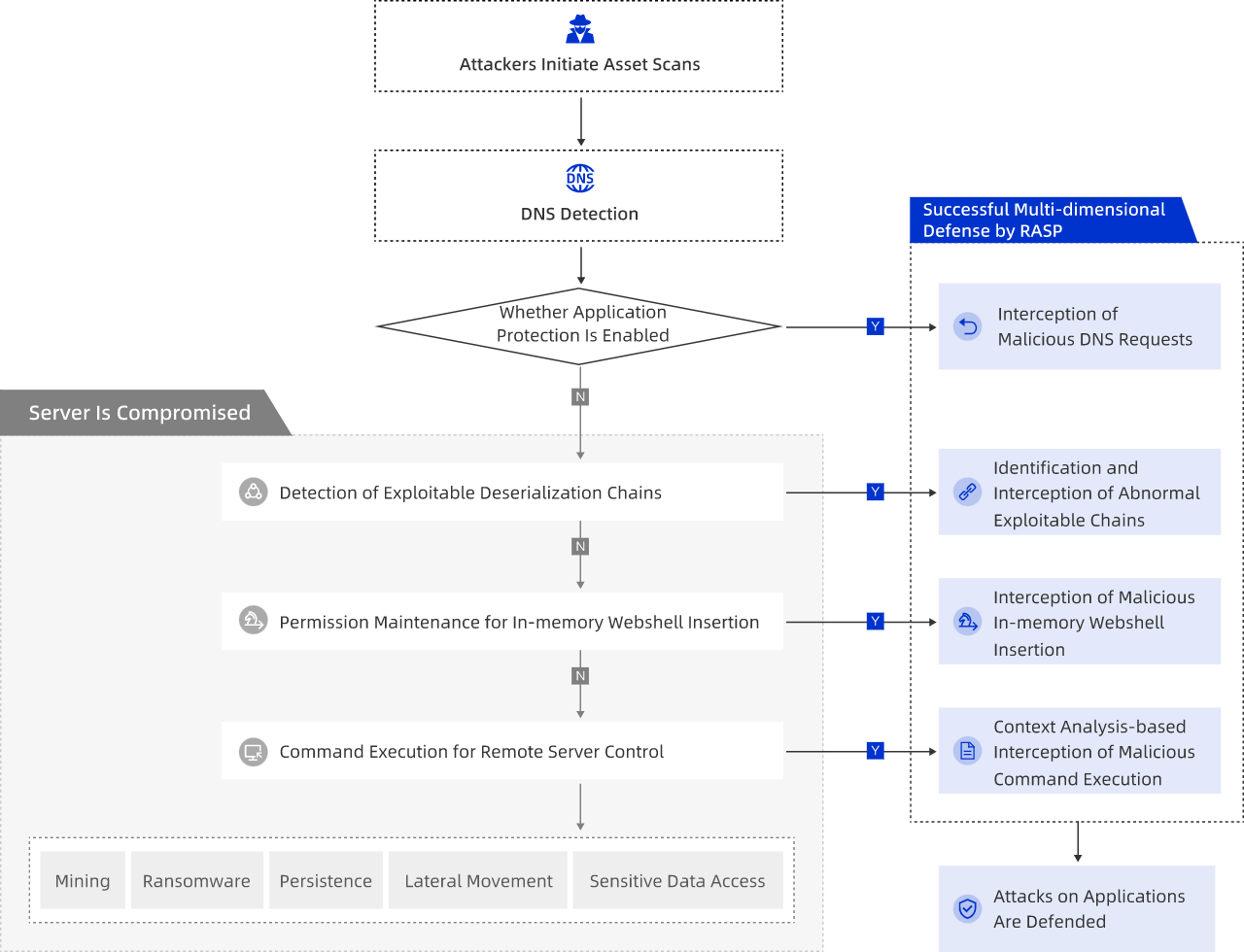
If you cannot fix an application vulnerability immediately, you can connect the application process to RASP for protection first. The following steps describe how to add RASP protection for an application where a vulnerability has been detected.
Log on to Security Center console.
In the left-side navigation pane, choose . In the upper-left corner of the console, select the region where the asset to be protected is located: Chinese Mainland or Outside Chinese Mainland.
On the Application Vulnerability tab, vulnerabilities with the RASP supports real-time protection. tag are supported by Application Protection. Click Enable Protection Now in the Actions column for the corresponding vulnerability.
In the Access Management panel, select the application group to connect from the Application Group Name dropdown, select the corresponding assets, and then click Confirm.
If the required application group does not exist, you can click Create Application Group in the dropdown, enter the application group name, and click OK to quickly create an application group. The Protection Mode of the application group created here is Block, and the Protection Policy Group is Group Name.
After the application with the detected vulnerability is connected to Application Protection, the Unhandled Vulnerabilities list on the vulnerability details page will show the server's Actions column as Protected only after a vulnerability scan has been completed for the application vulnerability.
Application behavior analysis
The Application Behavior Analysis feature monitors, collects, and analyzes application behavior data in real time for connected applications, generating reports and visual displays. This helps you understand your application's attack and defense details and strengthen system security. For more information, see Application behavior analysis.
Memory shell defense (Java applications only)
Application Protection's RASP technology can detect memory shells in real time by analyzing memory data, and supports intercepting memory shell injection and execution processes. For more information, see Memory-resident malware defense.
Weakness detection (Java applications only)
The following table lists the application weakness types that Application Protection can detect, along with related fix recommendations.
Weakness Type | Risk Level | Description | Recommendation |
Insecure Fastjson Configuration | High | Fastjson in the application has deserialization enabled, which may be exploited by attackers to achieve remote code execution. Disable this feature if not required. | Set Fastjson's safemode to true, or set autotype to false. |
Insecure log4j Configuration | High | The log4j component has lookup functionality enabled, which attackers may exploit for JNDI injection, resulting in remote code execution. | Upgrade log4j to the latest version, or delete the org/apache/logging/log4j/core/lookup/JndiLookup.class file from the JAR package. For more information, see Apache Log4j2 Remote Code Execution Vulnerability (CVE-2021-44228). |
Insecure Startup Parameters | High | When an attacker can access the JDWP debugging port, they can execute arbitrary code through this feature, causing remote code execution. | Close the JDWP port or avoid exposing the JDWP port to the public network if no such scenario is required. Be cautious about long-running applications that have the JDWP port enabled. |
Shiro Weak Key | High | Shiro is using a weak encryption key, which attackers may crack to perform further deserialization attacks, resulting in remote code execution. | Update the Shiro encryption key in your application promptly. |
Insecure JMX Configuration | Medium | JMX remote access is enabled without adequate authentication. Attackers may remotely connect to the application's JMX service and achieve command execution. | Disable remote JMX connections, or use secure authentication credentials. |
Insecure Rhino Configuration | Medium | The Rhino framework contains dangerous properties that attackers may exploit for remote code execution. | Upgrade Rhino to the latest version, then use SafeStandardObjects to define the Rhino context to prevent the JavaScript engine from calling Java code. The following is an example of using SafeStandardObjects to define the Rhino context: |
Insecure Spring Configuration | Medium | Spring Actuator has certain endpoints enabled: heapDump, env, restart, refresh, trace, jolokia, h2-console, etc., which may cause sensitive information leakage or remote code execution. | Disable these features if no special scenario requires them. |
Weak Login Credentials | Medium | The application has a weak login password, which attackers may brute-force to access the system and obtain sensitive information or even server access. | Change the application password to a complex password promptly. |
Insecure JNDI Configuration | Low | The application has insecure useCodebaseOnly/rmi-trustURLCodebase/ldap-trustURLCodebase parameter settings, which may be vulnerable to JNDI injection. | Upgrade JDK to the latest version. If you cannot upgrade, add the following startup parameters when starting the application: |
Insecure XML Entity Configuration | Low | XML external entity parsing is enabled, which may expose the application to XXE attacks. | Disable external entities if no special scenario requires them. |
Database Weak Password | Low | The application uses a weak password to connect to the database, which attackers may exploit to connect to the database and cause sensitive information leaks or remote code execution. | Change the database connection password to a complex password promptly. |