ALB billing
Application Load Balancer (ALB) uses a pay-as-you-go billing model. You are charged only for the resources you consume, with no upfront costs. This topic describes the billing details for pay-as-you-go ALB instances, including billing rules, billable items, and billing cycles.
Pay-as-you-go billing
|
Feature |
Pay-as-you-go |
|
Billing rule |
Charges are based on your actual usage. A bill is generated each billing cycle, and fees are deducted from your account balance. |
|
Purchase requirements |
Your account must have a positive balance to create an ALB instance. If your account has an overdue payment, you cannot create new instances until you top up your account. |
|
Billing cycle and bill generation |
|
Billable items
ALB currently supports pay-as-you-go. The fees for ALB consist of three parts: instance fee, load balancer capacity unit (LCU) fee, and Internet data transfer fee.
|
Network type |
Instance fee |
LCU fee |
Data transfer fee |
|
Public |
Charged |
Charged |
Charged |
|
Private |
Charged |
Charged |
Not applicable |
Instance fee
The ALB instance fee is billed hourly. Usage for less than an hour is rounded up to one hour. Billing starts when the instance is created and ends when it is released.
Instance fee = Unit price per instance (CNY/hour) × Billed duration (hours)The prices in the following table are for reference only. For the actual price, see the buy page.
|
Edition |
Unit price (CNY/hour) |
|
Basic |
0.049 |
|
Standard |
0.147 |
|
WAF-enabled |
0.245 |
Load balancer capacity unit (LCU) fee
A load balancer capacity unit (LCU) is the smallest unit used to measure the resources consumed by a load balancer.
LCU dimensions
The ALB LCU fee is billed hourly. Usage for less than an hour is rounded up to one hour.
LCU fee per hour = max(LCUs for new connections, LCUs for concurrent connections, LCUs for data transfer, LCUs for rule evaluations) × LCU unit priceEach hour, LCU consumption is calculated across four dimensions. You are billed based on the dimension with the highest consumption.
|
Dimension |
Description |
Measurement interval |
LCU coefficient |
Hourly LCU calculation |
|
New connections |
The number of new connections processed per second. |
Per second |
25 |
Each hour, the system finds the peak number of new connections per second and divides this value by the LCU coefficient to calculate the LCUs for this dimension. The formula is as follows: |
|
Concurrent connections |
The number of concurrent connections per minute. |
Per minute |
3,000 |
Each hour, the system finds the peak number of concurrent connections per minute and divides this value by the LCU coefficient to calculate the LCUs for this dimension. The formula is as follows: |
|
Data transfer |
The volume of data in GB that ALB processes for HTTP and HTTPS requests and responses. |
Per hour |
1 GB |
During each billing cycle, the system totals the volume of data processed for requests and responses and divides it by the LCU coefficient to determine the number of LCUs for this dimension. The formula is as follows: |
|
Rule evaluations |
The product of the total number of rules that ALB processes and the queries per second (QPS).
Important
|
N/A |
1,000 |
During each billing cycle, the system calculates rule evaluations based on the total number of forwarding rules and the peak QPS. The result is divided by the LCU coefficient to determine the number of LCUs for this dimension. The formula is as follows: |
For each listener, the hourly LCU consumption is based on the dimension with the highest usage. The total LCU fee for an ALB instance is the sum of the LCU fees for all its listeners.
LCU unit price
For billing purposes, the highest LCU value calculated among the four dimensions in a given hour is used. The minimum precision is 0.000001 LCU. For example, if you consume 0.1 LCU in an hour, the LCU fee for that hour is 0.1 × 0.049 = CNY 0.0049.
The prices in the following table are for reference only. For the actual price, see the buy page.
|
Billable item |
LCU unit price (CNY/LCU/hour) |
|
Load balancer capacity unit (LCU) |
0.049 |
LCU billing example
|
Dimension |
Example scenario |
Calculation |
LCU consumption |
|
New connections (per second) |
Within a specific hour, the peak number of new connections created in a single second is 100. |
In this example, the peak is 100 new connections per second. Each LCU provides 25 new connections per second. The number of LCUs is: |
4.0 |
|
Concurrent connections (per minute) |
The peak number of concurrent connections within that hour is 18,000. |
In this example, the peak number of concurrent connections within the hour is 18,000. The number of LCUs is: |
6.0 |
|
Data transfer (per hour) |
1,000 KB per second |
The data transfer rate is 1,000 KB per second. The total data processed per hour is: Each LCU provides 1 GB of data transfer per hour. The number of LCUs is: |
3.6 |
|
Rule evaluations (per second) |
|
In the hour with the peak of 100 new connections per second, each connection sends 4 requests per second. The QPS is: In this example, the number of forwarding rules and additional certificates exceeds the free quotas. The number of billable rule evaluations per second is: Each LCU provides 1,000 rule evaluations per second. The number of LCUs is: |
4.8 |
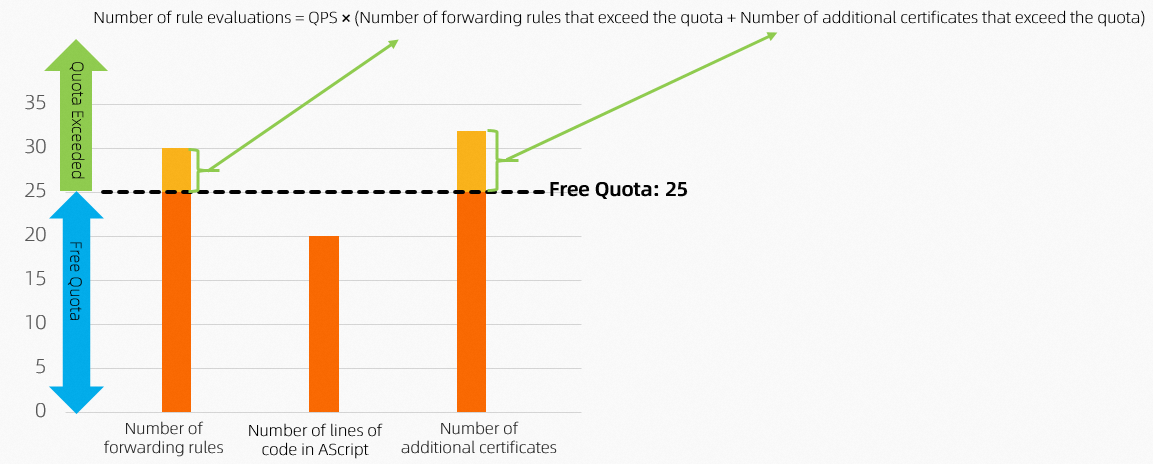
In this example, the dimension with the highest LCU consumption is concurrent connections (6.0 LCUs). Therefore, the LCU fee is calculated based on this dimension.
LCU fee per hour = CNY 0.049/LCU × 6.0 LCUs = CNY 0.294
Based on this usage, the estimated average monthly LCU fee is: CNY 0.294 × 24 hours × 30 days = CNY 211.68
Estimate LCU consumption
You can use the ALB LCU Calculator to estimate your LCU consumption.
Internet data transfer fee
An internal-facing ALB instance does not incur an Internet data transfer fee. This fee applies only to an Internet-facing ALB instance. Internet-facing ALB instances use Elastic IP Addresses (EIPs) to provide services over the internet. Using an Internet-facing ALB instance incurs both EIP instance fees and data transfer fees. For more information, see Pay-as-you-go.
FAQ
Will an ALB instance still incur fees when it has no backend servers attached, has no traffic, or is idle?
Yes. As long as the ALB instance is not released, the instance fee continues to accrue. The idle billing behavior of each ALB billable item is as follows:
-
Instance fee: As long as the ALB instance is not released, the instance fee is charged hourly, regardless of whether ECS instances are attached, all backend servers are removed, or the instance is idle.
-
LCU fee: The LCU fee is charged based on actual usage. If no traffic passes through the ALB instance (that is, no new connections, concurrent connections, data transfer, or rule evaluations occur), no LCU fee is incurred.
-
Internet data transfer fee: An internal-facing ALB instance does not incur an Internet data transfer fee. An Internet-facing ALB instance still incurs a public IP retention fee if an EIP is bound to it, even when there is no business traffic.
If you no longer need the ALB instance, we recommend that you release it promptly to stop billing.
Does ALB support subscription (annual/monthly) billing or auto-renewal? What happens after the free trial expires?
ALB currently supports only the pay-as-you-go billing model and does not support subscription (annual/monthly) billing. Therefore, there is no auto-renewal option. The system automatically deducts fees from your account balance based on actual usage, so you do not need to manually renew.
After the free trial expires, the service is not interrupted. The instance automatically switches to the standard pay-as-you-go billing model. As long as your account balance is sufficient, you can continue to use the ALB service.
How do I view the monthly ALB billing traffic and fee breakdown?
Log on to the Billing and Cost Management console. On the Bill Details page, filter by the ALB service to view the hourly LCU consumption and fee breakdown.
If the EIP bound to an Internet-facing ALB instance uses Cloud Data Transfer (CDT) billing, the data transfer fee generated by the EIP is settled through the CDT bill. In this case, view the related traffic data and fees in the CDT bill in the Expenses and Costs console.
How do I analyze an abnormal increase in fees?
-
Use the CloudMonitor console to view the trends of metrics such as traffic and request count for the ALB instance, and identify the time point when the fee increase started.
-
Check the ALB access logs (which must be enabled in advance) and the backend service logs to analyze whether abnormal traffic or malicious attacks exist.
-
In the Billing and Cost Management console, compare historical bills to identify the specific billable item that caused the fee increase.
-
You can configure fee alerts. When the fee exceeds a threshold, a notification is automatically sent so that you can detect anomalies in a timely manner.
Cost comparison between multiple instances and a single instance
ALB uses the LCU billing model. Forwarding rules occupy control plane resources and are counted in rule evaluations for LCU billing even when no traffic passes through them. Distributing the forwarding rules of a single instance across multiple ALB instances can spread out the number of rules, but each ALB instance independently incurs a fixed instance fee. As a result, the overall cost is not necessarily lower, and operational complexity increases. We recommend that you evaluate your actual business scale and rule count comprehensively, and plan the number of instances reasonably.
Relationship between ALB fees and the number of Ingresses
ALB fees are not directly related to the number of Ingresses. In Kubernetes scenarios, multiple Ingresses can share the same ALB instance, and adding an Ingress does not increase the instance fee. Fees are incurred through the corresponding LCU metrics only when Ingress forwarding generates actual traffic (new connections, concurrent connections, or data transfer), or when the number of added forwarding rules exceeds the free quota (25 rules).