Use CADT to implement availability zone-level disaster recovery drills
The Cloud Architect Design Tool (CADT) disaster recovery management service lets you plan, deploy, and run drills for high availability workloads. You can perform disaster recovery drills before and after your workloads go live to verify your system's robustness against resource or availability zone failures.
Limitations
Upgraded ALB instances support availability zone disaster recovery drills by default.
NoteFor ALB instances that have not been upgraded, only those in static IP mode support availability zone disaster recovery drills. Instances in dynamic IP mode are not supported.
An ALB availability zone disaster recovery drill can simulate a failure in only one availability zone at a time.
Prerequisites
You perform disaster recovery drills on CADT applications. You must first create and deploy an application. Make sure the application status is Deployed.
Billing
Billing for the Cloud Architect Design Tool (CADT) disaster recovery management service is based on the number of instances purchased within a one-year period. For more information about the billing rules, see Billing of CADT disaster recovery management service.
Example scenario
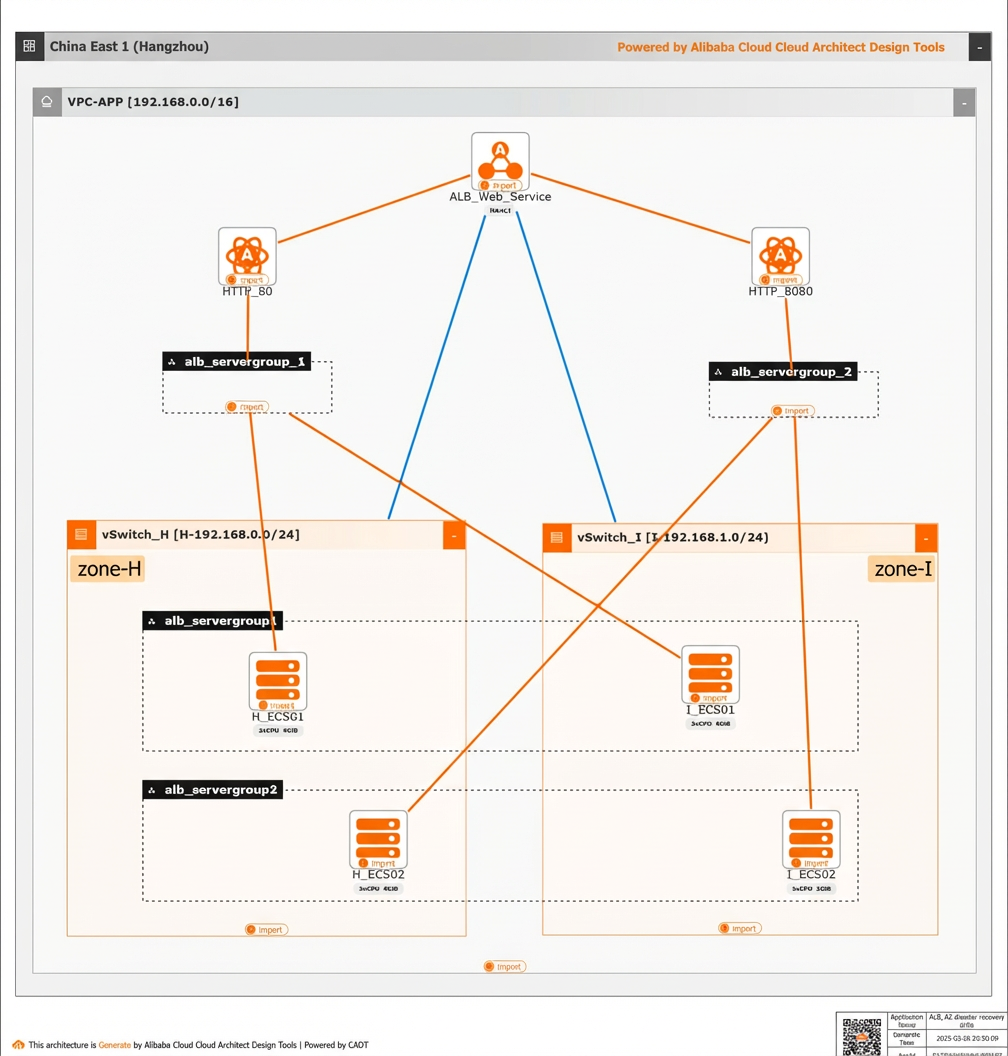
This topic uses a sample CADT application to simulate an availability zone disaster recovery scenario and verify the high availability of an ALB instance.
The following figure shows the sample application. This topic uses the sample application shown below to simulate a failure in China (Hangzhou) Zone H of an ALB instance to verify the instance's availability zone disaster recovery capabilities and high availability.
Procedure
The following steps use an upgraded ALB instance as an example.
Step 1: Create a disaster recovery plan
To run a disaster recovery drill for a CADT application, you must first create a disaster recovery plan. You can only use applications in a drill if they have been added to a disaster recovery plan.
Log on to the Cloud Architect Design Tool (CADT) console and go to the disaster recovery management service page.
Click Create disaster recovery plan, select the application that you want to add to the plan from the drop-down list, and then click OK.
NoteYou can create a disaster recovery plan only for CADT applications that are in the Deployed state.
Step 2: Create a disaster recovery set
Disaster recovery drills are based on disaster recovery sets. A disaster recovery set is a flexible combination of different products and switchover policies within the same disaster recovery plan. This enables versatile drill configurations.
On the disaster recovery plan page, click Create disaster recovery set.
In the Create disaster recovery set dialog box, configure the disaster recovery set and click OK.
In this scenario, set Resource type to alb and select the target ALB instance for primary node. Because the ALB instance is deployed across multiple availability zones, you can keep the default setting for standby node. For detailed instructions on how to configure a disaster recovery set, see Create a disaster recovery set.
After the disaster recovery set is created, you can expand the set to view its details.
Step 3: Disaster recovery switchover drill
A disaster recovery switchover simulates an availability zone failure for an ALB instance to verify its disaster recovery capabilities.
This drill switches resources based on the policies configured in the disaster recovery set.
Before the switchover, log on to the Application Load Balancer (ALB) console to check the status of the availability zones.
On the Instances page, find the target ALB instance and click its ID.
On the Instance Details tab, in the Availability Zone section, view the status of the availability zones and the VIP health check status.
Before the switchover, the status of both China (Hangzhou) Zone H and China (Hangzhou) Zone I is Active, and their VIP health check status is Running.
Log on to the Cloud Architect Design Tool (CADT) console, go to the disaster recovery management service page, and start the disaster recovery switchover drill.
Click Switch over disaster recovery plan. In the Supported failover zone dialog box, select an availability zone. In this example, select China (Hangzhou) Zone H. This simulates a failure in China (Hangzhou) Zone H for the ALB instance.
NoteSwitch over disaster recovery plan performs a switchover for all disaster recovery sets in the current disaster recovery plan. Switch over disaster recovery set performs a switchover only for the resources in the corresponding disaster recovery set. This topic uses Switch over disaster recovery plan as an example.
Click OK and confirm the information in the prompt to start the switchover.
The switchover takes about 10 to 20 seconds. Refresh the page to view the result. The primary node has changed to China (Hangzhou) Zone I.
Log on to the Application Load Balancer (ALB) console. Find and click the target ALB instance. On the Instance Details tab, in the Availability Zone section, view the status of the availability zones and the VIP health check status.
The status of China (Hangzhou) Zone H changes to Updating, and then to Stopped after about 2 seconds.
In the Availability Zone section, the status of China (Hangzhou) Zone H is Updating, and the status of its VIP address
192.168.0.38is Not detected. The status of China (Hangzhou) Zone I is Active, and the status of its VIP address192.168.1.14is Running. This indicates that a disaster recovery switchover is in progress.Stopped
In the Availability Zone section, the status of China (Hangzhou) Zone H is Stopped, and its VIP status is Not detected. The status of China (Hangzhou) Zone I is Active, and its VIP status is Running.
Result: The drill verifies that the ALB instance has availability zone disaster recovery capabilities. When a failure occurs in China (Hangzhou) Zone H, ALB can quickly disable the zone and continue to provide services by using other active availability zones.
Step 4: Disaster recovery failback drill
A disaster recovery failback verifies the recovery capabilities of an ALB instance after a failed availability zone is restored.
A disaster recovery failback is the reverse of a switchover, restoring resources to their original state.
Log on to the Cloud Architect Design Tool (CADT) console, go to the disaster recovery management service page, and start the disaster recovery failback drill.
Click Switch back disaster recovery plan. In the dialog box that appears, confirm the information to start the disaster recovery failback drill. This simulates the recovery of China (Hangzhou) Zone H for the ALB instance.
NoteSwitch back disaster recovery plan performs a failback for all disaster recovery sets in the current disaster recovery plan. Switch back disaster recovery set performs a failback only for the resources in the corresponding disaster recovery set. This topic uses Switch back disaster recovery plan as an example.
The failback takes about 10 to 20 seconds. Refresh the page to view the result. The primary node now includes both China (Hangzhou) Zone H and China (Hangzhou) Zone I, restoring its original configuration.
The status of both the disaster recovery set and the ALB resource changes to Failback complete.
Log on to the Application Load Balancer (ALB) console. Find and click the target ALB instance. On the Instance Details tab, in the Availability Zone section, view the status of the availability zones and the VIP health check status.
The status of China (Hangzhou) Zone H changes to Updating, and then to Active after about 2 seconds.
In the Availability Zone section, the status of China (Hangzhou) Zone H is Updating, and its VIP status is Not detected.
In the Availability Zone section, the status of both China (Hangzhou) Zone H and China (Hangzhou) Zone I is Active. Their respective VIP addresses,
192.168.0.38and192.168.1.14, are both Running. This confirms that the availability zone has recovered after the failback.
Result: The drill verifies that the ALB instance has availability zone restoration capabilities. When China (Hangzhou) Zone H is restored, ALB can quickly restore its service capabilities in that zone.
References
Console documentation
To learn more about the CADT disaster recovery management service, see Overview of the disaster recovery management service and Disaster recovery drills.
You can perform a zone shift and recovery in the ALB console. However, you can change the status of an availability zone to Active or Stopped only by using the CADT disaster recovery management service.
API reference
GetLoadBalancerAttribute : Use this API to query the details of an ALB instance. The
Statusparameter in the response indicates the status of the ALB instance's availability zones.StartShiftLoadBalancerZones: Use this API to perform a zone shift for an availability zone.
CancelShiftLoadBalancerZones: Use this API to cancel a zone shift for an availability zone.