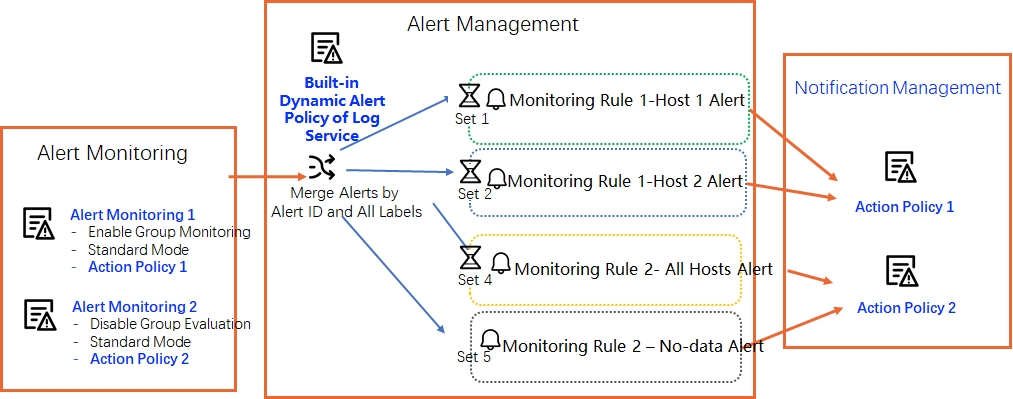
Dynamic action policy mechanism
Simple Log Service allows you to dynamically bind different action policies to a single alert policy. Instead of specifying the action policy in the alert policy, you specify it in each alert monitoring rule.
How it works
-
If you set Action Policy to Dynamic Action Policy when you create an alert policy, Simple Log Service sends alert notifications using the action policy specified in the corresponding alert monitoring rule.
-
If you set Action Policy to an option other than Dynamic Action Policy when you create an alert policy, Simple Log Service uses the action policy specified in the alert policy, ignoring any action policy configured in the alert monitoring rule.
Example
This example uses two alert monitoring rules. When an alert is triggered, Simple Log Service (SLS) uses its built-in dynamic alert policy to group and consolidate the alerts, then sends notifications based on Action Policy 1 and Action Policy 2 respectively.
In the built-in dynamic alert policy of SLS, Action Policy is set to Dynamic Action Policy by default.
-
Alert monitoring rule 1
Enable group evaluation. Set Alert Policy to Standard Mode and Action Policy to Action Policy 1.
-
Alert monitoring rule 2
Disable group evaluation. Set Alert Policy to Standard Mode and Action Policy to Action Policy 2.