Smoothing functions
Smoothing functions perform smoothing and simple filtering on an input time series. Filtering is often the first step in identifying the trend of a time series.
Function list
Function | Description |
| This is the default smoothing function. It uses the Holt-Winters algorithm to filter time series data. |
| Filters time series data using a Finite Impulse Response (FIR) filter. |
| Filters time series data using an Infinite Impulse Response (IIR) filter. |
ts_smooth_simple
Syntax:
select ts_smooth_simple(x, y)Parameters:
Parameter
Description
Value
x
The time column. The values must be in ascending order.
A UNIX timestamp in seconds.
y
The value column shows the data at a specific time.
-
Example
Query and analysis statement:
* | select ts_smooth_simple(stamp, value) from ( select '("__time__" - ("__time__" % 120))' as stamp, avg(v) as value from log GROUP BY stamp order by stamp )Output:
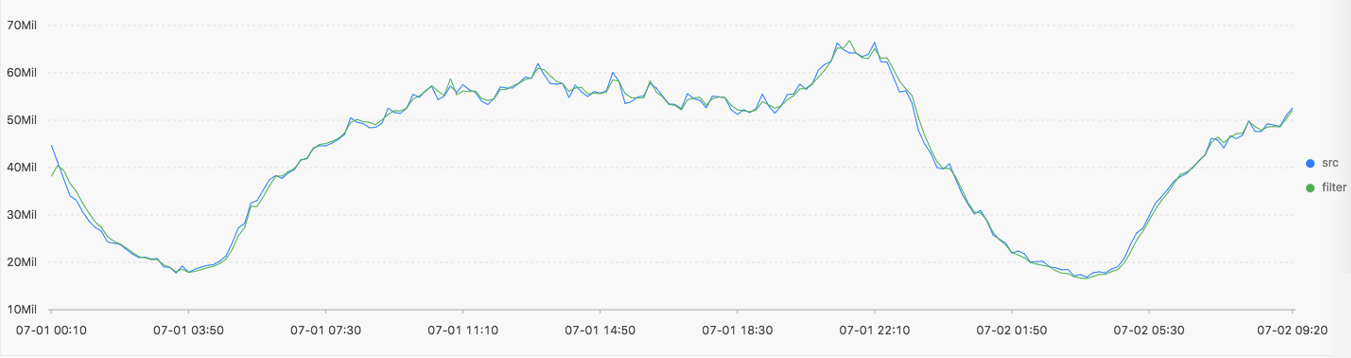
Display:
Displayed Items
Description
Horizontal axis
unixtime
The timestamp of the data in seconds.
Vertical axis
src
The data before filtering.
filter
The data after filtering.
ts_smooth_fir
Syntax:
If you cannot determine the filter parameters, you can use the parameters for the built-in window.
select ts_smooth_fir(x, y,winType,winSize)If you can determine the filter parameters, you can set custom filter parameters as needed.
select ts_smooth_fir(x, y,array[])
Parameters:
Parameter
Description
Value
x
The time column. The values must be in ascending order.
A UNIX timestamp in seconds.
y
A value column contains data for a specific point in time.
-
winType
The type of the filter window.
Valid values:
rectangle: a rectangular window.
hanning: a Hanning window.
hamming: a Hamming window.
blackman: a Blackman window.
NoteSet this parameter to rectangle for better display results.
winSize
The length of the filter window.
The value must be of the long type. The value ranges from 2 to 15.
array[]
The specific parameters for the FIR filter.
An array in which the sum of elements is 1. Example: array[0.2, 0.4, 0.3, 0.1].
Example 1
Query and analysis statement:
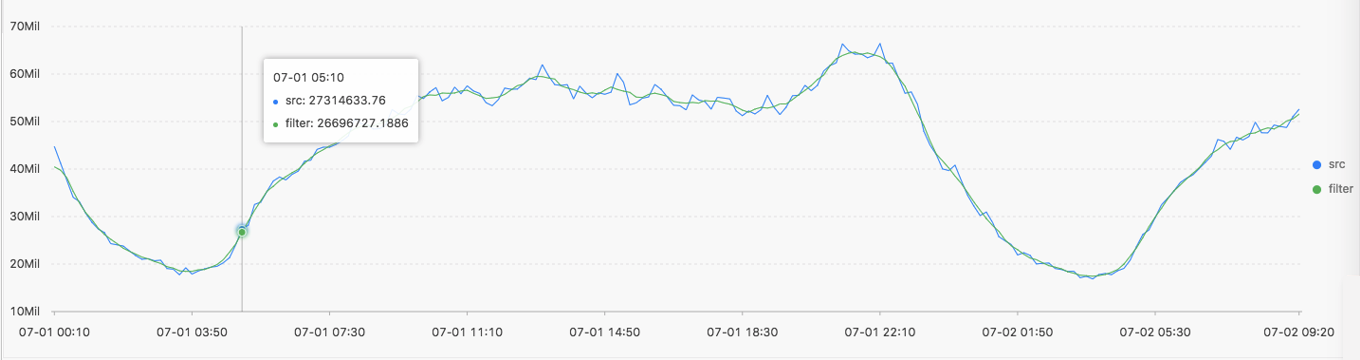
* | select ts_smooth_fir(stamp, value, 'rectangle', 4) from ( select '("__time__" - ("__time__" % 120))' as stamp, avg(v) as value from log GROUP BY stamp order by stamp )Output:
Example 2
Query and analysis statement:
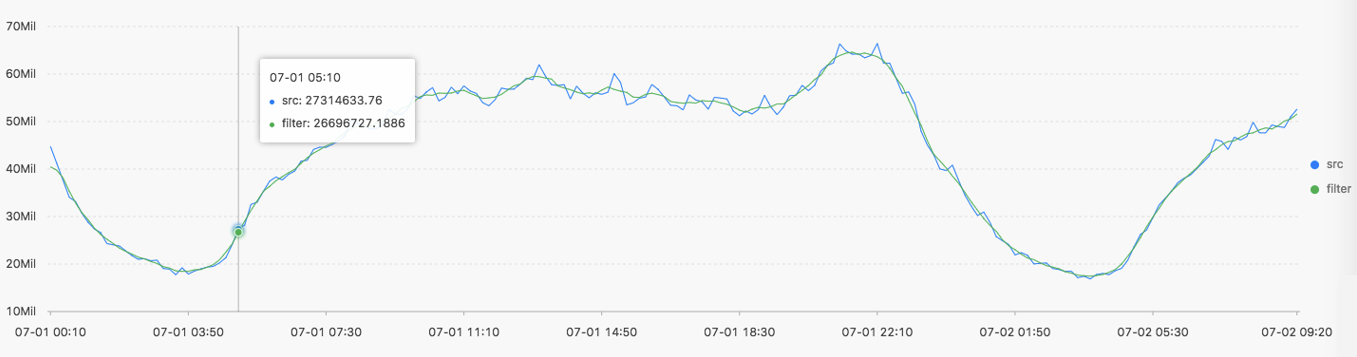
* | select ts_smooth_fir(stamp, value, array[0.2, 0.4, 0.3, 0.1]) from ( select '("__time__" - ("__time__" % 120))' as stamp, avg(v) as value from log GROUP BY stamp order by stamp )Output:
Displayed items:
Display Items
Description
Horizontal axis
unixtime
The UNIX timestamp of the data in seconds.
Vertical axis
src
The data before filtering.
filter
The data after filtering.
ts_smooth_iir
Syntax:
select ts_smooth_iir(x, y, array[], array[] )Parameters:
Parameter
Description
Value
x
The time column. The values must be in ascending order.
A UNIX timestamp in seconds.
y
A numeric column that contains data for a specific point in time.
-
array[]
The specific parameters for the IIR filter algorithm related to x i.
An array with a length from 2 to 15. The sum of the elements in the array must be 1. Example: array[0.2, 0.4, 0.3, 0.1].
array[]
The specific parameters for the IIR filter algorithm related to y i−1.
An array with a length from 2 to 15. The sum of the elements in the array must be 1. Example: array[0.2, 0.4, 0.3, 0.1].
Example
Query and analysis statement:
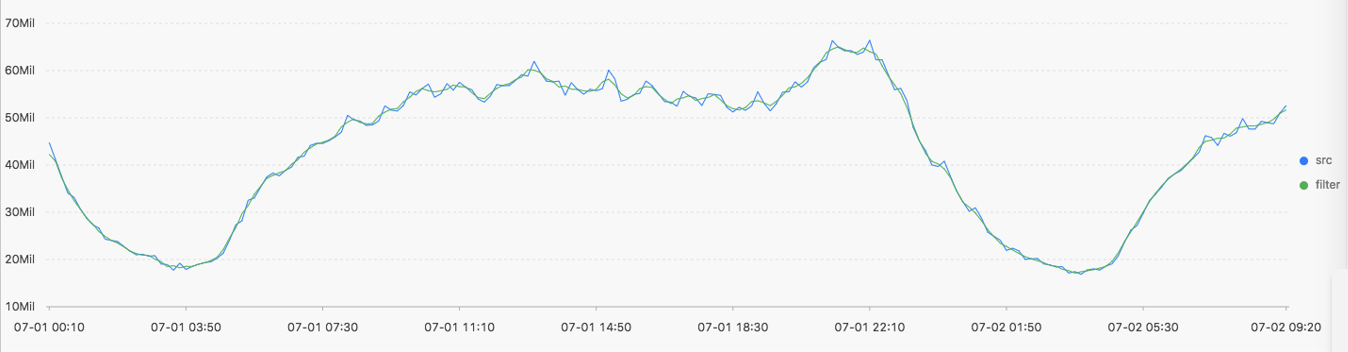
* | select ts_smooth_iir(stamp, value, array[0.2, 0.4, 0.3, 0.1], array[0.4, 0.3, 0.3]) from ( select '("__time__" - ("__time__" % 120))' as stamp, avg(v) as value from log GROUP BY stamp order by stamp )Output:
Displayed items:
Displayed Items
Description
Horizontal axis
unixtime
The UNIX timestamp of the data in seconds.
Vertical axis
src
The data before filtering.
filter
The data after filtering.