The new version of Cost Manager provides more accurate and real-time data. This topic describes the steps to upgrade Cost Manager.
If you use a Resource Access Management (RAM) user, ensure that the RAM user has the LogFullAccess permission.
On the Business Analysis tab in the Log Application section, click Cost Manager.
Confirm the Cost Manager version.
If the navigation bar in Cost Manager includes SLS Bill Self-service Analysis and OSS Bill Self-service Analysis, you are using the latest version. No upgrade is required. Otherwise, proceed to the next step to complete the upgrade.
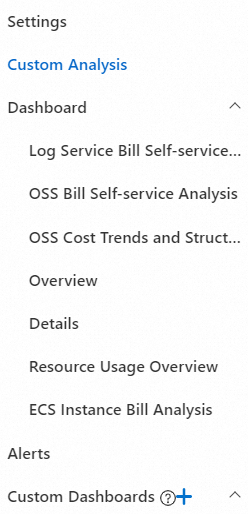
In the navigation pane on the left, click Settings.
If you are using an earlier version of Cost Manager, a version update prompt automatically appears. Follow the prompts to complete the upgrade.
NoteData import takes about 1 to 2 hours. The exact time depends on the volume of your bill data.