View data reports
The Log Analysis for AWS CloudTrail application provides out-of-the-box dashboards to analyze and audit events in your Amazon Web Services (AWS) account. Available dashboards include Overview, Logon Auditing, S3 Data Event, IAM Auditing, and Network and Security Auditing.
Prerequisites
A Log Analysis for CloudTrail configuration is created. For more information, see Import AWS CloudTrail logs.
Procedure
Log on to the Simple Log Service console.
- In the Log Application section, on the Audit & Security tab, click Log Analysis for AWS CloudTrail.
- In the left-side navigation pane, click the report that you want to view in the Data Reports section.
- In the upper-left corner of the page that appears, select the Log Analysis for AWS CloudTrail configuration.
Overview
The Overview dashboard summarizes events recorded by AWS CloudTrail, with charts for event counts, source services, source regions, Insights events, and trends by event type and source region.
Logon auditing
The Logon Auditing dashboard shows AWS CloudTrail logon events, with charts for global logon distribution, successful and failed logon trends, and failed authentication event distribution globally and by type.
The dashboard also includes panels such as List of Recent Failed Authentication Events, Root account Logon PV, Root account Logon UV, Failed Logon PV, Failed Logon UV, Account Logon List, Top IPs for Account Logons, Top IPs for Root account Logons, Failed Account Logon List, Distribution of Failed Account Logon Reasons, and Top IPs for Failed Account Logons.S3 Data Event
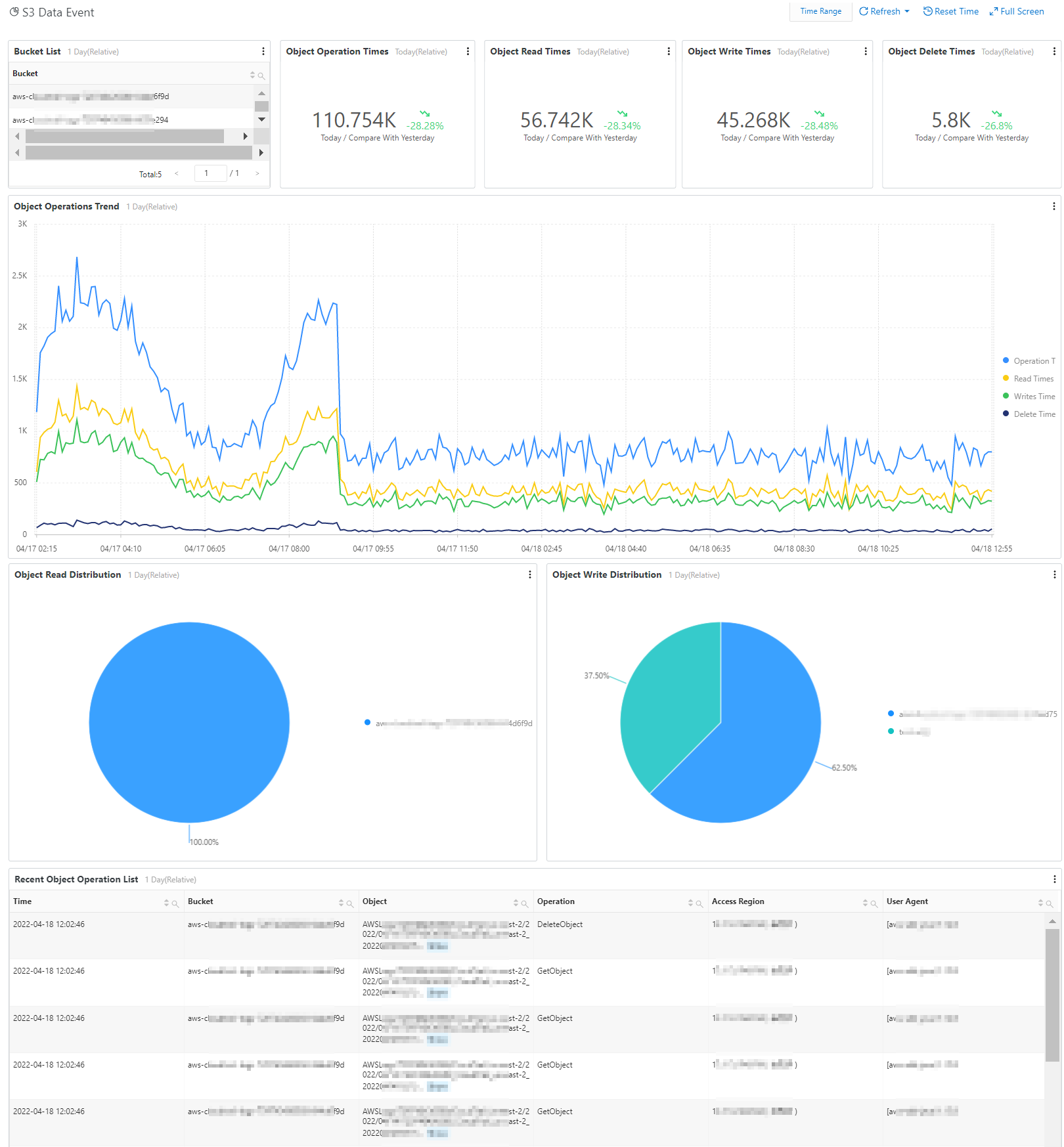
The S3 Data Event dashboard shows S3 data events from AWS CloudTrail, with charts for bucket lists, object operation counts, read/write/delete breakdowns, and operation trends.
IAM Auditing
The IAM Auditing dashboard shows IAM events from AWS CloudTrail, with charts for error event counts and distribution, error event lists, and user change event distribution and details.
The IAM Auditing dashboard contains the following areas:
-
Error event count (this week) and IAM error event distribution bar chart (including UpdateRole, AddUserToGroup, CreateUser, and other event types) and Error event list (including fields such as time, event name, error code, account ID, event region, and source IP)
-
User change event distribution pie chart (CreateUser 74.98%, AddUserToGroup 25.02%) and User change event list
-
Role change event distribution pie chart (UpdateRole 66.85%, DeleteRole 33.15%) and Role change event list
-
Policy change event distribution pie chart (CreatePolicyVersion 72.77%, CreatePolicy 27.23%) and Policy change event list
Network and Security Auditing
The Network and Security Auditing dashboard shows network and security events from AWS CloudTrail, with charts for VPC change distribution and details, and network firewall change distribution and details.
The Network and Security Auditing dashboard contains the following modules:
-
VPC change event distribution pie chart (CreateVpc 50.11%, DisableVpcClassicLink 49.89%) and corresponding event list (including fields such as time, event source, event name, account ID, source IP, and logon region)
-
Network firewall change event distribution pie chart (CreateFirewallRules 66.64%, CreateFirewallRules 33.36%) and corresponding event list
-
Security group change event distribution pie chart (AuthorizeSecurityGroup 75.06%, DeleteSecurityGroup 24.94%) and corresponding event list
-
Recent network access control list change events table, with columns including time, event name, event region, error code, access IP, visitor (region, ISP), and client. The table shows CreateNetworkAcl and CreateNetworkAclEntry events in regions including us-east-1 and us-east-2.