Error message: “Command 'yum -y distro-sync' returned non-zero”
This topic describes the issue description, root cause, and solution when you receive the error message “Command 'yum -y distro-sync' returned non-zero” during Linux operating system migration.
Issue description
During SMC operating system migration, the migration task fails with the error message “Command 'yum -y distro-sync' returned non-zero”.
Root cause
Migrating to Anolis OS uses the yum distro-sync mechanism. This command reinstalls all CentOS-provided packages on your current system with packages from the Anolis OS repository. The process involves parsing package dependencies, downloading packages, and installing them. It takes a long time to complete. If this command is interrupted unexpectedly, running it again will immediately fail and stop the migration.
Solution
If
yum distro-syncis interrupted unexpectedly, examine the issue based on the stage at which the command was running.Interrupted before the upgrade process starts
If the interruption occurs during dependency parsing or package downloading—but before package installation begins—you can run
yum distro-syncagain, and it will work normally.Interrupted during package installation
Package conflicts may occur. Running
yum distro-syncagain will show an error. The specific error and affected packages depend on when the command was interrupted. This example uses the following error message.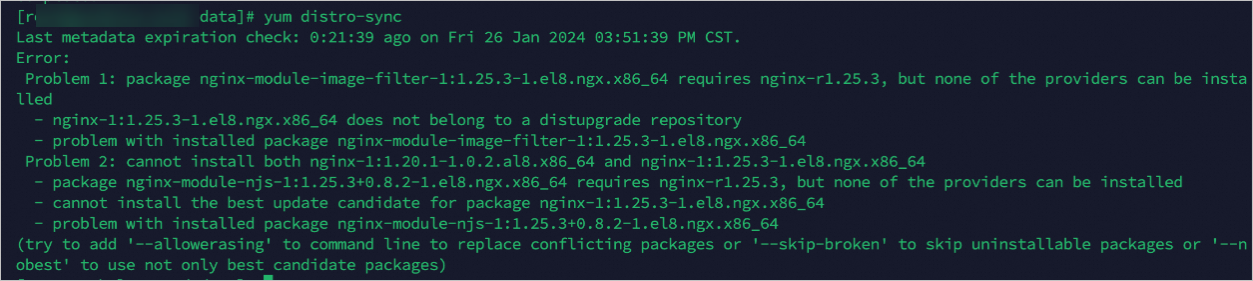
Run the following command to check how the nginx package is installed on your system.
rpm -q nginxThe query shows that nginx from a third-party repository is installed, causing incompatibility and conflict.
Run the following command to uninstall the incompatible nginx packages from the third-party repository.
rpm -e nginx*If uninstallation fails due to dependencies, uninstall those dependencies as well.
Run
yum distro-syncto check for errors.If the command runs successfully, continue the migration by running one of the following commands.
When migrating to Anolis OS
python3 /usr/sbin/centos2anolis.py -cWhen migrating to Alibaba Cloud Linux
python3 /usr/sbin/centos2alinux.py -c
If the error persists, continue troubleshooting the reported issue.
After resolving the issue, see Manage SMC client and run the SMC client command
./go2aliyun_client --rerun --skipgrubto retry.