To prevent migration task errors from blocking the SMC migration process, you can subscribe to SMC migration task error-related event notifications in Cloud Monitor, ensuring prompt receipt ofSMC messages and emails.
Cloud Monitor is an integrated monitoring service from Alibaba Cloud that enables you to query, manage, and monitor system events across Alibaba Cloud services. For more information about Cloud Monitor, see What is CloudMonitor.
Procedure
Step 1: Create alert contacts and alert contact groups
To receive notifications about SMC migration task errors, you must first create alert contacts and alert contact groups, then add alert contacts to the group.
-
Log on to the Cloud Monitor console.
Create an alert contact.
-
In the left-side navigation pane, choose .
-
On the Alert Contacts tab, click Create Alert Contact.
In the Set Alert Contact panel, configure the necessary parameters for the alert contact.
The following table describes the key parameters. You can retain the default values for other parameters. For more information, see Create an Alert Contact.
Parameter
Description
Name
The name of the alert contact. The name must start with a letter and must be 2 to 40 characters in length. It can contain letters, digits, periods (.), and underscores (_).
Region for Alert Notification Service
The region where you want to use the alert notification service. Data provided by the alert notification service, such as the contact name and email address, are stored and processed in the selected region.
Phone
Only mobile phone numbers prefixed with the country code 86 support alert notifications via text messages.
Email ID
The email address of the alert contact.
Language of Alert Notifications
The default value is Automatic. This indicates that Cloud Monitor automatically selects the language of alert notifications based on the language that you use to create your Alibaba Cloud account.
-
Verify the information and click Confirm.
-
(Optional) Activate the email address and phone number.
If you specify an email address and phone number, their status is Pending Activation by default. The contact must click the activation links in the email and text message within 24 hours to receive alert notifications. After activation, the email address and phone number appear in the contact list.
-
Create an alert contact group.
-
In the left-side navigation pane, choose .
-
Click the Alert Contact Group tab.
-
On the Alert Contact Group tab, click Create Alert Contact Group.
-
In the Create Alert Contact Group panel, enter a group name and select the alert contacts to add.
-
Click Confirm.
-
Step 2: Create a notification configuration policy
Configure the alert contact group to ensure timely receipt of notifications.
-
In the left-side navigation pane, choose .
-
On the Notification Configuration page, click Create policy.
In the Create Policy panel, configure the necessary parameters for your notification policy.
The following table describes the key parameters. You can retain the default values for other parameters. For more information, see Create a Notification Configuration Policy.
Parameter
Description
Name
The name of the notification configuration policy. We recommend that you use a Chinese name.
Description
The description of the notification configuration policy.
Notification Settings
Select Set Notification Group Directly.
Contact Group
Select the alert contact group.
-
Click OK.
Step 3: Create a subscription policy
Configure Cloud Monitor to automatically send the original alert notification to the alert contact upon SMC migration task failure.
-
In the left-side navigation pane, choose Event Center > Event Subscription.
NoteYou can also create a subscription policy from the System Event menu as follows:
-
In the left-side navigation pane, choose Event Center > System Event.
-
In the Welcome to the New Event Center section, click Create Now.
-
-
On the Subscription Policy tab, click Create Subscription Policy.
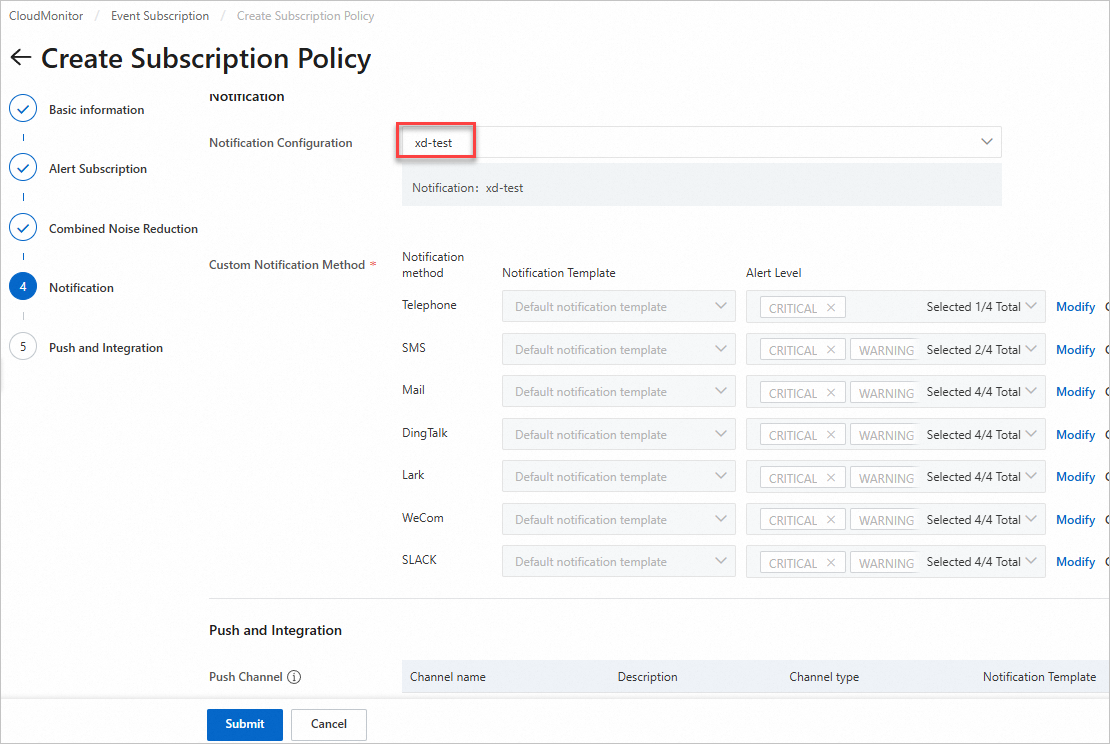
On the Create Subscription Policy page, configure the parameters for the subscription policy.
The following table describes the key parameters. You can retain the default values for other parameters. For more information, see Create a Subscription Policy.
Area
Parameter
Description
Basic information
Name
The name of the subscription policy. It is recommended to use a Chinese name.
Description
The description of the subscription policy.
Alert Subscription
Subscription Type
Select System Event.
Subscription Scope
Select Server Migration Center for Product. No other parameters need to be selected.
Notification
Notification Settings
Select the created notification configuration policy.
Click Submit.
Step 4: View alert notifications
When an SMC migration task error occurs, Cloud Monitor automatically issues an alert notification to the alert contact for prompt action.
In the migration source list of the SMC console, the Real-time Migration Status column displays the Error status, marked by a red exclamation point icon. Click View Details to identify the cause of the error. The Actions column provides the Troubleshoot and Retry Migration links.