Fine-grained access control with tags
Use tags on Server Migration Center (SMC) resources to categorize them and grant different RAM users specific access permissions.
Prerequisites
A RAM user is created under your Alibaba Cloud account. Create a RAM user.
Background
Tags identify and categorize cloud resources. Resource Access Management (RAM) policies control access and operation permissions. Adding tags as conditions in RAM policies enables fine-grained access control.
The following figure shows tag-based permission control for a RAM user.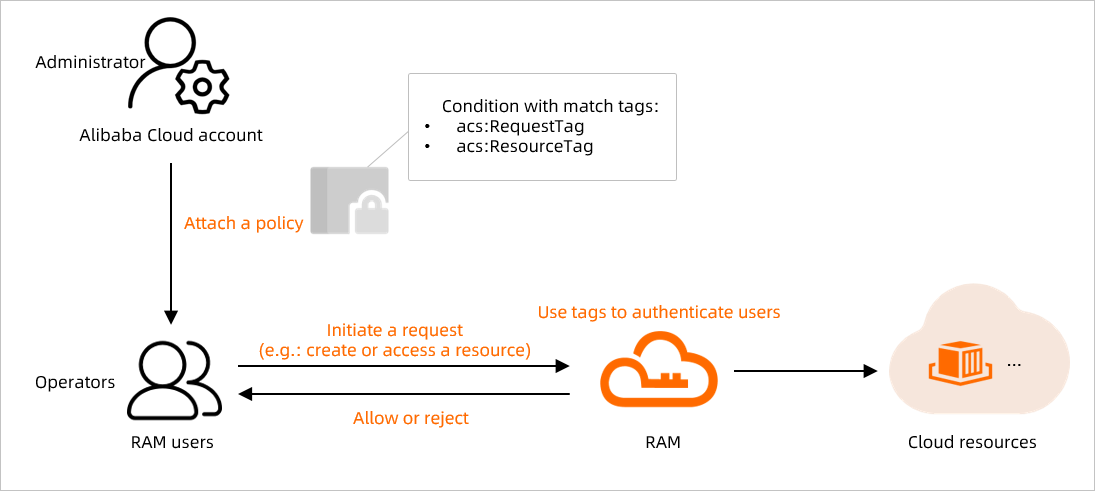
SMC resources that support tags include migration sources and migration jobs. You can add tags to a migration source only after it is created. Use tags to manage migration sources and migration jobs.
Use case example
The following scenario demonstrates tag-based access control.
Allow a RAM user to manage only SMC resources with a specific tag, such as smc:test, as shown in the following figure.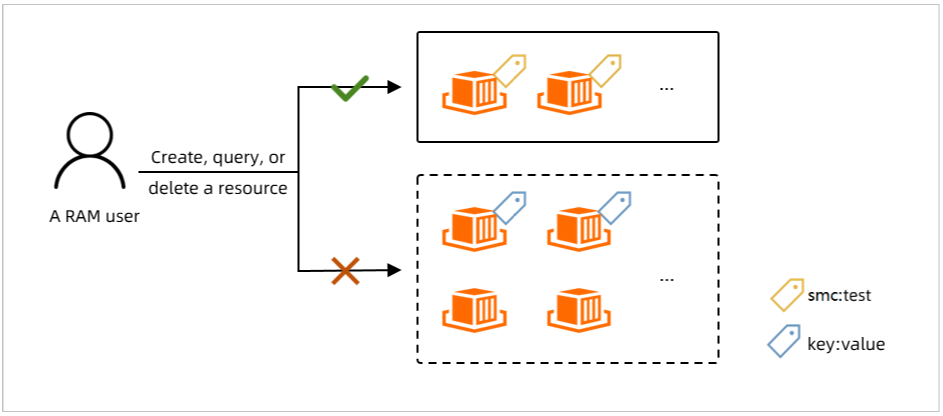
This example covers two scenarios:
-
Scenario 1: A migration job can be created only if the
smc:testtag is added during creation. -
Scenario 2: A user can perform operations, such as modifying properties, deleting resources, and managing tags, only on SMC resources that have the
smc:testtag.
Step 1: Create and grant a custom policy
Create a custom policy in the RAM console or call the CreatePolicy API operation. Policy details are in the Policy configuration section.
-
Log on to the RAM console with your Alibaba Cloud account.
-
In the left-side navigation pane, choose .
-
On the Policies page, click Create Policy.
-
On the Create Policy page, click the JSON tab.
-
Configure the policy.
A policy consists of a version number and statements. Each statement includes an Effect, Action, Resource, and optional Condition, as described in Policy elements and Policy structure and syntax.
-
After you modify the policy document as needed, click OK.
In the
Conditionblock, add tag-based conditions to restrict permissions. The following table describes the supported condition keys.Condition key
Description
acs:RequestTagRequires the request to include a specific tag.
If an API operation does not support tags in requests, you cannot use this condition key. Otherwise, authentication will fail.
acs:ResourceTagRequires the accessed resource to have a specific tag.
If an API operation does not require a resource ID in the request, you cannot use this condition key. Otherwise, authentication will fail.
NoteChoose
acs:RequestTagoracs:ResourceTagbased on the API operation — whether it requires a resource ID or supports tags in the request. Tag-based authentication for API operations.{ "Statement": [ { "Action": "smc:CreateReplicationJob", "Condition": { "StringEquals": { "acs:RequestTag/smc": "test" } }, "Effect": "Allow", "Resource": "*" }, { "Action": "smc:*", "Condition": { "StringEquals": { "acs:ResourceTag/smc": "test" } }, "Effect": "Allow", "Resource": "*" }, { "Action": [ "*:TagResources", "*:UntagResources" ], "Effect": "Deny", "Resource": "*" }, { "Action": [ "*:List*", "*:Describe*" ], "Effect": "Allow", "Resource": "*" } ], "Version": "1" }The preceding policy implements the following permission controls.
Scenario
Policy
Scenario 1: Allows a migration job to be created only if the
smc:testtag is added during creation.{ "Statement": [ { "Action": "smc:CreateReplicationJob", "Condition": { "StringEquals": { "acs:RequestTag/smc": "test" } }, "Effect": "Allow", "Resource": "*" }, { "Action": [ "*:List*", "*:Describe*" ], "Effect": "Allow", "Resource": "*" } ], "Version": "1" }Scenario 2: Allows operations (such as modifying properties and deleting resources) only on SMC resources that have the
smc:testtag. Operations on other SMC resources are denied.{ "Statement": [ { "Action": "smc:*", "Condition": { "StringEquals": { "acs:ResourceTag/smc": "test" } }, "Effect": "Allow", "Resource": "*" }, { "Action": [ "*:TagResources", "*:UntagResources" ], "Effect": "Deny", "Resource": "*" }, { "Action": [ "*:List*", "*:Describe*" ], "Effect": "Allow", "Resource": "*" } ], "Version": "1" } -
In the Create Policy dialog box, enter a name and description for the policy, and then click OK.
-
-
Attach the custom policy to the RAM user.
-
In the left-side navigation pane, choose .
-
Attach the newly created custom policy to the RAM user.
-
Step 2: Verify the policy
-
Log on to the SMC console or OpenAPI Explorer as a RAM user.
This example uses the SMC console for verification.
-
Verify that the policy works correctly.
Test the following permissions:
-
Create a migration job:
-
For a migration source with the
smc:testtag, you can create a migration job. -
For a migration source without the
smc:testtag or with other tags, you cannot create a migration job. The error message You are not authorized to perform this operation. Contact your Alibaba Cloud account to grant the required permissions and then try again. appears. Click Go to RAM for Authorization to grant permissions.
-
-
Delete a migration source:
-
You can delete a migration source that has the
smc:testtag. -
If you try to delete a migration source without the
smc:testtag, the operation fails. An Error dialog box appears with the message "You are not authorized to perform this operation. Contact your Alibaba Cloud account to grant the required permissions and then try again." Click OK to close the dialog box.
-
-
Tag-based authentication for API operations
After attaching a tag-based policy to a RAM user, API requests are authenticated as described in the following table.
|
API |
Authentication logic |
|
CreateReplicationJob |
This operation does not require a resource ID. Authentication is based on the
|
|
ModifyReplicationJobAttribute |
This operation requires a resource ID. Authentication is based on the
|
|
Other operations, such as StartReplicationJob, StopReplicationJob, and DeleteSourceServer |
These operations require a resource ID. Authentication is based on the
|