Before you send SMS messages, you must apply for an SMS signature. Submitting a signature that complies with the SMS signature specifications increases the likelihood of approval.
Usage notes
-
Before you apply for an SMS signature, you must apply for the necessary qualifications based on the qualification document instructions.
-
If you are applying for a signature for third-party use, you must provide a letter of authorization that meets the format requirements when you submit the application.
Procedure
-
Log on to the Short Message Service console.
-
In the left-side navigation pane, choose .
-
On the Digital Short Message Signatures page, click add signature and fill in the Basic Information and Other Information sections as prompted.
Purpose of Associated Qualification:
Personal use: Select this option if the enterprise or individual information for the selected Signature Source matches the real-name verification information of this Alibaba Cloud account.
Third-party use: Select this option if the enterprise or individual information for the selected Signature Source does not match the real-name verification information of this Alibaba Cloud account.
Power of attorney: When you set Associated Qualification Type to Third-party use, you must associate a power of attorney. The system automatically displays a list of valid powers of attorney that match the selected Qualification Information. If no power of attorney is available, click Add Power of Attorney to add one. For more information, see Instructions for completing a power of attorney.
NoteThe system automatically extracts approved but unnamed powers of attorney from your previously approved third-party qualifications. You can select these documents when applying for new signatures. They are named in the format
Authorizer Enterprise NameVVersion Number.For example, if the authorizer in a previously submitted power of attorney was Cainiao Network Technology Co., Ltd., the default name is
Cainiao Network Technology Co., Ltd.V1.
Associated Qualification Name: Select the qualification to which the signature belongs from the drop-down list. To prevent rejection, choose an approved qualification. If no qualification is available, apply for a qualification first.
Signature Source: Your signature must have a verifiable source to prove ownership. The signature name must correspond to the selected Signature Source. For example, if the Signature Source is Enterprise or public institution name, the signature name must be the full or abbreviated name of the enterprise or public institution. The available signature sources differ for individual and enterprise verified users. Select a Signature Source based on your business requirements.
NoteIf the Signature Source option you need is unavailable, note the following: Signatures for Personal use by individually verified users cannot pass the carrier's real-name registration. To proceed, you must apply for and associate a Third-party use qualification, or change your individual verification to enterprise verification.
If your business is in the development or testing phase, use the Quick Learning and Testing feature in the console or wait until your service is officially launched before applying for a signature.
For government agencies, select Enterprise or public institution name as the Signature Source. Choose the source that best fits your situation.
The enterprise must own the registered trademark. The trademark must be searchable on the China Trademark Office website, and the owner listed on the trademark must match the enterprise's name.
If Signature Source is Registered Trademark Name:
Screenshot of Trademark Details: If you select Registered Trademark Name as the Signature Source, you must upload a screenshot of the trademark details. See Steps to capture a screenshot of trademark details and Screenshot requirements for trademark details.
If Signature Source is Launched App (This is no longer supported by carriers. Click to view policy details):
Signature Name: Enter a signature name. Do not enter the square brackets
【】. The system automatically adds the brackets【】and places them at the beginning of the message content when an SMS message is sent. The signature name must be the sender's full name, abbreviation, or legally registered trademark to clearly identify the sender. Generic or ambiguous signatures are not supported. For more information, see Signature Specifications.ImportantIf you selected Third-party use, the signature name must be within the scope of signatures authorized in the uploaded power of attorney.
-
Industry type: Select the industry type for the signature based on your use case, and upload related attachments in the Additional Information section.
-
General/E-commerce and Retail: No additional attachments are required. The Attachments field is optional.
-
Finance: You must upload a financial license and a signature authorization letter. Attachments are required.
-
Insurance: You must upload an insurance business license. Attachments are required.
-
Gaming: You must upload a software copyright certificate for the game, a trademark registration certificate, and a game license number. Attachments are required.
-
Government/Enterprise: You must upload a letter of authorization (such as a cooperation agreement or a signature authorization letter). Attachments are required.
-
Live Streaming: You must upload a live streaming commitment letter. Attachments are required.
-
Use Scenario: Provide a detailed description of your business scenario to help reviewers understand your use case and speed up the review.
You can describe a use case for your live business and provide relevant links, such as a download link from an app marketplace.
You can provide a complete message sample that demonstrates your business scenario.
If the signature is for a government agency or enterprise, please provide the organization's landline number for verification.
For login scenarios, provide a screenshot of the website or system after a user logs in.
-
More Materials: Upload any additional supporting documents required for your industry type, such as financial licenses, insurance business licenses, game software copyright certificates, trademark registration certificates, game license numbers, letters of authorization, or live streaming commitment letters. This helps reviewers understand your business in more detail.
Click Submit. The signature enters the review process. You can view the Approval Status on the Change Review Records tab.
Next steps
This registration process typically takes 5 to 7 business days, though for some carriers it can extend to 7 to 10 business days. However, these timelines are not guaranteed and the process may take longer.
Appendix
Trademark details screenshot steps
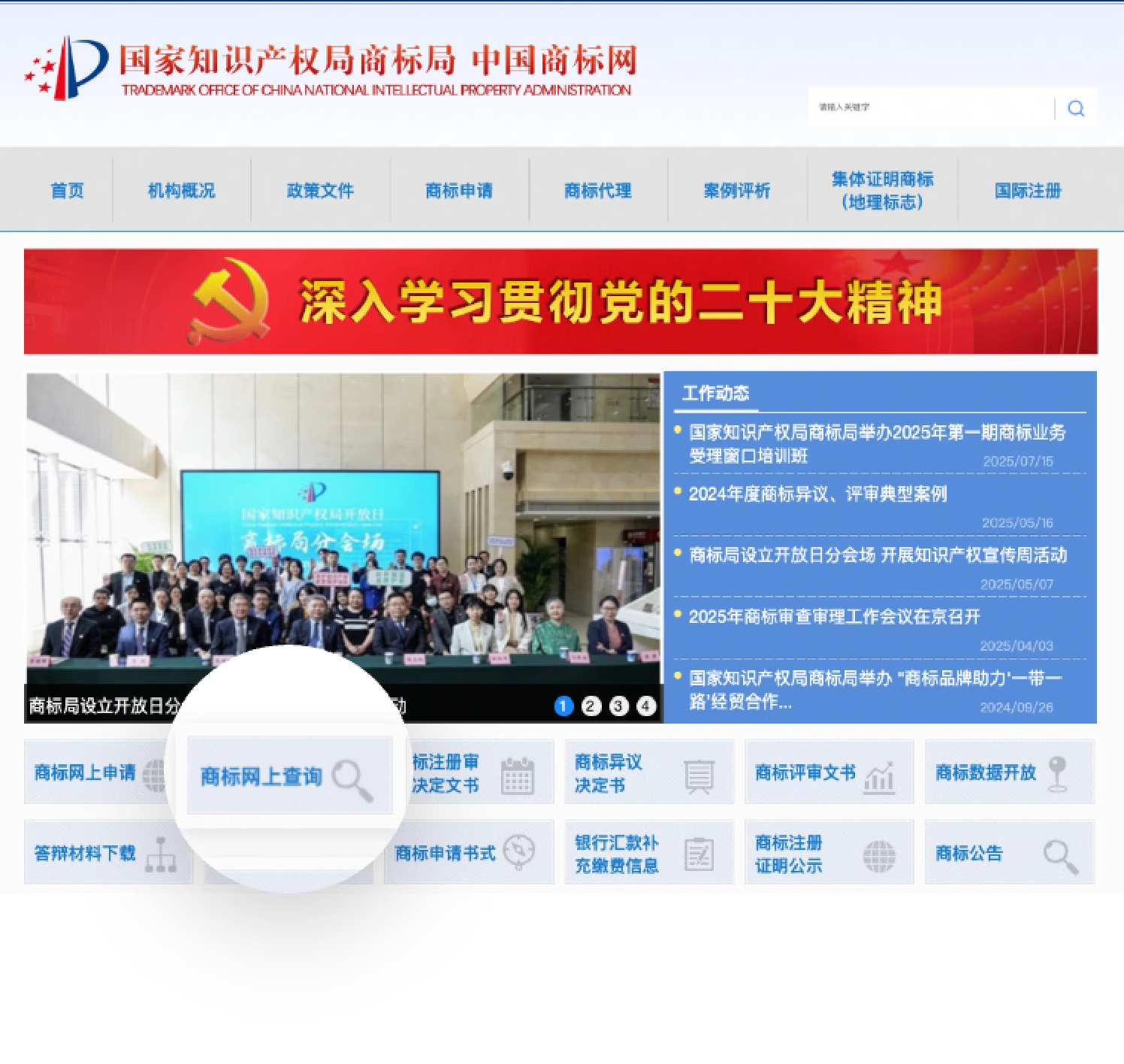
Go to the China Trademark Office website and click "Online Trademark Search" to capture a screenshot of the trademark details.
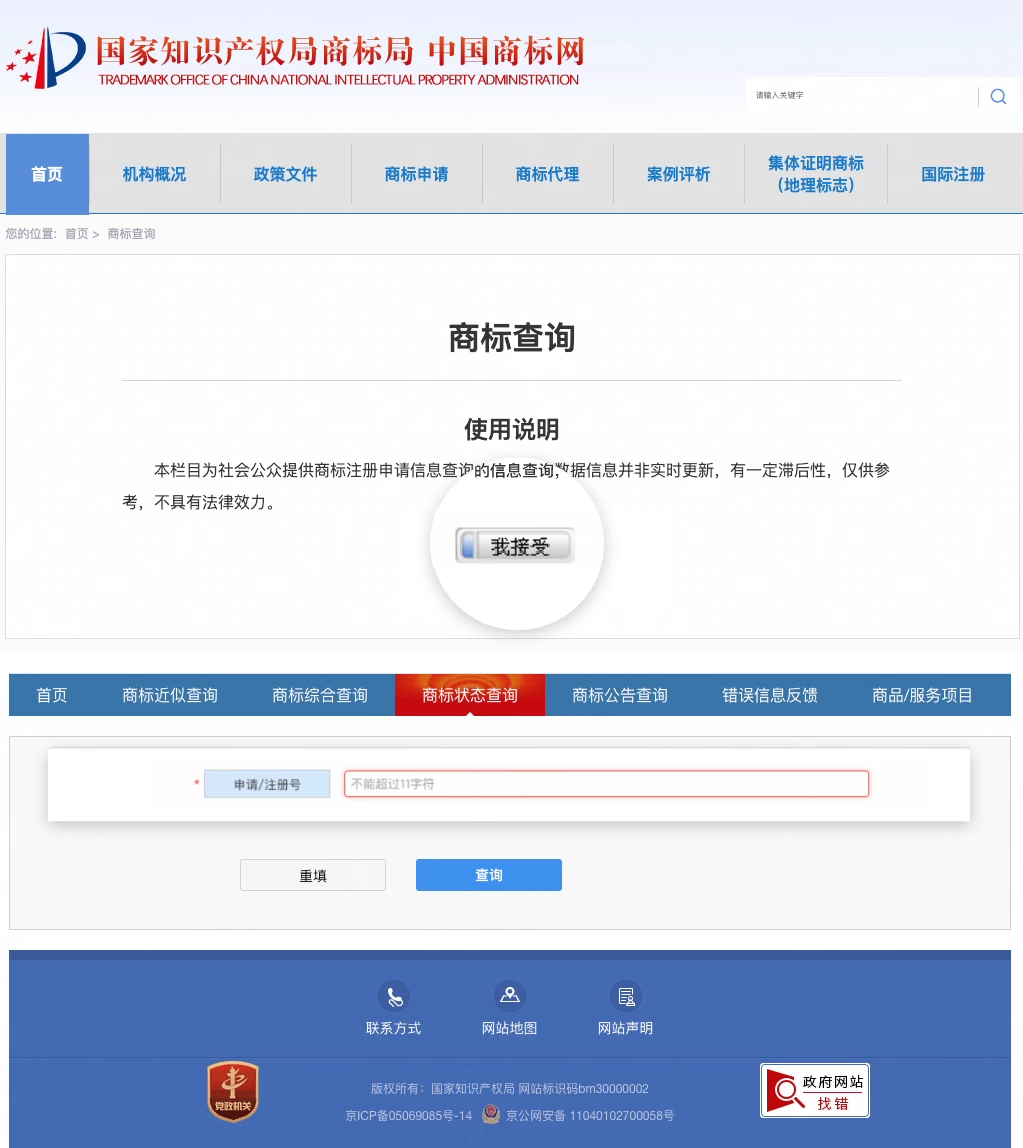
Accept the terms of use and enter the "Application/Registration Number" to search.
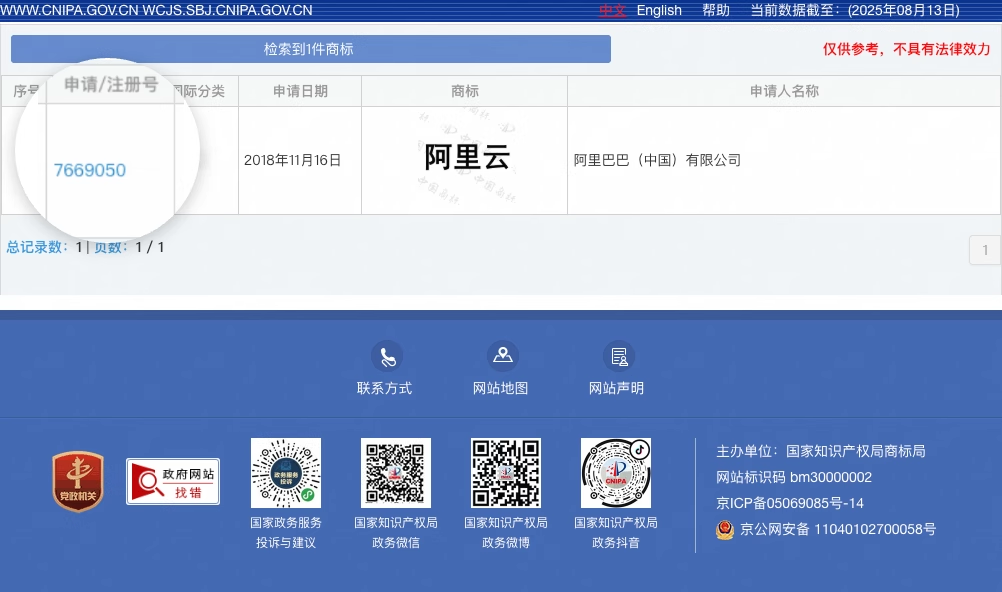
Click the "Application/Registration Number" to view the details.
Trademark details screenshot requirements
The screenshot must include the full website URL.
The trademark image must be clear and identical to the "Signature Name".
The "Applicant Name" must be identical to the name of the enterprise or public institution associated with the signature.
The trademark status must be "Registered".
Power of attorney
Parameter | Description |
Power of Attorney Name | We recommend naming the power of attorney based on information like the authorizer's name and signature scope to help you distinguish between multiple documents. This field must be unique. |
Authorization Certificate | Upload an image of the power of attorney. For formatting rules, see Power of Attorney Content Requirements.
Note If the upload fails after you have confirmed that the file format and size are correct, try clearing your browser cache or using a different browser. |
Authorizer | The owner of the signature and the party that needs to send the SMS messages (the party represented by the message content). Verify that the OCR result matches the authorizer specified in the Authorization Certificate file and manually correct any errors. |
Authorizer's Unified Social Credit Code | The authorizer's Unified Social Credit Code. The Authorizer's Unified Social Credit Code in the power of attorney must be identical to the Unified Social Credit Code field in the selected Qualification Information. You cannot submit the form if they do not match. |
Authorized Party | The party applying for the signature, which is the enterprise or individual user registered with Alibaba Cloud. Verify that the OCR result matches the authorized party specified in the Authorization Certificate file and manually correct any errors.
|
Signature Scope in Power of Attorney (Multiple signatures supported) | Verify that the OCR-recognized signature scope matches the scope in the uploaded Authorization Certificate file and manually correct any errors.
|
Authorization Validity Period | The validity period of the power of attorney. We recommend a period of 1 to 3 years. The current date must be within this period. Verify that the OCR result matches the validity period in the Authorization Certificate file and manually correct any errors. Note Set a reasonable validity period, such as 1 to 3 years. You must submit a new power of attorney when the current one expires. |