Signature rules
A signature identifies the sender of an SMS message. When you apply for a signature, you must follow the signature guidelines.
In response to the latest real-name verification requirements for signatures from China's Ministry of Industry and Information Technology (MIIT), carriers have recently tightened their control over signatures.
Signatures must be an enterprise or public institution name or a registered trademark name. If your existing signatures use other sources, they will likely cause sending failures. We recommend deactivating them and applying for new ones to ensure successful delivery.
Alibaba Cloud typically reviews signatures within 2 hours during business hours. The carrier's real-name signature filing process takes an average of 5 to 7 business days. However, based on recent observations, this process may take 7 to 10 business days for some carriers. Carriers do not guarantee this timeline, and it may take longer in practice.
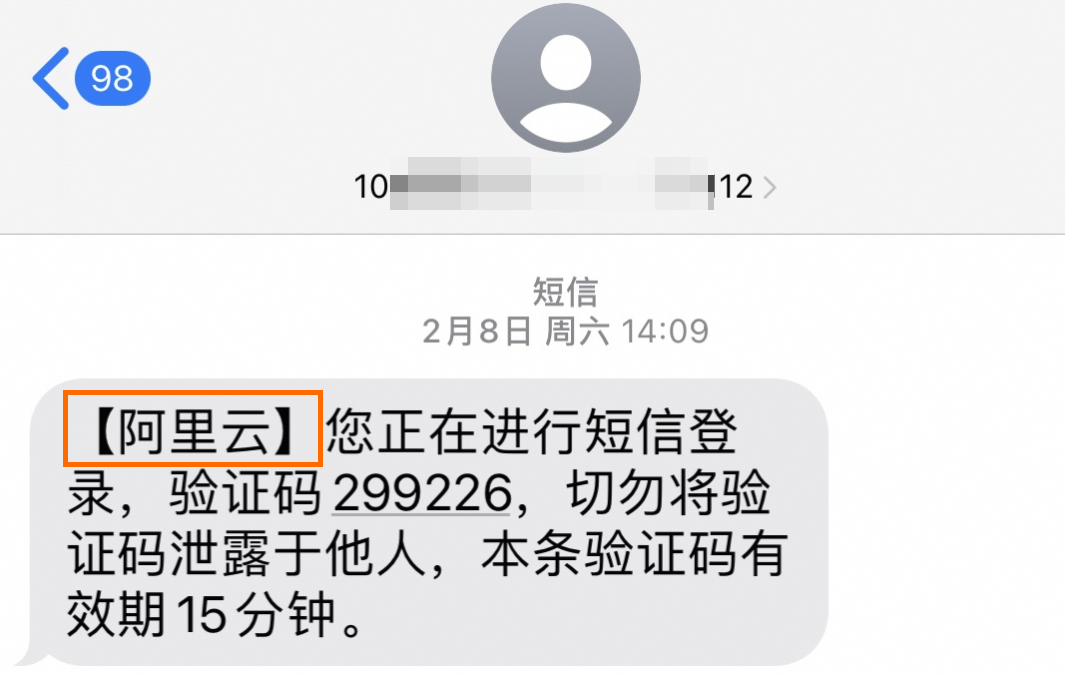
What is a signature?
A signature is an identifier for the sender. A complete message consists of a signature and message content. The signature is placed before the message content within As shown in the example on the right, a signature such as |
|
Usage notes
This topic applies to signature rules for SMS messages sent within the Chinese mainland (domestic SMS). For international SMS signatures, see SenderID filing.
Before you apply for a signature, first complete the qualification application based on the qualification material guidelines.
If the signature involves a third party, you must apply for a signature with the signature purpose set to third-party use and provide a letter of authorization. We strongly recommend authorizing all potential signatures in a single letter of authorization to avoid submitting new ones for future applications.
You can use a signature only after your application is approved.
Following these two guidelines will significantly increase your signature's approval rate:
Ensure your proposed signature meets all content, length, and format requirements.
Choose an appropriate signature source and provide detailed supporting information or materials. This can include identification documents, website links, or screenshots of your business functions.
Signature rules
Category | Description |
Signature content |
|
Signature length | The signature must be 2 to 18 characters long. This limit cannot be changed. Each Chinese character, English letter, or number counts as one character. |
Signature format |
|
Restricted business types |
|
Signature guidelines are subject to change based on the requirements of the MIIT and carriers. Approval is subject to the final review decision.
To help you better understand the rules, here are some examples of signatures with high and low approval rates.
Review outcome | Example signature | Reason | |
High approval rate | Approved |
| A registered trademark name that can be verified on the China Trademark Network website of the Trademark Office of the China National Intellectual Property Administration. The trademark registrant must match the entity associated with the signature's qualification. |
Approved |
| The full or abbreviated name of an enterprise. The abbreviation must not omit location information or skip characters, and must match the name on the business license. | |
Low approval rate | Rejected |
| Ambiguous, generic signatures that do not clearly identify the sending company or its specific business. |
Rejected |
| Traditional Chinese characters are not supported in signatures for the Chinese mainland. | |
Rejected |
| Signatures containing special characters are not supported. The length must be between 2 and 18 characters. | |
Rejected |
| Personal names and signatures containing words like "test" are not supported. | |
Signature purpose
When applying for a signature in the console, you must select a signature purpose, either "personal use" or "third-party use", and associate it with a qualification.
Personal use: Select a personal use qualification. The enterprise or individual information for this qualification must match that of your logged-in Alibaba Cloud account.
Third-party use: Select a third-party use qualification. The enterprise or individual information for this qualification does not match the information of your Alibaba Cloud account. Because this involves a third party, you must upload a letter of authorization. The third party must be an enterprise or public institution, not an individual user.
If the company that runs your program, the company that holds the trademark, and the entity behind your Alibaba Cloud account are three different entities, select third-party use and associate the qualification of the enterprise that holds the trademark. The company that runs your program is not relevant to the signature application. For the signature name, use the full name of the enterprise (2 to 18 characters). If the full name exceeds 18 characters, use a compliant abbreviated name that includes location information.
Account type | Signature purpose | Signature sources |
Individual user | Personal use | Cannot pass the signature filing for real-name verification. You must apply for a third-party use qualification or upgrade your Alibaba Cloud account to an enterprise account. |
Third-party use | Enterprise or public institution name (highly recommended), registered trademark name | |
Enterprise user | Personal use | |
Third-party use |
Signature sources and application requirements
Your proposed signature name must be relevant to the selected signature source, and you must submit supporting information or materials. The required information varies based on the signature source you choose.
For example, if you apply by using an enterprise or public institution name as the source, you can use your company name as the signature name.
Using "official account or mini program", "e-commerce platform store name", "filed website", "released app", "for test or learning", or "online trial" as a signature source will likely cause sending failures. We recommend applying for a signature that uses a compliant source.
Signature source | Requirements |
| |
Enterprise or public institution name | A signature sourced from an "enterprise or public institution name" must be the full or abbreviated name of the enterprise.
|
Registered trademark name | The trademark must be verifiable and registered on the China Trademark Network website. The trademark registrant must be the same as the entity associated with the signature's qualification.
You cannot use a trademark name directly as a signature in the following cases:
You must upload a screenshot of the trademark details. |
Released app (not supported) | Carriers no longer support signatures sourced from a released app (including those with software copyrights). Existing signatures using this source are at risk of sending failures. We recommend deactivating them and applying for a new signature using a full or abbreviated enterprise or public institution name, or a registered trademark name. |
Other high-risk sources | Using the following sources is highly likely to result in sending failures: official account or mini program, e-commerce platform store name, filed website, for test or learning, and online trial. If your current signature uses any of these sources, we recommend deactivating it and applying for a new signature sourced from an enterprise or public institution name (full or compliant abbreviation) or a registered trademark name to ensure successful delivery. |
 Alibaba Cloud Recommendation: We strongly recommend using "enterprise or public institution name (full or abbreviated)" as your signature source. This will significantly increase the success rate of your
 If a "registered trademark name" is considered a "generic signature" by carriers, meaning it does not reflect the unique characteristics of the enterprise or its connection to the verified entity, it will be considered non-compliant and cannot be used. We recommend using the full or abbreviated name of the verified enterprise as the signature.
Invalid examples: "Meeting Assistant", "Service Reminder", etc.
Additional requirements for special industries
If your signature application or its associated qualification is related to the following industries, read these instructions carefully:
Industry | Description |
Government and public institutions |
|
Gaming industry | Please upload your special qualification materials in the Additional Materials section: the Online Culture Business Permit, the Game Publication Number approved by the National Press and Publication Administration, or the Game Filing (only one of these is required). |
Logistics industry | To send logistics-related messages, such as pickup codes, you must meet the following requirements:
|
Financial industry | Signatures with a "third-party use" purpose are not supported. |
Signature types and limits
Except for the complimentary signature provided by the system, all subsequent signatures you apply for are standard signatures. The number of standard signatures you can apply for depends on your Alibaba Cloud account verification type.
Type | Usage limits | Application limit |
Standard signature (General signature) | Standard signatures have no usage limits, but are subject to frequency throttling. For details, see SMS Throttling. |
|
Complimentary signature | No application is required. After we approve your qualification, the system automatically provides a complimentary signature corresponding to your enterprise's full or abbreviated name. | |

Apply for a signature
To apply for a signature, go to the Add Signature page in the console. For instructions, see Apply for a signature.
Review time: After you submit a signature application, we typically complete the review within 2 hours. The review time may be extended during verification upgrades or outside of business hours.
Review business hours: 9:00 to 19:00, Monday to Sunday (UTC+8; review times may be extended during public holidays).
Reasons for signature status issues
To see recommended actions for a specific issue, hover over the signature status in the console to view detailed information.
Common issues and recommended actions include: Signature data issues, which may affect sending success rates. We recommend editing the signature to re-initiate the filing. Signature name does not match qualification, which means the current signature name and its source failed verification. We recommend checking the association between the signature and the enterprise and editing the signature. Signature real-name filing issues, which means the carrier filing is incomplete (not filed, in progress, failed, or expired) and may affect sending success rates. We recommend checking the signature's carrier filing status and taking appropriate action.
Why is my previously approved signature now showing "Available with issues" or failing to send?
Due to stricter real-name verification controls by the MIIT and carriers, existing signatures are undergoing compliance checks. If your original signature does not meet the latest guidelines (for example, an abbreviated enterprise name is missing location information, the abbreviation is too simple, or the signature source is a released app or another unsupported source), it may be marked as Available with issues or blocked, even if it was previously approved. We recommend editing any signatures marked "Available with issues" as prompted and applying for a new signature sourced from an enterprise or public institution name (full or compliant abbreviation) or a registered trademark name to ensure uninterrupted service.
Reasons for "Available with issues" status
The following are common reasons for a signature status of "Available with issues":
Issue category | Update frequency | Reason |
Invalid signature source | Real-time | The signature source is non-compliant and not a carrier-supported source (enterprise or public institution name, or registered trademark name). |
Signature not associated with a qualification | Real-time | The signature is not linked to a real-name qualification. |
Signature name does not match qualification | Real-time | The signature name does not match the name or trademark of the associated enterprise. |
Carrier compliance check failed | Real-time | The carrier considers the signature non-compliant. |
Incomplete qualification information | Real-time | The associated qualification is missing one or more of the six required elements (enterprise name, unified social credit code, legal person's name, legal person's ID number, administrator's name, administrator's ID number). |
Abnormal qualification status | Real-time | The associated qualification is being modified (status is Pending, Reviewing, Withdrawn, or Rejected). |
One person, multiple enterprises | Real-time | The enterprise administrator is associated with multiple enterprises. |
Inaccurate qualification information | Real-time | The associated qualification does not meet enterprise verification rules. |
Expired legal person certificate | Updated T+1 (not in real time) | The legal person's certificate for the associated qualification has expired. |
Expired administrator certificate | Updated T+1 (not in real time) | The administrator's certificate for the associated qualification has expired. |
Expired letter of authorization | Updated T+1 (not in real time) | The letter of authorization associated with the signature has expired. |
Signature filing issue | Real-time | The signature's real-name filing is incomplete for at least one carrier network (Not Filed, in progress, Failed, or Expired). |
Abnormal sending rate | Updated T+1 (not in real time) | The success rate of recent messages sent with this filed signature is abnormal. Check the sending logs to analyze the cause of failures. |
Sending issue due to incomplete filing | Updated T+1 (not in real time) | The success rate of recent messages sent with this unfiled signature (Not Filed, in progress, Failed, or Expired) is abnormal. You must complete the filing process. |
Signature unused for a long time | Updated T+1 (not in real time) | The signature has not been used to send messages and has not been updated in the last 170 days. |
Signature not used recently | Updated T+1 (not in real time) | The signature has not been used to send messages and has not been updated in the last n days. |
Reasons for "Unavailable" status
The following are common reasons for a signature status of "Unavailable":
Unavailable type | Update frequency | Reason |
Approval rejected | Real-time | The signature was newly created and has never been approved. |
Disabled | Real-time | The signature has been disabled due to a security penalty. |
Frozen - Platform | Real-time | The signature has been frozen by the platform. |
Frozen - Customer | Real-time | You have frozen the signature. |
FAQ
The following are frequently asked questions about signature guidelines:
For more questions about SMS signatures, see SMS signature FAQ.