Verify signatures for a system cluster
This topic describes how to verify signatures for a system cluster.
API Gateway provides a server-side demo that you can download for testing. After you download the API provider demo, the demo interface is located at com.alipay.gateway.common.GatewayFilter.
Follow these steps:
Import the gateway SDK
The API Gateway client depends on the gateway-sdk. On the server-side, this primarily involves configuring a Spring interceptor to verify request signatures and sign responses. Add the following software development kit (SDK) to the pom.xml file in your local project.
If mutual authentication is not required between the gateway and the server-side, you do not need to import the
gateway-sdk. Instead, you can write the HTTP API service directly.The gateway SDK includes a data encryption feature. For more information, see Data encryption.
<dependency>
<groupId>com.alipay.sofa</groupId>
<artifactId>gateway-sdk</artifactId>
<version>2.5.0</version>
</dependency>
Configure the key
If the system cluster where the API service is published uses key-based authentication, configure the corresponding Access Key and Secret Key in your project using startup parameters and environment variables.
# The AccessKey and SecretKey of the service publisher, which is the key information of the system cluster.
pub.app.accessKey=<yourAccessKeyId>
pub.app.secretKey=<yourAccessKeySecret>
Configure the filter
Add a signature verification filter to the service. The HTTP API service supports the REST and Spring MVC frameworks.
Spring MVC service
    @Bean
    public FilterRegistrationBean filterRegistrationBean(@Value("${pub.app.accessKey}") String keyId,
                                                         @Value("${pub.app.secretKey}") String secretKey) {
        FilterRegistrationBean registration = new FilterRegistrationBean();
        registration.setFilter(apiServletSignFilter(keyId, secretKey));
        registration.addUrlPatterns("/sign"); // The URI path where the filter is effective. This means it applies to paths that start with /sign.
        registration.setName("apiServletSignFilter");
        registration.setOrder(Ordered.HIGHEST_PRECEDENCE);
        return registration;
    }

    @Bean
    public ApiServletSignFilter apiServletSignFilter(@Value("${pub.app.accessKey}") String keyId,
                                                     @Value("${pub.app.secretKey}") String secretKey
    ) {
        ApiSecretKey apiSecretKey = new ApiSecretKey(keyId, secretKey);
        ApiServletSignFilter filter = new ApiServletSignFilter();
        List<ApiSecretKey> secretKeys = new ArrayList<>();
        secretKeys.add(apiSecretKey);
        filter.setApiSecretKeys(secretKeys);
        filter.setCheckSign(true);
        filter.setSignUriRegex("/j"); // The URI path where signature verification and signing are enabled. This means that for paths starting with /j, signatures are verified and responses are signed. Other paths are not verified.
        return filter;
    }
REST service
If the system cluster requires key-based authentication, enable response signature verification and add the @NeedSign annotation to the method.
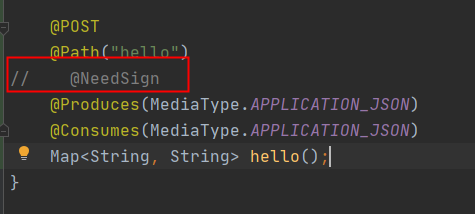
    // Add a filter to the REST service to verify request signatures.
    @Bean
    public ApiRestSignFilter apiRestSignFilter(@Value("${pub.app.accessKey}") String keyId,
                                               @Value("${pub.app.secretKey}") String secretKey) {
       ApiSecretKey apiSecretKey = new ApiSecretKey(keyId, secretKey);
        List<ApiSecretKey> secretKeys = new ArrayList<>();
        secretKeys.add(apiSecretKey);
        ApiRestSignFilter filter = new ApiRestSignFilter();
        filter.setApiSecretKeys(secretKeys);
        filter.setCheckSign(false);// The switch for request signature verification.
        //
        JAXRSProviderManager.registerCustomProviderInstance(filter);

        return filter;
    }