Create an API group
API groups help you manage APIs on a gateway based on your business needs. APIs in the same group share a domain name.
You can create an API group in one of the following ways:
Create an API group from the group list
Log on to the API Gateway console.
In the navigation pane on the left, click API Publish > API Groups.
In the upper-right corner of the API Groups page, click Create Group.
In the pop-up window, configure the API group:
Group Name: Required. The name of the API group. The name can contain letters, digits, underscores (_), and hyphens (-). The name can be up to 32 characters long.
Description: Optional. The description of the API group. The description can be up to 64 characters long. You can leave this empty.
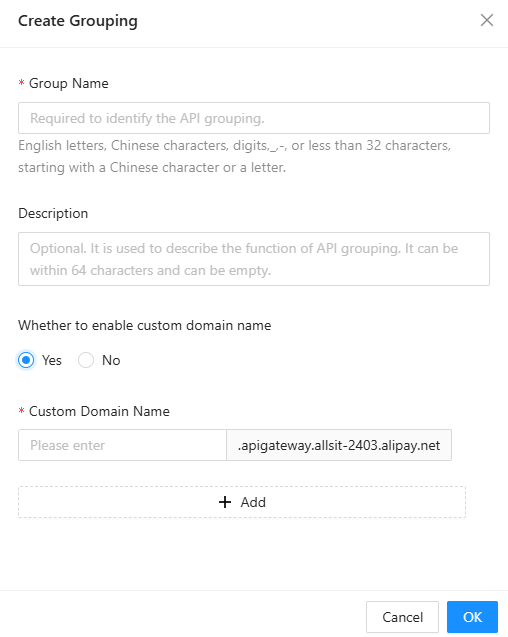
Click OK to create the API group.
Create an API group while creating an API
Log on to the API Gateway console.
In the navigation pane on the left, click API Publish > API Management.
In the upper-right corner of the API list, click Create API.
Select an API type and click Create. The API creation page is displayed.
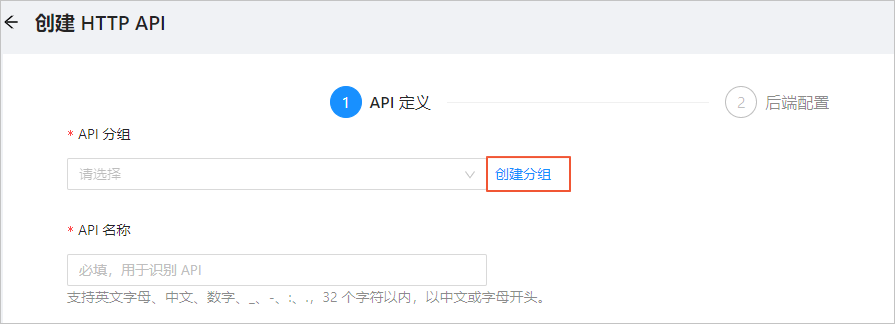
In the API Group section, click Create Group on the right. In the pop-up window, enter the group information and click OK.