Data storage
Tablestore bills data storage by the hour, based on the average data volume of your instance within each hour.
The total data volume of a Tablestore instance is the sum of the data volumes of all its tables. A table's data volume is the sum of the data volumes of all its rows. A row's data volume is the sum of the data volumes of its primary key columns and attribute columns.
For the latest pricing information, see the Tablestore pricing page.
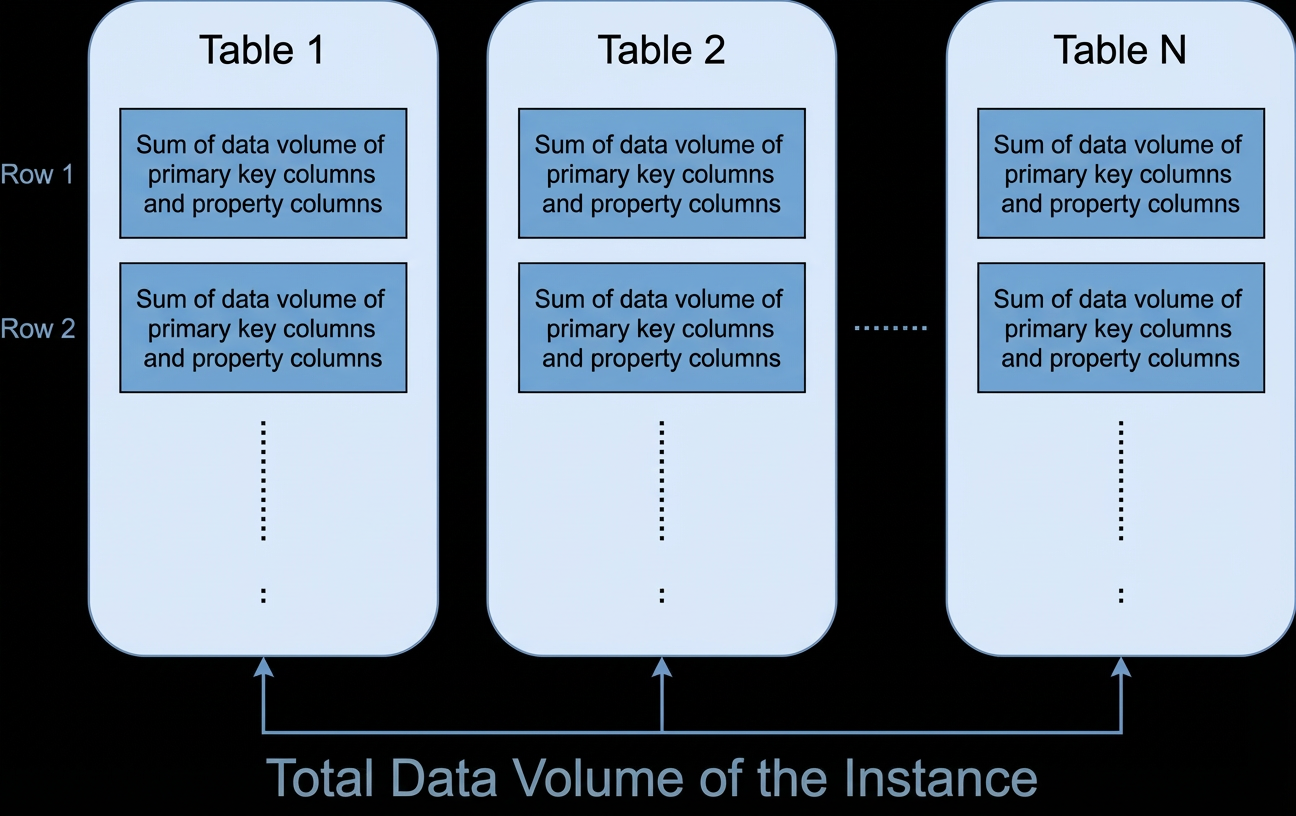
The following sections explain how to calculate the data volume of a row and a table.
Calculate row data volume
Each row occupies storage space determined by its primary key columns and attribute columns:
Row data volume = Data volume of primary key columns + Data volume of all attribute columns
Data volume of primary key columns = Sum of the lengths of primary key column names + Sum of the sizes of primary key column values
Attribute column data volume depends on your MaxVersions and Time to Live (TTL) settings. See the examples below.
Value sizes by data type
|
Data type |
Size in bytes |
|
String |
The number of bytes occupied by the UTF-8 string. Empty strings have a size of 0. |
|
Integer |
8 |
|
Double |
8 |
|
Boolean |
1 |
|
Binary |
The number of bytes occupied by the binary data. |
Tip: Use shorter attribute column names. Column names count toward your storage bill, so a 4-character name likeNamecosts less than a 12-character name likeCustomerName.
Example: row data volume calculation
Assume a table with a primary key column named ID of the Integer type. All other columns are attribute columns.
|
ID |
Name |
Length |
Comments |
|
1 |
timestamp=1466676354000,value='zhangsan' |
timestamp=1466676354000,value=20 |
timestamp=1466676354000,value=String (100 bytes) timestamp=1466679954000,value=String (150 bytes) |
The Comments column has two stored versions. The calculation differs depending on your MaxVersions and TTL settings.
Scenario 1: MaxVersions = 2, TTL = 2592000
When multiple versions are enabled (MaxVersions > 1) or TTL is set (TTL > -1), each version number is stored as an 8-byte timestamp.
-
Data volume of a single attribute column =
(column name length + 8) × number of versions + sum of all version value sizesNoteIn scenarios that use multiple versions (i.e., Max versions > 1) or have TTL enabled (i.e., TTL > -1), each version number is an 8-byte timestamp.
The data volume of this row is 10 + 20 + 22 + 282 = 334 bytes:
Primary key column (ID):
len('ID') + len(1) = 10 bytesName attribute column:
(len('Name') + 8) × 1 + len('zhangsan') = 20 bytesLength attribute column:
(len('Length') + 8) × 1 + len(20) = 22 bytesComments attribute column (2 versions):
(len('Comments') + 8) × 2 + 100 + 150 = 282 bytes
-
Scenario 2: MaxVersions = 1, TTL = -1
When MaxVersions = 1 and TTL = -1 (TTL disabled), version numbers do not occupy any bytes.
Attribute column data volume =
column name length + column value sizeNoteIn scenarios where a single version is used (Max versions = 1) and TTL is not used (TTL = -1), the version number does not occupy any bytes.
Although the Comments column has two versions, only the latest version counts toward data volume because MaxVersions is set to 1.
The data volume of this row is 10 + 12 + 14 + 158 = 194 bytes:
Primary key column (ID):
len('ID') + len(1) = 10 bytesName attribute column:
len('Name') + len('zhangsan') = 12 bytesLength attribute column:
len('Length') + len(20) = 14 bytesComments attribute column (latest version only):
len('Comments') + 150 = 158 bytes
Calculate table data volume
A table's data volume is the sum of the data volumes of all its rows. Consider a table where ID is the primary key column, all other columns are attribute columns, MaxVersions is 2, and TTL is -1.
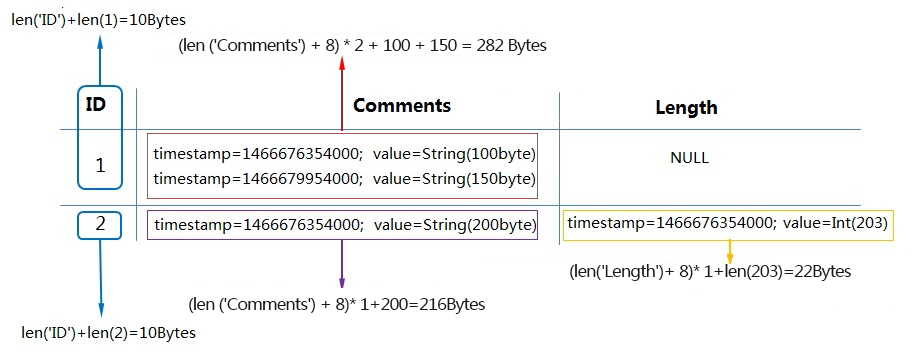
Row where ID=1: 292 bytes — 10 bytes for the primary key + 282 bytes for the Comments column (two versions).
Row where ID=2: 248 bytes — 10 bytes for the primary key + 216 bytes for the Comments column (one version) + 22 bytes for the Length column (one version).
The total data volume of the table is 292 + 248 = 540 bytes. If the data volume stays constant throughout the hour, the storage fee is based on 540 bytes.
Tablestore places no limit on per-table storage — you pay for what you use.
Tablestore asynchronously removes expired data and versions that exceed MaxVersions from each partition. After cleanup, Tablestore recalculates the data volume for that partition. Cleanup typically completes within 24 hours, depending on total data volume. Data written after a cleanup is included in the next cleanup cycle's data volume calculation.
Storage volume statistical period
Storage metering is not instantaneous. Statistics are typically updated within 24 hours, so there is a delay between data changes and their reflection in storage reports.
Why the delay occurs
Tablestore uses a Log-Structured Merge-tree (LSM tree) architecture. New data is first written to memory, then flushed to small files on disk when certain thresholds are met. Updates and deletions to a single row can be scattered across multiple files. Summing raw file sizes would overcount due to redundant data.
To ensure accurate metering, Tablestore waits for compaction — a periodic process that merges files and removes redundant data — then recalculates data volume based on the merged file sizes.
As a result, the reported table size may not change immediately after a write, update, or delete. The statistical period for data volume corresponds to the compaction cycle.