Why a few 500 errors occur when using Tablestore
Symptoms
When you use Tablestore, you may occasionally receive 500 errors. The following table lists the main error codes and messages.
Error status | Error code | Error message |
503 | OTSPartitionUnavailable | The partition is not available. |
503 | OTSServerUnavailable | Server is not available. |
503 | OTSServerBusy | Server is busy. |
503 | OTSTimeout | Operation timeout. |
Causes
Tablestore is a distributed, serverless table storage service that automatically balances loads based on the data volume and access traffic of each data partition. This design overcomes the capacity limits of a single server and allows for the seamless scaling of data and concurrent access.
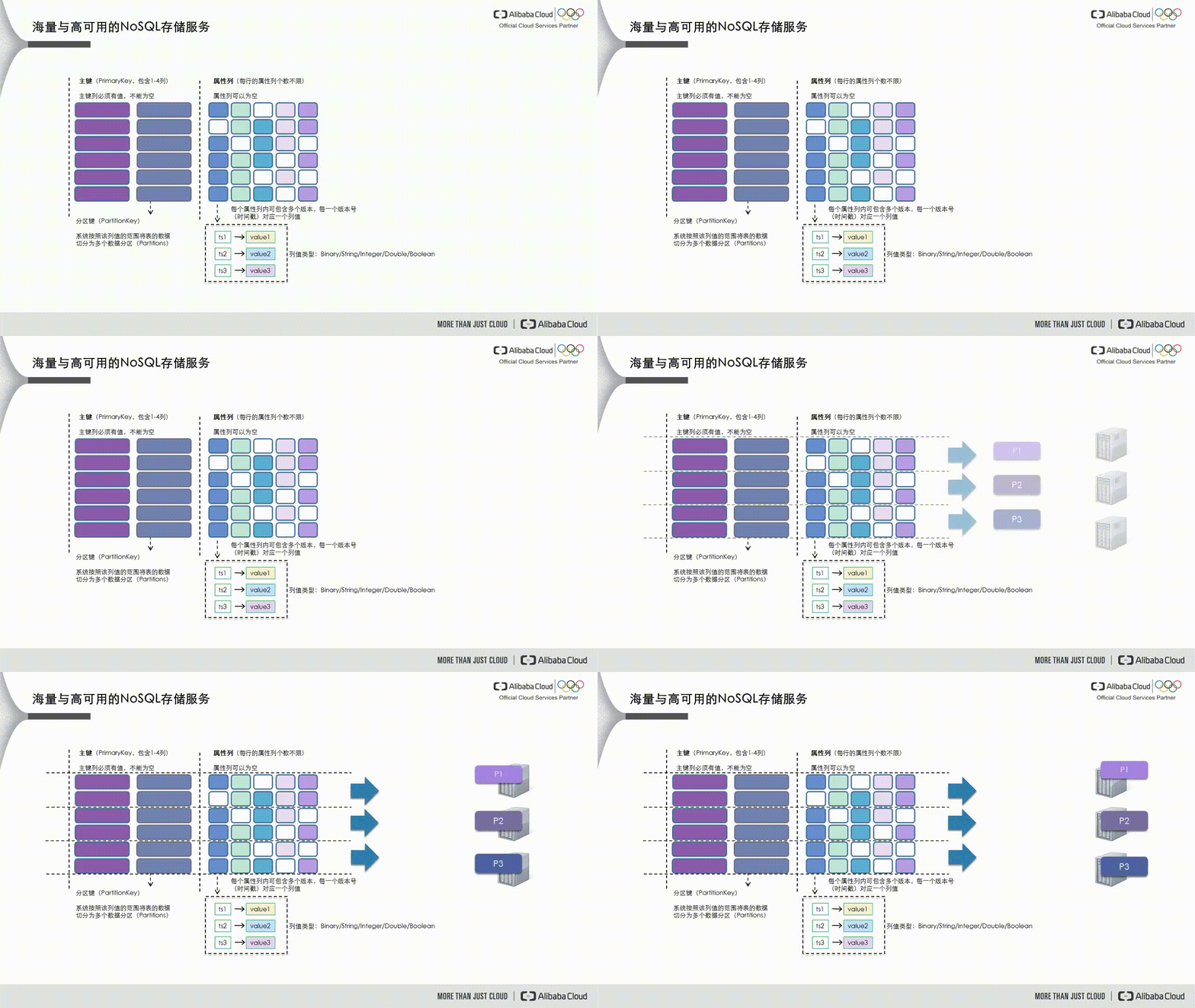
As shown in the following figure, Tablestore divides data into data partitions based on the partition key, which is the first primary key. These partitions are then scheduled to different service nodes to handle read and write requests.
If a data partition's data volume becomes too large or it receives excessive access traffic, it becomes a hot partition, such as partition P1 in the figure below. The dynamic load balancing mechanism in Tablestore detects this scenario and splits the partition into two new partitions, P1 and P5. These new partitions are then scheduled to service nodes with lower loads.
When you create a new table, it initially has only one data partition, which limits the table's read and write concurrency. The automatic load balancing mechanism also has a delay. To pre-partition the table into multiple data partitions, you can contact Tablestore technical support by joining DingTalk group 23307953 (Tablestore Technical Exchange Group-2) or 36165029092 (Tablestore Technical Exchange Group-3).
Tablestore uses this automatic load balancing to scale table data and access concurrency. This process is fully automatic and does not require manual intervention.
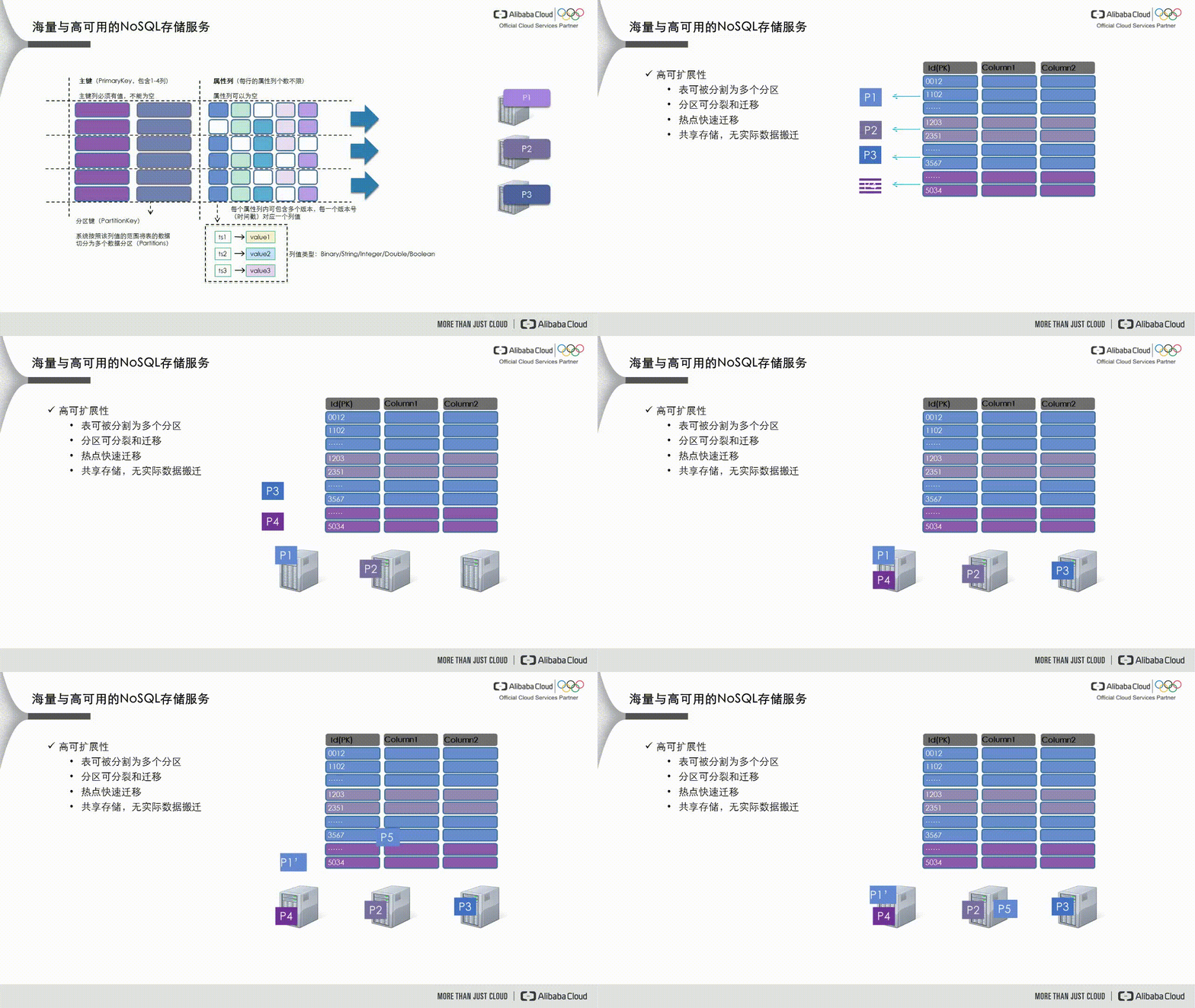
Tablestore uses a shared storage architecture in which data partitions are logical units. During load balancing, only the table's metadata is changed, and no data is migrated. To ensure data consistency, the affected partitions are briefly unavailable while the metadata is updated. This unavailability typically lasts for hundreds of milliseconds but can last for seconds under heavy partition loads. During this time, read and write operations to the partition may fail and return the errors listed above.
Solutions
You can usually resolve this issue by retrying the operation. The Tablestore software development kit (SDK) provides default retry policies. You can specify a retry policy when you initialize the client.
Tablestore provides a standard RESTful API. Because network conditions can be unpredictable, you should add retry policies to all read and write operations to build fault tolerance for network errors.
Data read from or written to Tablestore using batch operations, such as BatchWriteRow and BatchGetRow, can span multiple data partitions across one or more tables. If a partition is splitting during the operation, the entire batch operation is not atomic. Only the atomicity of each single-row operation is guaranteed. Even if the operation returns a 200 status code, you must check the getFailedRows() response to identify any failed single-row operations.