Synchronize data from MySQL to Tablestore by using Canal
This topic describes how to use Canal to synchronize data from a MySQL database to Tablestore. You can synchronize data from a self-managed MySQL database or an ApsaraDB RDS for MySQL instance. Canal supports real-time incremental data synchronization and full data synchronization.
Background information
Canal is an open source project from Alibaba. It provides incremental data subscription and consumption by parsing the incremental logs of MySQL databases. Canal works by impersonating a MySQL slave. It simulates the interaction protocol of a MySQL slave, sends a dump request to the MySQL master, and then retrieves and parses the binary log. For more information, see Canal.
Preparations
Obtain the connection details for the source MySQL database, including the username, password, database endpoint, and Java Database Connectivity (JDBC) connection string.
ImportantTo synchronize MySQL data using Canal, you must enable binary logging for MySQL. For more information about how to check whether binary logging is enabled and how to enable it, see Appendix 1: MySQL preparations.
Activate Tablestore, and then create an instance and a data table to store the synchronized data. For more information, see Activate Tablestore and create an instance and Create a data table.
NoteWhen you create the data table, use the primary key or unique index of the source MySQL table as the primary key for the Tablestore data table. For more information about the sample MySQL and Tablestore data tables used in this topic, see Appendix 3: Sample data.
Obtain the instance name and endpoint of the Tablestore instance.
Log on to the Tablestore console.
In the top navigation bar, select a resource group and a region.
On the Overview page, click the alias of an instance or Instance Management in the Actions column.
On the Instance Details tab, you can view the name and endpoint of the instance.
Obtain an AccessKey pair. You can use the AccessKey pair of your Alibaba Cloud account or a Resource Access Management (RAM) user. For more information about how to obtain an AccessKey pair, see Obtain an AccessKey pair.
NoteFor security purposes, we recommend that you use a RAM user to access Tablestore. You can create a RAM user, grant the user the
AliyunOTSFullAccesspermission, and then create an AccessKey pair for the RAM user. For more information, see Use the AccessKey pair of a RAM user to access Tablestore.
Procedure
The procedures in this topic are performed on an Elastic Computing Service (ECS) instance that runs Alibaba Cloud Linux 3.2104 LTS 64-bit or Ubuntu 24.04 64-bit. For more information, see Elastic Computing Service.
1. Install the JDK
Canal requires JDK 1.8 or later. We recommend that you use JDK 1.8. This section describes how to install JDK 1.8 on an ECS instance that runs Alibaba Cloud Linux or Ubuntu. If you use a different server, you must install the JDK based on your server's requirements.
Alibaba Cloud Linux
yum -y install java-1.8.0-openjdk-devel.x86_64Ubuntu
apt update && apt upgrade
apt install openjdk-8-jdk
2. Deploy the Deployer service
Create a deployment folder for the Deployer service.
cd && mkdir -p canal/deployer
cd canal/deployer
Download and decompress the Deployer package.
Download the Deployer package.
wget https://github.com/alibaba/canal/releases/download/canal-1.1.8/canal.deployer-1.1.8.tar.gzIf the network connection is poor, you can download canal.deployer-1.1.8.tar.gz and upload it to the server.
Decompress the package.
tar -zxvf canal.deployer-1.1.8.tar.gz
Edit the configuration file.
Create an instance directory and copy the default configuration file to the new directory.
mkdir conf/tablestore
cp conf/example/instance.properties conf/tablestore
Modify the configuration file.
vi conf/tablestore/instance.propertiesModify the following configuration items to specify the source MySQL database to monitor.
Configuration item
Example value
Description
canal.instance.master.address
Self-managed MySQL: 47.**.**.44:3306
ApsaraDB RDS for MySQL: rm-cn-rp************mo.rwlb.rds.aliyuncs.com:3306
The endpoint of the source MySQL database that Canal listens to. The format is
host:port.canal.instance.dbUsername
canal
The username of the source MySQL database user.
ImportantThis user must have the
SELECT,REPLICATION SLAVE, andREPLICATION CLIENTpermissions. For information about how to grant permissions, see Grant MySQL Slave permissions to a MySQL user.canal.instance.dbPassword
Ca*******88
The password of the source MySQL database user.
Modify the canal.properties file to customize the instance name.
vi conf/canal.propertiesModify the following configuration item to set the instance name to tablestore.
canal.destinations = tablestore
Start the Deployer service.
sh bin/startup.shRun the following command to view the logs and verify that the service has started.
tail -f logs/tablestore/tablestore.logIf the service starts successfully, the following information is displayed.
2025-02-13 19:45:40.622 [destination = tablestore , address = /47.**.**.44:3306 , EventParser] WARN  c.a.o.c.p.inbound.mysql.rds.RdsBinlogEventParserProxy - ---> find start position successfully, EntryPosition[included=false,journalName=binlog.000001,position=249075669,serverId=1,gtid=,timestamp=1739446563000] cost : 22134ms , the next step is binlog dump
2025-02-13 19:45:40.737 [destination = tablestore , address = /47.**.**.44:3306 , EventParser] WARN  c.a.otter.canal.parse.inbound.mysql.MysqlConnection - load MySQL @@version_comment : Source distribution
To shut down the Deployer service, run the following command.
sh bin/stop.sh
3. Deploy the Adapter service
Create a deployment folder for the Adapter service.
cd && mkdir -p canal/adapter
cd canal/adapter
Download and decompress the Adapter package.
Download the Adapter package canal.adapter-1.0.1.tar.gz and upload it to the deployment folder on the server.
ImportantThe Adapter package on GitHub does not support writing data to Tablestore. You must use the Adapter package provided in this topic.
Decompress the package.
tar -zxvf canal.adapter-1.0.1.tar.gz
Edit the configuration file.
Modify the application.yml configuration file to define adapter information.
vi conf/application.ymlModify the following configuration items to specify the MySQL database connection information and adapter information.
Configuration item
Example value
Description
srcDataSources
defaultDS
The identifier of the source database. You can keep the default value.
srcDataSources.defaultDS.url
Self-managed MySQL: jdbc:mysql://47.**.**.44:3306/ki**at?useSSL=false
ApsaraDB RDS for MySQL: jdbc:mysql://rm-cn-rp************mo.rwlb.rds.aliyuncs.com/ki**at?useSSL=false
The JDBC connection information of the source MySQL database.
srcDataSources.defaultDS.username
canal
The username of the source MySQL database user.
srcDataSources.defaultDS.password
Ca*******88
The password of the source MySQL database user.
canalAdapters.instance
tablestore
The name of the Canal instance. This must be the same as the instance name in the Deployer configuration.
canalAdapters.groups.groupId
g1
The ID of the adapter group. You can keep the default value.
canalAdapters.groups.groupId.outerAdapters.name
tablestore
The adapter type. Set this to tablestore. This indicates that the adapter writes data to Tablestore.
canalAdapters.groups.groupId.outerAdapters.key
orders
The adapter identifier. To synchronize multiple tables, you can use this parameter to differentiate them.
canalAdapters.groups.groupId.outerAdapters.properties.tablestore.endpoint
https://i0********44.cn-hangzhou.ots.aliyuncs.com
The endpoint of the Tablestore instance.
ImportantTo ensure secure resource access, public network access is disabled by default for new Tablestore instances. If you use a public endpoint, go to the page and select Public Network for Network Type.
canalAdapters.groups.groupId.outerAdapters.properties.tablestore.accessSecretId
LT********************bE
The AccessKey ID of your Alibaba Cloud account or RAM user.
canalAdapters.groups.groupId.outerAdapters.properties.tablestore.accessSecretKey
CR**************************HD
The AccessKey secret of your Alibaba Cloud account or RAM user.
canalAdapters.groups.groupId.outerAdapters.properties.tablestore.instanceName
i0********44
The name of the Tablestore instance.
Modify the adapter configuration file to specify the data to consume and the table mapping.
NoteTo synchronize multiple tables, you can create multiple .yml configuration files in the
conf/tablestorefolder of the Adapter installation directory. Ensure that theouterAdapterKeyin these files matches thecanalAdapters.groups.groupId.outerAdapters.keyin the application.yml file.vi conf/tablestore/orders.ymlModify the following configuration items.
Configuration item
Example value
Description
dataSourceKey
defaultDS
The identifier of the source database. This must be the same as srcDataSources in the application.yml file.
destination
tablestore
The instance name. This must be the same as canalAdapters.instance in the application.yml file.
groupId
g1
The ID of the adapter group. This must be the same as canalAdapters.groups.groupId in the application.yml file.
outerAdapterKey
orders
The adapter identifier. This must be the same as canalAdapters.groups.groupId.outerAdapters.key in the application.yml file.
threads
1
The number of buckets in TablestoreWriter. The default value is 1.
updateChangeColumns
false
Row overwrite or row update. The default value is false, which indicates row overwrite. When a row is updated, the entire old row in Tablestore is overwritten with the latest full row value. If set to true, it indicates row update. When a row is updated, only the changed fields are updated.
dbMapping.database
ki**at
The name of the MySQL database to synchronize.
dbMapping.table
orders
The name of the source MySQL data table to synchronize.
dbMapping.targetTable
orders_canal
The name of the destination table in Tablestore.
dbMapping.targetPk
order_id: order_id
The primary key configuration. The format is
pk: target_pk, which meanssource_table_primary_key_name: destination_table_primary_key_name.NoteIf you configure multiple primary key columns, their order must be the same as the primary key order in Tablestore.
The Tablestore adapter supports configuring an auto-increment primary key column. The format is
$$: target_pk. This creates a primary key column named target_pk in the destination table, and this column is an auto-increment column. When input data is written to Tablestore, the Tablestore Adapter automatically fills in the value for this column.
dbMapping.targetColumns
modified_time: $string
Configure the data columns to synchronize and their mapping. Type conversion is supported. The following four formats are supported:
id: target_id$string: The id field of the source table is synchronized to the target_id field of the destination table. The field type is mapped to string.id: target_id: The id field of the source table is synchronized to the target_id field of the destination table. The default type mapping is used.id: $string: The field name remains the same after synchronization. The field type is mapped to string.id:: The field name remains the same after synchronization. The default type mapping is used.
ImportantNon-auto-increment primary key columns configured in dbMapping.targetPk must also be configured here. Auto-increment primary key columns do not need to be configured.
If you do not configure type conversion, Canal infers the destination field type based on the source field type. For more information, see Appendix 2: Field type mapping between MySQL source tables and Tablestore destination tables
When you configure the mapped field type, the type name is case-insensitive.
dbMapping.commitBatch
200
The number of data rows imported in a single batch RPC request. This corresponds to maxBatchRowsCount in TablestoreWriter.
dbMapping.etlCondition
where create_time >= {}
The filter condition for full data extraction. The field names in the filter condition are the field names of the source table. This is optional.
ImportantThe filter condition takes effect only when the params parameter is included in the command for full data synchronization. Otherwise, even if etlCondition is set, all data is synchronized.
Start the Adapter service.
sh bin/startup.shRun the following command to view the logs and verify that the service has started.
tail -f logs/adapter/adapter.logIf the service starts successfully, the following information is displayed.
2025-02-13 16:16:21.415 [main] INFO  c.a.o.canal.adapter.launcher.loader.CanalAdapterLoader - Start adapter for canal-client mq topic: tablestore-g1 succeed
2025-02-13 16:16:21.415 [main] INFO  c.a.o.canal.adapter.launcher.loader.CanalAdapterService - ## the canal client adapters are running now ......
2025-02-13 16:16:21.415 [Thread-5] INFO  c.a.otter.canal.adapter.launcher.loader.AdapterProcessor - =============> Start to connect destination: tablestore <=============
2025-02-13 16:16:21.421 [main] INFO  org.apache.coyote.http11.Http11NioProtocol - Starting ProtocolHandler ["http-nio-8081"]
2025-02-13 16:16:21.423 [main] INFO  org.apache.tomcat.util.net.NioSelectorPool - Using a shared selector for servlet write/read
2025-02-13 16:16:21.447 [main] INFO  o.s.boot.web.embedded.tomcat.TomcatWebServer - Tomcat started on port(s): 8081 (http) with context path ''
2025-02-13 16:16:21.452 [main] INFO  c.a.otter.canal.adapter.launcher.CanalAdapterApplication - Started CanalAdapterApplication in 3.931 seconds (JVM running for 4.515)
2025-02-13 16:16:21.521 [Thread-5] INFO  c.a.otter.canal.adapter.launcher.loader.AdapterProcessor - =============> Subscribe destination: tablestore succeed <=============
After the Adapter service starts, Canal automatically begins to synchronize incremental data from MySQL and periodically writes synchronization logs.
2025-02-13 19:56:06.400 [writer-scheduled-pool-%d0] INFO  com.alicloud.openservices.tablestore.TableStoreWriter - WriterStatistics: WriterStatistics: {
    totalRequestCount=0,
    totalRowsCount=0,
    totalSucceedRowsCount=0,
    totalFailedRowsCount=0,
    totalSingleRowRequestCount=0,
}
To shut down the Adapter service, run the following command.
sh bin/stop.sh4. Verify incremental data synchronization
Insert a row of data into the source table in MySQL.
If the synchronization is successful, the adapter.log file contains the following synchronization log.
2025-02-13 16:14:25.512 [writer-scheduled-pool-%d0] INFO  com.alicloud.openservices.tablestore.TableStoreWriter - WriterStatistics: WriterStatistics: {
    totalRequestCount=1,
    totalRowsCount=1,
    totalSucceedRowsCount=1,
    totalFailedRowsCount=0,
    totalSingleRowRequestCount=0,
}
View the data in the Tablestore console.
5. (Optional) Synchronize full data
Run the following command to call the Adapter service method and trigger a synchronization task.
After you run the command, Canal first aborts the incremental data transfer and then synchronizes the full data. After the full data synchronization is complete, Canal automatically resumes incremental data synchronization.
Command format:
curl "hostip:port/etl/type/key/task" -X POSTExample:
curl "localhost:8081/etl/tablestore/orders/orders.yml" -X POSTThe following is an example of a synchronization command with a filter condition. When this command is called, the value of params replaces {} in dbMapping.etlCondition:
curl "localhost:8081/etl/tablestore/orders/orders.yml?params='2025-01-01'" -X POSTThe following describes the parameters:
Configuration item | Example value | Description |
hostip | localhost | The IP address of the server where the Canal service is deployed. If running locally, you can set this to localhost. |
port | 8081 | The port of the Canal service. |
type | tablestore | The adapter type. This must be set to tablestore. |
key | orders | The adapter identifier. This must be the same as canalAdapters.groups.groupId.outerAdapters.key in the application.yml file. |
task | orders.yml | The name of the configuration file. |
After the synchronization is successful, the adapter.log file contains the synchronization log.
2025-02-13 19:59:40.836 [http-nio-8081-exec-1] INFO  o.a.catalina.core.ContainerBase.[Tomcat].[localhost].[/] - Initializing Spring FrameworkServlet 'dispatcherServlet'
2025-02-13 19:59:40.836 [http-nio-8081-exec-1] INFO  org.springframework.web.servlet.DispatcherServlet - FrameworkServlet 'dispatcherServlet': initialization started
2025-02-13 19:59:40.865 [http-nio-8081-exec-1] INFO  org.springframework.web.servlet.DispatcherServlet - FrameworkServlet 'dispatcherServlet': initialization completed in 28 ms
2025-02-13 19:59:40.954 [http-nio-8081-exec-1] INFO  com.alicloud.openservices.tablestore.TableStoreWriter - Start initialize ots writer, table name: orders_canal.
2025-02-13 19:59:41.012 [http-nio-8081-exec-1] INFO  com.alicloud.openservices.tablestore.TableStoreWriter - End initialize with table meta: TableName: orders_canal, PrimaryKeySchema: order_id:STRING, DefinedColumnSchema: .
2025-02-13 19:59:41.017 [writer-scheduled-pool-%d0] INFO  com.alicloud.openservices.tablestore.TableStoreWriter - WriterStatistics: WriterStatistics: {
    totalRequestCount=0,
    totalRowsCount=0,
    totalSucceedRowsCount=0,
    totalFailedRowsCount=0,
    totalSingleRowRequestCount=0,
}
2025-02-13 19:59:41.149 [pool-8-thread-2] INFO  com.alicloud.openservices.tablestore.TableStoreWriter - WriterStatistics: WriterStatistics: {
    totalRequestCount=0,
    totalRowsCount=133,
    totalSucceedRowsCount=0,
    totalFailedRowsCount=0,
    totalSingleRowRequestCount=0,
}
2025-02-13 19:59:41.982 [pool-8-thread-1] INFO  com.alicloud.openservices.tablestore.TableStoreWriter - WriterStatistics: WriterStatistics: {
    totalRequestCount=44,
    totalRowsCount=8943,
    totalSucceedRowsCount=6740,
    totalFailedRowsCount=0,
    totalSingleRowRequestCount=0,
}
2025-02-13 19:59:42.085 [http-nio-8081-exec-1] INFO  c.a.o.c.c.a.tablestore.service.TablestoreEtlService - Full data import completed, 10001 rows imported in total, time taken: 1064
2025-02-13 19:59:42.086 [http-nio-8081-exec-1] INFO  com.alicloud.openservices.tablestore.TableStoreWriter - WriterStatistics: WriterStatistics: {
    totalRequestCount=54,
    totalRowsCount=10001,
    totalSucceedRowsCount=10001,
    totalFailedRowsCount=0,
    totalSingleRowRequestCount=0,
}
Appendix
Appendix 1: MySQL preparations
Enable binary logging
Binary logging is enabled by default for new instances of MySQL 8.0 and ApsaraDB RDS for MySQL. Log on to MySQL and run the following command to check whether binary logging is enabled.
show variables like 'log_bin';If binary logging is enabled, the following information is displayed.
mysql> show variables like 'log_bin';
+---------------+-------+
| Variable_name | Value |
+---------------+-------+
| log_bin       | ON    |
+---------------+-------+
1 row in set (0.01 sec)
If the value of the log_bin parameter is OFF, binary logging is disabled. Add the following content to the my.cnf configuration file to enable it.
[mysqld]
log-bin=mysql-bin # Enable binary logging
binlog-format=ROW # Select ROW mode
server_id=1 # Required for MySQL replication. Do not use the same ID as the Canal SlaveId
Grant MySQL Slave permissions to a MySQL user
You can grant permissions to an existing user, or log on to MySQL to create a new user and grant permissions.
The command to create a MySQL user is as follows.
create user 'canal' identified by 'password';The command to grant permissions is as follows.
grant select, replication slave, replication client on *.* to 'canal'@'%';After you grant permissions, you must flush the privileges.
flush privileges;
Appendix 2: Field type mapping between MySQL source tables and Tablestore destination tables
When you configure field mapping between a MySQL source table and a Tablestore destination table, if you do not manually specify the destination field type, Canal automatically determines the type based on the source field type. The following table describes the type mapping.
Source field type | Tablestore destination field type |
string | string |
int | int |
integer | |
bool | bool |
boolean | |
binary | binary |
double | double |
float | |
decimal |
Appendix 3: Sample data
MySQL source table
The following is the statement to create the MySQL source table.
create table orders (
  order_id varchar(50) primary key comment 'Order ID',
  user_id varchar(10) not null comment 'User ID',
  sku_id varchar(10) not null comment 'SKU ID',
  price decimal(12, 2) not null comment 'Unit price of the item',
  num int not null comment 'Quantity of the item',
  total_price decimal(12, 2) not null comment 'Total price of the order',
  order_status varchar(2) not null comment 'Order status',
  create_time timestamp not null default current_timestamp comment 'Order creation time',
  modified_time timestamp not null default current_timestamp on update current_timestamp comment 'Last modification time'
);
Tablestore destination table
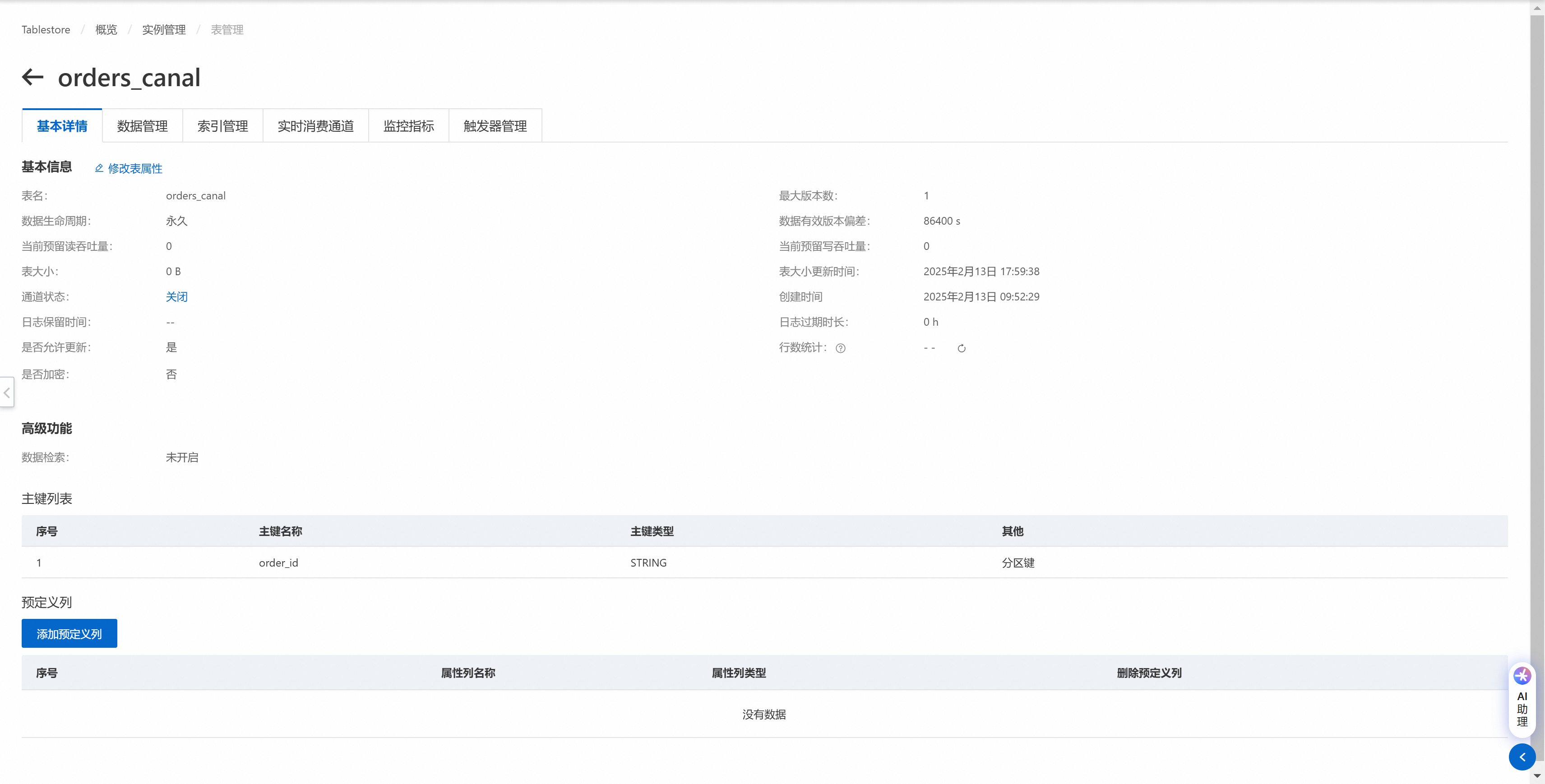
Because Tablestore is schema-free, you only need to specify the primary key order_id when you create the destination table. The following figure shows the basic details of the destination table.