Billing overview
Tablestore offers two billing modes: VCU mode (formerly reserved mode) and CU mode (formerly pay-as-you-go mode). Choose a billing mode and method based on your workload pattern.
Video introduction
Billing modes
Tablestore offers the following billing modes:
SQL statements incur no extra fees. However, SQL query operations such as table scans and index queries consume VCU compute resources in VCU mode (formerly reserved mode) and generate read throughput in CU mode (formerly pay-as-you-go mode).
Cross-region replication traffic fees apply only when you use Global Tables. Global Tables Metering and Billing.
Billing mode | Description |
VCU mode (formerly reserved mode) | Purchase reserved VCUs based on resource estimates, or enable elastic capacity to pay for consumed compute on a pay-as-you-go basis. Combine both to optimize costs.
VCU mode reduces compute costs and lets you control resource usage by capping or disabling elastic capacity, preventing unexpected charges from traffic spikes. Best for cost-controlled scenarios. Note For more information, see Resource assessment and selection. Billable items: computing power, data storage (high-performance, Capacity, and search index), cross-region replication traffic, and outbound public traffic. VCU mode (formerly Reserved mode). |
CU mode (formerly pay-as-you-go mode) | Charges are based on real-time read/write throughput and storage. No upfront resource planning is required. Best for unpredictable workloads with traffic bursts, where high service stability is required. Important CU mode does not cap overall resource usage. Manage consumption at the application layer to avoid unexpected costs from traffic spikes. Billable items: read throughput, write throughput, data storage, cross-region replication traffic, and outbound public traffic. CU mode (formerly Pay-As-You-Go mode). |
Billing methods
Tablestore supports the following billing methods:
Billing method | Description |
Subscription |
|
Pay-as-you-go |
|
Note Resource plans cannot be used to offset fees for Internet traffic. |
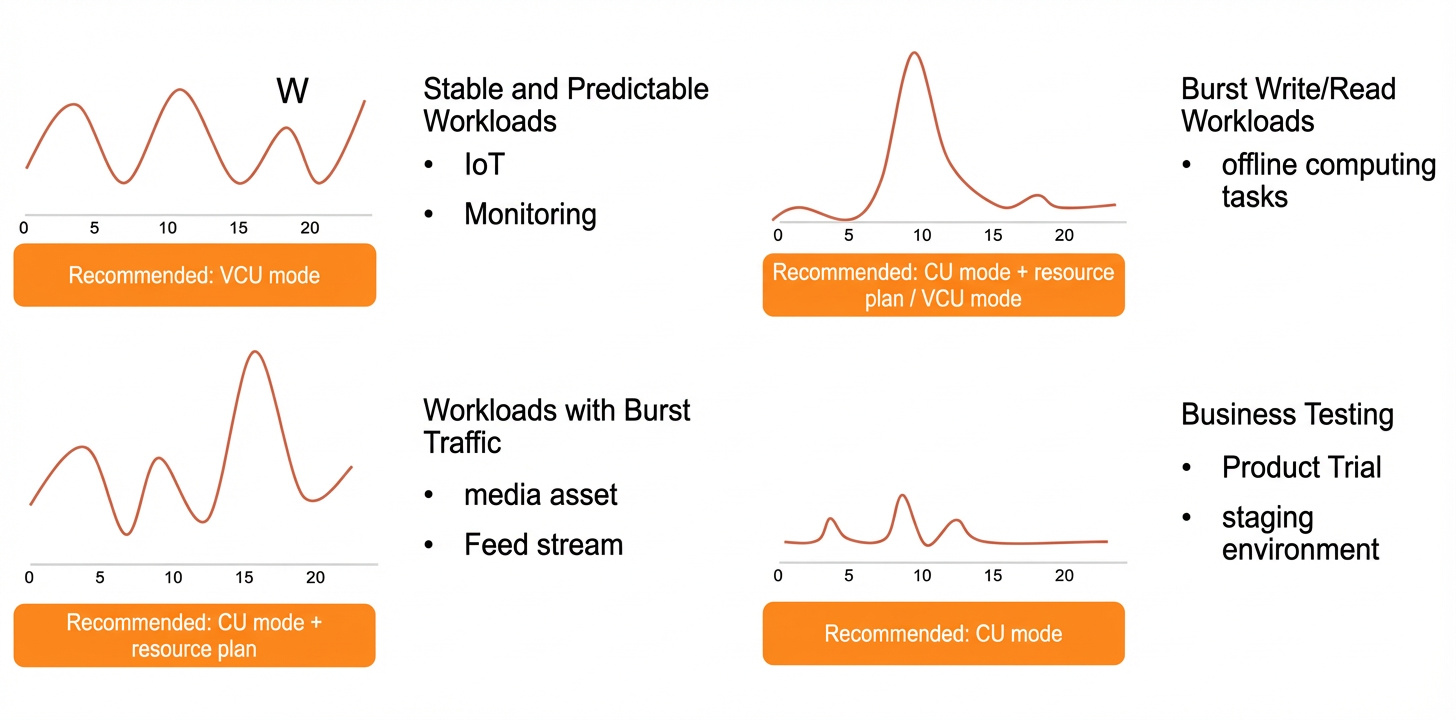
Recommended use cases
Choose a solution based on your workload pattern.
Business scenario | Description | Recommended solution | References |
Stable and predictable workloads | Consistent workloads without traffic spikes, such as monitoring and IoT. | VCU mode (formerly reserved mode) | |
Workloads with traffic bursts | Unpredictable traffic bursts, such as media and news workloads. |
|
|
Batch offline tasks | Scheduled large-scale offline reads and writes at low frequency. | CU mode (formerly pay-as-you-go mode) and resource plans | |
Business testing | Early-stage product testing in a staging environment. | CU mode (formerly pay-as-you-go mode) |