Convert Tablestore data into vectors using open source models
This topic describes how to use open source models to convert text data in Tablestore into vectors.
Solution overview
ModelScope is a next-generation open source Model-as-a-Service (MaaS) platform. It offers AI developers flexible, user-friendly, and low-cost model services to simplify model applications. ModelScope provides a collection of leading pre-trained models to help developers reduce redundant development costs. It provides an open AI development environment and model services.
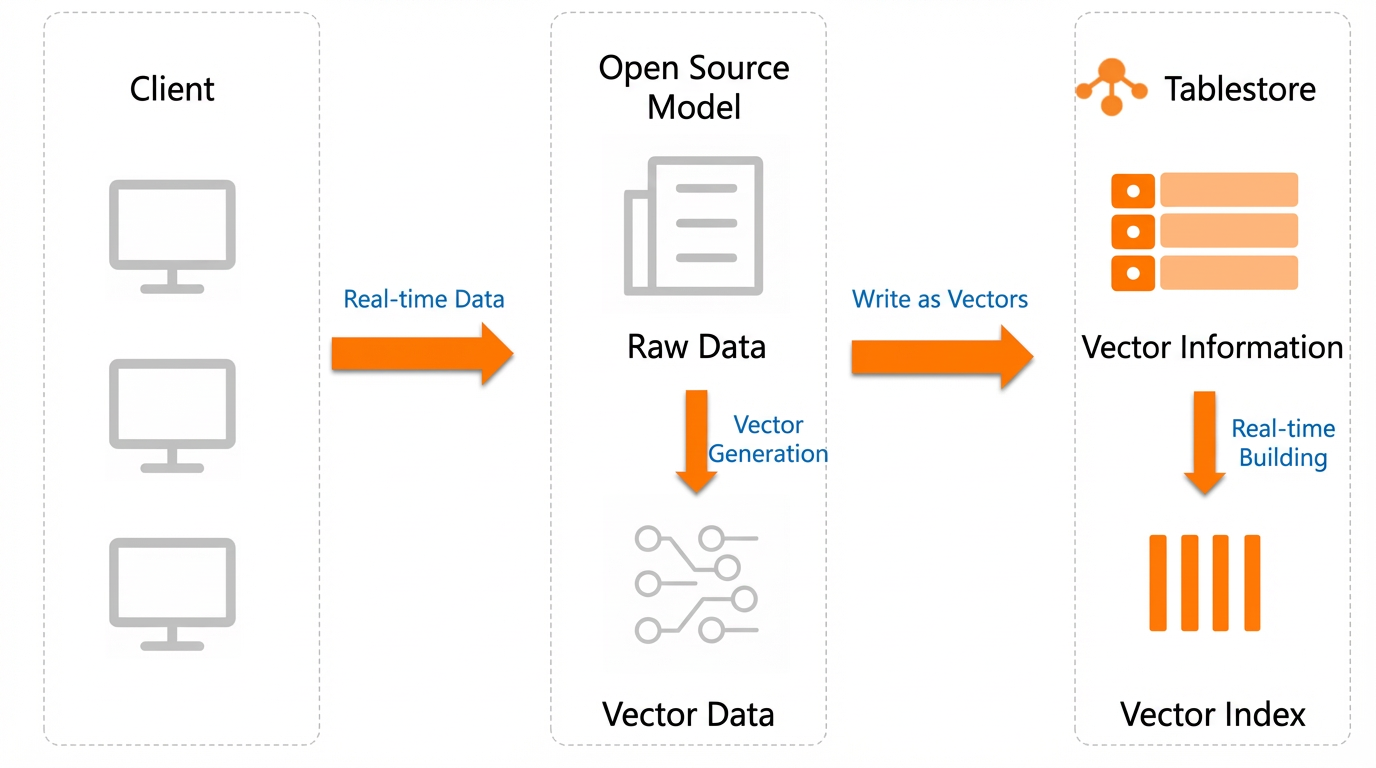
You can generate vectors from text data in Tablestore using free open source models in four steps:
Install the Python SDK: Before you use open source models to generate vectors and use Tablestore, you must install the Tablestore SDK and the open source model SDK.
Select and download an open source model: ModelScope provides many text embedding models. You can select and download a model from the model library.
Generate vectors and write them to Tablestore: After you generate vectors using an open source model, you can write the vector data to a Tablestore data table.
Verify the results: Query the vector data using the Tablestore data read API or the vector search feature of a search index.
Usage notes
Development language: Python
Python version: Python 3.9 or later is recommended.
Development environment: The examples in this topic are verified on CentOS 7 and macOS.
Notes
The dimension, type, and distance algorithm of the vector field in a Tablestore search index must be consistent with the configuration of the open source text-to-vector model. For example, the open source model damo/nlp_corom_sentence-embedding_chinese-tiny generates vectors with 256 dimensions, the Float32 type, and the Euclidean distance algorithm. When you create a search index in Tablestore, the vector field must also be configured with 256 dimensions, the Float32 type, and the Euclidean distance algorithm.
Prerequisites
You have an Alibaba Cloud account or a Resource Access Management (RAM) user that has permissions to manage Tablestore.
If you use a RAM user, you must create the RAM user using your Alibaba Cloud account and grant the RAM user permissions to access Tablestore (AliyunOTSFullAccess). For more information, see Manage RAM user permissions.
An AccessKey is created for the Alibaba Cloud account or RAM user. For more information, see Create an AccessKey.
WarningA leaked AccessKey for an Alibaba Cloud account poses a security threat to all your resources. To reduce security risks, we recommend that you use the AccessKey of a RAM user.
You have obtained the instance name and endpoint of the Tablestore instance. For more information, see Endpoints.
The AccessKey (including the AccessKey ID and AccessKey secret), instance name, and instance endpoint are configured as environment variables.
1. Install the SDK
Run the pip command on the command line to install the Tablestore Python SDK and ModelScope dependencies. The installation commands are as follows:
# Install the Tablestore Python SDK.
pip install tablestore
# Install ModelScope dependencies.
pip install torch torchvision torchaudio
pip install "modelscope[framework]" -f https://modelscope.oss-cn-beijing.aliyuncs.com/releases/repo.html
pip install --use-pep517 "modelscope[nlp]" -f https://modelscope.oss-cn-beijing.aliyuncs.com/releases/repo.html
2. Select and download an open source model
2.1 Select an open source model
ModelScope provides many text embedding models. You can select one from the model library.
The following table lists frequently used models. You can select a model based on your requirements.
If the vectors generated by ModelScope are not normalized, you can select Euclidean distance as the distance measure in Tablestore.
Model ID | Model realm | Vector dimensions | Recommended distance measure algorithm |
damo/nlp_corom_sentence-embedding_chinese-base | Chinese - General realm - base | 768 | Euclidean distance |
damo/nlp_corom_sentence-embedding_english-base | English - General realm - base | 768 | Euclidean distance |
damo/nlp_corom_sentence-embedding_chinese-base-ecom | Chinese - E-commerce realm - base | 768 | Euclidean distance |
damo/nlp_corom_sentence-embedding_chinese-base-medical | Chinese - Medical realm - base | 768 | Euclidean distance |
damo/nlp_corom_sentence-embedding_chinese-tiny | Chinese - General realm - tiny | 256 | Euclidean distance |
damo/nlp_corom_sentence-embedding_english-tiny | English - General realm - tiny | 256 | Euclidean distance |
damo/nlp_corom_sentence-embedding_chinese-tiny-ecom | Chinese - E-commerce realm - tiny | 256 | Euclidean distance |
damo/nlp_corom_sentence-embedding_chinese-tiny-medical | Chinese - Medical realm - tiny | 256 | Euclidean distance |
2.2 Download the open source model
After you select a model, run the modelscope download --mode {Model ID} command on the command line to download the model. Replace {Model ID} with the ID of the model that you want to use. This topic uses the damo/nlp_corom_sentence-embedding_chinese-tiny model as an example. The following command shows how to download the model:
modelscope download --mode damo/nlp_corom_sentence-embedding_chinese-tiny3. Generate vectors and write them to Tablestore
After you generate vectors using an open source model, you can write the vectors to a Tablestore data table. You can write new vectors to Tablestore, or generate vectors from existing data in Tablestore and then write the vectors back to Tablestore.
The following example shows how to use the Python SDK to create a Tablestore table and a search index. The example then uses an open source model to generate 256-dimension vectors and writes the vector data to Tablestore.
import json
import os

from modelscope.pipelines import pipeline
from modelscope.utils.constant import Tasks
from tablestore import OTSClient, TableMeta, TableOptions, ReservedThroughput, CapacityUnit, FieldSchema, FieldType, VectorDataType, VectorOptions, VectorMetricType, \
    SearchIndexMeta, AnalyzerType, Row, INF_MIN, INF_MAX, Direction, OTSClientError, OTSServiceError, Condition, RowExistenceExpectation

# Select a model and enter the model ID.
pipeline_se = pipeline(Tasks.sentence_embedding, model='damo/nlp_corom_sentence-embedding_chinese-tiny')


def text_to_vector_string(text: str) -> str:
    inputs = {'source_sentence': [text]}
    result = pipeline_se(input=inputs)
    # Convert the result to a format supported by Tablestore: a string of a float32 array, for example: [1, 5.1, 4.7, 0.08]
    return json.dumps(result["text_embedding"].tolist()[0])


def create_table():
    table_meta = TableMeta(table_name, [('PK_1', 'STRING')])
    table_options = TableOptions()
    reserved_throughput = ReservedThroughput(CapacityUnit(0, 0))
    tablestore_client.create_table(table_meta, table_options, reserved_throughput)


def create_search_index():
    index_meta = SearchIndexMeta([
        # Supports text-matching queries.
        FieldSchema('field_string', FieldType.KEYWORD, index=True, enable_sort_and_agg=True),
        # Supports numeric range queries.
        FieldSchema('field_long', FieldType.LONG, index=True, enable_sort_and_agg=True),
        # Full-text index field.
        FieldSchema('field_text', FieldType.TEXT, index=True, analyzer=AnalyzerType.MAXWORD),
        # Vector search field. Uses Euclidean distance as the measure. The vector dimension is 256.
        FieldSchema("field_vector", FieldType.VECTOR,
                    vector_options=VectorOptions(
                        data_type=VectorDataType.VD_FLOAT_32,
                        dimension=256,
                        metric_type=VectorMetricType.VM_EUCLIDEAN
                    )),
    ])
    tablestore_client.create_search_index(table_name, index_name, index_meta)


def write_data_to_table():
    for i in range(100):
        pk = [('PK_1', str(i))]
        text = "A string for full-text search. An embedding vector is generated from this field and written to the field_vector field below for vector semantic similarity search."
        vector = text_to_vector_string(text)
        columns = [
            ('field_string', 'str-%d' % (i % 5)),
            ('field_long', i),
            ('field_text', text),
            ('field_vector', vector),
        ]
        tablestore_client.put_row(table_name, Row(pk, columns))


def get_range_and_update_vector():
    # Set the start primary key for the range query. INF_MIN is a special flag that indicates the minimum value.
    inclusive_start_primary_key = [('PK_1', INF_MIN)]
    # Set the end primary key for the range query. INF_MAX is a special flag that indicates the maximum value.
    exclusive_end_primary_key = [('PK_1', INF_MAX)]
    total = 0
    try:
        while True:
            consumed, next_start_primary_key, row_list, next_token = tablestore_client.get_range(
                table_name,
                Direction.FORWARD,
                inclusive_start_primary_key,
                exclusive_end_primary_key,
                ["field_text", "other_fields_to_return"],
                5000,
                max_version=1,
            )
            for row in row_list:
                total += 1
                # Get the content of the "field_text" field.
                text_field_content = row.attribute_columns[0][1]
                # Regenerate a vector based on the content of the "field_text" field.
                vector = text_to_vector_string(text_field_content)
                update_of_attribute_columns = {
                    'PUT': [('field_vector', vector)],
                }
                update_row = Row(row.primary_key, update_of_attribute_columns)
                condition = Condition(RowExistenceExpectation.IGNORE)
                # Update the row.
                tablestore_client.update_row(table_name, update_row, condition)
            if next_start_primary_key is not None:
                inclusive_start_primary_key = next_start_primary_key
            else:
                break
    # Client exception, usually due to a parameter error or network exception.
    except OTSClientError as e:
        print('get row failed, http_status:%d, error_message:%s' % (e.get_http_status(), e.get_error_message()))
    # Server-side exception, usually due to a parameter error or throttling error.
    except OTSServiceError as e:
        print('get row failed, http_status:%d, error_code:%s, error_message:%s, request_id:%s' % (e.get_http_status(), e.get_error_code(), e.get_error_message(), e.get_request_id()))
    print("Total data processed:", total)


if __name__ == '__main__':
    # Initialize the Tablestore client.
    end_point = os.environ.get('end_point')
    access_id = os.environ.get('access_key_id')
    access_key_secret = os.environ.get('access_key_secret')
    instance_name = os.environ.get('instance_name')
    tablestore_client = OTSClient(end_point, access_id, access_key_secret, instance_name)

    table_name = "python_demo_table_name"
    index_name = "python_demo_index_name"

    # Create a table.
    create_table()
    # Create an index.
    create_search_index()
    # Method 1: Directly write vector data to Tablestore.
    write_data_to_table()
    # Method 2: Generate vectors from existing data in Tablestore and write them back to Tablestore.
    get_range_and_update_vector()
4. Verify the results
You can view the vector data that is written to Tablestore in the Tablestore console. You can query the vector data using data read operations, such as GetRow, BatchGetRow, and GetRange, or using the vector search feature of a search index.
Query vector data using data read operations
After vector data is written to Tablestore, you can read the vector data directly from the table. For more information, see Read data.
Query vector data using the vector search feature
After you configure a vector field for a search index, you can use the vector search feature to query vector data. For more information, see Vector search.
Billing
When you use Tablestore, you are charged for the storage resources that are consumed by data tables and search indexes and the computing resources that are consumed by data read and write operations and vector searches. In VCU mode (formerly Reserved mode), computing resources are billed based on compute capacity. In CU mode (formerly pay-as-you-go mode), computing resources are billed based on read throughput and write throughput.
References
You can also use the model service of Alibaba Cloud Model Studio to convert Tablestore data into vectors. For more information, see Convert Tablestore data into vectors using an Alibaba Cloud service.