Manage resources and costs with BssOpenAPI
Features of BssOpenAPI
BssOpenAPI is a collection of Alibaba Cloud APIs that provides tools for managing instances, orders, bills, and coupons. You can use BssOpenAPI to query basic product information and manage your finances, bills, and invoices. 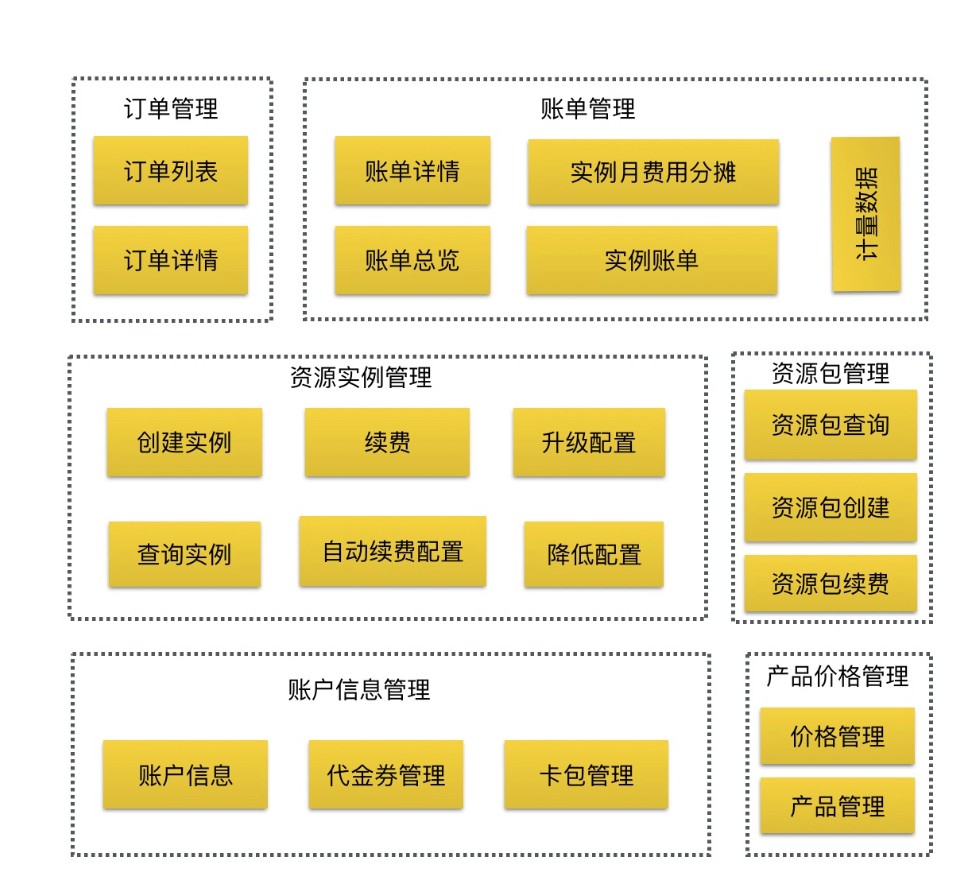
The resource concept
BssOpenAPI is designed around the concept of a resource. To use the API, you must understand the elements that uniquely identify a cloud resource.
In BssOpenAPI, a cloud resource is uniquely identified by four elements: product code, product type, billing method, and instance ID.
For example, to query the properties of a subscription-based, read-only RDS instance with the ID `roRDS-1`, you can use `instanceID = roRDS-1`, `productCode = RDS`, `productType = roRDS`, and `subscriptionType = Subscription`. 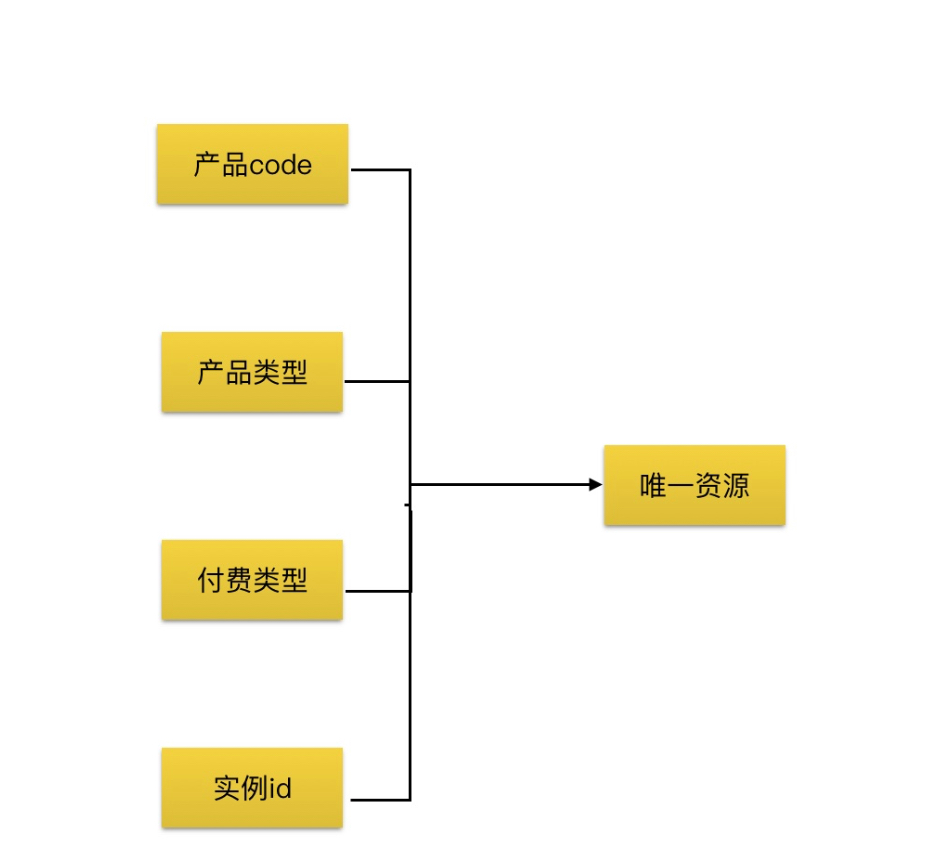
Typical scenarios
Online transactions
You can browse product features on Alibaba Cloud, assemble a product portfolio, and estimate the price of your configuration. Then, you can place an order to purchase and create your cloud resources. You can upgrade or downgrade the configuration of your resources based on business needs, such as traffic peaks and troughs. You can also query for a list of instances that are about to expire and renew them. If manual renewal is too complex, you can set up auto-renewal. The Alibaba Cloud auto-renewal service then performs renewal tasks according to your rules.
This includes the following scenarios.
-
Query product overviews with QueryProductList
-
Query detailed product module information with DescribePricingModule
-
Query prices with GetSubscriptionPrice / GetPayAsYouGoPrice
You can use `QueryProductList` to retrieve an overview of Alibaba Cloud products and find the `ProductCode`, `ProductType`, and `SubscriptionType` for the product you want to purchase. Then, you can use `DescribePricingModule` to query for detailed configuration information.
For example, you can use `QueryProductList` to find the basic information for a pay-as-you-go Elastic IP Address (EIP) product: `ProductCode=eip` and `SubscriptionType=PayAsYouGo`. To see the available configurations for an EIP product, you can use this information to call the `DescribePricingModule` API. You can retrieve details such as available regions such as `cn-qingdao-cm5-a01` and `cn-beijing-btc-a01`, and choose a billing method such as pay-by-data-transfer or pay-by-bandwidth.
Finally, after selecting a pay-by-bandwidth EIP in the `cn-qingdao-cm5-a01` region based on your business needs, you can use `GetPayAsYouGoPrice` to retrieve the specific price for that configuration.
-
Query your account balance with QueryAccountBalance
-
Query for available coupons and cards
Before you place an order, you can use `QueryAccountBalance`, `QueryCashCoupons`, `QueryPrepaidCards`, and `QueryRedeem` to check your account balance and available coupons. This helps determine if you have sufficient funds to cover the purchase. For example, you can check if your balance plus the value of your cash coupons is greater than the amount due.
-
Create an instance with CreateInstance
-
Modify an instance configuration with ModifyInstance
-
Switch the billing method with ConvertChargeType
-
Query a list of available instances with QueryAvailableInstances
-
Renew an instance with RenewInstance
-
Set the auto-renewal status for an instance with SetRenewal
As mentioned, you can use `DescribePricingModule` to retrieve the configuration details for a product and `GetPayAsYouGoPrice` to retrieve its price. To purchase and create the instance, you can call `CreateInstance` and pass the specific product and configuration information. The API returns the order ID associated with the instance creation and the ID of the new instance. For subscription instances, the cost of the `CreateInstance` call is automatically deducted from your account balance and any applicable coupons.
If you experience a business peak, you can upgrade your resource configuration. For example, you can increase the peak bandwidth of an EIP from 1 Mbps to 2 Mbps. You can use `ModifyInstance` to upgrade the configuration of a specific EIP instance. This upgrade action also generates a corresponding order ID.
You can also use `ConvertChargeType` to switch the billing method for a resource, such as from pay-as-you-go to subscription.
You can use `QueryAvailableInstances` to query a list of all resources under your account. The resource details include information such as the expiration date and region.
Based on the results from `QueryAvailableInstances`, you can filter for all resources that are about to expire and use `RenewInstance` to renew them. If manual renewal is too complex, you can use the `SetRenewal` API to configure auto-renewal rules. The Alibaba Cloud auto-renewal system will then automatically renew the resources before they expire based on your configured rules.
Due to internal system architecture limitations, the `CreateInstance` API in BssOpenAPI does not support instance creation, renewal, configuration changes, or billing method conversion for ECS and RDS products. For these operations, use the APIs of the corresponding product, which you can find on the product's API list page.
-
Query details of a resource plan with DescribeResourcePackageProduct
-
Query the price of a resource plan with GetResourcePackagePrice
-
Create a resource plan with CreateResourcePackage
-
Query a list of your resource plans with QueryResourcePackageInstances
-
QueryResourcePackageInstances: Renew resource plans
-
Upgrade a resource plan with UpgradeResourcePackage
Resource plans are a special type of cloud resource. A data transfer plan, for example, can automatically deduct usage fees for the corresponding resource type. BssOpenAPI also provides a series of APIs to query product details, retrieve prices, create, renew, upgrade, and list your resource plans.
Billing and finance
The online transactions section described how to use a series of APIs to manage cloud resources, including querying, pricing, creating, and modifying them. Costs are incurred when you create and use resources. For subscription resources, a fixed fee is generated when you pay for the creation order. For pay-as-you-go resources, bills are generated during each billing cycle. These bills are settled by continuously deducting from your account balance or coupons.
BssOpenAPI provides a set of tools that let you retrieve all order and bill details for your account. You can use this raw data to build your own logic for resource and cost analysis.
You can also retrieve invoice information. You can combine this with billing information to implement auditing and reconciliation logic that ensures consistency between your finances, invoices, and accounts.
-
Query a list of orders with QueryOrders
-
Query order details with GetOrderDetail
You can use the order query APIs to find information such as associated resource instances and the actual amount paid. Every operation on a subscription resource, such as a new purchase, renewal, upgrade, downgrade, or refund, generates a corresponding order. The order links the instance ID with the cost information. Therefore, you can use this data to retrieve the payment details for all operations on subscription resources.
-
Query detailed product metering data with QueryUserOmsData
Detailed metering data is the basis for pay-as-you-go product bills. The formula is as follows: Amount payable for a billable item = Metering data usage × Unit price of the billable item. You can obtain the unit price information using the `GetPayAsYouGoPrice` API.
-
Query Bill Overview
-
Query bills with QueryBill
-
Query instance bills with QueryInstanceBill
-
Use the monthly cost allocation service with QueryInstanceGaapCost
The bill query APIs provide bill data from multiple dimensions, such as overview, details, grouped by instance, and monthly cost allocation.
For example, `QueryBillOverview` presents an overview of bills aggregated by product type. If an account has resources of types A, B, and C in the August 2019 billing cycle, the overview data shows the consumption and refund amounts for each of A, B, and C. Because every change in your account balance is caused by the payment or settlement of a subscription order or a pay-as-you-go bill, the `QueryBill` API provides detailed billing information at the finest granularity of the order number or bill number. After you retrieve the most granular bill details, you may want to know the total cost of a specific ECS instance within a billing cycle. For this purpose, `QueryInstanceBill` provides detailed bill data aggregated by instance. In scenarios where settlement occurs on a monthly billing cycle, `QueryInstanceGaapCost` provides monthly cost allocation information in addition to the detailed bill data associated with your resources.
The billing APIs mentioned provide detailed bill data from various dimensions. By combining this with order details, you can obtain a clear picture of the costs for your entire account or for a specific cloud resource. This lets you effectively manage your resources and costs.
Summary
BssOpenAPI provides a systematic set of tools for everything from resource creation and management to detailed order and bill management. You can use these tools to implement your own system for managing resources and costs.