Savings plans
What is a savings plan?
A savings plan works like a phone plan — you commit to a fixed hourly spend (similar to a monthly plan fee), and you get discounted rates on eligible pay-as-you-go resources (similar to in-plan call rates). Usage beyond your commitment is billed at the standard pay-as-you-go rate (similar to out-of-plan charges).
Unlike subscription billing, a savings plan does not bind you to specific instances. It works with pay-as-you-go billing, giving you the flexibility to change configurations, release, and recreate resources at any time — while still enjoying discounted rates.
To summarize: a savings plan provides a cost advantage similar to subscription billing, combined with the operational flexibility of pay-as-you-go billing.
3-minute quick overview
How it works
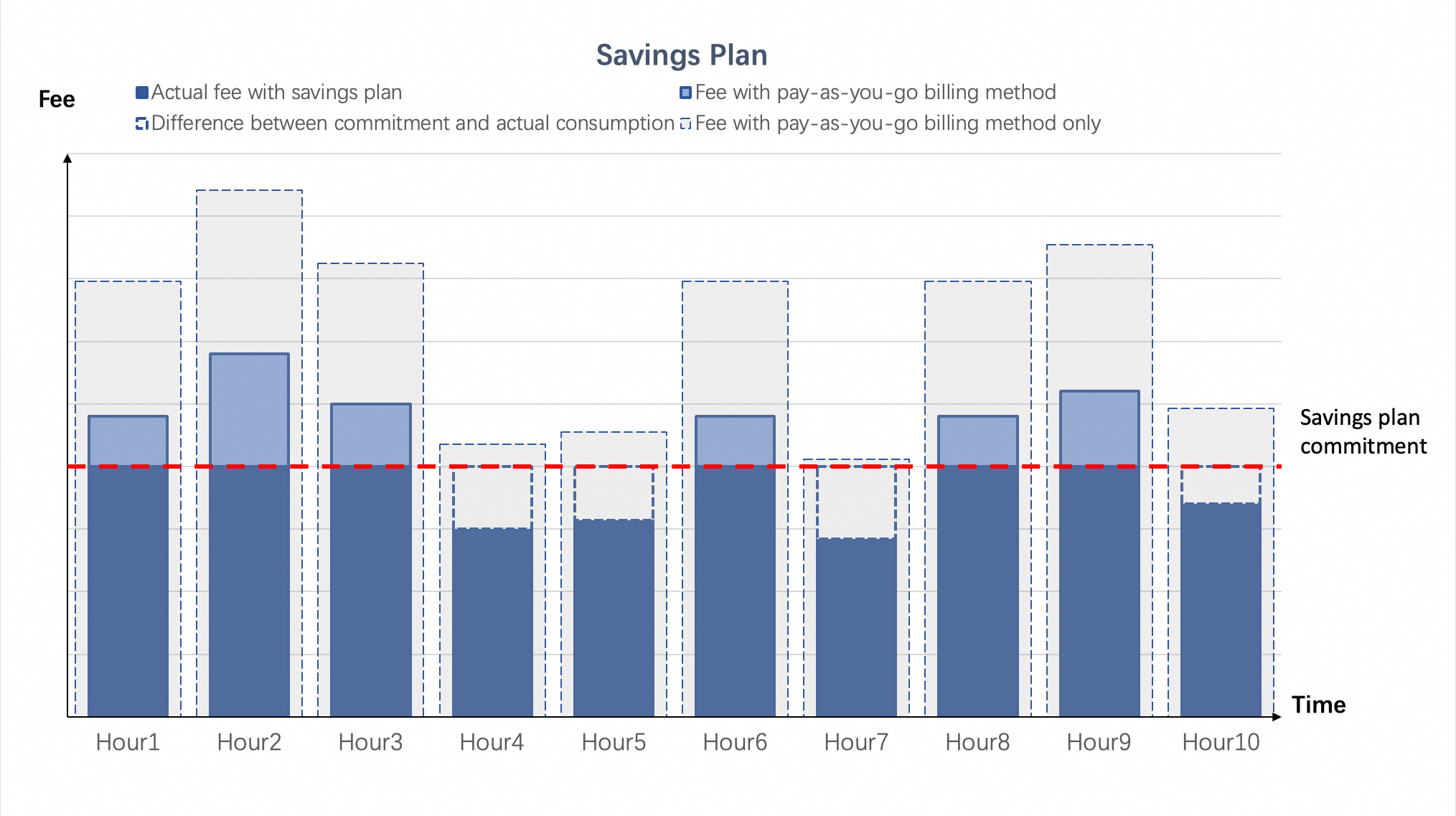
When you purchase a savings plan, you are billed for your hourly committed spend, and discounts are automatically applied to your hourly pay-as-you-go bills according to the following rules:
-
Billed hourly: The system charges you for your hourly committed spend every hour.
-
Overage: If your hourly pay-as-you-go bill exceeds your commitment, the excess usage is billed at the standard pay-as-you-go rate.
-
Full commitment charge: You are billed for the full hourly committed spend, even if your actual discounted usage is lower.
After purchase, you are billed for the hourly committed spend even if you have no eligible pay-as-you-go resources. If you no longer plan to use the associated pay-as-you-go resources, release them promptly to avoid unnecessary charges.
Example: Committed spend vs. actual usage
The standard pay-as-you-go price for an ECS instance is 12 CNY/instance/hour. With a savings plan, the discounted price is 4.75 CNY/instance/hour.
A user purchases a savings plan with an hourly committed spend of 95 CNY/hour. This commitment can cover a maximum of 20 instances (95 / 4.75 = 20).
Scenario: A user runs 25 instances of type A during the first hour and 15 instances during the second hour.
|
Billing method |
Hour 1 cost |
Hour 2 cost |
Total cost |
|
Pay-as-you-go |
25 instances × 12CNY/instance/hour × 1 hour = 300CNY |
15 instances × 12CNY/instance/hour × 1 hour = 180CNY |
480CNY |
|
Savings plan + Pay-as-you-go |
Committed spend CNY 95 Overage cost (25 - 20) instances × 12CNY/instance/hour × 1 hour = 60CNY |
Committed spend CNY 95 Overage cost CNY 0 |
CNY250 |
Deduction priority
When multiple discount types apply, the deduction priority is as follows (highest to lowest): Reserved Instance, resource plan (such as a Storage Capacity Unit), and then savings plan.
Additionally, the following rules apply:
-
If a pay-as-you-go discount is greater: The higher discount is applied first. Your savings plan can then cover the remaining billable amount.
-
If you have multiple savings plans: Plans are applied in the order they were purchased, not based on their discount rate.
Why choose savings plans
Key advantages
-
Flexible cloud usage: Use savings plans with pay-as-you-go billing to offset costs for various cloud resources. This approach helps you adapt to changing business needs and simplifies budget planning.
-
Flexible payment options: Choose from different upfront payment options to reduce pressure on your cash flow.
Applicable business models
Savings plans are often used with pay-as-you-go billing. They are ideal for situations where your overall usage is stable, but you expect changes in resource types or specifications. Common examples include system upgrades and cluster deployments. Typical models include:
Comparison with other billing models (summary)
|
Feature |
Subscription |
Reserved Instance |
Savings Plan |
|
Type |
A billing method that is bound to specific resources |
A discount benefit that randomly offsets the usage of eligible pay-as-you-go resources |
A discount benefit that randomly offsets the costs of eligible pay-as-you-go resources |
|
Discount restrictions |
Applies only to the specific instance purchased. |
Applies only to specific, matching instances. |
Applies to your bill. No instance limit for greater flexibility. |
|
Cross-product |
Not supported |
Supported |
Supported |
|
Cross-region |
Not supported |
Not supported |
Supported (General-purpose) |
|
Cross-instance family |
Not supported |
Not supported |
Supported (General-purpose) |
|
Payment flexibility |
Not supported |
Supported |
Supported (All Upfront, Partial Upfront, and No Upfront) |
|
Cross-account (via Financial Management) |
Not supported |
Supported |
Supported |
Supported cloud products
|
Savings plan type |
Deductible cloud products |
Deductible items |
Purchase link |
|
ECS compute savings plan |
ECS and Elastic Container Instance (ECI) Note
ECS and ECI share a savings plan. |
Pay-as-you-go Elastic Compute Service (ECS) instances, ECI, and immediate capacity reservations |
|
|
General-purpose |
Elastic Compute Service (ECS), Elastic Container Instance (ECI) Note
A single General-purpose Savings Plan covers both ECS and ECI. |
ECS, ECI, Immediate Capacity Reservation, Cloud Disk, Cloud Disk performance |
|
|
General-purpose database savings plan |
RDS |
Subscription ApsaraDB RDS, pay-as-you-go ApsaraDB RDS, RDS read-only instances, pay-as-you-go RDS read-only instances, and RDS Serverless |
|
|
Transit Router |
Transit Router |
Transit Router |
|
|
Wan Savings Plan |
Applies to usage for image generation (by count) and video generation (by duration) for Wan series models. Does not cover usage of the Qwen text-to-image model. |
||
|
LLM inference |
Applies to token usage for text generation from Large Language Model (LLM) inference on the Alibaba Cloud Model Studio platform. This includes text generation models such as Qwen-max, Qwen-plus, Qwen-flash, Qwen-coder, Qwen-long, and Qwen-VL, as well as third-party text generation models available on Alibaba Cloud Model Studio. |
||
Lifecycle
Expiration and its effects
You can find the expiration date of your savings plans in the savings plan list under Billing Management.
After a savings plan expires, you will no longer receive its discount. Your pay-as-you-go instances that were covered by the plan will be billed at the standard pay-as-you-go rate. The instances themselves are not released, so your business operations continue uninterrupted.
Service suspension due to overdue payments
If you chose a Partial Upfront or No Upfront payment option and your account has an overdue payment that prevents the hourly fee from being paid, the savings plan is immediately restricted (this rule does not apply if you are eligible for an overdue payment suspension exemption. For more information, see Overdue Payment Suspension Exemption). Starting the following hour, the plan stops applying discounts to your pay-as-you-go bills. Once you clear the overdue payment, the savings plan immediately resumes applying discounts.
-
If a savings plan enters the overdue-restricted state multiple times or for an extended period, it may affect your ability to use No Upfront features for other Alibaba Cloud products in the future. We recommend maintaining a sufficient account balance.
-
An overdue plan stops applying discounts but continues to incur charges for the hourly committed spend.
FAQ
No pay-as-you-go resources after purchase
You will still be billed for the hourly committed spend. We recommend estimating your commitment amount before purchasing to avoid paying for unused discounts.
Does a savings plan provide or lock resources?
No. It does not provide resources or bind to a specific instance. It is a discount model that applies to your billable spend. The type of plan you purchase determines the discount's scope.
Deduction priority among multiple plans
The typical priority is: Reserved Instance, resource plan > savings plan. If a standard pay-as-you-go discount is greater, it will be applied first.
References
For details about savings plans for different cloud products and their deduction rules, see: