App authentication solutions
This solution combines AI technologies, such as biometrics, with identity verification APIs from authoritative organizations to verify that users are genuine and their identities are valid.
If you have questions about API integration, API usage, or the visual AI capabilities of the Alibaba Cloud Visual Intelligence API, you can contact us through our DingTalk group (23109592).
Product solution description
The app authentication solution allows the client SDK to collect face photos. It uses client-plus-cloud liveness detection and face verification against an authoritative public security database to verify that the user is genuine and their identity is valid.
Authentication flow
App authentication requires the client (Android or iOS) and the server to work together to perform financial-grade face detection.
To configure the client environment and download the SDK, see the Android Client Integration Tutorial and the iOS Client Integration Tutorial. To quickly test the solution, you can download the Android Demo and the iOS Demo.
The following flowchart shows the overall process:
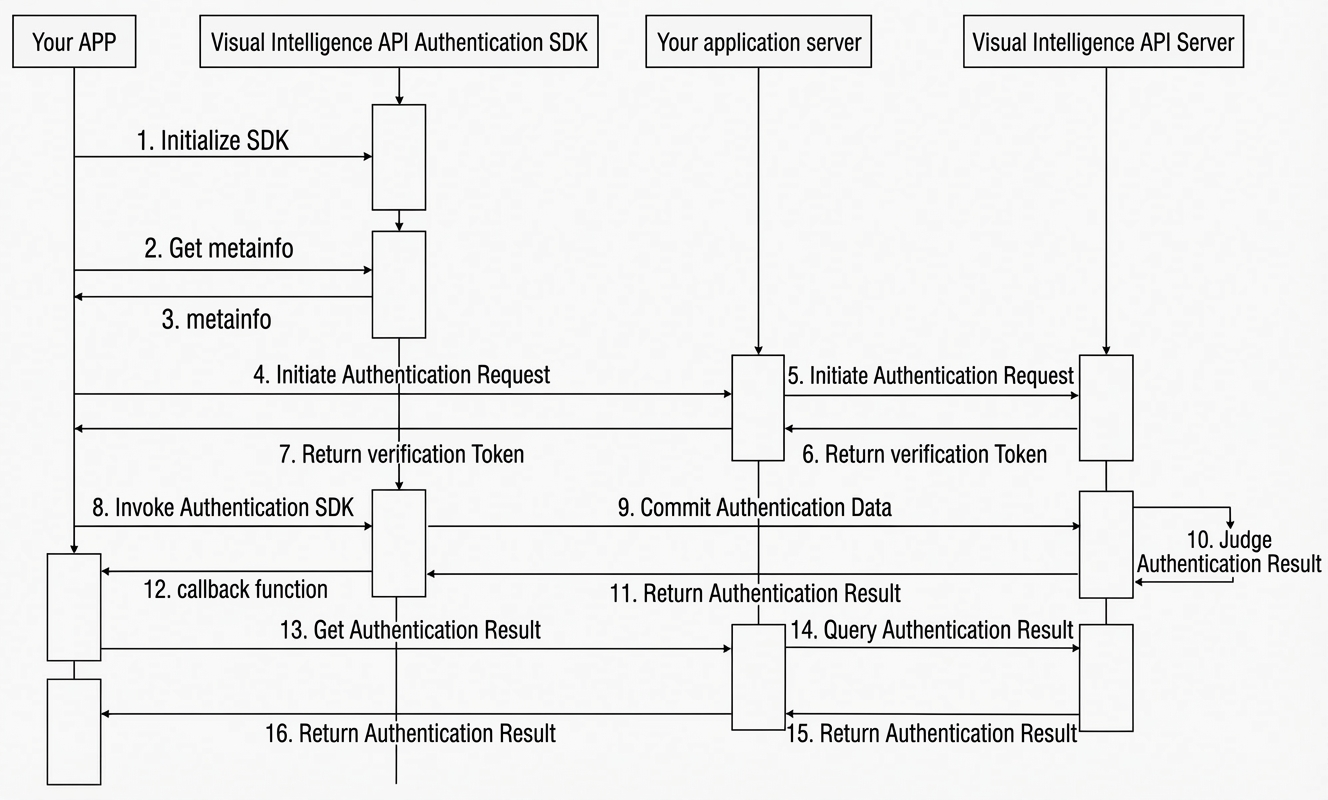
Initialize the SDK. For more information, see the SDK initialization code in the Android Client Integration Tutorial and the iOS Client Integration Tutorial.
Your app calls the platform SDK to obtain the metainfo. For more information, see the "Obtain metainfo data" section in the Android Client Integration Tutorial and the iOS Client Integration Tutorial.
The platform SDK returns the metainfo value.
Your app sends an authentication request to your server.
Your server sends an authentication request to the platform server by calling the Mobile Verification Request API.
The platform server returns a verificationToken to your server.
NoteThe verificationToken returned by the Mobile Verification Request API is valid for 30 minutes. If you perform face verification after the token expires, an error occurs. You must complete the authentication within this validity period.
Your server returns the verificationToken to your app.
Your app uses the verificationToken to call the authentication SDK. For more information, see the "Start authentication" section in the Android Client Integration Tutorial and the iOS Client Integration Tutorial.
The platform SDK submits the authentication materials to the platform server. This is an internal platform action and requires no action on your part.
The platform server determines the authentication result. This is an internal platform action and requires no action on your part.
The platform server returns the authentication result to the platform SDK. This is an internal platform action and requires no action on your part.
The platform SDK returns the result to your app through a callback function.
Your app sends a request to your server to retrieve the authentication result.
Your server sends a request to the platform server to query the authentication result by calling the Query Mobile Verification Result API.
The platform server returns the final authentication result to your server.
Your server returns the final authentication result to your app for display or further action.
After you successfully integrate the APP Authentication solution, your users' authentication interface is as follows.
Before collecting a user's facial information, the service informs the user about the process details. Authentication begins after the user grants authorization. The result is then returned to your application.
The user authentication interface consists of two stages: the authorization consent page displays the user's ID photo, and the user must select Agree to the Authentication Service Agreement and then click Start Authentication (or click Skip Authentication to skip); after entering the liveness detection stage, the interface prompts "Pick up your phone and blink", and the camera performs facial recognition verification.
The current version of the SDK does not support UI customization for the user authentication interface.
In the Android Demo and iOS Demo, the app sends requests directly to the platform server to demonstrate the complete client-side flow. In a production environment, you must send requests from your app to your server first. Your server then sends the requests to the platform server.
Limits
The financial-grade face detection service currently supports authentication for residents who have second-generation ID cards or permanent residence permits from Hong Kong (China), Macao (China), and Taiwan (China).