Video upload
The short video SDK for Android allows you to compose and upload videos to ApsaraVideo VOD.
Feature overview
ApsaraVideo VOD supports uploading media files such as audio, video, and images to its storage. For more information, see Media upload. The upload SDK provides interfaces to compose and upload videos separately, so you can compose an edited video on one interface and upload it on another. The AliyunIVodCompose core class encapsulates video composition and upload to simplify the process. The short video SDK uses AliyunIVodCompose to upload videos.
Supported editions
|
Edition |
Support |
|
Professional Edition |
Support |
|
Standard Edition |
Support |
|
Basic Edition |
No Note To upload a video by using the short video SDK Basic Edition, integrate the upload SDK. For more information, see Upload SDK overview. |
Related classes
|
Class |
Features |
|
The core upload class. Provides initialization, video and image upload, and upload credential refresh. |
|
|
The factory class used to create AliyunIVodCompose instances. |
Video upload process
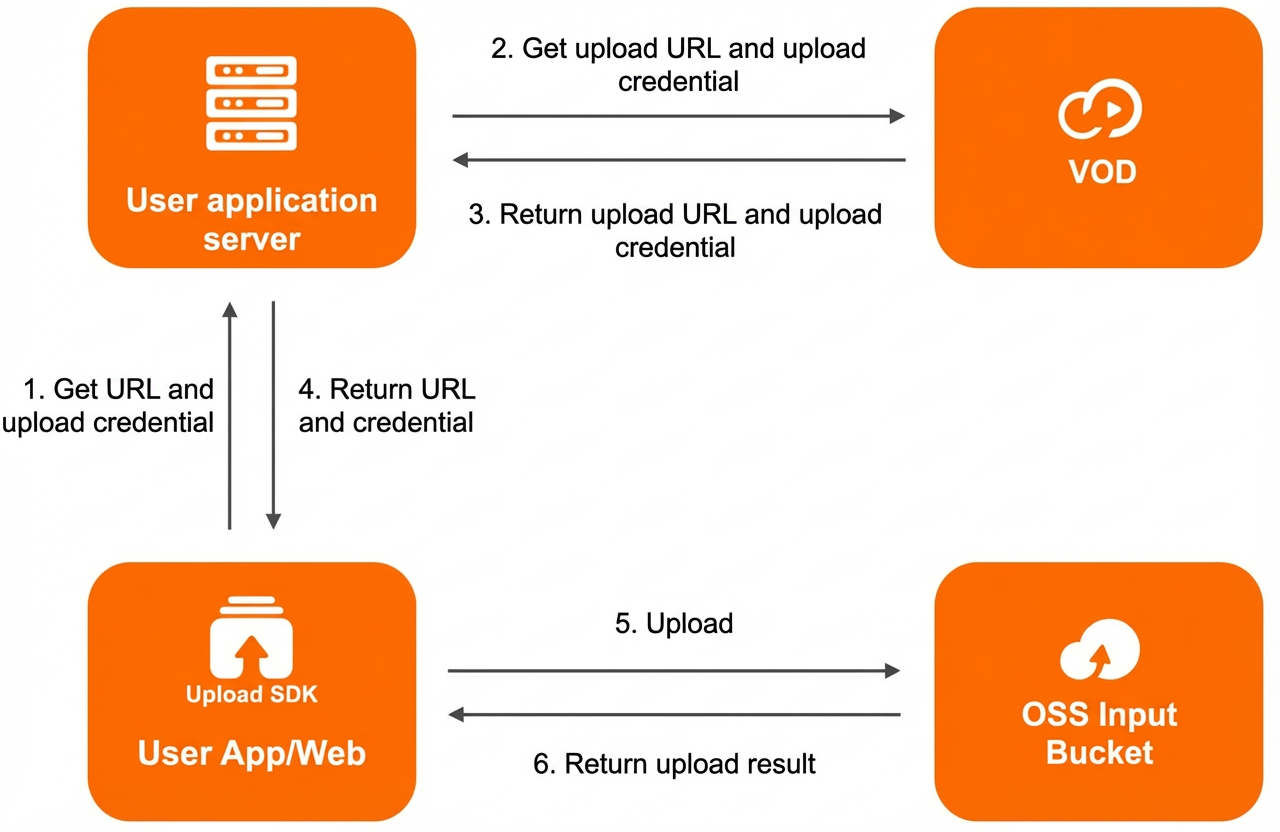
-
A client, such as a user app or web client, uses the upload SDK to upload a video or image. The client first sends a request to the application server to obtain an upload URL and credential.
-
The application server uses OpenAPI to send CreateUploadVideo (for videos) or CreateUploadImage (for images) requests to the ApsaraVideo VOD service.
-
If the request is successful, the ApsaraVideo VOD service returns the upload URL, upload credential, VideoId (for a video), and ImageURL (for an image) to the application server.
-
The application server returns the upload URL and upload credential to the client.
-
The client adds the local file, sets the upload URL and credential, and starts the upload to an OSS bucket.
-
OSS returns the upload result.
Initialization
Initialize the upload instance. For details about the parameters, see Related classes.
// Create an instance.
AliyunComposeFactory.createAliyunVodCompose();

// Initialize the instance.
AliyunIVodCompose.init(Context context);
Get an upload URL and credential
AliyunIVodCompose uploads files using an upload URL and credential. Before you upload a file, obtain them by calling Obtain an upload URL and credential for an audio or video file or Obtain an upload URL and credential for an image file.
This step only obtains the upload URL and credential. You must start the upload separately after obtaining them.
Upload a file
Upload media files such as videos and images. For details about the parameters, see Related classes.
// Upload a video or image using the upload URL and credential.
// videoPath: The path of the video file. Make sure that this path is the same as the video file path that you specified when you obtained the upload URL and credential.
// imagePath: The path of the image file. Make sure that this path is the same as the image file path that you specified when you obtained the upload URL and credential.
// uploadAddress: The upload URL.
// uploadAuth: The upload credential. If the credential expires, see the following section to refresh it.
// aliyunVodUploadCallBack: The upload callback.
// Upload a video.
AliyunIVodCompose.uploadVideoWithVod(String videoPath, String uploadAddress, String uploadAuth, AliyunIVodUploadCallBack aliyunVodUploadCallBack);

// Upload an image.
AliyunIVodCompose.uploadImageWithVod(String imagePath, String uploadAddress, String uploadAuth, AliyunIVodUploadCallBack aliyunVodUploadCallBack);
Refresh an upload credential
Upload credentials are time-sensitive. The Expiration variable in the UploadAuth field specifies the TTL of the upload authorization. The default TTL is 3,000 seconds. If a credential expires, call the onUploadTokenExpired callback to obtain a new one. For more information, see Refresh video upload credentials.
// Refresh the upload credential. uploadAuth: The upload credential.
AliyunIVodCompose.refreshWithUploadAuth(String uploadAuth);
Release resources
After the upload completes, destroy the instance to release resources. For details about the parameters, see Related classes.
AliyunIVodCompose.release();Upload control
You can pause, resume, or cancel an upload as needed. For details about the parameters, see Related classes.
// Pause the upload.
AliyunIVodCompose.pauseUpload();
// Resume the upload.
AliyunIVodCompose.resumeUpload();
// Cancel the upload.
AliyunIVodCompose.cancelUpload();