Use resource groups for fine-grained resource control
You can use resource groups with Resource Access Management (RAM) to isolate resources and manage permissions with fine-grained control in a single Alibaba Cloud account. This topic describes how ApsaraVideo VOD supports resource groups and how to grant permissions at the resource group level.
-
Resource group-level authorization is effective only for resource types and operations that support resource groups.
-
For resource types that do not support resource groups, granting permissions at the resource group level is not effective. You must grant permissions at the account level. For more information, see Operations that do not support resource-group-level authorization.
How it works
You can use resource groups to group and manage resources in your Alibaba Cloud account. For example, you can create a resource group for each project and move resources into their respective groups. This helps you manage project resources in a centralized manner. For more information, see What is a resource group?.
After you group your resources, you can grant permissions for a specific resource group to different RAM entities, such as RAM users, RAM user groups, or RAM roles. This restricts the entity to managing only the resources within that group. For more information, see Resource grouping and authorization.
The benefits of this authorization method are:
-
Fine-grained permissions: This ensures that each identity obtains the precise resource access permissions it needs. This prevents the management of resources from multiple projects from being mixed under one account.
-
Extensibility: When you add new resources, you can just add them to the resource group. The RAM identity automatically obtains the necessary permissions for the new resources. No extra authorization is required.
Grant resource-group-level permissions to a RAM user
This section uses a RAM user as an example to demonstrate how to grant permissions for ApsaraVideo VOD resources in a specific resource group.
1. Prerequisites
-
Create a RAM user. For more information, see Create a RAM user.
-
Create a resource group and move existing resources to the target resource group. For more information, see Create a resource group, Automatically transfer resources to a resource group, and Manually transfer resources to a resource group.
2. Grant resource-group-level permissions
You can grant resource group-level permissions in one of the following ways.
Method 1: Grant permissions in the Resource Management console
You can use the permission management feature of resource groups to grant permissions to a specific RAM user. For more information, see Grant permissions on a resource group to a RAM identity.
-
Log on to the Resource Management console.
-
On the Resource Groups page, find the target resource group and click Permission Management in the Actions column.
-
On the Permission Management tab, click Grant Permission.
-
In the Grant Permission panel, set the principal and access policy.
-
Principal: Select an existing RAM user.
-
Access Policy: Select a system policy or a custom policy. For more information, see Create a custom policy.
-
-
Click Confirm New Authorization.
Method 2: Grant permissions in the RAM console
You can grant resource group-level permissions to a specific RAM user in the RAM console. For more information, see Manage RAM user permissions.
-
Log on to the RAM console using your Alibaba Cloud account or as a RAM administrator.
-
In the navigation pane on the left, choose . On the Users page, find the target RAM user and click Add Permissions in the Actions column.
-
In the Add Permissions panel, add permissions to the RAM user.
-
Resource Scope: Select Resource Group.
-
Principal: Select an existing RAM user or the RAM user created in the previous steps.
-
Access Policy: Select a system policy or a custom policy. For more information, see Create a custom policy.
-
-
Click OK.
Resource types that support resource groups
The following table lists the resource types in ApsaraVideo VOD that support resource groups.
|
Alibaba Cloud service |
Service code |
Resource type |
|
ApsaraVideo VOD |
vod |
appinfo: Application information |
|
ApsaraVideo VOD |
vod |
storage: Storage management |
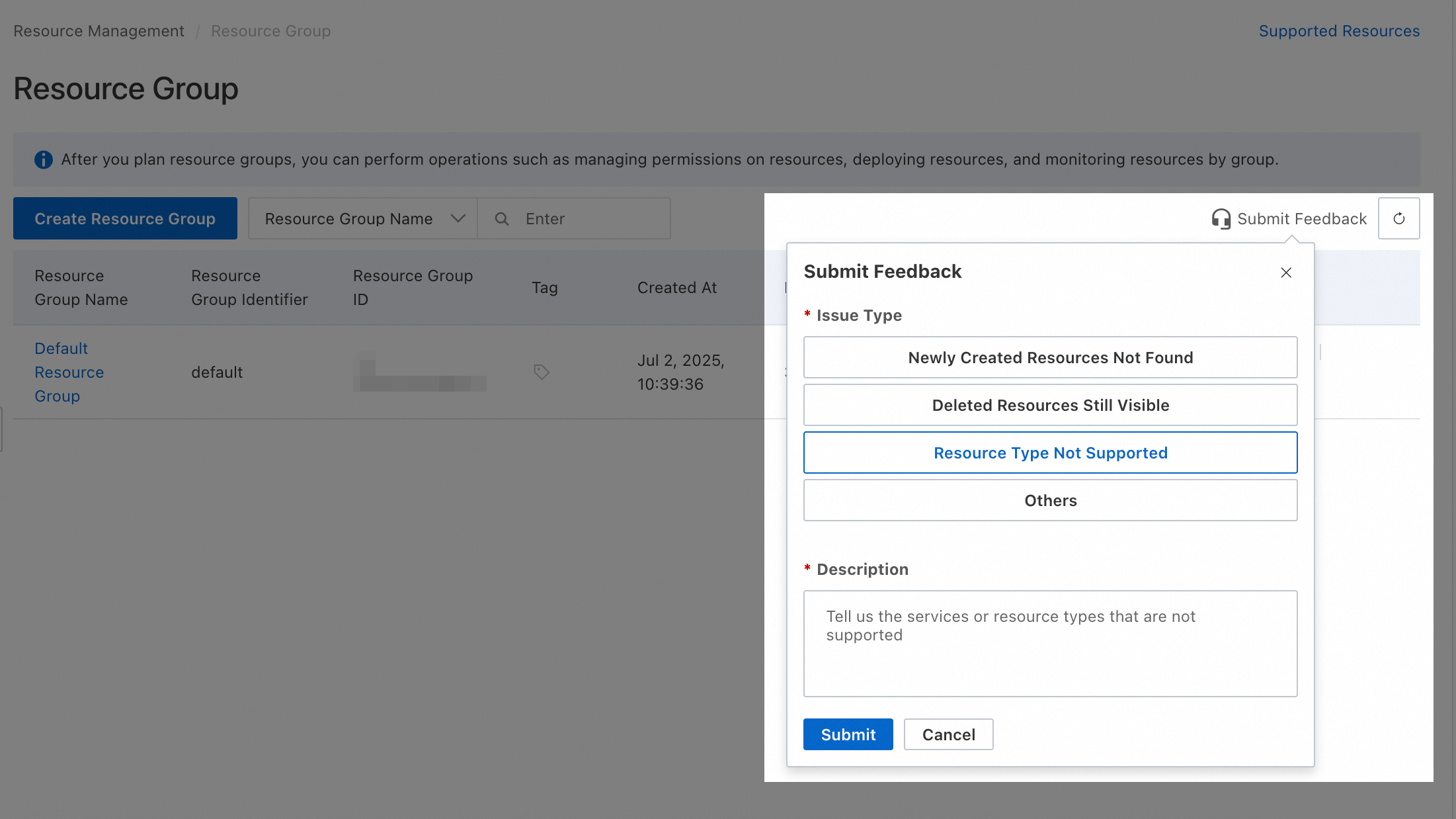
For resource types that do not currently support resource groups, you can submit feedback in the Resource Management console.
Operations that do not support resource group-level authorization
The following table lists the ApsaraVideo VOD actions that do not support resource group-level authorization.
|
Action |
Description |
|
vod:AddAITemplate |
Adds an AI template for automated review and smart thumbnail tasks. |
|
vod:AddBJStorage |
- |
|
vod:AddCategory |
Creates a category to efficiently classify audio, video, image, and short video assets in ApsaraVideo VOD. This makes it easier to find and manage resources. |
|
vod:AddCustomTemplateAndGroup |
- |
|
vod:AddCustomTemplateAndGroupConsole |
- |
|
vod:AddEditingProject |
Creates an online editing project, which is a video editing task. |
|
vod:AddEditingProjectMaterials |
Adds one or more media assets to an editing project. |
|
vod:AddFilterConfigs |
- |
|
vod:AddFreeLicense |
- |
|
vod:AddLicense |
- |
|
vod:AddLiveStreamVideo |
- |
|
vod:AddMediaSequences |
- |
|
vod:AddMediaServiceStorage |
- |
|
vod:AddMediaServiceUser |
- |
|
vod:AddPlaylistVideos |
- |
|
vod:AddProductAccount |
- |
|
vod:AddTranscodeTemplateGroup |
Adds transcoding configurations. You can create a new transcoding template group or add a new transcoding template to a specified template group. |
|
vod:AddVodDomain |
Adds an accelerated domain name for ApsaraVideo VOD. |
|
vod:AddVodStorageForApp |
Binds a storage bucket to a sub-application of ApsaraVideo VOD. |
|
vod:AddVodTemplate |
Adds a snapshot or animated image template. |
|
vod:AddWatermark |
Adds an image or text watermark template. ApsaraVideo VOD uses templates to simplify watermarking by solidifying complex parameters such as position, size, font, and color into a template identified by a unique ID. |
|
vod:AddWatermarkConsole |
- |
|
vod:AddWorkflow |
- |
|
vod:AssignProductAccountId |
- |
|
vod:AttachAppPolicyToIdentity |
Attaches access permissions for an ApsaraVideo VOD application to a specified identity, which can be a RAM user or a RAM role. |
|
vod:BatchCreateUploadAttachedMedia |
- |
|
vod:BatchCreateUploadImage |
- |
|
vod:BatchCreateUploadVideo |
- |
|
vod:BatchDeletePlayerConfigs |
- |
|
vod:BatchGetFullMediaInfoInner |
- |
|
vod:BatchGetImageStorageInfo |
- |
|
vod:BatchGetMediaInfos |
Obtains basic information and source file information for multiple media assets in a batch. |
|
vod:BatchGetMediaStorageInfo |
- |
|
vod:BatchSetVodDomainConfigs |
Configures multiple accelerated domain names in a batch. |
|
vod:BatchStartVodDomain |
Enables accelerated domain names that are in the "Disabled" state. |
|
vod:BatchStopVodDomain |
Pauses domain name acceleration. |
|
vod:BatchUpdateMediaInfoInner |
- |
|
vod:BatchUpdatePlayerConfigs |
- |
|
vod:BlockVodObjectCaches |
- |
|
vod:CancelBucketRedundancyTransition |
- |
|
vod:CancelMediaExportJobs |
- |
|
vod:CancelUrlUploadJobs |
Cancels queued URL upload tasks. |
|
vod:CheckAppPermission |
- |
|
vod:CheckDomainConfig |
- |
|
vod:CheckStorageActivity |
- |
|
vod:CheckStorageConfig |
- |
|
vod:CheckUserActivity |
- |
|
vod:CheckUserResourcePackage |
- |
|
vod:CheckVodDefaultRole |
- |
|
vod:ControlVodAppService |
- |
|
vod:CountMediaInfo |
- |
|
vod:CreateAppPolicy |
- |
|
vod:CreateAudit |
Performs a manual review of media assets such as videos and audio. |
|
vod:CreateDNADB |
- |
|
vod:CreateEntity |
- |
|
vod:CreateEntityAttribute |
- |
|
vod:CreateIntelligentStrategy |
- |
|
vod:CreateKMSServiceKey |
- |
|
vod:CreateLicense |
- |
|
vod:CreateMediaDNALib |
- |
|
vod:CreateMediaLifecycleRule |
- |
|
vod:CreateMultiOrderForLicense |
- |
|
vod:CreateOrder |
- |
|
vod:CreateOrderForLicense |
- |
|
vod:CreatePlaylist |
- |
|
vod:CreateStreamInner |
- |
|
vod:CreateUploadAttachedMedia |
Obtains an upload credential to upload auxiliary media assets such as watermarks and subtitles. ApsaraVideo VOD provides the upload URL and credential to ensure authorization and security, prevent malicious uploads, and automatically create a media asset ID for management. |
|
vod:CreateUploadImage |
Obtains an upload credential to upload an image. ApsaraVideo VOD provides the upload URL and credential to ensure authorization and security, prevent malicious uploads, and automatically create an image ID for management. |
|
vod:CreateUploadVideo |
Obtains an upload credential to upload an audio or video file. ApsaraVideo VOD provides the upload URL and credential to ensure authorization and security, prevent malicious uploads, and automatically create a media ID (also known as a video ID) for management. |
|
vod:CreateVodRealTimeLogDelivery |
- |
|
vod:CreateVodUserUsageDetailDataExportTask |
- |
|
vod:DecryptKMSDataKey |
Decrypts the CiphertextBlob of a KMS data key. |
|
vod:DelApp |
- |
|
vod:DelFreeLicense |
- |
|
vod:DeleteAIImageInfos |
Deletes AI image information. |
|
vod:DeleteAITemplate |
Deletes an AI template. |
|
vod:DeleteAppInfo |
Deletes application information. |
|
vod:DeleteAppLicense |
- |
|
vod:DeleteAppPolicy |
- |
|
vod:DeleteAttachedMedia |
Deletes one or more auxiliary media assets, such as watermark images, subtitle files, and other materials, that have been uploaded to ApsaraVideo VOD. |
|
vod:DeleteCategory |
Deletes a category and its subcategories. |
|
vod:DeleteCustomTemplateConsole |
- |
|
vod:DeleteDNADB |
- |
|
vod:DeleteDRMCertInfo |
- |
|
vod:DeleteDynamicImage |
Deletes animated image information. |
|
vod:DeleteEditingProject |
Deletes an online editing project. |
|
vod:DeleteEditingProjectMaterials |
Deletes media assets from an online editing project. |
|
vod:DeleteEntity |
- |
|
vod:DeleteEntityAttribute |
- |
|
vod:DeleteEntityMedias |
- |
|
vod:DeleteFilterConfigs |
- |
|
vod:DeleteFreeLicense |
- |
|
vod:DeleteImage |
Deletes an image that was uploaded by a user or generated from a video snapshot. |
|
vod:DeleteIntelligentStrategy |
- |
|
vod:DeleteMediaExportJobs |
- |
|
vod:DeleteMediaLifecycleRule |
- |
|
vod:DeleteMediaSyncTaskInfoInner |
- |
|
vod:DeleteMessageCallback |
Deletes the callback method, webhook address, and event type for event notifications. |
|
vod:DeleteMessageCloudMonitorConfig |
- |
|
vod:DeleteMezzanines |
Deletes source file information for multiple audio and video assets in a batch. |
|
vod:DeleteMidYKVid |
- |
|
vod:DeleteMnsMsgInner |
- |
|
vod:DeleteMultipartUpload |
Deletes fragment files generated during an upload. |
|
vod:DeletePlaylist |
- |
|
vod:DeletePlaylistVideos |
- |
|
vod:DeletePlaylists |
- |
|
vod:DeleteStream |
Deletes media stream information and stored files, including video and audio streams. |
|
vod:DeleteTemplateGroupConsole |
- |
|
vod:DeleteTranscodeTemplateGroup |
Deletes transcoding configurations. You can delete some transcoding templates from a transcoding template group or force delete the entire group. |
|
vod:DeleteTranscodeTemplates |
- |
|
vod:DeleteTransferedMediaInfos |
- |
|
vod:DeleteUserServiceConfig |
- |
|
vod:DeleteVideo |
Deletes a complete video, including the source file, transcoded stream files, and thumbnails. |
|
vod:DeleteVodDomain |
Deletes an added accelerated domain name for ApsaraVideo VOD. |
|
vod:DeleteVodRealTimeLogLogstore |
- |
|
vod:DeleteVodRealtimeLogDelivery |
- |
|
vod:DeleteVodSpecificConfig |
Deletes the configuration of an accelerated domain name for ApsaraVideo VOD. |
|
vod:DeleteVodTemplate |
Deletes a snapshot template. |
|
vod:DeleteWatermark |
Deletes an image or text watermark template by its ID. |
|
vod:DeleteWatermarkConsole |
- |
|
vod:DeleteWorkflow |
- |
|
vod:DescribeBizUserType |
- |
|
vod:DescribeCdnDomainLogs |
- |
|
vod:DescribeDailyAsyncJob |
- |
|
vod:DescribeDomainBpsData |
- |
|
vod:DescribeDomainFlowData |
- |
|
vod:DescribeFileIdPlayStatisByEdge |
- |
|
vod:DescribeFileIdPlayStatisByOrigin |
- |
|
vod:DescribeFilterConfigs |
- |
|
vod:DescribeMediaDistribution |
Queries the time-based distribution of audio and video media asset data. The maximum time span is six months. |
|
vod:DescribeMultiPriceForLicense |
- |
|
vod:DescribePlayDetail |
- |
|
vod:DescribePlayEventList |
- |
|
vod:DescribePlayFirstFrameDurationMetricData |
- |
|
vod:DescribePlayList |
- |
|
vod:DescribePlayMetricAuth |
- |
|
vod:DescribePlayMetricData |
- |
|
vod:DescribePlayQoeList |
- |
|
vod:DescribePlayQosList |
- |
|
vod:DescribePlayTopVideos |
Obtains daily playback statistics for top videos, including the number of views, unique viewers, and total playback duration. |
|
vod:DescribePlayUserAvg |
Obtains daily average playback statistics for a specified time range, including average playback duration and average number of views. |
|
vod:DescribePlayUserTotal |
Obtains daily total playback statistics for a specified time range, including total views, total unique viewers, total playback duration, and playback duration distribution. |
|
vod:DescribePlayVideoStatis |
Queries daily playback statistics for a specified video within a specified time range, including total playback duration, number of views, unique viewers, and playback duration distribution. |
|
vod:DescribeQueryConfigs |
- |
|
vod:DescribeUserVodStatus |
- |
|
vod:DescribeVodAIData |
Queries usage data for AI processing, such as automated review and media fingerprinting. |
|
vod:DescribeVodAppName |
- |
|
vod:DescribeVodCertificateDetail |
- |
|
vod:DescribeVodCertificateDetailById |
- |
|
vod:DescribeVodCertificateList |
Obtains a list of certificate information. |
|
vod:DescribeVodDomainBpsData |
Queries bandwidth data for accelerated domain names. Compared to the DescribeVodDomainRealTimeBpsData operation, this operation supports a longer historical data range (up to the last 366 days) but has a larger time granularity (minimum of 5 minutes) and higher data latency. |
|
vod:DescribeVodDomainBpsDataByLayer |
Queries bandwidth data for accelerated domain names by protocol type. |
|
vod:DescribeVodDomainCertificateInfo |
Obtains certificate information for a specified accelerated domain name. |
|
vod:DescribeVodDomainCname |
- |
|
vod:DescribeVodDomainConfigs |
- |
|
vod:DescribeVodDomainDetail |
- |
|
vod:DescribeVodDomainHitRateData |
Queries the byte hit ratio (percentage of bytes hit) for accelerated domain names. |
|
vod:DescribeVodDomainHttpCodeData |
- |
|
vod:DescribeVodDomainISPData |
- |
|
vod:DescribeVodDomainLog |
Obtains the download URL for the raw CDN access logs of a specified domain name. |
|
vod:DescribeVodDomainMax95BpsData |
Queries the 95th percentile peak bandwidth monitoring data for an accelerated domain name. |
|
vod:DescribeVodDomainPvData |
- |
|
vod:DescribeVodDomainQpsData |
Obtains the queries per second (QPS) for an accelerated domain name at a 5-minute granularity. Data from the last 90 days is available. |
|
vod:DescribeVodDomainRealTimeBpsData |
Queries bandwidth data for accelerated domain names. Compared to the DescribeVodDomainBpsData operation, this operation supports a smaller time granularity (minimum of 1 minute), lower data latency (as low as 5 minutes), but a shorter historical data range (up to the last 186 days). |
|
vod:DescribeVodDomainRealTimeByteHitRateData |
Queries byte hit ratio data for an accelerated domain name. This operation supports a minimum time granularity of 1 minute, a minimum data latency of 5 minutes, and can query data from the last 186 days. |
|
vod:DescribeVodDomainRealTimeDetailData |
Queries real-time access data for an accelerated domain name, including QPS, bandwidth, and HTTP status code data from the last 7 days. |
|
vod:DescribeVodDomainRealTimeHttpCodeData |
Queries the total count and proportion of HTTP status codes for an accelerated domain name. This operation supports a minimum time granularity of 1 minute, a minimum data latency of 5 minutes, and can query data from the last 186 days. |
|
vod:DescribeVodDomainRealTimeQpsData |
Queries QPS data for an accelerated domain name. This operation supports a minimum time granularity of 1 minute, a minimum data latency of 5 minutes, and can query data from the last 186 days. |
|
vod:DescribeVodDomainRealTimeReqHitRateData |
Queries request hit ratio data for an accelerated domain name. This operation supports a minimum time granularity of 1 minute, a minimum data latency of 5 minutes, and can query data from the last 186 days. |
|
vod:DescribeVodDomainRealTimeSrcBpsData |
- |
|
vod:DescribeVodDomainRealTimeSrcTrafficData |
- |
|
vod:DescribeVodDomainRealTimeTrafficData |
Queries traffic data for accelerated domain names. Compared to the DescribeVodDomainTrafficData operation, this operation supports a smaller time granularity (minimum of 1 minute), lower data latency (as low as 5 minutes), but a shorter historical data range (up to the last 186 days). |
|
vod:DescribeVodDomainRealtimeLogDelivery |
- |
|
vod:DescribeVodDomainRegionData |
- |
|
vod:DescribeVodDomainReqHitRateData |
Queries the request hit ratio (percentage of requests hit) for an accelerated domain name. |
|
vod:DescribeVodDomainSrcBpsData |
Queries origin bandwidth data for an accelerated domain name. |
|
vod:DescribeVodDomainSrcTrafficData |
Queries back-to-origin traffic data for an accelerated domain name. |
|
vod:DescribeVodDomainStagingConfig |
- |
|
vod:DescribeVodDomainTopReferVisit |
- |
|
vod:DescribeVodDomainTopUrlVisit |
- |
|
vod:DescribeVodDomainTrafficData |
Queries traffic data for accelerated domain names. Compared to the DescribeVodDomainRealTimeTrafficData operation, this operation supports a longer historical data range (up to the last 366 days) but has a larger time granularity (minimum of 5 minutes) and higher data latency. |
|
vod:DescribeVodDomainUsageData |
Queries usage data for accelerated traffic or bandwidth. |
|
vod:DescribeVodDomainUvData |
- |
|
vod:DescribeVodDomainVerifyData |
- |
|
vod:DescribeVodDomainsUsageByDay |
- |
|
vod:DescribeVodEditingUsageData |
Queries usage data for ApsaraVideo VOD online editing. |
|
vod:DescribeVodMediaPlayData |
Obtains playback data for an audio or video file on a specified date by its media ID. The data includes unique viewers, average views per user, total views, average playback duration per user, and cumulative playback duration. |
|
vod:DescribeVodMultiUsageData |
- |
|
vod:DescribeVodPlayerBusinessData |
- |
|
vod:DescribeVodPlayerBusinessDetailData |
- |
|
vod:DescribeVodPlayerCollectData |
Queries summary data for player playback. |
|
vod:DescribeVodPlayerCollectDataDemo |
- |
|
vod:DescribeVodPlayerDimensionData |
Queries player dimension metadata. |
|
vod:DescribeVodPlayerDimensionDataDemo |
- |
|
vod:DescribeVodPlayerDomainDimensionData |
- |
|
vod:DescribeVodPlayerMetricData |
Queries player metric data. |
|
vod:DescribeVodPlayerMetricDataDemo |
- |
|
vod:DescribeVodPlayerVideoBehaviorDistribution |
- |
|
vod:DescribeVodRangeDataByLocateAndIspService |
Queries access data for an accelerated domain name by ISP or region, including bandwidth, average response rate, page views, cache hit ratio, and request hit ratio. |
|
vod:DescribeVodRealtimeDeliveryAcc |
- |
|
vod:DescribeVodRealtimeLogAuthorized |
- |
|
vod:DescribeVodRefreshQuota |
Queries the maximum number of URLs and directories that can be refreshed or prefetched, and the remaining quota for the day. |
|
vod:DescribeVodRefreshTasks |
Queries whether a refresh or prefetch task has taken effect. |
|
vod:DescribeVodRefreshTasksInner |
- |
|
vod:DescribeVodSSLCertificateList |
Queries the list of certificate information by domain name. |
|
vod:DescribeVodService |
- |
|
vod:DescribeVodStatis |
- |
|
vod:DescribeVodStorageData |
Queries usage data for media asset management, including storage space and outbound storage traffic. |
|
vod:DescribeVodTagResources |
- |
|
vod:DescribeVodTieringStorageData |
Queries usage data for tiered storage in media asset management. |
|
vod:DescribeVodTieringStorageRetrievalData |
Queries data retrieval usage for tiered storage in media asset management. |
|
vod:DescribeVodTopDomainsByFlow |
- |
|
vod:DescribeVodTranscodeData |
Queries transcoding usage data. |
|
vod:DescribeVodUserBillPrediction |
- |
|
vod:DescribeVodUserDomains |
Queries the list of all accelerated domain names for ApsaraVideo VOD under a user's account. |
|
vod:DescribeVodUserQuota |
- |
|
vod:DescribeVodUserResourcePackage |
- |
|
vod:DescribeVodUserTags |
- |
|
vod:DescribeVodUserUsageDetailDataExportTask |
- |
|
vod:DescribeVodUserVipsByDomain |
Queries the IP list of a domain name. |
|
vod:DescribeVodVerifyContent |
Obtains the content for ownership verification. |
|
vod:DetachAppPolicyFromIdentity |
Revokes specified application permissions from a specified account identity, which can be a RAM user or a RAM role. |
|
vod:DisableVodRealtimeLogDelivery |
- |
|
vod:DisplayAIAuditSwitch |
- |
|
vod:DisplayMediaServiceInfo |
- |
|
vod:EditAppInfo |
- |
|
vod:EditLicense |
- |
|
vod:EditProductConfInfo |
- |
|
vod:EnableVodRealtimeLogDelivery |
- |
|
vod:FaceRegistration |
- |
|
vod:FinishLiveStreamRecord |
- |
|
vod:GenerateDownloadSecretKey |
Generates a key for secure download. The secure download feature of ApsaraVideo Player SDK encrypts downloaded videos with a key file. The videos can only be decrypted and played using the key file generated by the pre-bound app, effectively protecting video content from unauthorized playback or distribution. |
|
vod:GenerateKMSDataKey |
Generates a random KMS data key for standard encryption in ApsaraVideo VOD. |
|
vod:GetAICaptionExtractionJobs |
- |
|
vod:GetAIImageJobs |
Queries the list of AI image tasks. |
|
vod:GetAIMediaAuditJob |
Queries an automated review job. After an AI job is submitted, it is processed asynchronously. You can use this operation to query the job information in real time. |
|
vod:GetAIService |
- |
|
vod:GetAIStatis |
- |
|
vod:GetAITemplate |
Queries an AI template. |
|
vod:GetAIVideoTagResult |
Obtains the results of smart tagging. |
|
vod:GetAccountAccessKey |
- |
|
vod:GetAppConfigInfoService |
- |
|
vod:GetAppLicenseList |
- |
|
vod:GetAppPlayKey |
Obtains the playback key for an application. |
|
vod:GetAppPlayKeyInner |
- |
|
vod:GetAppPolicies |
- |
|
vod:GetAttachedMediaInfo |
Obtains basic information and access URLs for multiple auxiliary media assets in a batch by their IDs. Auxiliary media assets include watermark images, subtitle files, and other materials. |
|
vod:GetAuditHistory |
Obtains the history of manual reviews. |
|
vod:GetAuditResult |
- |
|
vod:GetAuditResultDetail |
- |
|
vod:GetBucketDeleteTask |
- |
|
vod:GetCDNStatis |
- |
|
vod:GetCDNStatisSum |
- |
|
vod:GetCategories |
Queries specified categories and their subcategories (next-level categories) by ID or type. |
|
vod:GetCheckChannel |
- |
|
vod:GetCrossServiceToken |
- |
|
vod:GetCustomerConfig |
- |
|
vod:GetDNADB |
- |
|
vod:GetDRMCertInfo |
- |
|
vod:GetDRMLicense |
- |
|
vod:GetDailyPlayRegionStatis |
Obtains traffic data for all media assets in a specified date and region. This data is generated from CDN traffic logs and primarily reflects video traffic consumption. The generated CSV file includes date, video ID, domain name, traffic, application ID, and category ID. You can download the file for operational data analysis. |
|
vod:GetDailyPlayStatis |
- |
|
vod:GetDefaultAITemplate |
Queries the default AI template. |
|
vod:GetDigitalWatermarkExtractResult |
Queries the result of a digital watermark (copyright or tracing) extraction job, including the job status and the extracted watermark text. |
|
vod:GetDomainList |
- |
|
vod:GetDomainPlayAuth |
- |
|
vod:GetEditingProject |
Obtains the details of an online editing project (video editing task). |
|
vod:GetEditingProjectMaterials |
Obtains the list of media assets for an online editing project. |
|
vod:GetEntity |
- |
|
vod:GetEntityAttribute |
- |
|
vod:GetEntityAttributeList |
- |
|
vod:GetEntityList |
- |
|
vod:GetEntityMedia |
- |
|
vod:GetEntityMediaList |
- |
|
vod:GetEntitylist |
- |
|
vod:GetFileInfo |
- |
|
vod:GetImageInfo |
Obtains the basic information and access URL of an image by its ID after it has been uploaded to ApsaraVideo VOD. |
|
vod:GetImageInfos |
Obtains the basic information and access URLs for multiple images in a batch by their IDs after they have been uploaded to ApsaraVideo VOD. |
|
vod:GetIntelligentStrategy |
- |
|
vod:GetJobDetail |
Queries the details of an asynchronous task by its job ID. |
|
vod:GetKMSServiceKey |
- |
|
vod:GetLicenseInfo |
- |
|
vod:GetLicenseKey |
- |
|
vod:GetLicensePurchaseStatus |
- |
|
vod:GetLicenses |
- |
|
vod:GetMTSStatis |
- |
|
vod:GetMediaAuditAudioResultDetail |
Obtains the details of an audio review. |
|
vod:GetMediaAuditResult |
Obtains the summary of an automated review result. |
|
vod:GetMediaAuditResultDetail |
Obtains the details of an automated review result. You can use this operation to query the review result details in real time. |
|
vod:GetMediaAuditResultTimeline |
Obtains the timestamps of all non-compliant content snapshots. |
|
vod:GetMediaBaseInfoByFileUrlInner |
- |
|
vod:GetMediaDNAResult |
Obtains the result of a media fingerprint job. After the job is complete, you can use this operation to query the fingerprint result in real time. |
|
vod:GetMediaExportJobs |
- |
|
vod:GetMediaInfoInner |
- |
|
vod:GetMediaLifecycleRule |
- |
|
vod:GetMediaRefreshJobs |
Queries information about a video refresh or prefetch task, such as the task status and filtering policy. |
|
vod:GetMediaStream |
- |
|
vod:GetMediaSyncProcessInfoInner |
- |
|
vod:GetMessageCallback |
Queries the callback method, webhook address, and event type for event notifications. |
|
vod:GetMessageCallbackEventList |
- |
|
vod:GetMessageCloudMonitorConfig |
- |
|
vod:GetMessageCloudMonitorEventList |
- |
|
vod:GetMezzanineInfo |
Obtains the source file information of an audio or video asset, including the file URL, resolution, and bitrate. |
|
vod:GetMtsTemplateInfo |
- |
|
vod:GetMtsWorkflowInfo |
- |
|
vod:GetOSSFlowStatis |
- |
|
vod:GetOSSStatis |
- |
|
vod:GetOssObjectInfo |
- |
|
vod:GetPageByCondAppInfo |
- |
|
vod:GetPageByCondLicenseInstance |
- |
|
vod:GetPersonalStorageList |
- |
|
vod:GetPlanSpecificationForLicense |
- |
|
vod:GetPlayInfo |
Obtains the playback URL by providing the audio or video ID. You can then use ApsaraVideo Player or a third-party player (such as a native, open source, or self-developed player) to play the content. |
|
vod:GetPlaylist |
- |
|
vod:GetPlaylists |
- |
|
vod:GetProductAccountInfo |
- |
|
vod:GetProductConfInfo |
- |
|
vod:GetProductConfinfo |
- |
|
vod:GetSdkIntegration |
- |
|
vod:GetSdkList |
- |
|
vod:GetSpecificationsForLicense |
- |
|
vod:GetStorageGroup |
- |
|
vod:GetStorageNotifyConfig |
- |
|
vod:GetStorageRegionList |
- |
|
vod:GetTemplateGroup |
- |
|
vod:GetTemplateGroupConsole |
- |
|
vod:GetTotalStatis |
- |
|
vod:GetTranscodeInfo |
- |
|
vod:GetTranscodeSummary |
Queries the transcoding summary for an audio or video asset by its ID, including the transcoding status and progress. |
|
vod:GetTranscodeTask |
Queries the details of a transcoding job by its ID. |
|
vod:GetTranscodeTemplateGroup |
Queries the details of a transcoding configuration by the transcoding template group ID. |
|
vod:GetURLUploadInfos |
Obtains URL upload information. |
|
vod:GetUnactivatedLicenseOrder |
- |
|
vod:GetUploadDetails |
Obtains media upload details by media ID, such as upload time, upload progress, and upload source. Batch retrieval is supported. |
|
vod:GetUserServiceConfig |
- |
|
vod:GetVideoConfig |
- |
|
vod:GetVideoDNAResult |
- |
|
vod:GetVideoInfo |
Obtains information about a single audio or video asset by its ID, including title, description, duration, thumbnail URL, status, creation time, size, snapshots, category, and tags. |
|
vod:GetVideoInfos |
Obtains information for multiple audio or video assets in a batch by their IDs, including title, description, duration, thumbnail URL, status, creation time, size, snapshots, category, and tags. |
|
vod:GetVideoList |
Obtains a list of video information. |
|
vod:GetVideoPlayAuth |
Obtains the playback credential (PlayAuth) for an audio or video asset. ApsaraVideo Player SDK uses this credential to automatically get the playback URL. This method is suitable for scenarios that require high security, as the credential is time-limited, bound to a specific asset, and cannot be reused. An expired or invalid credential will prevent playback. |
|
vod:GetVideoPlayInfo |
- |
|
vod:GetVodServiceRegion |
- |
|
vod:GetVodTemplate |
Queries a single snapshot template. |
|
vod:GetVodWorkflowTaskInner |
- |
|
vod:GetWatermark |
Queries the configuration of a single image or text watermark template by its ID. This includes parameters such as position, size, display time for image watermarks, and content, font, color, and position for text watermarks. |
|
vod:GetWatermarkConsole |
- |
|
vod:GetWatermarksConsole |
- |
|
vod:GetWorkflow |
- |
|
vod:GetWorkflowProcessInfo |
- |
|
vod:HttpRequestVodTestTool |
- |
|
vod:InitialTranscodeConfig |
- |
|
vod:ListAIASRJob |
- |
|
vod:ListAIImageInfo |
Queries AI image information for a specified video. |
|
vod:ListAIJob |
Queries smart tagging or media fingerprint jobs. After a job is submitted, it is processed asynchronously. You can use this operation to query the job information in real time. |
|
vod:ListAIStatisType |
- |
|
vod:ListAITemplate |
Queries the list of AI templates. |
|
vod:ListAIVideoCategoryJob |
- |
|
vod:ListAIVideoCensorJob |
- |
|
vod:ListAIVideoCoverJob |
- |
|
vod:ListAIVideoFaceRecogJob |
- |
|
vod:ListAIVideoPornRecogJob |
- |
|
vod:ListAIVideoSummaryJob |
- |
|
vod:ListAIVideoTagJob |
- |
|
vod:ListAIVideoTerrorismRecogJob |
- |
|
vod:ListAppPoliciesForIdentity |
Lists the application permissions granted to a specified account identity, which can be a RAM user or a RAM role. |
|
vod:ListAppPolicy |
- |
|
vod:ListAuditSecurityIp |
Obtains the list of secure IP addresses for review. |
|
vod:ListBucketRedundancyTransition |
- |
|
vod:ListDNADB |
- |
|
vod:ListDRMCertInfo |
- |
|
vod:ListDynamicImage |
Queries the list of animated images for a video by its ID. |
|
vod:ListIntelligentStrategy |
- |
|
vod:ListJobInfo |
Queries the list of historical tasks for a media asset by its ID. |
|
vod:ListLicenseInfos |
- |
|
vod:ListLicenses |
- |
|
vod:ListLiveRecordVideo |
Obtains a list of live-to-VOD videos. |
|
vod:ListMediaDNADeleteJob |
- |
|
vod:ListMediaDNALibs |
- |
|
vod:ListMediaEncryptKey |
- |
|
vod:ListMediaExportJobs |
- |
|
vod:ListMediaLifecycleRule |
- |
|
vod:ListPlayerConfigs |
- |
|
vod:ListSnapshots |
Queries snapshots generated by a video snapshot job and the thumbnail generated by the system during video upload. |
|
vod:ListStrategyExecutionRecord |
- |
|
vod:ListTagResources |
- |
|
vod:ListTemplateGroup |
- |
|
vod:ListTemplateGroupConsole |
- |
|
vod:ListTranscodeTask |
Queries historical transcoding task information for an audio or video asset by its ID. This operation does not return specific job information. |
|
vod:ListTranscodeTemplateGroup |
Queries the list of transcoding template configurations. |
|
vod:ListVodEsTemplateInfo |
- |
|
vod:ListVodRealtimeLogDelivery |
- |
|
vod:ListVodRealtimeLogDeliveryDomains |
- |
|
vod:ListVodRealtimeLogDeliveryInfos |
- |
|
vod:ListVodTagResources |
- |
|
vod:ListVodTemplate |
Queries the list of snapshot templates. |
|
vod:ListWatermark |
Queries the configurations of all added image and text watermark templates in the current service region. This includes parameters such as position, size, display time for image watermarks, and content, font, color, and position for text watermarks. |
|
vod:ListWorkflow |
- |
|
vod:ListWorkflowTask |
- |
|
vod:MigrateMediaUserId |
- |
|
vod:ModifyLicenseInfo |
- |
|
vod:ModifyServiceConfigTranscode |
- |
|
vod:ModifyVodDomainSchdmByProperty |
- |
|
vod:ModifyVodService |
- |
|
vod:MoveAppResource |
Moves resources such as media assets from one application to another. Application administrators can perform the transfer directly. RAM users or RAM roles need write permissions for both the source and destination applications. Batch migration is supported. |
|
vod:NotifyAuthManagementVodMediaInner |
- |
|
vod:NotifyInitResource |
- |
|
vod:NotifyMediaSyncEventInner |
- |
|
vod:OpenVodService |
- |
|
vod:PreloadPlayDeviceAbility |
- |
|
vod:PreloadVodObjectCaches |
Prefetches content from the origin server to L2 cache nodes. This allows first-time access to directly hit the cache, reducing pressure on the origin server. |
|
vod:ProduceEditingProjectVideo |
Synthesizes one or more videos into a final product. You can submit source videos directly using timeline parameters or create an online editing project first and then submit it for synthesis. |
|
vod:PublishVodStagingConfigToProduction |
- |
|
vod:PushObjectCache |
- |
|
vod:QueryAsyncProduceTaskDelayData |
- |
|
vod:QueryAsyncTaskImpact |
- |
|
vod:QueryCssOrderForLicense |
- |
|
vod:QueryFailedJob |
- |
|
vod:QueryMediaProduceProcessInfo |
- |
|
vod:QueryUploadInfo |
- |
|
vod:ReadRedisConfigMessage |
- |
|
vod:ReadRedisConfigVideoApi |
- |
|
vod:RefreshEsMediaData |
- |
|
vod:RefreshMediaPlayUrls |
Initiates a video refresh or prefetch task by audio or video ID. |
|
vod:RefreshObjectCaches |
- |
|
vod:RefreshUploadVideo |
Re-obtains a video upload credential after the previous one has timed out. |
|
vod:RefreshUploadVideoInner |
- |
|
vod:RefreshVodMediaInfo |
- |
|
vod:RefreshVodMediaInfoInner |
- |
|
vod:RefreshVodObjectCaches |
Refreshes the content of files on cache nodes. You can refresh content for specified URLs in a batch. |
|
vod:RefreshVodPlayInfo |
- |
|
vod:RegistDRMCertInfo |
- |
|
vod:RegisterEntityMedia |
- |
|
vod:RegisterMedia |
Registers existing media files from your own OSS bucket with ApsaraVideo VOD. This generates the necessary associated data so you can use VOD features like transcoding and snapshots. |
|
vod:RenewAppLicense |
- |
|
vod:RenewFreeLicense |
- |
|
vod:ResendMnsCallbackMsg |
- |
|
vod:ResendOssCompleteMsg |
- |
|
vod:ResendOssCompleteMsgInner |
- |
|
vod:RestoreMedia |
Restore media assets. |
|
vod:RetrySubmitMediaInfoJob |
- |
|
vod:RetrySubmitMediaInfoJobInner |
- |
|
vod:RetrySubmitSnapshotJob |
- |
|
vod:RetrySubmitSnapshotJobInner |
- |
|
vod:RetrySubmitTranscodeJobInner |
- |
|
vod:RollbackVodStagingConfig |
- |
|
vod:SearchEditingProject |
Searches for online editing projects (video editing lists). |
|
vod:SearchMedia |
Searches for media assets such as videos, audio, and images produced by ApsaraVideo VOD. You can use this operation with the media search protocol to perform multi-dimensional searches with specified return fields, exact matches, fuzzy matches, multi-value queries, range queries, and sorting. |
|
vod:SetAIService |
- |
|
vod:SetAIUserConfig |
- |
|
vod:SetAppPlayKey |
Sets the playback key for an application. |
|
vod:SetAuditSecurityIp |
Sets the secure IP addresses for review. |
|
vod:SetBucketTransferAcceleration |
- |
|
vod:SetCheckChannel |
- |
|
vod:SetCrossdomainContent |
Updates the content of the cross-domain file crossdomain.xml for ApsaraVideo VOD. |
|
vod:SetCustomerConfig |
- |
|
vod:SetDefaultAITemplate |
Sets the default AI template. |
|
vod:SetDefaultPlayDomain |
- |
|
vod:SetDefaultTemplateGroupConsole |
- |
|
vod:SetDefaultTranscodeTemplateGroup |
Sets the default transcoding template configuration. |
|
vod:SetDefaultVodTemplate |
- |
|
vod:SetDefaultWatermark |
Sets a specified watermark template as the default. |
|
vod:SetDefaultWatermarkConsole |
- |
|
vod:SetEditingProjectMaterials |
Sets the media assets for an online editing project. |
|
vod:SetL2OssKeyConfig |
- |
|
vod:SetMessageCallback |
Sets the callback method, webhook address, and event type for event notifications. |
|
vod:SetMessageCloudMonitorConfig |
- |
|
vod:SetUserConfig |
- |
|
vod:SetUserServiceConfigInner |
- |
|
vod:SetVodDomainCertificate |
Enables or disables the certificate feature for a domain name and modifies certificate information. |
|
vod:SetVodDomainSSLCertificate |
Enables or disables the certificate feature for a domain name and updates certificate information. |
|
vod:SetVodDomainStagingConfig |
- |
|
vod:StartVodDomain |
- |
|
vod:StartWorkflowV2 |
- |
|
vod:StopVodDomain |
- |
|
vod:SubmitAIASRJob |
- |
|
vod:SubmitAICaptionExtractionJob |
- |
|
vod:SubmitAIImageAuditJob |
Submits an image for an automated review task. The job is executed asynchronously after successful submission. The operation does not guarantee that the job is complete when the response is returned. |
|
vod:SubmitAIImageJob |
Submits an AI image processing task. |
|
vod:SubmitAIJob |
Submits a smart tagging or media fingerprint job. |
|
vod:SubmitAIMediaAuditJob |
Submits an audio or video file for an automated review job. The job is executed asynchronously after successful submission. The operation does not guarantee that the job is complete when the response is returned. |
|
vod:SubmitAIVideoCategoryJob |
- |
|
vod:SubmitAIVideoCensorJob |
- |
|
vod:SubmitAIVideoCoverJob |
- |
|
vod:SubmitAIVideoFaceRecogJob |
- |
|
vod:SubmitAIVideoPornRecogJob |
- |
|
vod:SubmitAIVideoSummaryJob |
- |
|
vod:SubmitAIVideoTagJob |
- |
|
vod:SubmitAIVideoTerrorismRecogJob |
- |
|
vod:SubmitBucketDeleteTask |
- |
|
vod:SubmitBucketRedundancyTransition |
- |
|
vod:SubmitDNAInitializationJob |
- |
|
vod:SubmitDigitalWatermarkExtractJob |
Submits a digital watermark (copyright or tracing) extraction job to start asynchronously extracting the watermark. |
|
vod:SubmitDynamicImageJob |
Submits a media animated image job for asynchronous processing. |
|
vod:SubmitLiveEditing |
- |
|
vod:SubmitMediaDNADeleteJob |
Deletes a media fingerprint job. |
|
vod:SubmitMediaExportJob |
- |
|
vod:SubmitPreprocessJobs |
Transcodes a video using the production studio. |
|
vod:SubmitPreprocessJobsConsole |
- |
|
vod:SubmitSnapshotJob |
Submits a video snapshot job for asynchronous processing. |
|
vod:SubmitTranscodeJobs |
Submits a media transcoding job for asynchronous processing. |
|
vod:SubmitWorkflowJob |
Initiates a VOD workflow to process a video. |
|
vod:SyncMediaToIms |
- |
|
vod:SyncUserProdAccountAndBucket |
- |
|
vod:TagResources |
- |
|
vod:TagVodResources |
- |
|
vod:TerminateBucketDeleteTask |
- |
|
vod:TransferMediaInfos |
- |
|
vod:UnTagVodResources |
- |
|
vod:UntagResources |
- |
|
vod:UpdateAITemplate |
Modifies an AI template. |
|
vod:UpdateAppInfo |
Updates application information. |
|
vod:UpdateAppLicense |
- |
|
vod:UpdateAppPolicy |
- |
|
vod:UpdateAttachedMediaInfos |
Updates the title, description, tags, and category information for multiple auxiliary media assets in a batch by their unique IDs. Auxiliary media assets include watermark images, subtitle files, and other materials. |
|
vod:UpdateBucketUserId |
- |
|
vod:UpdateCategory |
Updates the name of a category. |
|
vod:UpdateCustomTemplateAndGroup |
- |
|
vod:UpdateCustomTemplateAndGroupConsole |
- |
|
vod:UpdateDNADB |
- |
|
vod:UpdateEditingProject |
Modifies an online editing project (video editing task). |
|
vod:UpdateEntity |
- |
|
vod:UpdateEntityMedia |
- |
|
vod:UpdateImageInfos |
Modifies the title, description, tags, and category information for multiple images in a batch by their IDs after they have been uploaded to ApsaraVideo VOD. |
|
vod:UpdateIntelligentStrategy |
- |
|
vod:UpdateMediaLifecycleRule |
- |
|
vod:UpdateMediaStorageClass |
Modifies the storage class of a media asset. |
|
vod:UpdatePlaylistBasicInfo |
- |
|
vod:UpdatePlaylistVideoBasicInfo |
- |
|
vod:UpdatePlaylistVideos |
- |
|
vod:UpdateProductAccount |
- |
|
vod:UpdateStreamInfo |
- |
|
vod:UpdateTranscodeTemplateGroup |
Modifies transcoding configurations by changing the settings of a specified transcoding template within a transcoding template group. |
|
vod:UpdateUserMediaSyncAuthInfoInner |
- |
|
vod:UpdateVideoInfo |
Modifies the information of a single audio or video asset. |
|
vod:UpdateVideoInfos |
Modifies the information of multiple audio or video assets in a batch. |
|
vod:UpdateVodDomain |
Modifies an accelerated domain name. |
|
vod:UpdateVodTemplate |
Modifies a snapshot template. |
|
vod:UpdateWatermark |
Modifies the template name and watermark configuration (WatermarkConfig) of an image or text watermark template after it has been added. |
|
vod:UpdateWatermarkConsole |
- |
|
vod:UpdateWorkflow |
- |
|
vod:UploadMediaByURL |
Pulls and uploads audio or video media files from a source URL. Batch uploads are supported. |
|
vod:UploadMediaByUrl |
- |
|
vod:UploadStreamByURL |
Uploads transcoded stream files from external storage and attaches them to the corresponding VOD media asset. |
|
vod:UploadStreamByURLInner |
- |
|
vod:UserExist |
- |
|
vod:ValidateCdnUrlAuth |
- |
|
vod:VerifyVodDomainOwner |
Verifies the ownership of a domain name. |
|
vod:WriteRedisConfigMessage |
- |
|
vod:WriteRedisConfigVideoApi |
- |
|
vod:createUploadVideo |
- |
|
vod:describePlayVideoStatis |
- |
|
vod:getMezzanineInfo |
- |
|
vod:getPlayInfo |
- |
|
vod:getURLUploadInfos |
- |
|
vod:getVideoInfo |
- |
|
vod:getVideoPlayAuth |
- |
|
vod:listTranscodeTask |
- |
|
vod:null |
- |
|
vod:searchMedia |
- |
|
vod:uploadMediaByURL |
- |
For operations that do not support resource group-level authorization, granting permissions at the Resource Group level is not effective. If a RAM user requires permissions for these operations, you must create a custom policy and grant permissions at the Account level.
 The following are two examples of custom policies. You can adjust the policy content as needed.
-
This policy allows all read-only operations that do not support resource group-level authorization. The
Actionelement lists all read-only operations that do not support resource group-level authorization.{ "Version": "1", "Statement": [ { "Effect": "Allow", "Action": [ "vod:DescribeBizUserType", "vod:DescribeCdnDomainLogs", "vod:DescribeDailyAsyncJob", "vod:DescribeDomainBpsData", "vod:DescribeDomainFlowData", "vod:DescribeFileIdPlayStatisByEdge", "vod:DescribeFileIdPlayStatisByOrigin", "vod:DescribeFilterConfigs", "vod:DescribeMediaDistribution", "vod:DescribeMultiPriceForLicense", "vod:DescribePlayDetail", "vod:DescribePlayEventList", "vod:DescribePlayFirstFrameDurationMetricData", "vod:DescribePlayList", "vod:DescribePlayMetricAuth", "vod:DescribePlayMetricData", "vod:DescribePlayQoeList", "vod:DescribePlayQosList", "vod:DescribePlayTopVideos", "vod:DescribePlayUserAvg", "vod:DescribePlayUserTotal", "vod:DescribePlayVideoStatis", "vod:DescribeQueryConfigs", "vod:DescribeUserVodStatus", "vod:DescribeVodAIData", "vod:DescribeVodAppName", "vod:DescribeVodCertificateDetail", "vod:DescribeVodCertificateDetailById", "vod:DescribeVodCertificateList", "vod:DescribeVodDomainBpsData", "vod:DescribeVodDomainBpsDataByLayer", "vod:DescribeVodDomainCertificateInfo", "vod:DescribeVodDomainCname", "vod:DescribeVodDomainConfigs", "vod:DescribeVodDomainDetail", "vod:DescribeVodDomainHitRateData", "vod:DescribeVodDomainHttpCodeData", "vod:DescribeVodDomainISPData", "vod:DescribeVodDomainLog", "vod:DescribeVodDomainMax95BpsData", "vod:DescribeVodDomainPvData", "vod:DescribeVodDomainQpsData", "vod:DescribeVodDomainRealTimeBpsData", "vod:DescribeVodDomainRealTimeByteHitRateData", "vod:DescribeVodDomainRealTimeDetailData", "vod:DescribeVodDomainRealTimeHttpCodeData", "vod:DescribeVodDomainRealTimeQpsData", "vod:DescribeVodDomainRealTimeReqHitRateData", "vod:DescribeVodDomainRealTimeSrcBpsData", "vod:DescribeVodDomainRealTimeSrcTrafficData", "vod:DescribeVodDomainRealTimeTrafficData", "vod:DescribeVodDomainRealtimeLogDelivery", "vod:DescribeVodDomainRegionData", "vod:DescribeVodDomainReqHitRateData", "vod:DescribeVodDomainSrcBpsData", "vod:DescribeVodDomainSrcTrafficData", "vod:DescribeVodDomainStagingConfig", "vod:DescribeVodDomainTopReferVisit", "vod:DescribeVodDomainTopUrlVisit", "vod:DescribeVodDomainTrafficData", "vod:DescribeVodDomainUsageData", "vod:DescribeVodDomainUvData", "vod:DescribeVodDomainVerifyData", "vod:DescribeVodDomainsUsageByDay", "vod:DescribeVodEditingUsageData", "vod:DescribeVodMediaPlayData", "vod:DescribeVodMultiUsageData", "vod:DescribeVodPlayerBusinessData", "vod:DescribeVodPlayerBusinessDetailData", "vod:DescribeVodPlayerCollectData", "vod:DescribeVodPlayerCollectDataDemo", "vod:DescribeVodPlayerDimensionData", "vod:DescribeVodPlayerDimensionDataDemo", "vod:DescribeVodPlayerDomainDimensionData", "vod:DescribeVodPlayerMetricData", "vod:DescribeVodPlayerMetricDataDemo", "vod:DescribeVodPlayerVideoBehaviorDistribution", "vod:DescribeVodRangeDataByLocateAndIspService", "vod:DescribeVodRealtimeDeliveryAcc", "vod:DescribeVodRealtimeLogAuthorized", "vod:DescribeVodRefreshQuota", "vod:DescribeVodRefreshTasks", "vod:DescribeVodRefreshTasksInner", "vod:DescribeVodSSLCertificateList", "vod:DescribeVodService", "vod:DescribeVodStatis", "vod:DescribeVodStorageData", "vod:DescribeVodTagResources", "vod:DescribeVodTieringStorageData", "vod:DescribeVodTieringStorageRetrievalData", "vod:DescribeVodTopDomainsByFlow", "vod:DescribeVodTranscodeData", "vod:DescribeVodUserBillPrediction", "vod:DescribeVodUserDomains", "vod:DescribeVodUserQuota", "vod:DescribeVodUserResourcePackage", "vod:DescribeVodUserTags", "vod:DescribeVodUserUsageDetailDataExportTask", "vod:DescribeVodUserVipsByDomain", "vod:DescribeVodVerifyContent", "vod:GetAICaptionExtractionJobs", "vod:GetAIImageJobs", "vod:GetAIMediaAuditJob", "vod:GetAIService", "vod:GetAIStatis", "vod:GetAITemplate", "vod:GetAIVideoTagResult", "vod:GetAccountAccessKey", "vod:GetAppConfigInfoService", "vod:GetAppLicenseList", "vod:GetAppPlayKey", "vod:GetAppPlayKeyInner", "vod:GetAppPolicies", "vod:GetAttachedMediaInfo", "vod:GetAuditHistory", "vod:GetAuditResult", "vod:GetAuditResultDetail", "vod:GetBucketDeleteTask", "vod:GetCDNStatis", "vod:GetCDNStatisSum", "vod:GetCategories", "vod:GetCheckChannel", "vod:GetCrossServiceToken", "vod:GetCustomerConfig", "vod:GetDNADB", "vod:GetDRMCertInfo", "vod:GetDRMLicense", "vod:GetDailyPlayRegionStatis", "vod:GetDailyPlayStatis", "vod:GetDefaultAITemplate", "vod:GetDigitalWatermarkExtractResult", "vod:GetDomainList", "vod:GetDomainPlayAuth", "vod:GetEditingProject", "vod:GetEditingProjectMaterials", "vod:GetEntity", "vod:GetEntityAttribute", "vod:GetEntityAttributeList", "vod:GetEntityList", "vod:GetEntityMedia", "vod:GetEntityMediaList", "vod:GetEntitylist", "vod:GetFileInfo", "vod:GetImageInfo", "vod:GetImageInfos", "vod:GetIntelligentStrategy", "vod:GetJobDetail", "vod:GetKMSServiceKey", "vod:GetLicenseInfo", "vod:GetLicenseKey", "vod:GetLicensePurchaseStatus", "vod:GetLicenses", "vod:GetMTSStatis", "vod:GetMediaAuditAudioResultDetail", "vod:GetMediaAuditResult", "vod:GetMediaAuditResultDetail", "vod:GetMediaAuditResultTimeline", "vod:GetMediaBaseInfoByFileUrlInner", "vod:GetMediaDNAResult", "vod:GetMediaExportJobs", "vod:GetMediaInfoInner", "vod:GetMediaLifecycleRule", "vod:GetMediaRefreshJobs", "vod:GetMediaStream", "vod:GetMediaSyncProcessInfoInner", "vod:GetMessageCallback", "vod:GetMessageCallbackEventList", "vod:GetMessageCloudMonitorConfig", "vod:GetMessageCloudMonitorEventList", "vod:GetMezzanineInfo", "vod:GetMtsTemplateInfo", "vod:GetMtsWorkflowInfo", "vod:GetOSSFlowStatis", "vod:GetOSSStatis", "vod:GetOssObjectInfo", "vod:GetPageByCondAppInfo", "vod:GetPageByCondLicenseInstance", "vod:GetPersonalStorageList", "vod:GetPlanSpecificationForLicense", "vod:GetPlayInfo", "vod:GetPlaylist", "vod:GetPlaylists", "vod:GetProductAccountInfo", "vod:GetProductConfInfo", "vod:GetProductConfinfo", "vod:GetSdkIntegration", "vod:GetSdkList", "vod:GetSpecificationsForLicense", "vod:GetStorageGroup", "vod:GetStorageNotifyConfig", "vod:GetStorageRegionList", "vod:GetTemplateGroup", "vod:GetTemplateGroupConsole", "vod:GetTotalStatis", "vod:GetTranscodeInfo", "vod:GetTranscodeSummary", "vod:GetTranscodeTask", "vod:GetTranscodeTemplateGroup", "vod:GetURLUploadInfos", "vod:GetUnactivatedLicenseOrder", "vod:GetUploadDetails", "vod:GetUserServiceConfig", "vod:GetVideoConfig", "vod:GetVideoDNAResult", "vod:GetVideoInfo", "vod:GetVideoInfos", "vod:GetVideoList", "vod:GetVideoPlayAuth", "vod:GetVideoPlayInfo", "vod:GetVodServiceRegion", "vod:GetVodTemplate", "vod:GetVodWorkflowTaskInner", "vod:GetWatermark", "vod:GetWatermarkConsole", "vod:GetWatermarksConsole", "vod:GetWorkflow", "vod:GetWorkflowProcessInfo", "vod:ListAIASRJob", "vod:ListAIImageInfo", "vod:ListAIJob", "vod:ListAIStatisType", "vod:ListAITemplate", "vod:ListAIVideoCategoryJob", "vod:ListAIVideoCensorJob", "vod:ListAIVideoCoverJob", "vod:ListAIVideoFaceRecogJob", "vod:ListAIVideoPornRecogJob", "vod:ListAIVideoSummaryJob", "vod:ListAIVideoTagJob", "vod:ListAIVideoTerrorismRecogJob", "vod:ListAppPoliciesForIdentity", "vod:ListAppPolicy", "vod:ListAuditSecurityIp", "vod:ListBucketRedundancyTransition", "vod:ListDNADB", "vod:ListDRMCertInfo", "vod:ListDynamicImage", "vod:ListIntelligentStrategy", "vod:ListJobInfo", "vod:ListLicenseInfos", "vod:ListLicenses", "vod:ListLiveRecordVideo", "vod:ListMediaDNADeleteJob", "vod:ListMediaDNALibs", "vod:ListMediaEncryptKey", "vod:ListMediaExportJobs", "vod:ListMediaLifecycleRule", "vod:ListPlayerConfigs", "vod:ListSnapshots", "vod:ListStrategyExecutionRecord", "vod:ListTagResources", "vod:ListTemplateGroup", "vod:ListTemplateGroupConsole", "vod:ListTranscodeTask", "vod:ListTranscodeTemplateGroup", "vod:ListVodEsTemplateInfo", "vod:ListVodRealtimeLogDelivery", "vod:ListVodRealtimeLogDeliveryDomains", "vod:ListVodRealtimeLogDeliveryInfos", "vod:ListVodTagResources", "vod:ListVodTemplate", "vod:ListWatermark", "vod:ListWorkflow", "vod:ListWorkflowTask", "vod:SearchEditingProject", "vod:SearchMedia" ], "Resource": "*" } ] } -
This policy allows all operations that do not support resource group-level authorization. The
Actionelement lists all operations that do not support resource group-level authorization.{ "Version": "1", "Statement": [ { "Effect": "Allow", "Action": [ "vod:AddAITemplate", "vod:AddBJStorage", "vod:AddCategory", "vod:AddCustomTemplateAndGroup", "vod:AddCustomTemplateAndGroupConsole", "vod:AddEditingProject", "vod:AddEditingProjectMaterials", "vod:AddFilterConfigs", "vod:AddFreeLicense", "vod:AddLicense", "vod:AddLiveStreamVideo", "vod:AddMediaSequences", "vod:AddMediaServiceStorage", "vod:AddMediaServiceUser", "vod:AddPlaylistVideos", "vod:AddProductAccount", "vod:AddTranscodeTemplateGroup", "vod:AddVodDomain", "vod:AddVodStorageForApp", "vod:AddVodTemplate", "vod:AddWatermark", "vod:AddWatermarkConsole", "vod:AddWorkflow", "vod:AssignProductAccountId", "vod:AttachAppPolicyToIdentity", "vod:BatchCreateUploadAttachedMedia", "vod:BatchCreateUploadImage", "vod:BatchCreateUploadVideo", "vod:BatchDeletePlayerConfigs", "vod:BatchGetFullMediaInfoInner", "vod:BatchGetImageStorageInfo", "vod:BatchGetMediaInfos", "vod:BatchGetMediaStorageInfo", "vod:BatchSetVodDomainConfigs", "vod:BatchStartVodDomain", "vod:BatchStopVodDomain", "vod:BatchUpdateMediaInfoInner", "vod:BatchUpdatePlayerConfigs", "vod:BlockVodObjectCaches", "vod:CancelBucketRedundancyTransition", "vod:CancelMediaExportJobs", "vod:CancelUrlUploadJobs", "vod:CheckAppPermission", "vod:CheckDomainConfig", "vod:CheckStorageActivity", "vod:CheckStorageConfig", "vod:CheckUserActivity", "vod:CheckUserResourcePackage", "vod:CheckVodDefaultRole", "vod:ControlVodAppService", "vod:CountMediaInfo", "vod:CreateAppPolicy", "vod:CreateAudit", "vod:CreateDNADB", "vod:CreateEntity", "vod:CreateEntityAttribute", "vod:CreateIntelligentStrategy", "vod:CreateKMSServiceKey", "vod:CreateLicense", "vod:CreateMediaDNALib", "vod:CreateMediaLifecycleRule", "vod:CreateMultiOrderForLicense", "vod:CreateOrder", "vod:CreateOrderForLicense", "vod:CreatePlaylist", "vod:CreateStreamInner", "vod:CreateUploadAttachedMedia", "vod:CreateUploadImage", "vod:CreateUploadVideo", "vod:CreateVodRealTimeLogDelivery", "vod:CreateVodUserUsageDetailDataExportTask", "vod:DecryptKMSDataKey", "vod:DelApp", "vod:DelFreeLicense", "vod:DeleteAIImageInfos", "vod:DeleteAITemplate", "vod:DeleteAppInfo", "vod:DeleteAppLicense", "vod:DeleteAppPolicy", "vod:DeleteAttachedMedia", "vod:DeleteCategory", "vod:DeleteCustomTemplateConsole", "vod:DeleteDNADB", "vod:DeleteDRMCertInfo", "vod:DeleteDynamicImage", "vod:DeleteEditingProject", "vod:DeleteEditingProjectMaterials", "vod:DeleteEntity", "vod:DeleteEntityAttribute", "vod:DeleteEntityMedias", "vod:DeleteFilterConfigs", "vod:DeleteFreeLicense", "vod:DeleteImage", "vod:DeleteIntelligentStrategy", "vod:DeleteMediaExportJobs", "vod:DeleteMediaLifecycleRule", "vod:DeleteMediaSyncTaskInfoInner", "vod:DeleteMessageCallback", "vod:DeleteMessageCloudMonitorConfig", "vod:DeleteMezzanines", "vod:DeleteMidYKVid", "vod:DeleteMnsMsgInner", "vod:DeleteMultipartUpload", "vod:DeletePlaylist", "vod:DeletePlaylistVideos", "vod:DeletePlaylists", "vod:DeleteStream", "vod:DeleteTemplateGroupConsole", "vod:DeleteTranscodeTemplateGroup", "vod:DeleteTranscodeTemplates", "vod:DeleteTransferedMediaInfos", "vod:DeleteUserServiceConfig", "vod:DeleteVideo", "vod:DeleteVodDomain", "vod:DeleteVodRealTimeLogLogstore", "vod:DeleteVodRealtimeLogDelivery", "vod:DeleteVodSpecificConfig", "vod:DeleteVodTemplate", "vod:DeleteWatermark", "vod:DeleteWatermarkConsole", "vod:DeleteWorkflow", "vod:DescribeBizUserType", "vod:DescribeCdnDomainLogs", "vod:DescribeDailyAsyncJob", "vod:DescribeDomainBpsData", "vod:DescribeDomainFlowData", "vod:DescribeFileIdPlayStatisByEdge", "vod:DescribeFileIdPlayStatisByOrigin", "vod:DescribeFilterConfigs", "vod:DescribeMediaDistribution", "vod:DescribeMultiPriceForLicense", "vod:DescribePlayDetail", "vod:DescribePlayEventList", "vod:DescribePlayFirstFrameDurationMetricData", "vod:DescribePlayList", "vod:DescribePlayMetricAuth", "vod:DescribePlayMetricData", "vod:DescribePlayQoeList", "vod:DescribePlayQosList", "vod:DescribePlayTopVideos", "vod:DescribePlayUserAvg", "vod:DescribePlayUserTotal", "vod:DescribePlayVideoStatis", "vod:DescribeQueryConfigs", "vod:DescribeUserVodStatus", "vod:DescribeVodAIData", "vod:DescribeVodAppName", "vod:DescribeVodCertificateDetail", "vod:DescribeVodCertificateDetailById", "vod:DescribeVodCertificateList", "vod:DescribeVodDomainBpsData", "vod:DescribeVodDomainBpsDataByLayer", "vod:DescribeVodDomainCertificateInfo", "vod:DescribeVodDomainCname", "vod:DescribeVodDomainConfigs", "vod:DescribeVodDomainDetail", "vod:DescribeVodDomainHitRateData", "vod:DescribeVodDomainHttpCodeData", "vod:DescribeVodDomainISPData", "vod:DescribeVodDomainLog", "vod:DescribeVodDomainMax95BpsData", "vod:DescribeVodDomainPvData", "vod:DescribeVodDomainQpsData", "vod:DescribeVodDomainRealTimeBpsData", "vod:DescribeVodDomainRealTimeByteHitRateData", "vod:DescribeVodDomainRealTimeDetailData", "vod:DescribeVodDomainRealTimeHttpCodeData", "vod:DescribeVodDomainRealTimeQpsData", "vod:DescribeVodDomainRealTimeReqHitRateData", "vod:DescribeVodDomainRealTimeSrcBpsData", "vod:DescribeVodDomainRealTimeSrcTrafficData", "vod:DescribeVodDomainRealTimeTrafficData", "vod:DescribeVodDomainRealtimeLogDelivery", "vod:DescribeVodDomainRegionData", "vod:DescribeVodDomainReqHitRateData", "vod:DescribeVodDomainSrcBpsData", "vod:DescribeVodDomainSrcTrafficData", "vod:DescribeVodDomainStagingConfig", "vod:DescribeVodDomainTopReferVisit", "vod:DescribeVodDomainTopUrlVisit", "vod:DescribeVodDomainTrafficData", "vod:DescribeVodDomainUsageData", "vod:DescribeVodDomainUvData", "vod:DescribeVodDomainVerifyData", "vod:DescribeVodDomainsUsageByDay", "vod:DescribeVodEditingUsageData", "vod:DescribeVodMediaPlayData", "vod:DescribeVodMultiUsageData", "vod:DescribeVodPlayerBusinessData", "vod:DescribeVodPlayerBusinessDetailData", "vod:DescribeVodPlayerCollectData", "vod:DescribeVodPlayerCollectDataDemo", "vod:DescribeVodPlayerDimensionData", "vod:DescribeVodPlayerDimensionDataDemo", "vod:DescribeVodPlayerDomainDimensionData", "vod:DescribeVodPlayerMetricData", "vod:DescribeVodPlayerMetricDataDemo", "vod:DescribeVodPlayerVideoBehaviorDistribution", "vod:DescribeVodRangeDataByLocateAndIspService", "vod:DescribeVodRealtimeDeliveryAcc", "vod:DescribeVodRealtimeLogAuthorized", "vod:DescribeVodRefreshQuota", "vod:DescribeVodRefreshTasks", "vod:DescribeVodRefreshTasksInner", "vod:DescribeVodSSLCertificateList", "vod:DescribeVodService", "vod:DescribeVodStatis", "vod:DescribeVodStorageData", "vod:DescribeVodTagResources", "vod:DescribeVodTieringStorageData", "vod:DescribeVodTieringStorageRetrievalData", "vod:DescribeVodTopDomainsByFlow", "vod:DescribeVodTranscodeData", "vod:DescribeVodUserBillPrediction", "vod:DescribeVodUserDomains", "vod:DescribeVodUserQuota", "vod:DescribeVodUserResourcePackage", "vod:DescribeVodUserTags", "vod:DescribeVodUserUsageDetailDataExportTask", "vod:DescribeVodUserVipsByDomain", "vod:DescribeVodVerifyContent", "vod:DetachAppPolicyFromIdentity", "vod:DisableVodRealtimeLogDelivery", "vod:DisplayAIAuditSwitch", "vod:DisplayMediaServiceInfo", "vod:EditAppInfo", "vod:EditLicense", "vod:EditProductConfInfo", "vod:EnableVodRealtimeLogDelivery", "vod:FaceRegistration", "vod:FinishLiveStreamRecord", "vod:GenerateDownloadSecretKey", "vod:GenerateKMSDataKey", "vod:GetAICaptionExtractionJobs", "vod:GetAIImageJobs", "vod:GetAIMediaAuditJob", "vod:GetAIService", "vod:GetAIStatis", "vod:GetAITemplate", "vod:GetAIVideoTagResult", "vod:GetAccountAccessKey", "vod:GetAppConfigInfoService", "vod:GetAppLicenseList", "vod:GetAppPlayKey", "vod:GetAppPlayKeyInner", "vod:GetAppPolicies", "vod:GetAttachedMediaInfo", "vod:GetAuditHistory", "vod:GetAuditResult", "vod:GetAuditResultDetail", "vod:GetBucketDeleteTask", "vod:GetCDNStatis", "vod:GetCDNStatisSum", "vod:GetCategories", "vod:GetCheckChannel", "vod:GetCrossServiceToken", "vod:GetCustomerConfig", "vod:GetDNADB", "vod:GetDRMCertInfo", "vod:GetDRMLicense", "vod:GetDailyPlayRegionStatis", "vod:GetDailyPlayStatis", "vod:GetDefaultAITemplate", "vod:GetDigitalWatermarkExtractResult", "vod:GetDomainList", "vod:GetDomainPlayAuth", "vod:GetEditingProject", "vod:GetEditingProjectMaterials", "vod:GetEntity", "vod:GetEntityAttribute", "vod:GetEntityAttributeList", "vod:GetEntityList", "vod:GetEntityMedia", "vod:GetEntityMediaList", "vod:GetEntitylist", "vod:GetFileInfo", "vod:GetImageInfo", "vod:GetImageInfos", "vod:GetIntelligentStrategy", "vod:GetJobDetail", "vod:GetKMSServiceKey", "vod:GetLicenseInfo", "vod:GetLicenseKey", "vod:GetLicensePurchaseStatus", "vod:GetLicenses", "vod:GetMTSStatis", "vod:GetMediaAuditAudioResultDetail", "vod:GetMediaAuditResult", "vod:GetMediaAuditResultDetail", "vod:GetMediaAuditResultTimeline", "vod:GetMediaBaseInfoByFileUrlInner", "vod:GetMediaDNAResult", "vod:GetMediaExportJobs", "vod:GetMediaInfoInner", "vod:GetMediaLifecycleRule", "vod:GetMediaRefreshJobs", "vod:GetMediaStream", "vod:GetMediaSyncProcessInfoInner", "vod:GetMessageCallback", "vod:GetMessageCallbackEventList", "vod:GetMessageCloudMonitorConfig", "vod:GetMessageCloudMonitorEventList", "vod:GetMezzanineInfo", "vod:GetMtsTemplateInfo", "vod:GetMtsWorkflowInfo", "vod:GetOSSFlowStatis", "vod:GetOSSStatis", "vod:GetOssObjectInfo", "vod:GetPageByCondAppInfo", "vod:GetPageByCondLicenseInstance", "vod:GetPersonalStorageList", "vod:GetPlanSpecificationForLicense", "vod:GetPlayInfo", "vod:GetPlaylist", "vod:GetPlaylists", "vod:GetProductAccountInfo", "vod:GetProductConfInfo", "vod:GetProductConfinfo", "vod:GetSdkIntegration", "vod:GetSdkList", "vod:GetSpecificationsForLicense", "vod:GetStorageGroup", "vod:GetStorageNotifyConfig", "vod:GetStorageRegionList", "vod:GetTemplateGroup", "vod:GetTemplateGroupConsole", "vod:GetTotalStatis", "vod:GetTranscodeInfo", "vod:GetTranscodeSummary", "vod:GetTranscodeTask", "vod:GetTranscodeTemplateGroup", "vod:GetURLUploadInfos", "vod:GetUnactivatedLicenseOrder", "vod:GetUploadDetails", "vod:GetUserServiceConfig", "vod:GetVideoConfig", "vod:GetVideoDNAResult", "vod:GetVideoInfo", "vod:GetVideoInfos", "vod:GetVideoList", "vod:GetVideoPlayAuth", "vod:GetVideoPlayInfo", "vod:GetVodServiceRegion", "vod:GetVodTemplate", "vod:GetVodWorkflowTaskInner", "vod:GetWatermark", "vod:GetWatermarkConsole", "vod:GetWatermarksConsole", "vod:GetWorkflow", "vod:GetWorkflowProcessInfo", "vod:HttpRequestVodTestTool", "vod:InitialTranscodeConfig", "vod:ListAIASRJob", "vod:ListAIImageInfo", "vod:ListAIJob", "vod:ListAIStatisType", "vod:ListAITemplate", "vod:ListAIVideoCategoryJob", "vod:ListAIVideoCensorJob", "vod:ListAIVideoCoverJob", "vod:ListAIVideoFaceRecogJob", "vod:ListAIVideoPornRecogJob", "vod:ListAIVideoSummaryJob", "vod:ListAIVideoTagJob", "vod:ListAIVideoTerrorismRecogJob", "vod:ListAppPoliciesForIdentity", "vod:ListAppPolicy", "vod:ListAuditSecurityIp", "vod:ListBucketRedundancyTransition", "vod:ListDNADB", "vod:ListDRMCertInfo", "vod:ListDynamicImage", "vod:ListIntelligentStrategy", "vod:ListJobInfo", "vod:ListLicenseInfos", "vod:ListLicenses", "vod:ListLiveRecordVideo", "vod:ListMediaDNADeleteJob", "vod:ListMediaDNALibs", "vod:ListMediaEncryptKey", "vod:ListMediaExportJobs", "vod:ListMediaLifecycleRule", "vod:ListPlayerConfigs", "vod:ListSnapshots", "vod:ListStrategyExecutionRecord", "vod:ListTagResources", "vod:ListTemplateGroup", "vod:ListTemplateGroupConsole", "vod:ListTranscodeTask", "vod:ListTranscodeTemplateGroup", "vod:ListVodEsTemplateInfo", "vod:ListVodRealtimeLogDelivery", "vod:ListVodRealtimeLogDeliveryDomains", "vod:ListVodRealtimeLogDeliveryInfos", "vod:ListVodTagResources", "vod:ListVodTemplate", "vod:ListWatermark", "vod:ListWorkflow", "vod:ListWorkflowTask", "vod:MigrateMediaUserId", "vod:ModifyLicenseInfo", "vod:ModifyServiceConfigTranscode", "vod:ModifyVodDomainSchdmByProperty", "vod:ModifyVodService", "vod:MoveAppResource", "vod:NotifyAuthManagementVodMediaInner", "vod:NotifyInitResource", "vod:NotifyMediaSyncEventInner", "vod:OpenVodService", "vod:PreloadPlayDeviceAbility", "vod:PreloadVodObjectCaches", "vod:ProduceEditingProjectVideo", "vod:PublishVodStagingConfigToProduction", "vod:PushObjectCache", "vod:QueryAsyncProduceTaskDelayData", "vod:QueryAsyncTaskImpact", "vod:QueryCssOrderForLicense", "vod:QueryFailedJob", "vod:QueryMediaProduceProcessInfo", "vod:QueryUploadInfo", "vod:ReadRedisConfigMessage", "vod:ReadRedisConfigVideoApi", "vod:RefreshEsMediaData", "vod:RefreshMediaPlayUrls", "vod:RefreshObjectCaches", "vod:RefreshUploadVideo", "vod:RefreshUploadVideoInner", "vod:RefreshVodMediaInfo", "vod:RefreshVodMediaInfoInner", "vod:RefreshVodObjectCaches", "vod:RefreshVodPlayInfo", "vod:RegistDRMCertInfo", "vod:RegisterEntityMedia", "vod:RegisterMedia", "vod:RenewAppLicense", "vod:RenewFreeLicense", "vod:ResendMnsCallbackMsg", "vod:ResendOssCompleteMsg", "vod:ResendOssCompleteMsgInner", "vod:RestoreMedia", "vod:RetrySubmitMediaInfoJob", "vod:RetrySubmitMediaInfoJobInner", "vod:RetrySubmitSnapshotJob", "vod:RetrySubmitSnapshotJobInner", "vod:RetrySubmitTranscodeJobInner", "vod:RollbackVodStagingConfig", "vod:SearchEditingProject", "vod:SearchMedia", "vod:SetAIService", "vod:SetAIUserConfig", "vod:SetAppPlayKey", "vod:SetAuditSecurityIp", "vod:SetBucketTransferAcceleration", "vod:SetCheckChannel", "vod:SetCrossdomainContent", "vod:SetCustomerConfig", "vod:SetDefaultAITemplate", "vod:SetDefaultPlayDomain", "vod:SetDefaultTemplateGroupConsole", "vod:SetDefaultTranscodeTemplateGroup", "vod:SetDefaultVodTemplate", "vod:SetDefaultWatermark", "vod:SetDefaultWatermarkConsole", "vod:SetEditingProjectMaterials", "vod:SetL2OssKeyConfig", "vod:SetMessageCallback", "vod:SetMessageCloudMonitorConfig", "vod:SetUserConfig", "vod:SetUserServiceConfigInner", "vod:SetVodDomainCertificate", "vod:SetVodDomainSSLCertificate", "vod:SetVodDomainStagingConfig", "vod:StartVodDomain", "vod:StartWorkflowV2", "vod:StopVodDomain", "vod:SubmitAIASRJob", "vod:SubmitAICaptionExtractionJob", "vod:SubmitAIImageAuditJob", "vod:SubmitAIImageJob", "vod:SubmitAIJob", "vod:SubmitAIMediaAuditJob", "vod:SubmitAIVideoCategoryJob", "vod:SubmitAIVideoCensorJob", "vod:SubmitAIVideoCoverJob", "vod:SubmitAIVideoFaceRecogJob", "vod:SubmitAIVideoPornRecogJob", "vod:SubmitAIVideoSummaryJob", "vod:SubmitAIVideoTagJob", "vod:SubmitAIVideoTerrorismRecogJob", "vod:SubmitBucketDeleteTask", "vod:SubmitBucketRedundancyTransition", "vod:SubmitDNAInitializationJob", "vod:SubmitDigitalWatermarkExtractJob", "vod:SubmitDynamicImageJob", "vod:SubmitLiveEditing", "vod:SubmitMediaDNADeleteJob", "vod:SubmitMediaExportJob", "vod:SubmitPreprocessJobs", "vod:SubmitPreprocessJobsConsole", "vod:SubmitSnapshotJob", "vod:SubmitTranscodeJobs", "vod:SubmitWorkflowJob", "vod:SyncMediaToIms", "vod:SyncUserProdAccountAndBucket", "vod:TagResources", "vod:TagVodResources", "vod:TerminateBucketDeleteTask", "vod:TransferMediaInfos", "vod:UnTagVodResources", "vod:UntagResources", "vod:UpdateAITemplate", "vod:UpdateAppInfo", "vod:UpdateAppLicense", "vod:UpdateAppPolicy", "vod:UpdateAttachedMediaInfos", "vod:UpdateBucketUserId", "vod:UpdateCategory", "vod:UpdateCustomTemplateAndGroup", "vod:UpdateCustomTemplateAndGroupConsole", "vod:UpdateDNADB", "vod:UpdateEditingProject", "vod:UpdateEntity", "vod:UpdateEntityMedia", "vod:UpdateImageInfos", "vod:UpdateIntelligentStrategy", "vod:UpdateMediaLifecycleRule", "vod:UpdateMediaStorageClass", "vod:UpdatePlaylistBasicInfo", "vod:UpdatePlaylistVideoBasicInfo", "vod:UpdatePlaylistVideos", "vod:UpdateProductAccount", "vod:UpdateStreamInfo", "vod:UpdateTranscodeTemplateGroup", "vod:UpdateUserMediaSyncAuthInfoInner", "vod:UpdateVideoInfo", "vod:UpdateVideoInfos", "vod:UpdateVodDomain", "vod:UpdateVodTemplate", "vod:UpdateWatermark", "vod:UpdateWatermarkConsole", "vod:UpdateWorkflow", "vod:UploadMediaByURL", "vod:UploadMediaByUrl", "vod:UploadStreamByURL", "vod:UploadStreamByURLInner", "vod:UserExist", "vod:ValidateCdnUrlAuth", "vod:VerifyVodDomainOwner", "vod:WriteRedisConfigMessage", "vod:WriteRedisConfigVideoApi", "vod:createUploadVideo", "vod:describePlayVideoStatis", "vod:getMezzanineInfo", "vod:getPlayInfo", "vod:getURLUploadInfos", "vod:getVideoInfo", "vod:getVideoPlayAuth", "vod:listTranscodeTask", "vod:null", "vod:searchMedia", "vod:uploadMediaByURL" ], "Resource": "*" } ] }
A RAM user or RAM role with account-level permissions can operate on all relevant resources within the entire account. Always confirm that the granted permissions meet your expectations and follow the Principle of Least Privilege (PoLP) when you assign permissions.
FAQ
How do I view the resource group to which a resource belongs?
-
Method 1: Click the resource name to go to its details page. You can find the resource group information on the details page.
-
Method 2: Log on to the Resource Management console. In the navigation pane on the left, choose . In the pane on the left, select the account to which the resource belongs (the Current Account is selected by default). Use the filter conditions to locate the target resource and view its resource group.
How do I view all resources of a product in a specific resource group?
-
Method 1: Log on to the Resource Management console. In the navigation pane on the left, choose . In the pane on the left, under the account to which the resource belongs (the Current Account is selected by default), click the target resource group name. Then, from the Select Resource Type drop-down list on the right, select the current product to view all its resources in that resource group.
-
Method 2: Log on to the Resource Management console. In the navigation pane on the left, choose . Find the target resource group and click Manage Resources in the Actions column. On the Manage Resources page, select the current product from the Product drop-down list to view all its resources in that resource group.
How do I modify the resource group for multiple resources in a batch?
Log on to the Resource Management console. In the navigation pane on the left, choose . Find the target resource group and click Manage Resources in the Actions column to go to the resource management page. Use the filter conditions to locate the target resources. Select the check boxes in the first column for the resources that you want to move, click Transfer Resource Group at the bottom of the page, and follow the on-screen instructions to complete the modification.