Configure the QUIC protocol
QUIC provides security comparable to TLS/SSL with lower connection and transmission latency. Enable QUIC to improve resource access efficiency while keeping data transmission secure.
What is QUIC
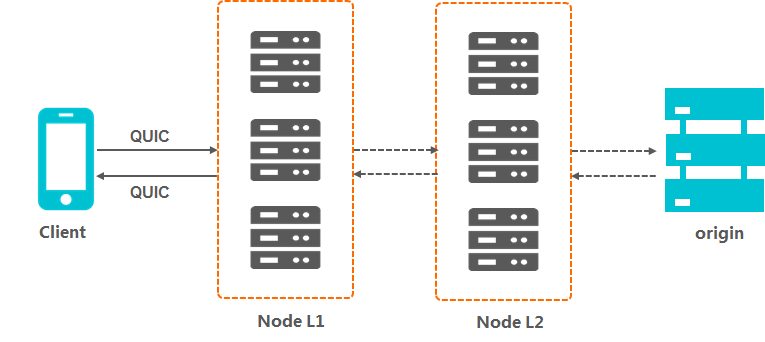
QUIC (Quick UDP Internet Connections) is an experimental transport-layer network protocol that provides security comparable to TLS/SSL with lower connection and transmission latency. Built on UDP, QUIC performs well on weak networks and maintains usable service even with severe packet loss and high latency. QUIC implements congestion control algorithms at the application layer without kernel support, making it more flexible than TCP and ideal for services that hit TCP optimization bottlenecks.
ApsaraVideo VOD uses QUIC as a Layer 7 protocol for accelerated domain names.
QUIC types
Accelerated domain names in ApsaraVideo VOD support IETF QUIC and Google QUIC. The supported Google QUIC versions are Q39, Q43, and Q46.
-
IETF QUIC is the Internet standard version.
-
IETF QUIC is compatible with Google QUIC versions Q39, Q43, and Q46. We strongly recommend that you use IETF QUIC.
Client requirements
QUIC has the following client requirements:
-
Chrome: Alibaba Cloud Content Delivery Network (CDN) supports the standard HTTP/3 protocol, which allows Chrome to send QUIC requests directly to Alibaba Cloud CDN.
-
Self-developed applications: The application must integrate a network library that supports QUIC, such as lsquic-client, Cronet, ngtcp2, or quiche.
How it works
QUIC billing rules
QUIC is a value-added service. You are charged an additional fee based on the number of QUIC requests. For more information about billing details, submit a ticket.
-
A request is identified as a QUIC request if it is based on the UDP protocol.
-
A request that has an HTTPS protocol header is billed as a QUIC request if it is sent over QUIC. Otherwise, the request is billed as an HTTPS request.
Limits
QUIC is available only to users on the whitelist. To enable this feature, submit a ticket.
Enable the QUIC protocol
-
Log on to the ApsaraVideo VOD console.
In the left-side navigation pane, choose Configuration Management > CDN Configuration > Domain Names.
-
In the navigation pane on the left, click QUIC Protocol.
-
On the QUIC Protocol tab, turn on the QUIC Protocol switch.
Verify QUIC requests
This example shows how to verify QUIC requests in the Chrome browser.
Right-click a blank area on the webpage and select Inspect > Network. A value of h3-29 in the Protocol column indicates a QUIC request.
If the Protocol column is not visible, refresh the page. Then, right-click the table header and select Header Options > Protocol.