HTTPS secure acceleration
This topic describes how HTTPS secure acceleration works, its benefits, use cases, and how to enable it. You can enable HTTPS secure acceleration to encrypt requests between clients and points of presence (POPs) to ensure data security in transit. ApsaraVideo VOD uses a content delivery network (CDN) for acceleration.
Background
The HTTP protocol transmits content in plaintext and does not provide data encryption. HTTPS is the secure version of HTTP. It wraps HTTP with the Secure Sockets Layer (SSL)/Transport Layer Security (TLS) protocol. It provides authentication and encrypted communication and is widely used for security-sensitive communications, such as payment transactions.
You can configure HTTPS secure acceleration in the ApsaraVideo VOD console to encrypt requests between clients and points of presence (POPs).
When a POP returns resources from an origin server to a client, the POP follows the origin server's configuration. We recommend that you configure and enable HTTPS on your origin server to implement end-to-end encryption.
The HTTPS certificate that you configure in the ApsaraVideo VOD console only encrypts communication between clients and CDN points of presence (POPs). When a POP retrieves resources from your VOD bucket at the origin (typically over port 443), this is internal communication between the CDN and the origin, and it is independent of the protocol that clients use to access your accelerated domain name. If you want clients to access your accelerated domain name over HTTPS, you must configure an SSL certificate for that domain name separately in the ApsaraVideo VOD console.
How it works
The following figure shows the HTTPS encryption process.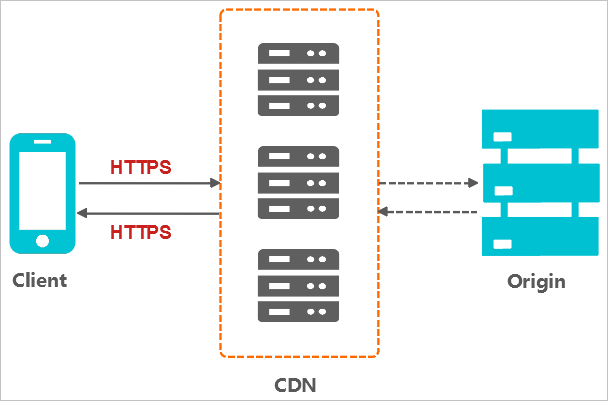
A client sends an HTTPS request.
The server generates a public key and a private key. You can create the keys or request them from a certificate authority (CA).
The server sends the public key certificate to the client.
The client verifies the certificate.
If the certificate is valid, the client generates a random number (key), encrypts it by using the public key, and then sends the encrypted number to the server.
If the certificate is invalid, the SSL handshake fails.
NoteValidation includes the following checks: the certificate is not expired, the certificate authority (CA) that issued the server certificate is trusted, the issuer's public key can verify the digital signature on the server certificate, and the domain name on the server certificate matches the actual domain name of the server.
The server uses the private key to decrypt the message and obtain the random number (key).
The server uses the key to encrypt the data for transmission.
The client uses the key to decrypt the encrypted data from the server and obtain the requested data.
Benefits
HTTPS secure transmission offers the following benefits:
Secure data transmission over HTTPS prevents eavesdropping, tampering, impersonation, and hijacking risks that can occur with plaintext HTTP transmission.
Your critical information is encrypted during transmission to prevent sensitive data leaks, such as when attackers capture session IDs or cookie content.
Data integrity is verified during transmission to prevent man-in-the-middle (MITM) attacks, such as DNS or content hijacking and tampering by third parties.
Using HTTPS is now standard practice. Major browsers mark HTTP sites as insecure. Continuing to use HTTP creates security vulnerabilities and browser warnings that can deter users and reduce traffic.
Major browsers boost the search ranking for HTTPS websites and support HTTP/2, which requires HTTPS. The widespread adoption of HTTPS also benefits security, marketing, and user experience. Therefore, we strongly recommend upgrading your access protocol to HTTPS.
Use cases
The following table describes the main use cases for HTTPS secure transmission.
Use case | Description |
Enterprise applications | If a website contains confidential enterprise information, such as CRM or ERP data, hijacking or intercepting this information during access can be catastrophic for the enterprise. |
Government information | Information on government websites must be authoritative and accurate. It is essential to prevent phishing, fraud, and information hijacking to prevent information hijacking or leaks that could cause a crisis of public trust. |
Payment systems | The payment process involves sensitive information such as names and phone numbers. To prevent information hijacking and fraudulent impersonation, you must enable HTTPS encryption. This prevents scenarios where customers, after placing an order, receive fraudulent messages with their personal and order details, asking for a second payment due to a "stuck order". Such scams can cause significant losses for both the customer and the business. |
API | HTTPS protects the transmission of sensitive information and critical operational commands, preventing data from being hijacked. |
Enterprise websites | Using HTTPS displays the green security lock icon (for DV or OV certificates) or the company name in the address bar (for EV certificates), which gives potential customers a more trustworthy and secure browsing experience. |
Procedure
Purchase a certificate.
To enable HTTPS secure acceleration, you need a certificate that matches your accelerated domain name. In SSL Certificate Service, you can apply for a free personal test certificate or purchase a commercial certificate based on your business needs.
On the purchase page, configure parameters based on your business needs, such as Domain Type (wildcard or single domain), Certificate Type (OV Enterprise SSL or DV Domain SSL), Certificate Level (for example, Professional, which supports multiple algorithms such as RSA, ECC, and SM2), and Certificate Brand (GlobalSign, GeoTrust, CFCA (for use in China), and DigiCert (formerly Symantec)).
When purchasing a certificate for a second-level domain name (for example,
sub.example.com), you must complete DNS validation by adding a TXT record to the primary domain name (example.com), not to the second-level domain name. Use the host name and record value provided on the certificate application page. After configuring the TXT record, wait approximately 10 minutes for DNS propagation before retrying the validation.Configure the HTTPS certificate.
Before you configure the HTTPS certificate, check the status of your accelerated domain name in the ApsaraVideo VOD console. If the domain status shows Configuring, you cannot configure the HTTPS certificate. Wait until the Manage button appears for the domain, then proceed to the HTTPS settings page to configure the SSL certificate and enable HTTPS secure acceleration.
In the left-side navigation pane, choose Configuration Management.
Click to go to the Domain Names page.
Find the domain name that you want to configure and click Configure in the Actions column.
Click the HTTPS tab. In the HTTPS Certificate section, click Modify.
Modify the configuration.
NoteAn expired or invalid HTTPS certificate may cause playback failures. Make sure your certificate is valid and not expired.
Parameter
Description
Certificate Type
Certificate Management Service
You can apply for certificates of various brands and types in the SSL Certificate Service console. For more information, see Apply for a certificate.
You can apply for certificates of various brands and types. For more information, see Apply for a certificate.
After you apply for a free personal test certificate, set Certificate Type to Certificate Management Service and select the free test certificate that you applied for.
A free personal test certificate is typically issued within one to two business days. During this period, you can choose to upload a custom certificate or a different certificate from Certificate Management Service.
NoteCertificate issuance time varies by CA and can take from several hours to two business days.
A free personal test certificate is valid for three months. If you disable HTTPS secure acceleration and then re-enable it while the certificate is still valid, the system reuses the certificate. If the certificate has expired when you re-enable the feature, you must apply for a new one. Free personal test certificates cannot be renewed — you cannot extend the validity period of an existing certificate. To get a new certificate, log on to the Digital Certificate Management Service console and apply for a new free personal test certificate.
The SSL certificate domain must exactly match your accelerated domain name. For example, if your accelerated domain is
example.com, the certificate domain must also beexample.com. Using a certificate issued for a different domain will cause HTTPS acceleration to fail or result in access errors.How to choose the certificate type:
If you have already applied for a certificate in the Digital Certificate Management Service console (including free test certificates), select Cloud Shield as the certificate type and choose your certificate from the list. No manual input is required.
If you are using a certificate purchased from a third-party CA (such as DigiCert, Let's Encrypt, or others), select Custom as the certificate type and upload the PEM-formatted certificate content and private key. There is no mandatory naming rule for the certificate name — you can name it as you like. When you upload a Custom certificate, paste the public key content (in PEM or CRT format) from your downloaded SSL certificate file into the Content field, and paste the private key (Key) content into the Private Key field. Copy only the certificate code section, and do not include any extra characters.
A wildcard certificate covers only domain names at the same level. For example,
*.example.comcovers only second-level domain names (such asvod.example.com) and does not cover third-level domain names (such asvideo.vod.example.com). If your accelerated domain name is a third-level domain name, apply for a wildcard certificate at the matching level (such as*.vod.example.com) or a single-domain certificate.Free test certificates: Log on to the Digital Certificate Management Service console > SSL Certificate Management > Personal Test Certificate (formerly Free Certificate) > Create Certificate. Each calendar year is limited to 20 certificates, with a validity period of 3 months.
You can access the certificate console at SSL Certificate Service.
You can access the certificate console at Certificate Management Service.
Custom
If no suitable certificate is available in the certificate list, you can choose this option to upload a custom certificate. You must specify a certificate name and then paste the certificate content and private key. The certificate is saved in Alibaba Cloud Certificate Management Service. You can view the certificate on the My Certificates page.
NoteIf a "duplicate certificate name" error occurs when you upload a Custom certificate, rename the certificate and try again.
There is no restriction on the certificate brand for a custom certificate. A certificate issued by any CA can be used for HTTPS secure acceleration as long as it is in the correct format (PEM), its domain name matches your accelerated domain name, and it has not expired.
Certificate Name
This parameter is required when Certificate Type is set to Certificate Management Service or Custom.
Content
This parameter is required when Certificate Type is set to Custom. Paste the public key content of your certificate into this field. For the required format, refer to the PEM Encoding Example below the Content input box. Copy only the certificate code section, and do not include any extra characters.
Private Key
This parameter is required when Certificate Type is set to Custom. Paste the private key content of your certificate into this field. For the required format, refer to the PEM Encoding Example below the Private Key input box. Copy only the certificate code section, and do not include any extra characters.
Click OK to save the configuration.
Next steps
The updated HTTPS certificate takes effect globally in about one minute. You can verify that the certificate has taken effect by accessing your resources over HTTPS. Check that the URL in your browser's address bar starts with https:// and that a lock icon appears to the left of the address bar. This indicates a secure connection.
How SSL certificates affect playback:
Preview playback in the ApsaraVideo VOD console requires the HTTPS protocol. If no valid SSL certificate is configured for the domain, clicking Play in the console may display a protocol not supported error or become inaccessible.
Common playback issues such as a black screen in the web player, browser security warnings (for example, in Firefox or Safari), or third-party player failures are often caused by an expired or unconfigured SSL certificate. Check your certificate status and renew it promptly if needed.
The SSL certificate referenced in ApsaraVideo VOD standard encryption errors specifically refers to the certificate configured for your custom CDN accelerated domain in the domain management of the ApsaraVideo VOD console. Ensure that it is valid and that force HTTPS is enabled.
For the console, go to ApsaraVideo VOD console > Configuration Management > Distribution Acceleration Configuration > Domain Names > Configure > HTTPS Configuration.
FAQ
Do I need to re-upload my video resources after replacing or renewing an SSL certificate?
No. Replacing or renewing an HTTPS certificate only affects the transport encryption layer and does not impact the video source files stored in OSS. You do not need to re-upload any video resources.
What can I do if video playback fails or resources fail to load on an HTTPS website?
If your website uses HTTPS but references video links over HTTP that are not covered by a valid certificate, browsers enforce mixed content security policies and block the request. As a result, the video fails to play or the resource fails to load.
To resolve this, enable HTTPS secure acceleration for your ApsaraVideo VOD accelerated domain name and configure an SSL certificate, so that your video resource links also use the HTTPS protocol.
If you play videos through the Alibaba Cloud console, the console enforces HTTPS. After you bind a custom domain name, you must configure an HTTPS certificate for it to play back normally. If you use the default VOD bucket domain name directly, no certificate is required, but the bucket domain name does not support custom cross-origin resource sharing (CORS) and is deducted from your data transfer plan at a higher ratio (1:3). We recommend that you configure an accelerated domain name and apply for an SSL certificate (you can use a free test certificate or upload your own certificate).
When should I renew my SSL certificate?
You can configure a new SSL certificate before the current one expires — you do not need to wait for the certificate to expire. You can upload or select a new certificate at any time during the certificate validity period through the console (Configuration Management > Distribution Acceleration Configuration > Domain Names > HTTPS Configuration > Modify Configuration).
Do I need to manually deploy the certificate or wait for review after configuring or updating an HTTPS certificate?
No manual operation is required. Once your SSL certificate passes review, it takes effect automatically. After you complete or replace the HTTPS certificate configuration in the ApsaraVideo VOD console, the system automatically deploys the certificate to CDN points of presence (POPs) — you do not need to manually deploy it to your origin server or the CDN. As described in the Next steps section, the update takes effect across the network in about 1 minute; you can verify this by accessing the HTTPS address in a browser and checking that the lock icon appears in the address bar.
Log on to the ApsaraVideo VOD console to manage your certificates.
What can I do if videos cannot be played after I configure an HTTPS certificate?
If you have configured an HTTPS certificate for your VOD accelerated domain name but cannot play videos over HTTPS, troubleshoot the issue by using the following steps:
Check that the certificate domain name matches: Make sure that the domain name bound to the certificate (CN or SAN) exactly matches your VOD accelerated domain name. The browser error
net::ERR_CERT_COMMON_NAME_INVALIDusually indicates a domain name mismatch.Check the certificate format: VOD HTTPS supports only PEM-format certificates. When you download the certificate from SSL Certificate Service, select the Nginx format, which includes the
.crtcertificate file and the.keyprivate key file. To convert a certificate in another format to PEM, see Certificate formats.Verify the deployment status: In the VOD console, choose Configuration Management > Distribution Acceleration Configuration > Domain Names, and confirm that HTTPS is enabled for the target domain name. After you update the certificate, it takes about 1 minute to take effect across the network. Wait and then try again.
Check the certificate validity period: Make sure that the certificate has not expired. An expired or invalid HTTPS certificate may cause playback failures. Renew the certificate promptly. You can check the certificate expiration date in the Digital Certificate Management Service console.