HLS encryption

更新时间:
复制 MD 格式

HLS encryption uses AES-128 and works with all HLS players. Combined with key management and a token service, it suits high-security scenarios such as online education and exclusive content streaming.

How it works

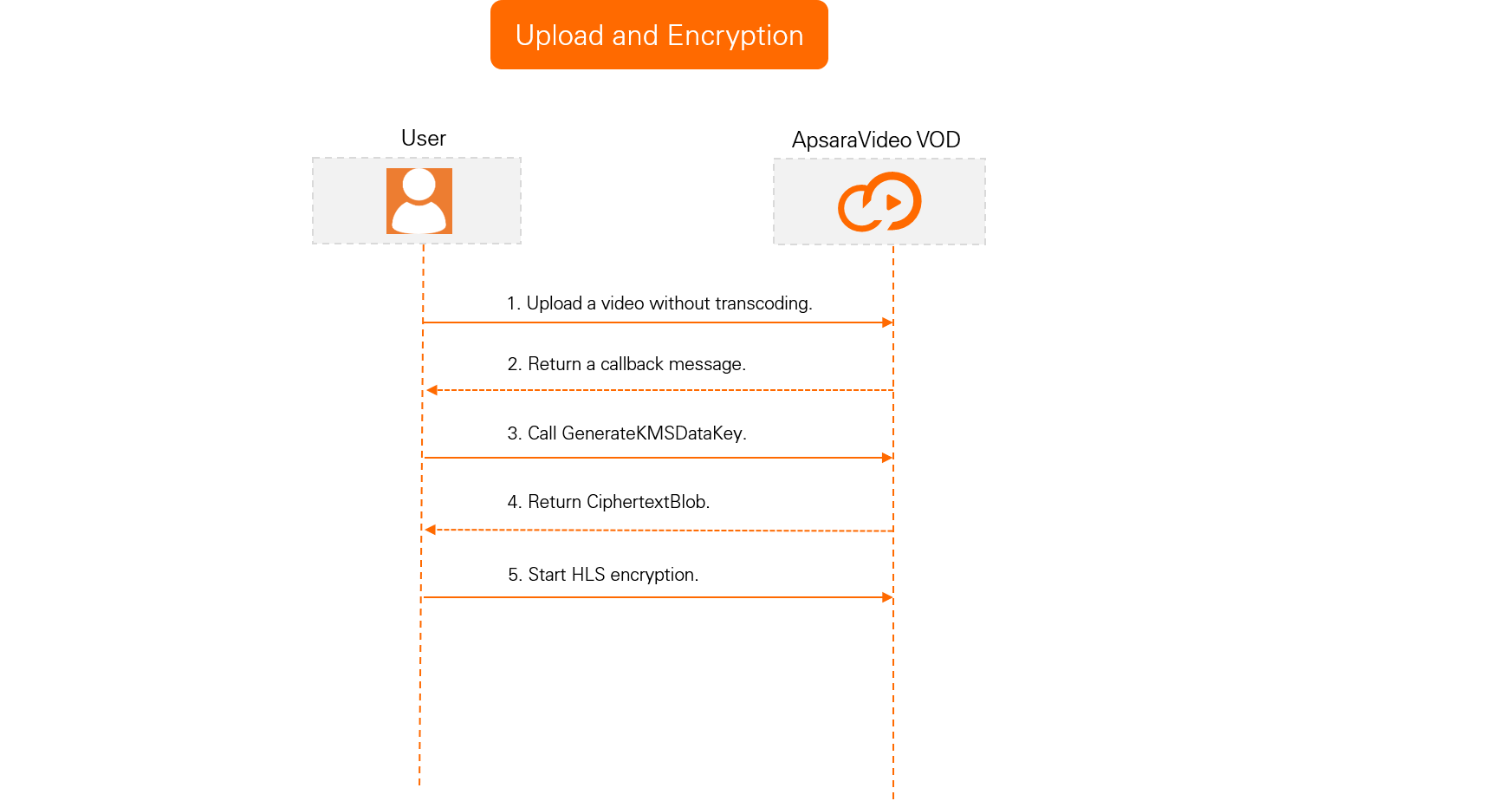
ApsaraVideo VOD uses envelope encryption. A service provider uses Alibaba Cloud Key Management Service (KMS) to generate a data key (DK) and an enveloped data key (EDK). The DK encrypts the video, and the EDK is stored alongside it. During playback, the client retrieves the DK from the decryption service to decrypt the video.

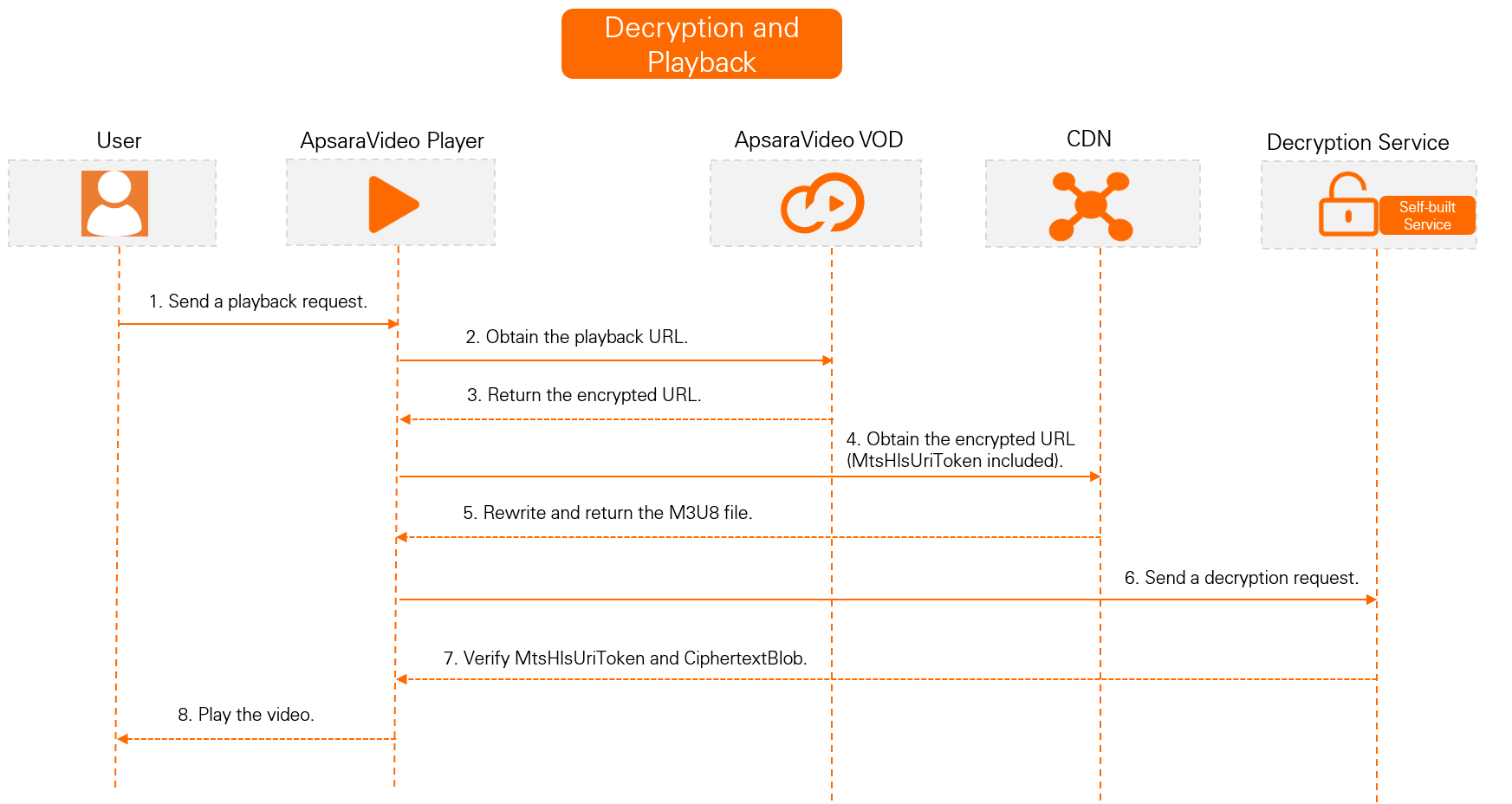
To secure the decryption URL, enable M3U8 encryption and rewrite, which adds another layer of protection to the HLS data access process. The default rewritten parameter is MtsHlsUriToken. To learn how to enable this feature and how it works, see M3U8 encryption and rewrite.

Prerequisites

  • HLS encryption is a free service. However, this feature requires video transcoding, which incurs fees. For pricing details, see Media transcoding billing.

  • You have activated ApsaraVideo VOD. For instructions, see Activate ApsaraVideo VOD.

  • You have authorized ApsaraVideo VOD to access your Key Management Service (KMS). You can grant the required permissions on the Cloud Resource Access Authorization page.

  • You have added an accelerated domain name in ApsaraVideo VOD. For instructions, see Add an accelerated domain name.

  • You have installed the required server-side SDK. For more information, see Server-side SDKs. This topic uses the SDK for Java as an example.

Key concepts

Concept

Description

Resource Access Management (RAM)

An Alibaba Cloud service that lets you manage user identities and control access to your resources. For more information, see What is RAM.

Key Management Service (KMS)

An Alibaba Cloud one-stop platform for key management and data encryption. It provides a simple, reliable, secure, and compliant solution to protect your data and manage credentials. For more information, see What is Key Management Service.

Data key (DK)

A plaintext key used to encrypt data. For more information, see Terms.

Enveloped data key (EDK)

An encrypted data key protected by envelope encryption. For more information, see Terms.

Encryption and decryption workflow

Upload and encryption workflow
视频安全-HLS标准加密3

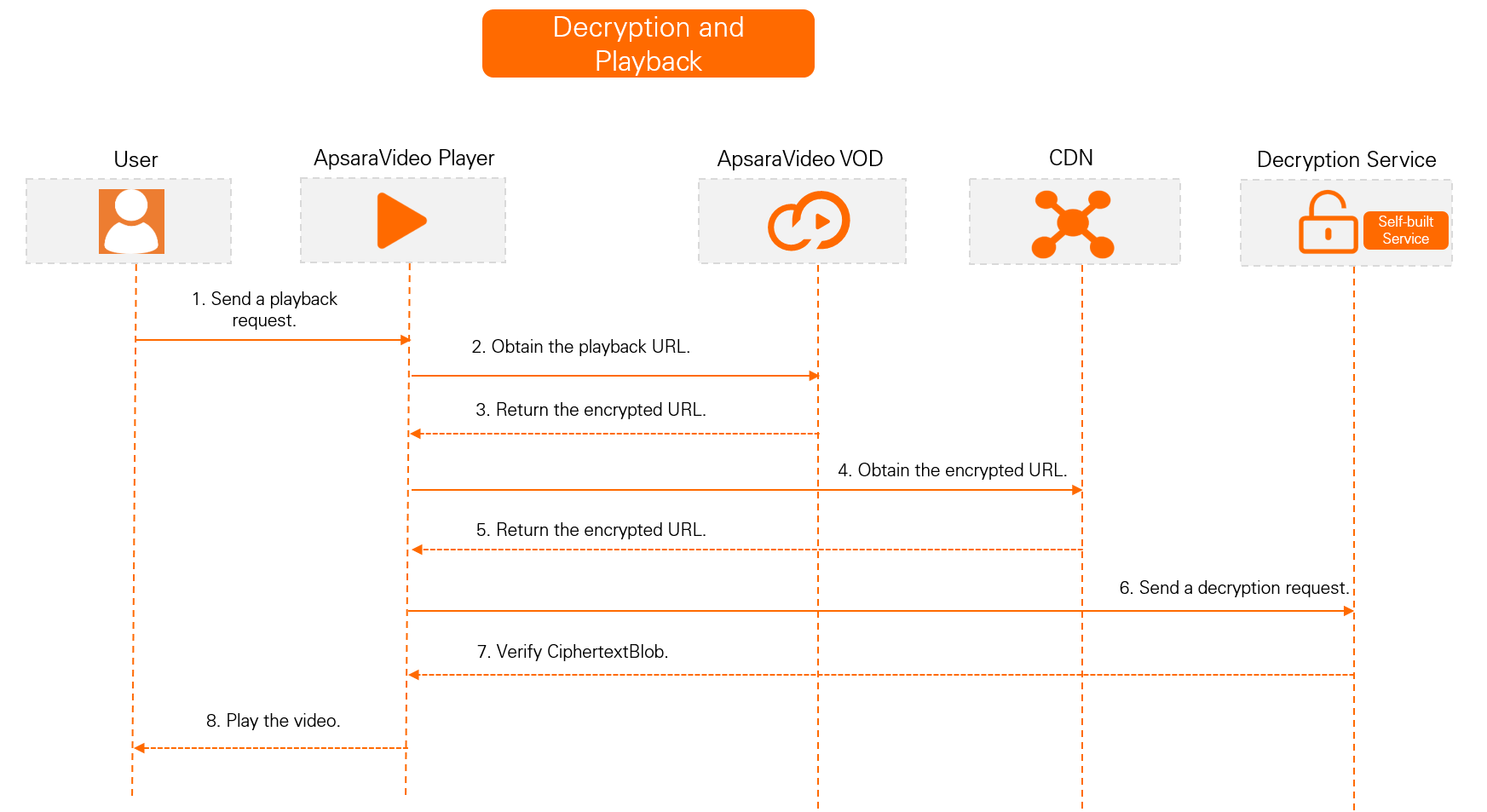
Decryption and playback workflow

M3U8 rewrite enabled (Recommended)
视频安全-HLS标准加密6..png

M3U8 rewrite disabled

视频安全-HLS标准加密2

Encrypt a video

  1. Upload your video and receive a callback.

    To prevent videos that support HLS Encryption from being automatically transcoded, you must use the built-in No Transcoding template group when you upload the videos to ApsaraVideo VOD. This prevents automatic transcoding during the upload.

    1. To upload a video by using the ApsaraVideo VOD console, see Upload files in the ApsaraVideo VOD console. To upload a video by using a server-side API, see Media upload.

    2. Configure event notifications for ApsaraVideo VOD. A callback message for the Video upload completed event indicates that the video has been uploaded to ApsaraVideo VOD. For information about how to configure event notifications, see Event notifications.

  2. Set up an encryption service.

    1. Create a service key.

      A service key is the primary encryption key in KMS and must be used to generate keys for HLS Encryption. If you do not create a service key, the GenerateKMSDataKey operation reports an error.

      1. In the upper-left corner of the page, click the region ID to switch to the region where you want to create the service key.

        Note

        The service key must be in the same region as your video's origin server. For example, if your video is stored in China (Shanghai), the service key must also be created in the China (Shanghai) region.

        The available regions are China (Shanghai), China (Beijing), China (Shenzhen), Japan (Tokyo), Singapore, Indonesia (Jakarta), India (Mumbai), and Germany (Frankfurt).

      2. Log on to the ApsaraVideo VOD console. In the left-side navigation pane, choose Configuration Management > Media Processing > HLS Standard Encryption.

      3. On the HLS Encryption page, click Create Service Key.

        After the service key is created, a confirmation message appears. You can then view the key in the Key Information section.

        Note

        If a success message appears but you cannot view the key, the cause may be a missing service-linked role. You can reauthorize ApsaraVideo VOD to restore the role and then refresh the page to view the service key.

    2. Call an API operation to generate a data key (DK).

      Call the GenerateKMSDataKey operation to generate a data key (DK) and an enveloped data key (EDK). You do not need to pass any parameters. After a successful call, the Plaintext field in the response contains the DK, and the CiphertextBlob field contains the EDK in AES-128 format. Cache the CiphertextBlob value for the HLS Encryption transcoding job.

  3. Create a transcoding template group for HLS Encryption.

    The HLS Encryption process requires two transcoding template groups: the built-in No Transcoding template group and a custom transcoding template group for HLS Encryption. To create a custom transcoding template group, perform the following steps:

    1. Log on to the ApsaraVideo VOD console. In the left-side navigation pane, choose Configuration Management > Media Processing > Transcoding Template Groups.

    2. On the Transcoding Template Groups page, create a transcoding template group for HLS Encryption.

      Set Encapsulation Format to hls. In the Advanced Parameters section, enable Video Encryption and select the Alibaba Cloud Encryption option. Configure other parameters as required. For more information about the parameters, see Transcoding templates.

    3. After the template group is created, find the new template group in the list on the Transcoding Template Groups page and record its ID. This template group ID is required for the encryption configuration.

  4. Submit an HLS Encryption transcoding job.

    1. Call the SubmitTranscodeJobs operation to submit an HLS Encryption transcoding job.

      Java sample code

      In the following Java sample code, change the following parameters based on your requirements:

      Parameter

      Value

      request.setTemplateGroupId("")

      The ID of the transcoding template group for HLS Encryption that you created in Step 3.

      request.setVideoId("")

      The ID of the video that you uploaded in Step 1.

      encryptConfig.put("CipherText","")

      The CiphertextBlob value that is returned in Step 2.

      encryptConfig.put("DecryptKeyUri","")

      The key URI. The URI is created by concatenating the decryption service URL and the CiphertextBlob value. For example, if your service runs on port 8099 locally, the key URI is as follows:

      http://172.16.0.1:8099?CipherText=CiphertextBlobValue

      import com.alibaba.fastjson.JSON;
      import com.alibaba.fastjson.JSONObject;
      import com.aliyuncs.DefaultAcsClient;
      import com.aliyuncs.exceptions.ClientException;
      import com.aliyuncs.profile.DefaultProfile;
      import com.aliyuncs.vod.model.v20170321.SubmitTranscodeJobsRequest;
      import com.aliyuncs.vod.model.v20170321.SubmitTranscodeJobsResponse;
      public class SubmitTranscodeJobs {
          // An AccessKey pair of an Alibaba Cloud account has permissions to call all API operations. We recommend that you use a RAM user to call API operations or perform routine O&M.
          // We strongly recommend that you do not hard-code the AccessKey ID and AccessKey secret in your project code. Otherwise, the AccessKey pair may be leaked and the security of all your resources may be compromised.
          // This example shows how to use environment variables to obtain the AccessKey pair for authentication. Before you run the sample code, configure the ALIBABA_CLOUD_ACCESS_KEY_ID and ALIBABA_CLOUD_ACCESS_KEY_SECRET environment variables.
          private static String accessKeyId = System.getenv("ALIBABA_CLOUD_ACCESS_KEY_ID");
          private static String accessKeySecret = System.getenv("ALIBABA_CLOUD_ACCESS_KEY_SECRET");
          public static SubmitTranscodeJobsResponse submitTranscodeJobs(DefaultAcsClient client) throws Exception{
              SubmitTranscodeJobsRequest request = new SubmitTranscodeJobsRequest();
              request.setTemplateGroupId("");
              request.setVideoId("");
              JSONObject encryptConfig = new JSONObject();
              encryptConfig.put("CipherText","");
              encryptConfig.put("DecryptKeyUri","");
              encryptConfig.put("KeyServiceType","KMS");
              request.setEncryptConfig(encryptConfig.toJSONString());
              return client.getAcsResponse(request);
          }
          public static void main(String[] args) throws ClientException {
              String regionId = "cn-shanghai";  // The region for ApsaraVideo VOD.
              DefaultProfile profile = DefaultProfile.getProfile(regionId, accessKeyId, accessKeySecret);
              DefaultAcsClient client = new DefaultAcsClient(profile);
              SubmitTranscodeJobsResponse response;
              try {
                  response = submitTranscodeJobs(client);
                  System.out.println("RequestId is:"+response.getRequestId());
                  System.out.println("TranscodeTaskId is:"+response.getTranscodeTaskId());
                  System.out.println("TranscodeJobs is:"+ JSON.toJSON(response.getTranscodeJobs()));
              } catch (Exception e) {
                  e.printStackTrace();
              }
          }
      }       
    2. If you have configured event notifications, a callback message for the Single Definition Transcoding Complete or Transcode complete event indicates that the transcoding job is complete.

  5. Verify the HLS Encryption result.

    After the transcoding job is complete, use one of the following methods to verify the encryption.

    • Method 1: Log on to the ApsaraVideo VOD console. Go to the details page of the Audio/Video file and click the Video URL tab. In the video URL list, check the format column for an HLS Encryption tag on the M3U8 output file. The presence of this tag confirms that the encryption was successful.

    • Method 2: Copy the URL of the M3U8 file that has the HLS Standard Encryption tag. Run the curl -v "URL of the M3U8 file" command to retrieve the M3U8 content. Check the content for the following key information: URI="<the decryption URI that you provided as the DecryptKeyUri parameter value>". If this information is present, the encryption was successful.

    • Method 3: Call the GetTranscodeTask operation and pass the value of the JobId parameter that is returned in Step 4. The encryption is successful if the value of TranscodeTemplateId in the response matches the ID of the transcoding template group that you created in Step 3 and TranscodeJobStatus is TranscodeSuccess.

HLS (M3U8) encryption and rewrite (Recommended)

With M3U8 encryption and rewrite enabled, the system automatically adds encryption parameters, including the algorithm, key URI, and authentication parameters, to the #EXT-X-KEY tag in the HLS Media Playlist (M3U8 file). When a client parses the rewritten M3U8 file, it uses the key URI with authentication parameters to request the decryption key, then decrypts the transport stream (TS) segments with the specified algorithm.

Step 1: Enable parameter pass-through for HLS encryption

In the ApsaraVideo VOD console, enable Parameter Pass-through for HLS Encryption.

After you enable Parameter Pass-through for HLS Encryption, ApsaraVideo VOD rewrites the M3U8 file, modifying the URI in the #EXT-X-KEY tag by appending parameters from the client request. The default parameter name is MtsHlsUriToken.

Prerequisites

You have configured cross-origin resource sharing (CORS). For more information, see Configure cross-origin resource sharing.

Important

This feature is not available in Alibaba Cloud Gov Cloud.

Procedure

  1. Log on to the ApsaraVideo VOD console.

  2. In the left-side navigation pane, click Configuration Management.

  3. Click CDN Configuration > Domain Names to go to the Domain Names page.

  4. Find the domain name that you want to manage and click configure in the Actions column.

  5. On the domain's configuration page, click Video Related in the left-side navigation pane.

  6. In the encrypted playback section, turn on the Parameter Pass-through for HLS Encryption switch. By default, this switch is turned off, and the parameter name is MtsHlsUriToken.

Note
  • After you enable this feature, ApsaraVideo VOD handles authentication by rewriting the token parameter. The rewritten parameter is MtsHlsUriToken, and its value is test. During decrypted playback, the point of presence (POP) appends MtsHlsUriToken=test to the URI in the #EXT-X-KEY tag of the M3U8 file.

Step 2: Send request with MtsHlsUriToken

To access the M3U8 file, the client sends a request that includes the MtsHlsUriToken parameter to a point of presence (POP).

You must build a token service to generate and issue the MtsHlsUriToken for users.

The following code generates the MtsHlsUriToken. You must modify the following parameters based on your business requirements:

Java sample code

Parameter

Description

ENCRYPT_KEY

The encryption key. A custom string of 16, 24, or 32 characters.

INIT_VECTOR

The encryption offset. A custom 16-character string that cannot contain special characters.

import org.apache.commons.codec.binary.Base64;
import org.apache.commons.lang3.StringUtils;
import javax.crypto.Cipher;
import javax.crypto.spec.IvParameterSpec;
import javax.crypto.spec.SecretKeySpec;
import java.util.Arrays;
public class PlayToken {
    // These parameters are required only for AES token generation.
    private static String ENCRYPT_KEY = "";
    private static String INIT_VECTOR = "";
    public static void main(String[] args) throws Exception {
        String serviceId = "12";
        PlayToken playToken = new PlayToken();
        String aesToken = playToken.generateToken(serviceId);
        //System.out.println("aesToken " + aesToken);
        //System.out.println(playToken.validateToken(aesToken));   // Verify the decryption.
    }
    /**
     * Generates a token based on the passed parameters.
     * Note:
     *  1. The parameters can include information such as the user ID of your service and the playback client type.
     *  2. The token is generated by a call to your token service API.
     * @param args
     * @return
     */
    public String generateToken(String... args) throws Exception {
        if (null == args || args.length <= 0) {
            return null;
        }
        String base = StringUtils.join(Arrays.asList(args), "_");
        // Sets the token to expire after 30 seconds. You can adjust the expiration time.
        long expire = System.currentTimeMillis() + 30000L;
        base += "_" + expire;   // A custom string. The final length of `base` must be 16, 24, or 32 characters. In this example, the timestamp is 13 characters and the underscore (_) is 1 character, so you must pass a 2-character string. You can modify this string as needed.
        // Generate the token.
        String token = encrypt(base, ENCRYPT_KEY);  // 'encryptStr' is the custom string to encrypt and 'encryptKey' is the encryption key.
        // Save the token to validate it during decryption, for example, its expiration time and number of uses.
        saveToken(token);
        return token;
    }
    /**
     * Validates the token.
     * Note:
     *  1. Your decryption service must validate the token's legitimacy and validity before returning the playback key.
     *  2. We strongly recommend that you also validate the token's expiration time and number of valid uses.
     * @param token
     * @return
     * @throws Exception
     */
    public boolean validateToken(String token) throws Exception {
        if (null == token || "".equals(token)) {
            return false;
        }
        String base = decrypt(token,ENCRYPT_KEY); // 'encryptStr' is the string to decrypt and 'decryptKey' is the decryption key.
        // First, validate the token's expiration time.
        Long expireTime = Long.valueOf(base.substring(base.lastIndexOf("_") + 1));
        System.out.println("Time validation: " + expireTime);
        if (System.currentTimeMillis() > expireTime) {
            return false;
        }
        // Obtain token information from the database to determine its validity. You must implement this part.
        TokenInfo dbToken = getToken(token);
        // Check whether the token has been used.
        if (dbToken == null || dbToken.useCount > 0) {
            return false;
        }
        // Obtain the business attribute information for validation.
        String businessInfo = base.substring(0, base.lastIndexOf("_"));
        String[] items = businessInfo.split("_");
        // Validate the legitimacy of the business information. You must implement this part.
        return validateInfo(items);
    }
    /**
     * Saves the token to the database.
     * You must implement this part.
     *
     * @param token
     */
    public void saveToken(String token) {
        //TODO: Store the token.
    }
    /**
     * Queries the token.
     * You must implement this part.
     *
     * @param token
     */
    public TokenInfo getToken(String token) {
        //TODO: Obtain token information from the database for validity and legitimacy checks.
        return null;
    }
    /**
     * Validates the business information. You must implement this part.
     *
     * @param infos
     * @return
     */
    public boolean validateInfo(String... infos) {
        //TODO: Validate the information, for example, whether the UID is valid.
        return true;
    }
    /**
     * Generates a token by using AES encryption.
     *
     * @param encryptStr  The string to encrypt.
     * @param encryptKey  The encryption key.
     * @return
     * @throws Exception
     */
    public String encrypt(String encryptStr, String encryptKey) throws Exception {
        IvParameterSpec e = new IvParameterSpec(INIT_VECTOR.getBytes("UTF-8"));
        SecretKeySpec skeySpec = new SecretKeySpec(encryptKey.getBytes("UTF-8"), "AES");
        Cipher cipher = Cipher.getInstance("AES/CBC/PKCS5PADDING");
        cipher.init(Cipher.ENCRYPT_MODE, skeySpec, e);
        byte[] encrypted = cipher.doFinal(encryptStr.getBytes());
        return Base64.encodeBase64String(encrypted);
    }
    /**
     * Decrypts a token by using AES.
     *
     * @param encryptStr  The string to decrypt.
     * @param decryptKey  The decryption key.
     * @return
     * @throws Exception
     */
    public String decrypt(String encryptStr, String decryptKey) throws Exception {
        IvParameterSpec e = new IvParameterSpec(INIT_VECTOR.getBytes("UTF-8"));
        SecretKeySpec skeySpec = new SecretKeySpec(decryptKey.getBytes("UTF-8"), "AES");
        Cipher cipher = Cipher.getInstance("AES/CBC/PKCS5PADDING");
        cipher.init(Cipher.DECRYPT_MODE, skeySpec, e);
        byte[] encryptByte = Base64.decodeBase64(encryptStr);
        byte[] decryptByte = cipher.doFinal(encryptByte);
        return new String(decryptByte);
    }
    /**
     * Token information. You can add more information based on your business logic. This is for reference only.
     */
    class TokenInfo {
        // The number of times the token can be used. Note synchronization issues in a distributed environment.
        int useCount;
        // The token content.
        String token;
    }}
                        
Note

The preceding sample code is for reference only. It does not involve any SDKs or service code. You must configure and adjust it based on your business requirements.

Step 3: Decrypt and play the file

Upon receiving a request from the client, the point of presence (POP) authenticates it. If authentication is successful, the POP decrypts and plays the file.

If the MtsHlsUriToken parameter generated in Step 2 has a value of test, the POP appends MtsHlsUriToken=test to the URI in the #EXT-X-KEY tag of the M3U8 file during decrypted playback.

You must implement the authentication logic. For reference, see the decryption service sample code for M3U8 encryption and rewrite in Play videos.

Play video

With M3U8 rewrite (recommended)

  1. Set up a decryption service.

    Set up a local HTTP service to decrypt videos.

    Call the DecryptKMSDataKey operation to decrypt the data key. The data key in the response, PlainText, is the Base64-decoded version of the PlainText value returned by the GenerateKMSDataKey operation.

    To add an extra layer of security by verifying decryption URLs, enable M3U8 encryption and rewrite. This feature adds a token to the key request URL. The default parameter name is MtsHlsUriToken. Your decryption service implementation depends on whether this feature is enabled.

    Click to expand the Java sample code

    The following table describes the parameters in the sample code that you can customize.

    Parameter

    Description

    region

    The region ID. The region of the KMS service must be the same as the region where your ApsaraVideo VOD video is stored. For example, for China (Shanghai), set this parameter to cn-shanghai. For more information about other region IDs, see ApsaraVideo VOD region IDs.

    AccessKey

    The AccessKey pair (AccessKey ID and AccessKey secret) of your Alibaba Cloud account or RAM user. For more information, see Create an AccessKey pair.

    httpserver

    The port number on which you want to start the service.

    import com.aliyuncs.DefaultAcsClient;
    import com.aliyuncs.exceptions.ClientException;
    import com.aliyuncs.http.ProtocolType;
    import com.aliyuncs.vod.model.v20170321.DecryptKMSDataKeyRequest;
    import com.aliyuncs.vod.model.v20170321.DecryptKMSDataKeyResponse;
    import com.aliyuncs.profile.DefaultProfile;
    import com.sun.net.httpserver.Headers;
    import com.sun.net.httpserver.HttpExchange;
    import com.sun.net.httpserver.HttpHandler;
    import com.sun.net.httpserver.HttpServer;
    import com.sun.net.httpserver.spi.HttpServerProvider;
    import org.apache.commons.codec.binary.Base64;
    import java.io.IOException;
    import java.io.OutputStream;
    import java.net.HttpURLConnection;
    import java.net.InetSocketAddress;
    import java.net.URI;import java.util.regex.Matcher;
    import java.util.regex.Pattern;
    public class HlsDecryptServer {
        private static DefaultAcsClient client;
        static {
            // The KMS region, which must be the same as the video's region.
            String region = "";
            // The AccessKey pair for accessing KMS.
            // An AccessKey pair of an Alibaba Cloud account has permissions on all API operations. We recommend that you use a RAM user to call API operations or perform routine O&M.
            // We strongly recommend against hard-coding the AccessKey ID and AccessKey secret in your project code. Doing so may lead to the leakage of the AccessKey pair and compromise the security of all resources in your account.
            // This example demonstrates how to authenticate API requests by reading the AccessKey pair from environment variables. Before running the sample code, configure the ALIBABA_CLOUD_ACCESS_KEY_ID and ALIBABA_CLOUD_ACCESS_KEY_SECRET environment variables.
            String accessKeyId = System.getenv("ALIBABA_CLOUD_ACCESS_KEY_ID");
            String accessKeySecret = System.getenv("ALIBABA_CLOUD_ACCESS_KEY_SECRET");
            client = new DefaultAcsClient(DefaultProfile.getProfile(region, accessKeyId, accessKeySecret));
        }
        /**
         * Description:
         * 1. Receives a decryption request to get the ciphertext and user token.
         * 2. Calls the KMS decrypt operation to get the plaintext key.
         * 3. Returns the Base64-decoded plaintext key.
         */
        public class HlsDecryptHandler implements HttpHandler {
            /**
             * Handles the decryption request.
             * @param httpExchange
             * @throws IOException
             */
            public void handle(HttpExchange httpExchange) throws IOException {
                String requestMethod = httpExchange.getRequestMethod();
                if ("GET".equalsIgnoreCase(requestMethod)) {
                    // Verify the token's validity.
                    String token = getMtsHlsUriToken(httpExchange);
                    boolean validRe = validateToken(token);
                    if (!validRe) {
                        return;
                    }
                    // Get the ciphertext from the URL.
                    String ciphertext = getCiphertext(httpExchange);
                    if (null == ciphertext)
                        return;
                    // Decrypt the key from KMS and perform Base64 decoding.
                    byte[] key = decrypt(ciphertext);
                    // Set the header.
                    setHeader(httpExchange, key);
                    // Return the Base64-decoded key.
                    OutputStream responseBody = httpExchange.getResponseBody();
                    responseBody.write(key);
                    responseBody.close();
                }
            }
            private void setHeader(HttpExchange httpExchange, byte[] key) throws IOException {
                Headers responseHeaders = httpExchange.getResponseHeaders();
                responseHeaders.set("Access-Control-Allow-Origin", "*");
                httpExchange.sendResponseHeaders(HttpURLConnection.HTTP_OK, key.length);
            }
            /**
             * Calls the KMS decrypt operation and Base64-decodes the plaintext.
             * @param ciphertext
             * @return
             */
            private byte[] decrypt(String ciphertext) {
                DecryptKMSDataKeyRequest request = new DecryptKMSDataKeyRequest();
                request.setCipherText(ciphertext);
                request.setProtocol(ProtocolType.HTTPS);
                try {
                    DecryptKMSDataKeyResponse response = client.getAcsResponse(request);
                    String plaintext = response.getPlaintext();
                    System.out.println("PlainText: " + plaintext);
                    // Note: Base64 decoding is required.
                    return Base64.decodeBase64(plaintext);
                } catch (ClientException e) {
                    e.printStackTrace();
                    return null;
                }
            }
            /**
             * Gets the ciphertext parameter from the URL.
             * @param httpExchange
             * @return
             */
            private String getCiphertext(HttpExchange httpExchange) {
                URI uri = httpExchange.getRequestURI();
                String queryString = uri.getQuery();
                String pattern = "CipherText=(\\w*)";
                Pattern r = Pattern.compile(pattern);
                Matcher m = r.matcher(queryString);
                if (m.find())
                    return m.group(1);
                else {
                    System.out.println("Not Found CipherText Param");
                    return null;
                }
            }
              /**
             * Verifies the token's validity. This is required for M3U8 encryption and rewrite.
             * @param token
             * @return
             */
            private boolean validateToken(String token) {
                if (null == token || "".equals(token)) {
                    return false;
                }
                //TODO: Implement your token validation logic here.
                return true;
            }
            /**
             * Gets the token parameter. This is required for M3U8 encryption and rewrite.
             *
             * @param httpExchange
             * @return
             */
            private String getMtsHlsUriToken(HttpExchange httpExchange) {
                URI uri = httpExchange.getRequestURI();
                String queryString = uri.getQuery();
                String pattern = "MtsHlsUriToken=(\\w*)";
                Pattern r = Pattern.compile(pattern);
    Matcher m = r.matcher(queryString);
                if (m.find())
                    return m.group(1);
                else {
                    System.out.println("Not Found MtsHlsUriToken Param");
                    return null;
                }
            }
        }
        /**
         * Starts the service.
         *
         * @throws IOException
         */
        private void serviceBootStrap() throws IOException {
            HttpServerProvider provider = HttpServerProvider.provider();
            // The listening port can be customized. The server can accept up to 30 concurrent requests.
            HttpServer httpserver = provider.createHttpServer(new InetSocketAddress(8099), 30);
            httpserver.createContext("/", new HlsDecryptHandler());
            httpserver.start();
            System.out.println("hls decrypt server started");
        }
        public static void main(String[] args) throws IOException {
            HlsDecryptServer server = new HlsDecryptServer();
            server.serviceBootStrap();
        }}
  2. Obtain the video playback URL or credential.

    Call the GetVideoPlayAuth operation to obtain the playback credential, or call the GetPlayInfo operation to obtain the playback URL.

  3. Play the encrypted video.

    HLS standard encryption is compatible with all HLS players. You can use a self-developed player or ApsaraVideo Player to play the encrypted video.

    If you use ApsaraVideo Player, obtain the token and authentication information as required to play the video. For more information, see Play an encrypted video. If you use a different player, implement the playback logic.

    The following section describes the internal playback process of ApsaraVideo Player:

    With M3U8 rewrite (recommended)

    Workflow

    • The player parses the EXT-X-KEY tag in the M3U8 file to obtain the decryption key URI. This URI corresponds to the value of the DecryptKeyUri parameter in EncryptConfig.

    • To restrict unauthorized access, the player must include authentication information (passed in the MtsHlsUriToken parameter) in the request to the decryption endpoint.

    • The player automatically requests the decryption endpoint to get the key, decrypts the TS files, and then plays the video.

    Example

    • If the playback URL is https://demo.aliyundoc.com/encrypt-stream****-hd.m3u8, the request must include the MtsHlsUriToken parameter.

    • Final request URL: https://demo.aliyundoc.com/encrypt-stream****-hd.m3u8?MtsHlsUriToken=<token>

    • Decryption URL: https://demo.aliyundoc.com?CipherText=ZjJmZGViNzUtZWY1Mi00Y2RlLTk3MTMtOT****

    • Final decryption request URL: https://demo.aliyundoc.com?CipherText=ZjJmZGViNzUtZWY1Mi00Y2RlLTk3MTMtOT****&MtsHlsUriToken=<token>

Without M3U8 rewrite

  1. Set up a decryption service.

    Set up a local HTTP service to decrypt videos.

    Call the DecryptKMSDataKey operation to decrypt the data key. The data key in the response, PlainText, is the Base64-decoded version of the PlainText value returned by the GenerateKMSDataKey operation.

    For example:

    Click to expand the Java sample code

    The following table describes the parameters in the sample code that you can customize.

    Parameter

    Description

    region

    The region ID. The region of the KMS service must be the same as the region where your ApsaraVideo VOD video is stored. For example, for China (Shanghai), set this parameter to cn-shanghai. For more information about other region IDs, see ApsaraVideo VOD region IDs.

    AccessKey

    The AccessKey pair (AccessKey ID and AccessKey secret) of your Alibaba Cloud account or RAM user. For more information, see Create an AccessKey pair.

    httpserver

    The port number on which you want to start the service.

    import com.aliyuncs.DefaultAcsClient;
    import com.aliyuncs.exceptions.ClientException;
    import com.aliyuncs.http.ProtocolType;
    import com.aliyuncs.profile.DefaultProfile;
    import com.aliyuncs.vod.model.v20170321.DecryptKMSDataKeyRequest;
    import com.aliyuncs.vod.model.v20170321.DecryptKMSDataKeyResponse;
    import com.sun.net.httpserver.Headers;
    import com.sun.net.httpserver.HttpExchange;
    import com.sun.net.httpserver.HttpHandler;
    import com.sun.net.httpserver.HttpServer;
    import com.sun.net.httpserver.spi.HttpServerProvider;
    import org.apache.commons.codec.binary.Base64;
    import java.io.IOException;
    import java.io.OutputStream;
    import java.net.HttpURLConnection;
    import java.net.InetSocketAddress;
    import java.net.URI;
    import java.util.regex.Matcher;
    import java.util.regex.Pattern;
    public class HlsDecryptServerNoToken {
        private static DefaultAcsClient client;
        static {
            // The KMS region, which must be the same as the video's region.
            String region = "cn-beijing";
            // The AccessKey pair for accessing KMS.
            // An AccessKey pair of an Alibaba Cloud account has permissions on all API operations. We recommend that you use a RAM user to call API operations or perform routine O&M.
            // We strongly recommend against hard-coding the AccessKey ID and AccessKey secret in your project code. Doing so may lead to the leakage of the AccessKey pair and compromise the security of all resources in your account.
            // This example demonstrates how to authenticate API requests by reading the AccessKey pair from environment variables. Before running the sample code, configure the ALIBABA_CLOUD_ACCESS_KEY_ID and ALIBABA_CLOUD_ACCESS_KEY_SECRET environment variables.
            String accessKeyId = System.getenv("ALIBABA_CLOUD_ACCESS_KEY_ID");
            String accessKeySecret = System.getenv("ALIBABA_CLOUD_ACCESS_KEY_SECRET");
            client = new DefaultAcsClient(DefaultProfile.getProfile(region, accessKeyId, accessKeySecret));
        }
        /**
         * Description:
         * 1. Receives a decryption request to get the ciphertext.
         * 2. Calls the KMS decrypt operation to get the plaintext key.
         * 3. Returns the Base64-decoded plaintext key.
         */
        public class HlsDecryptHandler implements HttpHandler {
            /**
             * Handles the decryption request.
             * @param httpExchange
             * @throws IOException
             */
            public void handle(HttpExchange httpExchange) throws IOException {
                String requestMethod = httpExchange.getRequestMethod();
                if ("GET".equalsIgnoreCase(requestMethod)) {
                    // Get the ciphertext from the URL.
                    String ciphertext = getCiphertext(httpExchange);
                    System.out.println(ciphertext);
                    if (null == ciphertext)
                        return;
                    // Decrypt the key from KMS and perform Base64 decoding.
                    byte[] key = decrypt(ciphertext);
                    // Set the header.
                    setHeader(httpExchange, key);
                    // Return the Base64-decoded key.
                    OutputStream responseBody = httpExchange.getResponseBody();
                    responseBody.write(key);
                    responseBody.close();
                }
            }
            private void setHeader(HttpExchange httpExchange, byte[] key) throws IOException {
                Headers responseHeaders = httpExchange.getResponseHeaders();
                responseHeaders.set("Access-Control-Allow-Origin", "*");
                httpExchange.sendResponseHeaders(HttpURLConnection.HTTP_OK, key.length);
            }
            /**
             * Calls the KMS decrypt operation and Base64-decodes the plaintext.
             * @param ciphertext
             * @return
             */
            private byte[] decrypt(String ciphertext) {
                DecryptKMSDataKeyRequest request = new DecryptKMSDataKeyRequest();
                request.setCipherText(ciphertext);
                request.setProtocol(ProtocolType.HTTPS);
                try {
                    DecryptKMSDataKeyResponse response = client.getAcsResponse(request);
                    String plaintext = response.getPlaintext();
                    System.out.println("PlainText: " + plaintext);
                    // Note: Base64 decoding is required.
                    return Base64.decodeBase64(plaintext);
                } catch (ClientException e) {
                    e.printStackTrace();
                    return null;
                }
            }
            /**
             * Gets the ciphertext parameter from the URL.
             * @param httpExchange
             * @return
             */
            private String getCiphertext(HttpExchange httpExchange) {
                URI uri = httpExchange.getRequestURI();
                String queryString = uri.getQuery();
                String pattern = "CipherText=(\\w*)";
                Pattern r = Pattern.compile(pattern);
                Matcher m = r.matcher(queryString);
                if (m.find())
                    return m.group(1);
                else {
                    System.out.println("Not Found CipherText Param");
                    return null;
                }
            }
        }
        /**
         * Starts the service.
         *
         * @throws IOException
         */
        private void serviceBootStrap() throws IOException {
            HttpServerProvider provider = HttpServerProvider.provider();
            // The listening port can be customized. The server can accept up to 30 concurrent requests.
            HttpServer httpserver = provider.createHttpServer(new InetSocketAddress(8099), 30);
            httpserver.createContext("/", new HlsDecryptHandler());
            httpserver.start();
            System.out.println("hls decrypt server started");
        }
        public static void main(String[] args) throws IOException {
            HlsDecryptServerNoToken server = new HlsDecryptServerNoToken();
            server.serviceBootStrap();
        }}
    
  2. Obtain the video playback URL or credential.

    Call the GetVideoPlayAuth operation to obtain the playback credential, or call the GetPlayInfo operation to obtain the playback URL.

  3. Play the encrypted video.

    HLS standard encryption is compatible with all HLS players. You can use a self-developed player or ApsaraVideo Player to play the encrypted video.

    If you use ApsaraVideo Player, obtain the token and authentication information as required to play the video. For more information, see Play an encrypted video. If you use a different player, implement the playback logic.

    The following section describes the internal playback process of ApsaraVideo Player:

    Without M3U8 rewrite

    Workflow

    • The player parses the EXT-X-KEY tag in the M3U8 file to obtain the decryption key URI, which corresponds to the value of the DecryptKeyUri parameter in the EncryptConfig.

    • The player automatically requests the decryption endpoint to get the key, decrypts the TS files, and then plays the video.

    Example

    • Playback URL: https://demo.aliyundoc.com/encrypt-stream****-hd.m3u8

    • Final request URL: https://demo.aliyundoc.com/encrypt-stream****-hd.m3u8

    • Decryption URL: https://demo.aliyundoc.com?CipherText=ZjJmZGViNzUtZWY1Mi00Y2RlLTk3MTMtOT****

    • Final decryption request URL: https://demo.aliyundoc.com?CipherText=ZjJmZGViNzUtZWY1Mi00Y2RlLTk3MTMtOT****

Related documentation