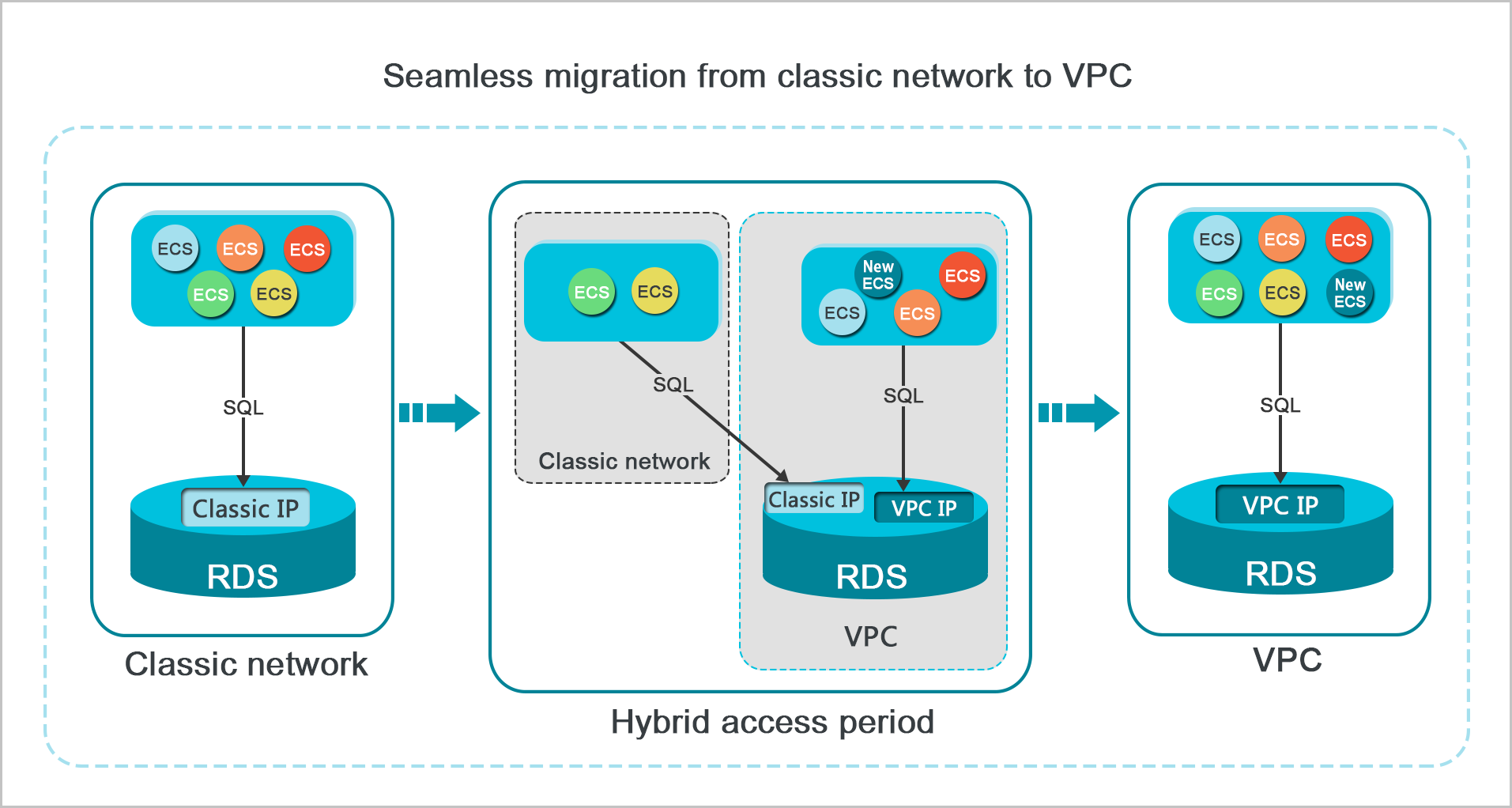
To switch an instance's network type from classic network to a VPC without service interruptions, enable the hybrid access mode. This mode temporarily keeps both the classic network and VPC endpoints active. During this period, you can gradually update your applications to use the new VPC endpoint. Once all applications are updated, you can release the classic network endpoint to complete the migration.
Starting from 00:00:00 on October 30, 2024, you can no longer renew, modify the specifications of, or clone instances in the classic network. For more information, see Service Update: Decommission of Classic Network for ApsaraDB RDS.
If you cannot renew your instance or change its specifications, this may be for one of the following reasons:
You have switched to a VPC but have not deleted the classic network endpoint: Go to the ApsaraDB RDS Instances page, click the ID of the target instance, and on the Database Connection page, delete the classic network endpoint.
The instance was not switched to a VPC before the deadline: You must submit a ticket to request an extension. After the extension is granted, switch the network type to a VPC, delete the classic network endpoint, and then you can renew the instance.
Background
Previously, when you migrated an ApsaraDB RDS instance from the classic network to a VPC, its internal endpoint changed. Although the connection string remained the same, the underlying IP address changed. This process caused an instance switchover and immediately cut off internal access for any ECS instances still in the classic network. To enable a smoother migration, ApsaraDB RDS now provides the hybrid access mode. For more information about the effects of an instance switchover, see Effects of an instance switchover.
The hybrid access mode allows ECS instances in both the classic network and a VPC to access an ApsaraDB RDS instance simultaneously. When you enable this mode, your instance retains its original classic network internal endpoint and gains a new VPC internal endpoint. The public endpoint is not affected. This prevents an instance switchover during the network migration.
For security and performance, we recommend using only a VPC. Therefore, the hybrid access mode is temporary. When the retention period for the classic network internal endpoint expires, it is automatically released. At that point, applications can no longer connect to the database using that endpoint. To avoid disrupting your business, you must configure all your applications to use the VPC internal endpoint before the classic network endpoint expires.
For example, a company wants to migrate from the classic network to a VPC. Using the hybrid access mode, the company can switch some applications to the new VPC endpoint while others continue to connect through the classic network. Once all applications are connecting through the VPC, the company can release the classic network internal endpoint.
Prerequisites
Your ApsaraDB RDS for MySQL instance must meet the following conditions to use the hybrid access mode:
-
The instance is in a classic network.
-
A VPC and a vSwitch are available in the zone where the instance is located. If you need to create a VPC and a vSwitch, see Create and manage a VPC.
Usage notes
-
While the hybrid access mode is enabled, you cannot switch the instance back to the classic network or migrate the instance to a different zone.
-
Effects on instance endpoints:
-
Internal endpoint: The existing classic network internal endpoint is retained, and a new VPC internal endpoint is automatically created.
-
Public endpoint: Enabling the hybrid access mode does not affect the instance's public endpoint.
-
-
Effects on instance access:
-
Internal access: Other cloud products, such as ECS, can access the ApsaraDB RDS instance from either the classic network (using the classic network internal endpoint) or a VPC (using the VPC internal endpoint). After the classic network endpoint expires, the instance can be accessed only from the VPC.
-
Public access: Enabling the hybrid access mode does not affect access to the instance from the public network.
-
-
Whitelist: For instances that run MySQL 5.6 or 5.7 on RDS High-availability Edition with high-performance local SSDs, you must switch to the enhanced whitelist mode when you enable the hybrid access mode. The IP addresses in the original whitelist are automatically copied to the classic network group in the enhanced whitelist. For more information, see Enhanced whitelist mode.
-
Read-only instances: You must first use the hybrid access mode to migrate the primary instance from the classic network to a VPC. Then, you can perform the same migration for any read-only instances.
-
If the primary instance uses high-performance local SSDs, the read-only instances can be in any VPC.
-
If the primary instance uses cloud disks, the read-only instances must be in the same VPC as the primary instance.
-
Migrate from the classic network to a VPC
-
Go to the ApsaraDB RDS Instances page. In the upper-left corner, select the region where your instance is located. Then, click the ID of the target instance.
-
In the left-side navigation pane, click Database Connection.
-
Click Switch to VPC.
NoteIf the button is not displayed, make sure your ApsaraDB RDS for MySQL instance meets the conditions described in Prerequisites.
-
In the dialog box that appears, select a VPC and a vSwitch, and specify whether to retain the classic network endpoint.
-
Select a VPC. We recommend that you select the VPC where your ECS instances are located. Otherwise, the ECS and ApsaraDB RDS instances cannot communicate over the internal network unless you establish a connection between the two VPCs using CEN or a VPN Gateway.
-
Select a vSwitch. If no vSwitches are available in the selected VPC, you must first create a vSwitch that is in the same zone as the instance. For more information, see Create and manage vSwitches. After you select a VPC, you must also select a vSwitch from the drop-down list. If no vSwitch is available, the message No vSwitch is available in this VPC. The switchover cannot be performed. is displayed. In this case, go to the VPC console to create a vSwitch first.
-
Select the Reserve original classic endpoint checkbox. This enables the hybrid access mode, which allows the ApsaraDB RDS instance to be accessed over the internal network from ECS instances in both the classic network and the VPC.
Affected item
Direct switch
(Direct Switch)
Smooth switch
(Enable a smooth switchover with temporary mixed access)
Transient disconnection
A transient disconnection occurs during the network switch. Internal access from ECS instances in the classic network is immediately lost.
No transient disconnection occurs during the network switch. Internal access from ECS instances in the classic network remains active until the classic network endpoint expires.
Internal endpoint
Only one internal endpoint is available. The connection string remains unchanged after the switch, but its type changes from a classic network endpoint to a VPC endpoint.
Two different internal endpoints are available: The original classic network internal endpoint is retained, and a new VPC internal endpoint is automatically created.
Internal access
After the ApsaraDB RDS instance is switched to the VPC, other cloud products, such as ECS, must also be in a VPC to access the instance.
After the hybrid access mode is enabled, other cloud products, such as ECS, can access the ApsaraDB RDS instance from:
-
The classic network, using the classic network internal endpoint.
-
A VPC, using the VPC internal endpoint.
After the classic network endpoint expires, the instance can be accessed only from the VPC.
Public endpoint
The public endpoint remains unchanged in both scenarios. Therefore, switching the network type has no effect on access from the public network. Only the internal endpoints and internal access are affected.
Public access
Note-
If you retain the classic network endpoint, no instance switchover occurs when you switch the network type. The internal connection from ECS instances in the classic network remains active until the classic network endpoint expires.
-
Before the classic network endpoint expires, you must configure your applications on ECS instances in the VPC to use the VPC endpoint. This ensures a smooth migration to the VPC.
-
-
-
Add the internal IP addresses of your ECS instances in the VPC to a VPC whitelist group on your ApsaraDB RDS instance. This allows the ECS instances to access the ApsaraDB RDS instance over the internal network. If a VPC group does not exist, create one.
-
Before the classic network endpoint expires, update your applications on the ECS instances in the VPC to use the VPC endpoint of the ApsaraDB RDS instance.
Note-
To connect an ECS instance in a VPC to an ApsaraDB RDS instance in a VPC over the internal network, the ECS and ApsaraDB RDS instances must be in the same region and the same VPC (have the same VPC ID). They can be in different zones.
-
To connect an ECS instance in the classic network to an ApsaraDB RDS instance in a VPC over the internal network, you can use ClassicLink or migrate the ECS instance from the classic network to a VPC.
-
Change classic network endpoint expiration
During the hybrid access period, you can change the retention period of the classic network endpoint at any time. The new expiration countdown starts from the day you make the change. For example, if the original endpoint is set to expire on August 18, 2017, and on August 15, 2017, you change the expiration to '14 days later', the endpoint will be released on August 29, 2017.
To change the expiration time, follow these steps:
-
Go to the ApsaraDB RDS Instances page. In the upper-left corner, select the region where your instance is located. Then, click the ID of the target instance.
-
In the left-side navigation pane, click Database Connection.
-
On the Instance Connection tab, click Change Expiration Time.
-
In the Change Expiration Time dialog box, select a new expiration period and click OK.
FAQ
Does changing from classic network to VPC affect my public endpoint or internet access?
No. The public endpoint and internet access are not affected. Changing from classic network to VPC only changes the internal endpoint — the endpoint type changes from classic to VPC. The public endpoint remains the same throughout.
Can I still renew or change specifications after switching to VPC?
Only if the classic network endpoint has been deleted. If you retained the classic network endpoint during the switch (hybrid access mode), delete it before renewing or changing instance specifications. Go to Database Connection and delete the classic network endpoint. If your instance has already expired without switching to VPC, submit a ticket to apply for a validity period extension, then switch to VPC and delete the classic network endpoint before renewing.