WAF onboarding and configuration
Adding your website domain name to Web Application Firewall (WAF) helps protect your website from common OWASP Top 10 web attacks and malicious CC attack traffic, prevent data breaches caused by website intrusions, and ensure its overall security and availability. This topic provides best practices for onboarding configurations and protection policies to help you better protect your website with WAF in various scenarios.
Standard onboarding scenario
Business assessment
Conduct a comprehensive assessment of the services you plan to protect with WAF. This assessment helps you understand your current business status and informs your WAF protection policy configuration.
Item | Description |
Website and service information | |
Daily peak traffic of your website or application, including Mbps and queries per second (QPS) | This information helps you identify high-risk periods and select the right bandwidth and QPS specifications for your WAF instance. |
Primary user base of your service (for example, the primary regions of your visitors) | Helps identify the source of malicious attacks. You can later use the Region Block feature to block traffic from malicious source regions. |
Whether your service uses a client-server (C/S) architecture | If it does, identify the client types, such as mobile apps, Windows or Linux clients, code callbacks, or clients in other environments. |
Whether the origin server is deployed in regions outside the Chinese mainland | Helps determine if the instance configuration aligns with the optimal network architecture. |
The operating system (Linux or Windows) and web service middleware (Apache, Nginx, IIS, etc.) of the origin server | This helps determine if the origin server has access control policies that might mistakenly block traffic from WAF back-to-origin IP addresses. |
Domain protocols | To determine if WAF supports the communication protocols used. |
Service ports | To determine if the service ports of the origin server are within the range supported by WAF. For more information, see Ports supported by WAF. |
Whether the service has a mechanism to obtain and verify the real client IP address | After you add your service to WAF, the source IP address visible to your origin server changes. You may need to adjust your origin server's configuration for obtaining the real client IP address to prevent service disruptions. |
Whether the service uses TLS 1.0 or weak cipher suites | To determine if the cipher suites used by the service are supported. |
Whether the service needs to support IPv6 | The Enterprise and Ultimate editions of WAF support IPv6. |
(For HTTPS services) Whether the service uses two-way authentication | WAF does not support two-way authentication. If your HTTPS service uses two-way authentication, we recommend first deploying it with Application Load Balancer (ALB) or Dynamic Route for Content Delivery Network (DCDN), and then enabling WAF protection for the service.
|
(For HTTPS services) Whether clients support Server Name Indication (SNI) | For domains that use HTTPS, both the client and server must support SNI after being added to WAF. |
(For HTTPS services) Whether a session persistence mechanism is in place | If your service uses an Alibaba Cloud Server Load Balancer (SLB) instance, we recommend enabling its cookie-based session persistence feature. |
Service interaction process | Understand the service interaction process and business logic to help configure targeted protection policies. |
Number of active users | Helps assess the severity of an incident and choose low-risk emergency response measures during an attack. |
Service and attack profile | |
Service type and characteristics (for example, games, websites, or apps) | Helps you analyze attack characteristics during an attack. |
Inbound service traffic | Helps determine whether traffic is malicious. For example, if the average daily traffic is 100 Mbps, traffic exceeding this rate may indicate an attack. |
Outbound service traffic | Helps determine if an attack is occurring and serves as a reference for whether additional service bandwidth is needed. |
Inbound traffic volume and connection status per user and per IP address | Helps determine whether you can create a rate limiting policy for a single IP address. |
User group attributes | For example, individual users, users in internet cafes, or users accessing through proxies. |
Whether the service has experienced high-volume attacks and the types of attacks | Helps determine if you need to add a DDoS protection service. |
Peak traffic of the largest attack experienced by the service | Helps determine the required DDoS protection specifications based on peak attack traffic. |
Whether the service has experienced CC attacks (HTTP Flood) | Configure preventive policies by analyzing historical attack characteristics. |
Peak QPS of the largest CC attack experienced by the service | Configure preventive policies by analyzing historical attack characteristics. |
Whether the service provides a Web API | If it does, we do not recommend using the emergency mode for CC attack protection. Analyze API access characteristics and configure a custom CC protection rule to prevent normal API requests from being blocked. |
Whether the service experiences scraping on registration, logon, password reset, or SMS API endpoints | Helps determine whether to enable data risk control policies and initiate relevant testing in advance. |
Whether a stress test has been completed for the service | Assess the request processing performance of the origin server to help determine if a service anomaly is caused by an attack. |
Prerequisites
We strongly recommend testing WAF in a non-production environment before onboarding. Proceed with your production environment only after all tests pass.
Before you add your website to WAF, complete the following preparations:
A list of the website domains to be onboarded, including the IP addresses and port information of their origin servers.
The website domains to be added must have a valid ICP filing. For more information, see Alibaba Cloud ICP filing.
If your website is accessed over HTTPS, prepare the corresponding certificate and private key. This typically includes a public key file in CRT format or a certificate file in PEM format, and a private key file in KEY format.
An account with permissions to manage the DNS records for your domain. You will need this to switch traffic to WAF.
We recommend that you perform a stress test before you onboard your service.
Identify trusted clients, such as monitoring systems, API calls from fixed internal IP addresses or CIDR blocks, or specific client applications. After onboarding, you must add the IP addresses of these trusted clients to a whitelist.
WAF configuration
Configure domain onboarding.
Add your website domain to WAF based on your business scenario. Refer to the following guides:
NoteIf you receive a message indicating that the domain you are configuring is already in use by another user, check if a conflicting domain record has been added to a WAF instance under another Alibaba Cloud account. If so, delete the conflicting domain configuration and then try again.
Configure origin server protection.
Origin Protection: To prevent attackers from bypassing WAF to directly attack your origin server, we recommend that you configure Origin Protection. For more information, see Origin Protection.
Tag back-to-origin traffic: After you add a domain to WAF, you can set a traffic tag for the domain. For more information, see Set Traffic Tag. Setting traffic tags helps you identify traffic forwarded by WAF. This enables precise origin server protection (access control), effective analysis, and prevents traffic from bypassing WAF.
NoteIf the origin server for the domain you add to WAF uses Windows IIS, IIS enables Require Server Name Indication (SNI) by default for HTTPS domains. This may cause a 502 error or a blank page after onboarding. To resolve this issue, disable this option.
Configure protection policies.
Refer to the following recommendations to configure protection for your onboarded service:
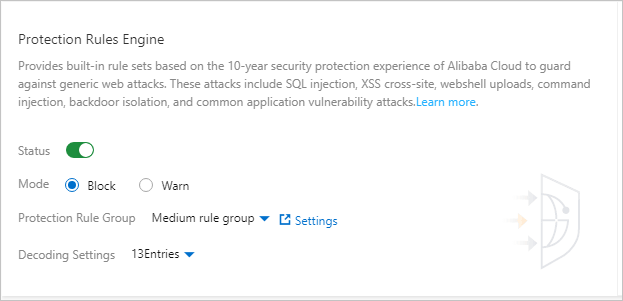
Protection Rules Engine
In most cases, we recommend setting the protection mode to Block and using the Medium Rule Set.
 Note
After your service is protected by WAF for a period (typically 2 to 3 days), if normal business requests are mistakenly blocked by WAF, you can create a custom rule set to improve web protection. For more information, see Use a custom rule group to enhance web attack protection.
CC Security Protection
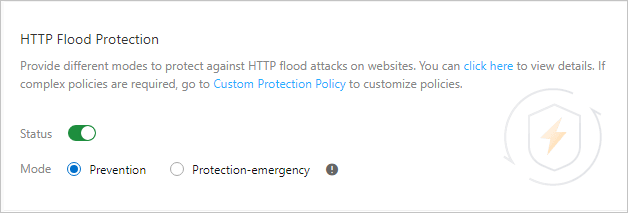
During normal operation, we recommend that you use the default system settings.
NoteThe Protection-Emergency mode for CC attack protection can cause false positives. Therefore, we do not recommend enabling it for mobile apps or services that provide a Web API. If you still observe false positives with the Normal mode, we recommend that you use accurate access control to allow specific types of requests.
 Note
After your service has been protected by WAF for a period (typically 2 to 3 days), you can analyze service logs (such as visited URLs and the QPS of individual IP addresses) to estimate the peak QPS for a single IP address. Proactively configure rate limiting policies by using custom CC protection rules to avoid reactive responses and temporary policy configurations during an attack.
When your website is under a large-scale CC attack, we recommend that you enable Log Service. By analyzing access logs, you can identify the characteristics of malicious requests and use the following WAF security features for a combined defense:
Custom CC Protection Rule: Set flexible rate limiting policies for URLs to effectively mitigate the impact of CC attacks (HTTP Flood).
NoteRate limiting policies in custom CC protection rules may cause false positives. We recommend that you conduct an in-depth analysis of logs to identify attack characteristics and configure accurate access control policies for precise blocking.
Custom ACL: When attack source IP addresses are widely distributed, you can analyze access logs and use the rich fields and logical conditions provided by accurate access control to flexibly configure access control policies. This enables precise protection and effectively reduces false positives.
Supports combinations of common HTTP parameters and fields such as IP, URL, Referer, User-Agent, Params, and Header.
Supports logical conditions such as
contains,does not contain,is,is not,starts with, anddoes not start withto set block or allow policies.
Region Block: Customize access control based on the geographic location of source IP addresses worldwide. You can block unwanted source regions based on your user distribution.
Data Risk Control: Effectively identifies and blocks fraudulent activities by using a risk decision engine and human-machine identification algorithms.
NoteThe Data Risk Control feature is currently available only for web pages and H5 environments.
In general, functional pages have a low risk of being scraped, and you may not need to configure data risk control policies for them. However, for pages such as registration, logon, password reset, and marketing campaigns, we recommend that you configure data risk control based on your protection needs to effectively identify and block fraudulent activities.
After configuration, you must perform compatibility and service availability tests to ensure that data risk control policies do not affect normal business operations.
NoteThe front-end code of some pages may have compatibility issues with the JavaScript SDK for data risk control. If you encounter such issues, we recommend using the Insert JS to Specified Pages feature and enabling protection only after passing tests to avoid impacting normal services. If you are still unable to resolve the issue, contact Alibaba Cloud technical support for assistance.
Log Service
Enable Log Service based on your business needs and budget. Enabling Log Service allows you to record more detailed raw log information and perform flexible, custom analysis of access logs to discover malicious request patterns. For more information, see Overview.
Monitoring and Alarms
Set specific alert thresholds for QPS, 4xx, and 5xx status codes based on your business needs. By configuring WAF monitoring and alerting, you can detect attack incidents in real time. For more information, see Configure notifications for CloudMonitor.
Perform local testing.
After you complete the WAF configuration, we recommend that you check the configuration accuracy and run verification tests.
NoteYou can test by modifying the local hosts file. For more information, see Perform local testing.
Table 1. Configuration accuracy checklist
Item No.
Check item
Required
1
Is the domain name in the onboarding configuration correct?
Yes
2
Does the domain have an ICP filing?
Yes
3
Does the protocol in the onboarding configuration match the actual protocol?
Yes
4
Do the ports in the onboarding configuration match the actual service ports?
Yes
5
Are other Layer 7 proxies (such as Anti-DDoS Premium or CDN) configured in front of WAF?
Yes
6
Is the IP address specified for the origin server the real server IP, not an Anti-DDoS Premium IP or another service IP?
Yes
7
Is the back-to-origin algorithm consistent with expectations?
No, but recommended
8
Is the certificate information uploaded correctly?
Yes
9
Is the certificate valid? (For example, check for non-compliant encryption algorithms or an incorrectly uploaded certificate for another domain).
Yes
10
Is the certificate chain complete?
Yes
11
Is a traffic tag configured?
No, but recommended
12
Are monitoring and alarms configured?
No, but recommended
13
Do you understand the billing method for pay-as-you-go instances?
NoteApplies only to pay-as-you-go WAF instances.
Yes
Table 2. Service availability verification checklist
Item No.
Check item
Required
1
Can the test service be accessed normally? This includes web clients, mobile apps, Windows clients, Linux clients, and clients in other environments.
Yes
2
Does the session persistence feature for service logon work as expected?
Yes
3
Observe the number of 4xx and 5xx response codes returned by the service to ensure that back-to-origin IP addresses are not blocked.
Yes
4
For app-based services, check for SNI issues.
Yes
5
Is the backend server configured to obtain the real client IP address?
No, but recommended
6
Is origin server protection configured to prevent attackers from bypassing WAF and directly compromising the origin server?
No, but recommended
Go live with your service.
After all required tests pass, we recommend switching your traffic to WAF by modifying DNS records in phases. This approach helps prevent service disruptions caused by bulk operations. After you modify a DNS record, it takes about 10 minutes for the change to take effect. If an issue occurs during the traffic switch, quickly revert the DNS record.
After the production traffic is switched, you must test again by using the service availability verification checklist to ensure that your website operates as expected.
Perform ongoing maintenance.
You can refer to the following best practices to further configure targeted protection policies for specific scenarios:
If you are using a pay-as-you-go WAF instance, carefully read the billing method to avoid incurring costs that exceed your budget. For more information, see Billing.
To prevent large-scale DDoS attacks from triggering a blackhole for your WAF instance and making your website inaccessible, we recommend that you use Anti-DDoS Origin or Anti-DDoS Premium to defend against DDoS attacks. For more information, see What is Anti-DDoS Origin and What is Anti-DDoS Premium.
If you experience high latency or packet loss, consider changing your deployment based on the following recommendations:
Scenario: Your origin server is in a region outside the Chinese mainland, your WAF instance is in the Chinese mainland, and your primary users are in the Chinese mainland. If users experience high latency or packet loss, the issue may be due to the back-to-origin network link. We recommend deploying your origin server in the Chinese mainland.
Scenario: Your origin server is in a region outside the Chinese mainland, your WAF instance is in a region outside the Chinese mainland, and your primary users are in the Chinese mainland. If users experience high latency or packet loss, there may be unstable network links due to cross-carrier access. We recommend using a WAF instance in the Chinese mainland.
If you need to delete a protected domain record, confirm whether the service has been officially onboarded to WAF.
If you have not yet switched the production traffic, you can directly delete the domain record in the WAF management console.
If you have already switched the production traffic, you must go to your DNS provider's console and modify the domain's DNS record to switch traffic back to the origin server before you delete the domain record.
NoteBefore you delete a domain record, make sure that the domain's DNS resolution has been switched back to the origin server.
After you delete a domain record, WAF can no longer provide professional security protection for your domain.
Emergency onboarding during an attack
If your website is under attack, take the following steps before adding it to WAF:
If your site is compromised by a web attack
To prevent a second compromise, first clean up any malicious files planted by the attacker and patch all vulnerabilities.
NoteIf you need help from professional security engineers, you can purchase the emergency response service.
Harden your service systems.
Add your service to WAF.
NoteSet the web attack protection policy to a stricter level based on your needs to effectively defend against intrusion events caused by web attacks.
If your site is under a CC attack or bot attack
After adding your service to WAF, analyze your website access logs with Log Service to identify attack characteristics and configure targeted protection policies.